Meet Cisdem Duplicate Finder, a new AI-assisted approach to duplicate detection that goes beyond file names, sizes, and traditional file matching.
Available for


When identifying duplicate files, Cisdem Duplicate Finder compares the file content, without considering file names. File content comparison is enabled by the XXH3 hash algorithm. The app also filters files by size in advance to help improve hashing efficiency.
In duplicate file detection, what matters is whether two files share exactly the same file content. That's why Cisdem Duplicate Finder compares files based on file content. But how?
The app uses a hash algorithm called XXH3 to first generate a hash value for each file based on its file content. Files with identical content, regardless of file names, produce the same hash value. Then, the app compares hash values to find duplicate files.
XXH3 is much faster than older hash algorithms such as MD5 and SHA-256. To further improve efficiency, the app filters files by size before the hashing process.
Filter out files with a unique size: It looks at each file's size. For example, a folder contains a single 8.4 MB file, a single 20.4 MB file, and a single 2.5 GB file. They can't possibly be duplicates with any other files in the folder. Among the remaining files, those with the same file size may be duplicates and enter the hashing process.
Hashing strategy based on file size: For smaller files, the app generates and compares hash values based on full file content. For larger files, generating full hash values would take longer and slow down the scan. So it hashes representative sections from the head, middle, and tail of each file instead.
The test used a 7.25 GB folder containing 5,035 files across 72 subfolders, including photos, videos, music, documents, and other file types.
| Tool | Scan time | Duplicate files found | Storage freed up |
|---|---|---|---|
| Cisdem Duplicate Finder using XXH3 hashing | 2 seconds | 2,576 | 3.5 GB |
| Traditional duplicate file finder using MD5 | 25 seconds | 2,565 | 3.47 GB |
Cisdem Duplicate Finder uses an on-device AI model called DINOv2 Small to intelligently detect similar photos, such as burst shots, resized or edited versions, versions taken from different angles, and more. This AI model runs entirely on users' computers through ONNX Runtime, without uploading users' photos to any cloud or server.
Note: This applies to Cisdem Duplicate Finder for Windows only and is coming to Mac soon. The Mac version currently uses traditional similar photo detection using Histogram, Features, and pHash methods.
DINOv2 Small is a deep learning vision model developed by Meta AI and has been trained on 142 million images.
Understand Visual Content: While traditional methods mainly check basic features like pixels, shapes, and colors, DINOv2 Small also looks at advanced features and understands the visual content in a photo. Therefore, even if similar photos have different details, such as angles or lighting, this model can still detect their visual similarity.
Generate Vectors: The model understands photos and then generates a 384-dimensional vector (e.g., 0.0266, ..., -0.0282) for each photo, which represents what a photo shows. Similar photos tend to have similar 384-dimensional vectors.
The model checks the visual content rather than file sizes or types. It recognizes that it's still the same subject, whether the photo is small or large, saved as JPEG or RAW.
It focuses on the core subject itself and avoids being confused by cropping or rotating the photo, adjusting the colors, or adding watermarks.
It understands that these photos were taken in quick succession and detects that the same subject moves slightly, while the background remains unchanged.
It can identify visual similarity between the same building from different angles or in different lighting, or between the same person in the same set with different poses or expressions.
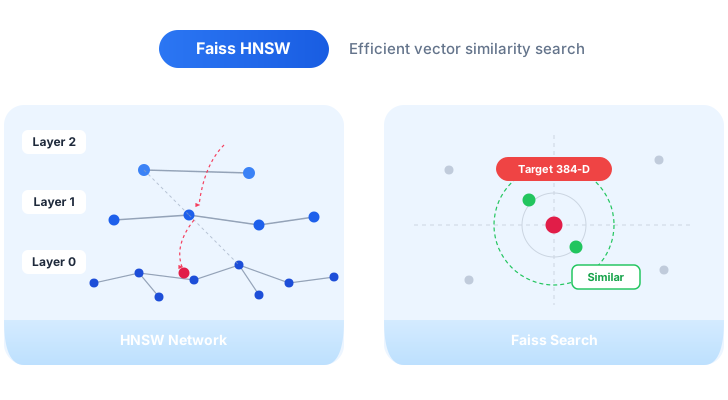
Once every photo has a 384-dimensional vector to represent its visual content, it comes to comparing those vectors to find similar ones. Since comparing every vector against every other one would require a large number of comparisons, Cisdem Duplicate Finder does this in a more efficient manner.
It uses an algorithm called HNSW to help avoid unnecessary comparisons and focus on potentially similar photos. How? HNSW organizes vectors into a multi-layer navigation network, allowing the process to start from a general level and then move towards vectors that are closer to the target one, avoiding the need to compare every vector one by one.
The process is powered by Faiss, a framework developed by Meta for efficient similarity search. It provides the foundation for the search, while HNSW is the algorithm used to perform it. Together, they make similar image detection faster.
The test used a photo collection containing 4,290 photos to compare the performance of AI-powered and traditional similar photo detection.
| Similar image detection method | Scan time | Similar photo groups found |
|---|---|---|
| AI-powered | 6 s | 104 |
| Traditional | 24 s | 53 |
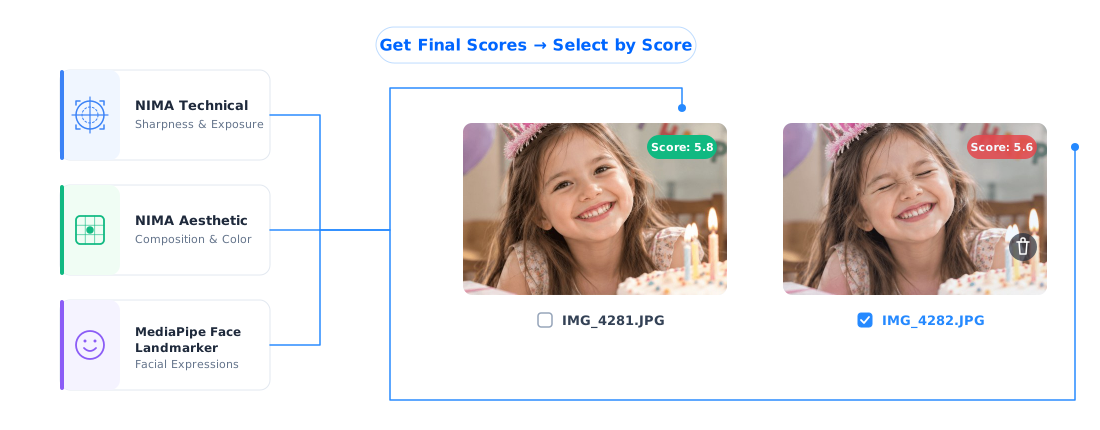
When users are cleaning up similar photos, spotting them is the first step. They need to decide which one to keep. Cisdem Duplicate Finder helps with this task using three on-device AI models running through ONNX Runtime, each looking at a photo from a different aspect: how well it was taken, how good it looks, and how people appear in it. Every evaluated photo gets a quality score from 0 to 10, helping users decide which one to keep.
Note: AI scoring is available on Windows only and coming to Mac soon.
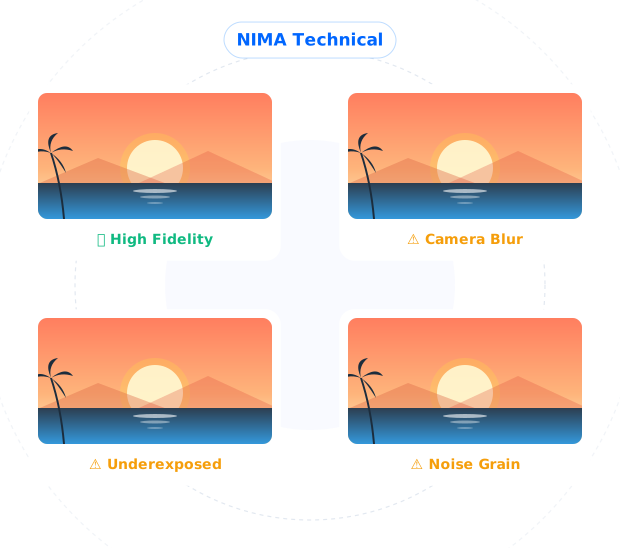
NIMA Technical, an on-device AI model running locally on users' computers, looks at a photo's technical quality.
It assesses issues such as blur, overly dark or bright photos, visible noise in low light, and other visual issues that may make a photo look undesirable. However, sometimes, a photo with a blurred background can still be a good photo instead of a bad one. That's why using the NIMA Technical alone is not enough.
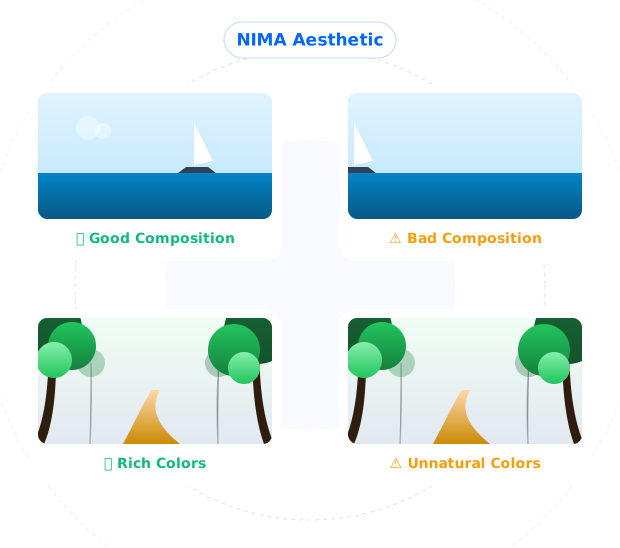
The NIMA Aesthetic model looks at whether a photo is attractive. It considers composition, colors, lighting, and subject position, then predicts how humans would rate it.
For example, two similar photos have similar sharpness and exposure, and one of them has a more balanced composition. The NIMA Aesthetic model can help distinguish between them.
For a photo with people in it, technical and aesthetic quality are only part of the visual quality. A technically good shot can still make a poor picture, because someone blinks or looks away. Those are the differences that help decide which shot you keep.
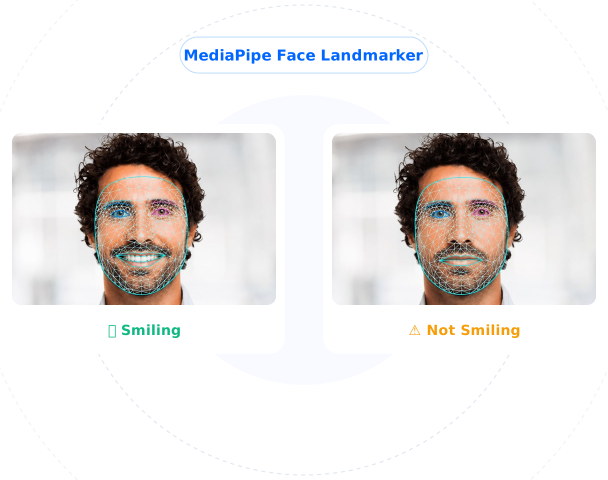
The MediaPipe Face Landmarker model looks at the face in the photo, considering details such as whether the eyes are open, where the person is looking, whether they are smiling or frowning, and how the head is turned.
This model runs locally, just like the others. It's used only to score the photo. It doesn't identify who the person is, and no facial data leaves users' computers.
These three models work together to give each photo a final score, helping users to keep the best shot. For example, among burst shots of the same birthday celebration, the one that's sharp and where nobody blinks may get the highest score and be kept.
Not every photo needs all three models. Photos without people are scored based on technical and aesthetic quality, with the technical score playing a more important role. For photos with people, face quality matters the most, with the NIMA scores taking care of the rest.
Cisdem Duplicate Finder provides automatic selection rules. The Select by Score rule works based on these scores. If applied, in each group of similar photos, the app selects all but the highest rated one for deletion.
AI processing can take a while when detecting similar photos or scoring a large number of photos. To improve efficiency, the app uses GPU acceleration and caching to speed up both initial scans and rescans. This helps reduce the processing time when working with large photo collections and avoid unnecessary repeated processing.
When a compatible GPU is available on your computer, ONNX Runtime uses DirectML to accelerate AI processing on the GPU. This allows the app to get the job done more efficiently, which can help process large photo collections faster. Without a compatible GPU, the app uses the CPU instead.
The processing results are cached between scans to avoid repeating work that has already been done. When you scan the same photo collection again, the app can reuse the results that were already processed instead of starting the processing entirely again. This makes rescans faster.

Efficiently manage duplicate files and similar photos with this AI-powered duplicate file and photo finder.