
As the tired mama of a 19-month-old, I appreciate that Cisdem Duplicate Finder spares me the mental gymnastics of sorting photos on my photos library. Fast. Satisfying. Zero brainpower. It helped me free up a significant amount of disk space and organize my photo collection much more efficiently.
Alyssa Bock Alyssa Bock Web Designer & Mother · New Orleans
98GB reclaimed on her MacBook Pro
38,906 redundant photos removed from a 70,252-photo archive
< 1hr to scan and clean up her photo collection

Customer at a Glance

Customer
Alyssa Bock (Designer & Mom)
Focus Area
Family photo archive
Ecosystem
macOS, iOS & Cloud-Synced Storage
Library Scale
70,252 Photos
Features
Duplicate Detection Similar Photo Detection Safe Review Before Deletion

The Interview

Hey Alyssa! Tell us a bit about what you do and your relationship with photos.

I’m a former web designer based in New Orleans. When I became a mother, I also unexpectedly became a photographer.

I quit my job to stay home with my newborn daughter, and I found myself taking more photos and videos than ever - not just of her, but of our whole world.

Between developmental milestones, birthday parties, our new apartment, dozens of trips, and everyday family moments, my camera roll became a visual diary of our lives.

From the time I met my husband ten years ago, we had accumulated over 70,000 photos and 10,000 video clips. It was a priceless treasure, but keeping everything organized felt like an insurmountable mountain.
When did you realize that your photo collection had turned into a storage crisis?

It hit me right when I tried to download a newly released app, and that dreaded warning flashed on my screen: “Insufficient Storage Space.” It forced me to stop what I was doing. I opened my iPhone settings, and I had to laugh - photos and videos were taking up over 80% of my entire phone's storage!

And it wasn’t just my phone. My MacBook Pro’s 256GB drive had plunged down to only 9GB of free space.

On our old home iMac, our 1TB drive was maxed out with a 250GB family photo library and 550GB of unlabeled video clips.

I was constantly getting “Startup Disk Full” warnings and sometimes couldn’t even save a basic text file.

I had been paying $10 every single month for a 2TB iCloud plan, but throwing more cloud storage at the problem didn’t fix the chaos.

Opening my photo gallery felt like walking into a messy room you don’t even know how to start cleaning, so you just close the door and pretend it’s fine.

You'd tried to fix this before. What happened?

I quit. Every time.

I’d open an album, start scrolling, tap a few photos, delete them, and then just… stop. You tell yourself you’ll do a little bit each evening.

What nobody warns you about is that every photo pulls you straight back into the moment it was taken. It's like tidying your room - every file has a story, and every story makes you wonder: keep it or let it go?

After reviewing 100 similar shots, my brain simply shuts down. I constantly ask myself: “Should I keep this? Have I see this photo before? Is this a duplicate of the other photo I just saw?”

Every photo held a memory. Every deletion felt like a decision.

And the thumbnail grid view wasn’t helping with quality checks. You’re choosing from tiny previews, so it’s hard to tell whether something is blurry, nearly identical to another shot, or actually worth keeping.

So you keep everything - just in case.

At one point, I managed to clear about 6GB manually. It took forever, and the space was gone again within a few days.

Every time I tried to clean, I’d get overwhelmed, delete like six photos, and quit. One afternoon I frantically cleaned for two hours, only to realize I had reduced my library by barely 5%. It felt like a total waste of time.

Manual Cleanup vs. Cisdem
Audit Metric Manual Scrolling Cisdem Duplicate Finder
Time to Clear 98GB Estimated 60+ Hours Under 1 Hour
Duplicate Detection Visual Guesswork Content-Based Detection + AI
Library Database Safety Risk of orphan references Using the Photos.app itself to remove the duplicates.
Long-Term Result Often abandoned 38,906 duplicates removed (–55%)

What made you choose Cisdem Duplicate Finder over other tools?

I had tried the built-in macOS storage tools and general cleanup utilities like CleanMyMac. They would clear 5GB or 10GB of temporary caches, but the disk would fill back up in a few weeks because they didn't touch the root cause: the photo graveyard.

What stood out about Cisdem was that I could scan my Apple Photos Library and regular folders in one place.

I could simply add my Photos Library or folders on my external drives, start a scan, and let it work while I did something else. and I feel safe that Cisdem scans Apple Photos libraries natively without altering or corrupting the album structure. Other tools often mess up the metadata or break my photos structure.

It also helped with more than exact duplicates. For photos that looked almost the same - like burst shots or multiple versions of the same moment - it grouped them together so I could review them as a set.

That was important to me because not every photo I wanted to remove was an exact copy.

And the selection rules made the cleanup much easier. Instead of manually selecting thousands of files, I could let Cisdem narrow down the obvious ones based on things like resolution, file size, or folder priority, then review the results before deleting anything.

The side-by-side comparison mode is kind of like the back and forth at the eye doctor: Which is clearer, A or B? You pick the best shot in seconds with zero brainpower.

Do you mind walking us through your routine with Cisdem?

Sure! Here is the simple 3-step routine that completely transformed our 70,000-photo archive:

Alyssa’s 3-Step Decluttering Routine

1

Start with a Deep Scan

I start with the obvious stuff: exact duplicates.

Those don't need any judgment at all - it's literally the same file twice. That's the easy win, and it's what brings the number down quickly.

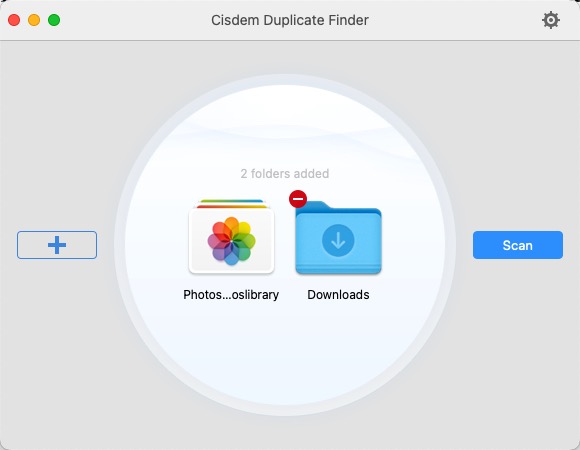
I open Cisdem Duplicate Finder and add my Apple Photos Library and folders on my external drives.

One small thing I learned is that for Photos, you need to add the actual Photos Library from your Pictures folder, not the Photos app itself.

Then I hit Scan and let it do its thing.

I can scan multiple locations at once, and when I want to find photos that look almost the same, I turn on Similar Images as well.

Cisdem Duplicate Finder with the Apple Photos Library and a Downloads folder added, ready to scan
2

Let It Narrow Down the Obvious Ones, Then I Pick the Keepers

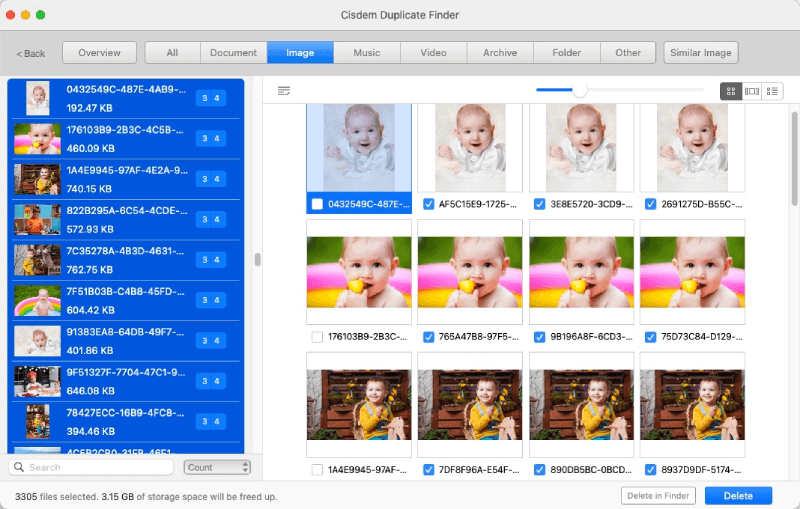
For exact duplicates, Cisdem automatically selects duplicate copies while leaving one version unselected, so I don’t have to go through every file manually.

The similar photos are different.

Sometimes I have the same moment shot six times. Cisdem groups those photos together and lets me compare them side by side, so I can actually choose the best frame.

That’s a completely different decision from simply asking, “Keep or delete?”

I can also use selection rules based on things like resolution or file size to narrow down lower-quality or less desirable copies.

For important family bursts, I still like using the side-by-side view because I can spot the sharpest smile in a few seconds.

I also use folder priority when the same photos exist in multiple locations. I can set my preferred location as the higher priority, so Cisdem selects the other copies for removal.

I only have to set that up once, and I don’t have to think about it every time.

Duplicate photo groups in Cisdem Duplicate Finder with one copy of each group left unselected
3

Send the Junk to Trash and Move On

Once I’ve reviewed the selections, I hit Delete.

Most of the time, I send files to the Trash so I don’t have to worry about permanently deleting something by accident.

For photos in Apple Photos, deleted photos go to the Recently Deleted Album, which gives me another safety net if I change my mind.

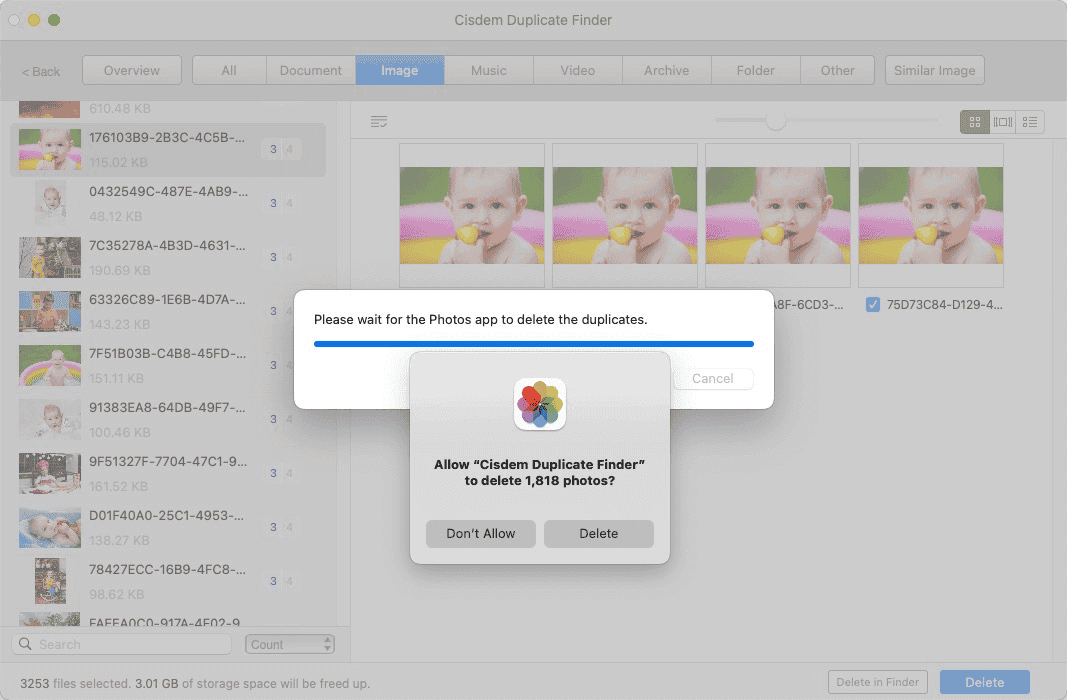
Cisdem Duplicate Finder asking the Photos app to delete the selected duplicate photos
With 70,000 photos, I definitely wasn’t going to sit there and manually compare every single file. Once I saw that progress bar start moving and gigabytes tumbling back into my free space, I was hooked. It became a personal challenge.

The Outcome

What was the final outcome after your cleanup?

The numbers speak for themselves:

  • 38,906 redundant photos removed from a 70,252-photo archive - 55% of the library - leaving 31,346 photos worth keeping.
  • 98GB of storage reclaimed on a MacBook Pro that had been down to just 9GB of free space.
  • The whole scan and cleanup finished in under 1 hour, instead of an estimated 60+ hours of manual scrolling.
  • No more “Startup Disk Full” warnings, and no more paying for endless cloud upgrades.
But beyond the gigabytes, it was amazing how much lighter I felt. Cleaning out the clutter freed up physical storage space, but it also freed up mental space. I didn’t have to keep paying for endless cloud upgrades or stress every time I wanted to take a video.

Any final advice for parents or creators buried under photo clutter?

You’ve taken time to declutter your wardrobe, your kitchen, and your home - now it’s time to declutter your devices. Don’t torture yourself with manual scrolling. Let smart software do the heavy lifting, so you can spend less time managing files and more time enjoying the memories that actually matter.

Related Case Studies

Explore how others solved storage bottlenecks and protected critical data.