


7 Best Video Downloader Add-ons for Firefox (Work in 2026)
 44.5K
44.5K
 1
1


How we download videos on Firefox browser? Firefox allow users to download videos with its Page Info feature. But most streaming videos cannot be downloaded that easily as popular websites often encrypt the video source link to prevent downloading. In this case, we need to utilize third-party download tools, such as Firefox add-ons, aka extensions.
This guide will explore some of the best video downloader add-ons for Firefox. So you can download videos from sites like YouTube, Facebook, Instagram, etc. for free and conveniently, without software.
 Cisdem VideoPaw
The Best All-in-One Video Downloader App
- Download video and audio from web with support of 1000+ sites
- Download private content that requires login
- Support high quality downloads up to 8K
- Batch download videos and playlists fast
- Convert streaming videos and music to MP4, MP3, or any desired format
- Rip DVD and Blu-ray Discs
- Built-in video editing tools
- Clean and safe to use, no ads or spyware
 Free Download Windows 10 or later
  Free Download macOS 10.15 or later
Firefox Video Downloader Add-ons Compared
| Add-on | Best For | Supported Sites | Max Quality | Free or Paid |
|---|---|---|---|---|
| SaveFrom.net Helper | Quick 720p downloads | YouTube, Dailymotion, Instagram, VK | 720p | Free |
| Video DownloadHelper | Download from many sites | YouTube, X, Twitch, CNN and many video-sharing sites | Up to 4K | Free (HD requires companion app) |
| Easy YouTube Video Downloader Express | Simple YouTube downloads | YouTube only | 1080p | Free (HD requires donation) |
| UDL Helper | 1080p YouTube downloads | YouTube, Instagram | 1080p | Free |
| Video Downloader VeeVee | Multi-site downloads | Facebook, Vimeo, TikTok, and more | Varies by site | Free |
| HLS Downloader | HLS streams | Twitch, JW Player, Wistia, and more | Highest available | Free |
| Ant Video Downloader | Legacy option | YouTube, Dailymotion, Threads | Varies | Free |
Top 7 Best Firefox Add-ons for Downloading Videos
1. SaveFrom.net Helper
Powered by: savefrom
Users: 350K+
Rating: 4.1/5.0
Advantages:
- Download YouTube video in 720p with sound
- No extra software needed
- Support audio-only download
Disadvantages:
- Ad-supported
- Can’t download full HD YouTube video with sound
While the popular online video downloader savefrom.net has been discontinued in the U.S. since 2020, its browser extension “SaveFrom.net Helper” still works and the Firefox version allows you to download YouTube videos.
This video downloader add-on integrates into the website design by adding a download button on the video page. On YouTube, for example, the button appears below the video player.
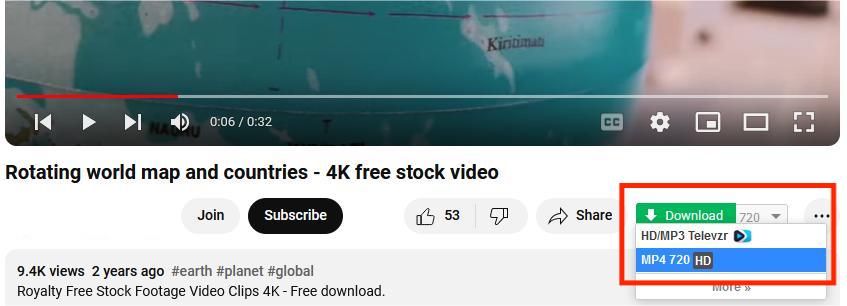
It can save YouTube videos up to 720p and extract the M4A audio file, no separate software needed. It’s a handy YouTube video downloader if you don’t require high definition.
2. Video DownloadHelper
Powered by: vdh
Users: 1.5M+
Rating: 4.3/5.0
Advantages:
- Wide range of supported websites
- Download in preferred quality and format
Disadvantages:
- Need to install companion app
- Pay to unlock full features
- Unstable
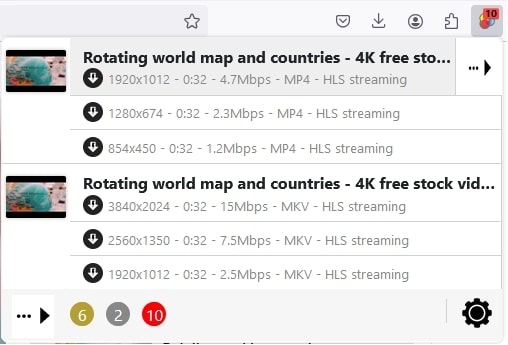
The Firefox version of Video DownloadHelper is more powerful than Chrome version because it supports downloading from YouTube. As one of the most reputable video downloader extensions, VDH lets users capture videos from various popular and obscure sites and convert to various formats.
However, some operations, such as high-definition download and video conversion, require users to install its companion app (CoApp) to perform. And sometimes a QR code is written in the corner of the video, and you need to pay $39 for Firefox Premium license to get rid of watermark.
3. Easy YouTube Video Downloader Express
Powered by: Dishita
Users: 350K+
Rating: 4.1/5.0
Advantages:
- Safe and fast
- Full HD downloads
- MP3 conversion
Disadvantages:
- Donate to activate HD downloads
- Support YouTube only
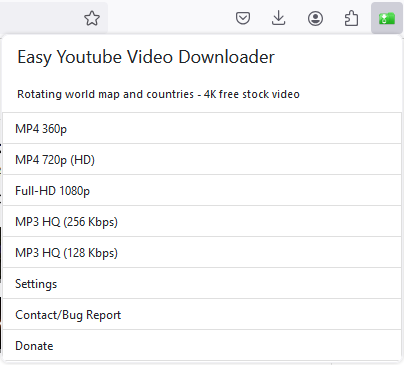
Easy YouTube Video Downloader Express enjoys a good reputation in Firefox for years. It provides stable support for downloading videos from YouTube. But it comes at a price, you need to pay a pro license fee to get 720p and 1080p as well as MP3 downloads. If you are looking for a fast and reliable YouTube downloader for Firefox, it’s a worthy investment.
4. YouTube Downloader (UDL Helper)
Powered by: unidownloader.com
Users: 25K+
Rating: 4.6/5.0
Advantages:
- Support 1080P
- Support for audio-only downloads
Disadvantages:
- Take a long time to download high quality videos
- Intend to lure you to download its UDL client program
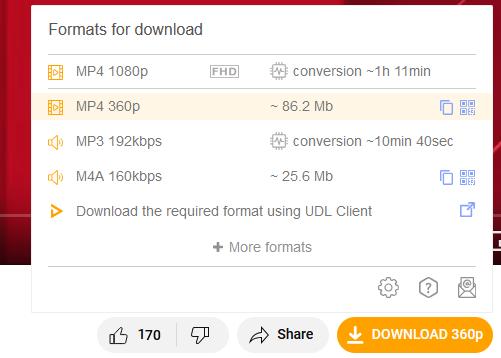
UDL Helper is a dedicated YouTube downloader for Firefox. It allows you to download YouTube videos to MP4 in 1080p or lower. If you need 4K resolution, it will ask you to install UDL client software. Also, downloading videos in 720p and above can take hours to convert and the conversion may cause decrease in browser speed.
5. Video Downloader VeeVee
Powered by: VeeVee
Users: 20K+
Rating: 4.3/5.0
Advantages:
- Support many popular sites
- Scan QR code to save videos directly to your phone
- Select and download all videos on a page
Disadvantages:
- Download quality varies by site, and some platforms cap resolution lower than expected
- Can't merge M3U8 segments, download individual TS files instead of a complete MP4
- Detect YouTube videos but often fails to download them
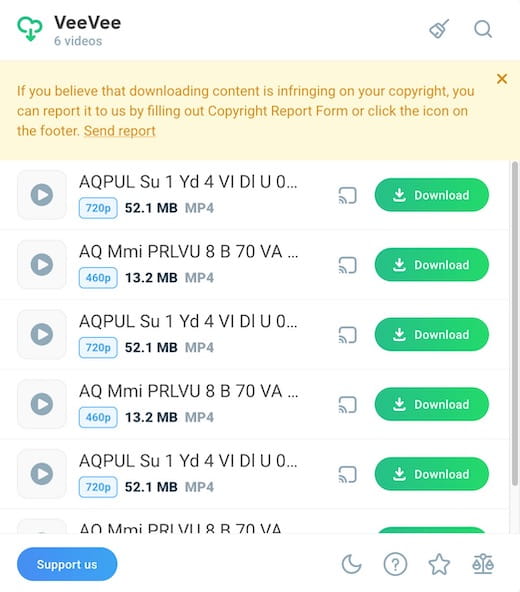
This is another dedicated YouTube video downloader extension, available for Firefox, Chrome and other browsers. It supports multiple sites and offers useful extras like QR code mobile downloads and multi‑file selection. The extension has a beautiful and clean design.
In practice, YouTube downloads often get stuck at 360p, and HLS streams (like Vimeo) download as separate fragments instead of a single playable file.
That said, Video Downloader VeeVee works well on most other websites, and it doesn't require any extra software or sub‑apps.
6. HLS Downloader
Powered by: puemos
Users: 15K+
Rating: 3.7/5.0
Advantages:
- Clean UI
- Fast download
Disadvantages:
- No support for popular websites like YouTube
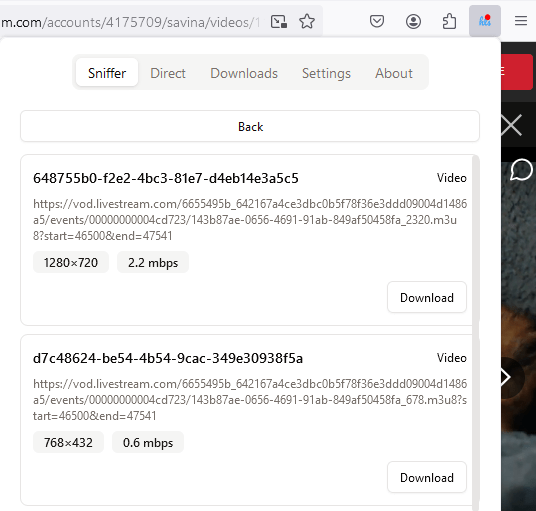
HLS Downloader is designed to capture HTTP Live Streaming (HLS) protocol videos from the various websites, such as Twitch VODs, JW Player, Wistia and Brightcove videos. It allows you to choose the highest possible quality and save the video to your computer quickly.
7. Ant Video Downloader
Powered by: ANT
Users: 50K+
Rating: 3.8/5.0
Advantages:
- Support various websites
- Completely free tool
Disadvantages:
- Fail download errors often occur
- Require native app installed to save high quality
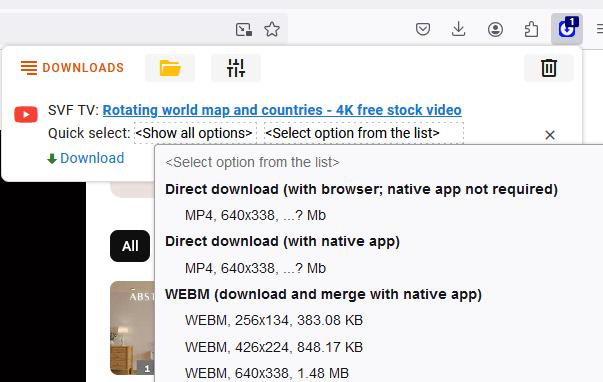
Ant Video Downloader used to be one of the best video downloaders for Firefox before it was discontinued. While it offers direct video downloads in the browser, it may require you to install its native software for high quality downloads and to merge video segments. Although it hasn't been updated in years, I found that you can still use it to download videos from certain sites.
Verdict
Browser extensions in Firefox is not a very reliable way to download videos. Here are some reasons why:
Quality restriction - High resolution formats require either native software or extra cost
Limited website support - Browser extensions may not be able to detect the videos you want from some sites with special protocols and encryption, such as Vimeo.
Lack of maintenance - Add-ons need active updates to keep up with changes in the website and Firefox license, or downloads can fail or result in corrupted files.
Slow down your browser speed - Some video downloaders can slow down your Firefox performance significantly. With too many add-ons tested in Firefox, my computer even crashed once and I had to reboot.
How to Download Any Video from Firefox in High Quality
Want to get rid of tricky add-ons and download videos from Firefox without any hassle? Your best bet is to use a powerful and safe desktop video downloader, e.g. Cisdem VideoPaw (originally Cisdem Video Converter).
Supporting more websites than all add-ons combined, Cisdem VideoPaw can download almost any video with the URL. It can rip videos in full quality (up to 4K/8K) and convert to any format with built-in converter, no plug-in required.
Below is a simple guide on how to use it, and users can try it for free before purchasing.
1. Download and install Cisdem VideoPaw.
Free Download Windows 10 or later Free Download macOS 10.15 or later
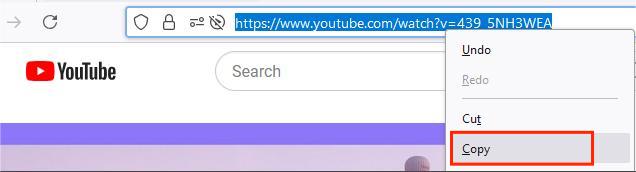
2. Visit the web page that contains the video you want to download, and copy the complete URL from the address bar.
3. Launch the downloader, click the third tab, then paste the video URL into the provided box. Press the Enter key or click the “+” button to parse out the link.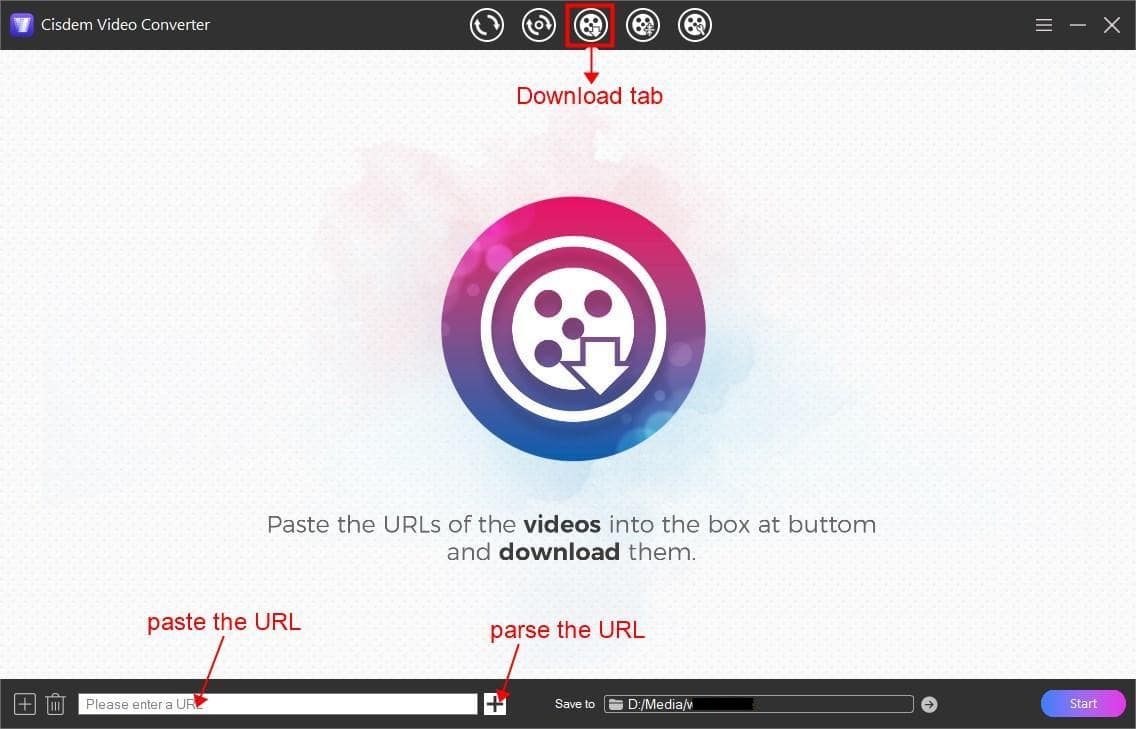
4. When the video is added, the downloader defaults to the highest quality available. Users can also select a download option from the "Format" drop-down menu.
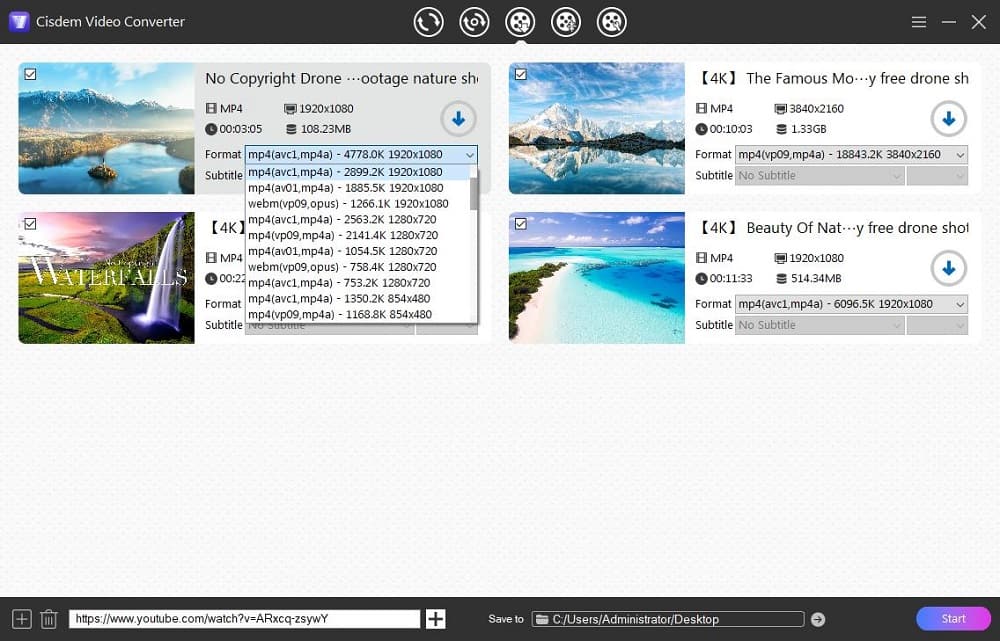
5. Specify a folder to store downloaded files, and click the arrow down button to start downloading videos to computer.
Additional features:
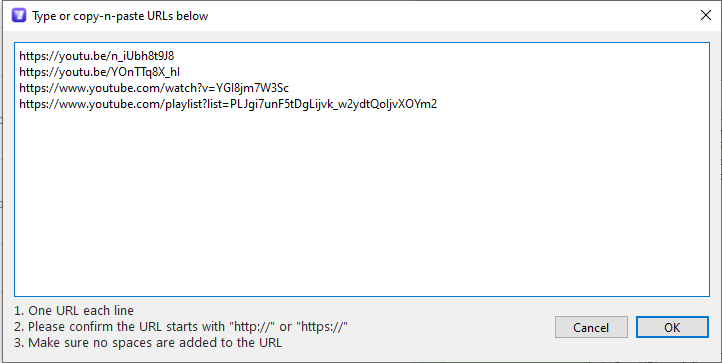
1. Add URLs in batch. Click the  button at lower left corner or go to "File > input URLs" (on Mac) to add multiple URLs. So you can bulk add videos and download them with one click.
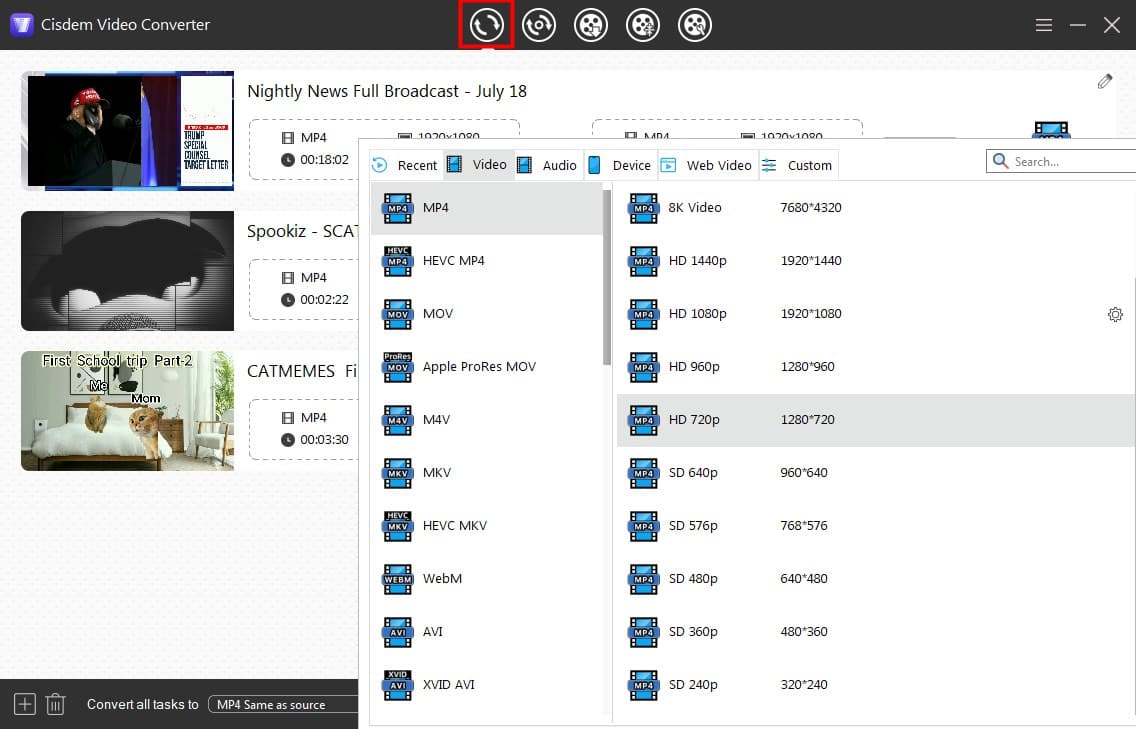
2. Convert feature. Drag the downloaded video file to the first tab of Cisdem, and convert to over 300 video & audio formats and preset profiles.
FAQs
1. How to download video directly from Firefox Page Info?
Some videos can be downloaded using Firefox’s built-in tools. Steps:
- Play the video in Firefox.
- Press Ctrl+I to open the Page Info window.
- Click the “Media” tab, and find the video in the address list.
- Click on the video link, then the “Save As” button.
- Specify a save location and enter the file name, then click Save.
![firefox built-in feature]()
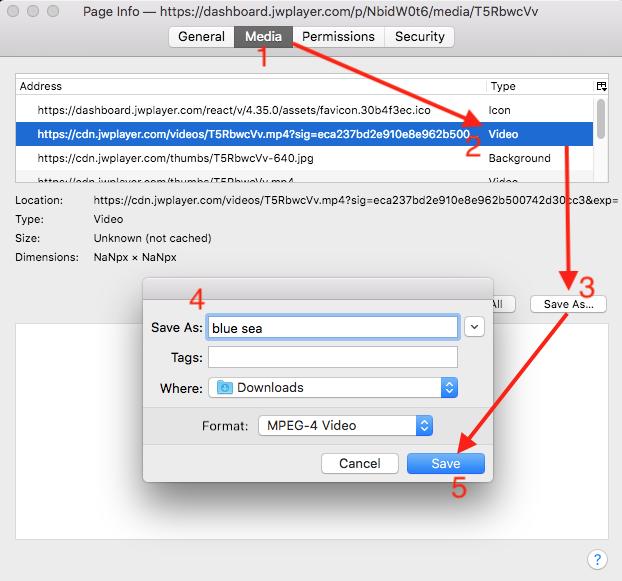
The video option may be grayed out and display a blob link, which means you need a third-party tool to download it.
2. Are these add-ons safe to use?
The tools outlined above are generally safe. Avoid extensions that redirect you to external websites that can expose you to malicious ads and viruses. For maximum security, use a standalone professional video downloader software like Cisdem VideoPaw.
3. Can I use video downloaders in Firefox app on mobile?
There are Firefox add-ons developed for Android, visit addons.mozilla.org/android on your phone and search for workable video downloaders there.
The Firefox app for iPhone and iPad does not have an extension feature due to Apple restrictions. iOS users can download videos on computer first and transfer to mobile device via iTunes or cloud services.
Read More: 10 Best Video Downloaders for Chrome | How to Download Videos from Safari
Copyright Disclaimer
Videos downloaded from Firefox are for personal and educational use only. Sharing or commercial use is not allowed unless you get permission first. The website fully respects copyright laws and will act upon any valid removal request.

Emily is a girl who loves to review various multimedia software. She enjoys exploring cutting edge technology and writing how-to guides. Hopefully her articles will help you solve your audio, video, DVD and Blu-ray issues.

Ryan Li is a senior developer at Cisdem. Since joining the company in 2017, he has led the development of Cisdem VideoPaw and now serves as the editorial advisor for all articles related to Video Converter.
David
UDL Helper is good. But if it get crashing like others, I have to use the software to download from YouTube.