


4 Ways to Recover Data from Floppy Disk 2026
 2.2K
2.2K
 1
1


Built in 1971, floppy disk was designed and widely used to store data, transfer files, or distribute software. But today, it becomes a fading market. Though lot of companies stopped manufacturing floppy disks in the 2010s, there are still some floppy disk users. And if you are one of them and wondering how to get access old floppy files on a modern new computer or recover data from a floppy disk, this is the guide for you.
Key Takeaways
- To access files on a floppy disk, we need a floppy disk drive (reader) that connects the drive to a computer via an USB cable. You can purchase such a floppy disk reader online easily.
- There are 4 ways to recover data from a floppy disk, with or without using software. Cisdem Data Recovery is a high-recovery-rate program to recover deleted, formatted, even corrupted data from a floppy disk, and you can check the recovery story of Martin from USA; Recuva offers a free solution to recover deleted data from floppy disk; PowerISO works great on recovering corrupted files from floppy disk. If you want to recover your data from floppy disk without installing a piece of software on your computer, go visiting a local data recovery sevice lab near your home.
 Cisdem Data Recovery for Windows and Mac
Recover Deleted, Formatted and Damaged Floppy Disk Files
- Recover data from floppy disk under different data loss situations
- Recover files from floppy disk on Windows PCs or Macs
- Support different types of floppy disks
- Recover video, audio, photo, document, email, archive, etc.
- Repair damaged videos, photos, office documents, etc.
- Recover unsaved office documents
- Recover files from NAS/Linux/RAID or crashed computer
- Create disk backup image and restore files from it
- Save search records and resume scanning at any time
- Preview files before recovery
 Free Download Windows 11/10/8/7
 Free Download macOS 10.15 or later
How to Access Old Floppy Disks?
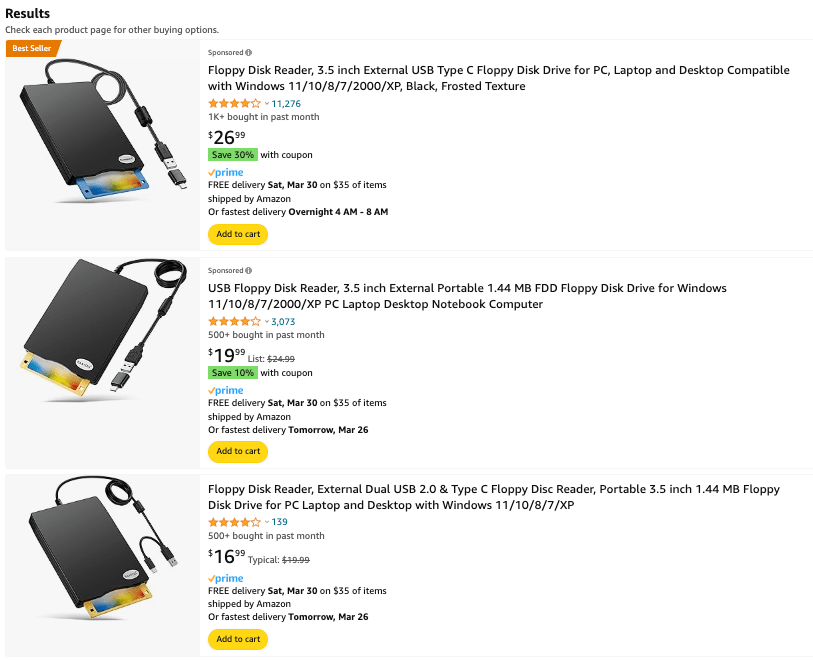
Though floppy disks had a high compatibility on those computers before 2000, as new storage technologies appeared, floppy disks are now outdated and not compatible with modern new computers. To access old floppy disk files on a new computer, we will need a floppy disk drive.
Floppy disk drive, also known as FDD, is a device that uses a magnetic head to read, write and store data on a floppy disk. There is a USB coming along with the drive, which helps your computer recognize the floppy disk and access the data on it.
To find a floppy disk drive that is compatible with your disk, you can search on Amazon or eBay by entering keywords or model names, and check the reviews or contact the support to get full information.
Way #1: Use The Best Floppy Disk Recovery Software
There are several floppy disk recovery solutions that others have shared across different forums, social media or other platforms, and we are sure that floppy disk users will add new solutions all the time. Although we can cover all the feasible solutions in this guide, we don’t recommend all the users trying each of them. If you are looking for a solution that is quick and easy to recover files from your floppy disk, try a floppy disk recovery program. And Cisdem Data Recovery is the best way out. We’ll cover the necessary information about this program and steps of a successful floppy disk recovery in the following part.
Cisdem Data Recovery is made by Cisdem Inc., which is a dedicated IT solutions provider for more than 10 years. This tool has a range of features to recover files and data from nearly all storage devices and file systems. It has the fastest, also the most thorough scanning engine to find lost file as many as possible, under different situations. All the found files (recoverable items) will be listed in different categories basing on file type and extension, and users can have an unlimited previews of the videos, pictures, even MS Office documents.
Regarding floppy disk recovery performance of Cisdem Data Recovery, it is straightforward, fast and efficient. Right after connecting the disk to the computer that installs Cisdem Data Recovery, the disk and detailed info about the floppy disk show up on the interface. And the scanning can be amazingly fast, though it depends on how large capacity of the floppy disk is. Users don't need to understand any technical stuff about data recovery, within several clicks, you will be brought to the lost files that are well organized by type, size, date, etc. Users can also benefit from its file repair tool, which lets users fix damaged videos, photos even some documents.
Main Features of Cisdem Data Recovery
- Recover data under different data loss situations
- Recover files from both internal and external hard drive: HDD, SSD, USB, SD Card, etc.
- Support 1000+ files: video, audio, photo, document, email, archive, etc.
- Support NAS/Linux/RAID/iCloud and crashed PC recovery
- Repair damaged videos, photos and documents
- Recover unsaved files
- Preview files before recovery
- Recover files to selected location or to cloud
Steps of Recovering Data from Floppy Disk in Cisdem
- Download and install Cisdem Data Recovery.
Free Download Windows 11/10/8/7 Free Download macOS 10.15 or later - Connect your floppy disk to the computer using a floppy disk drive.
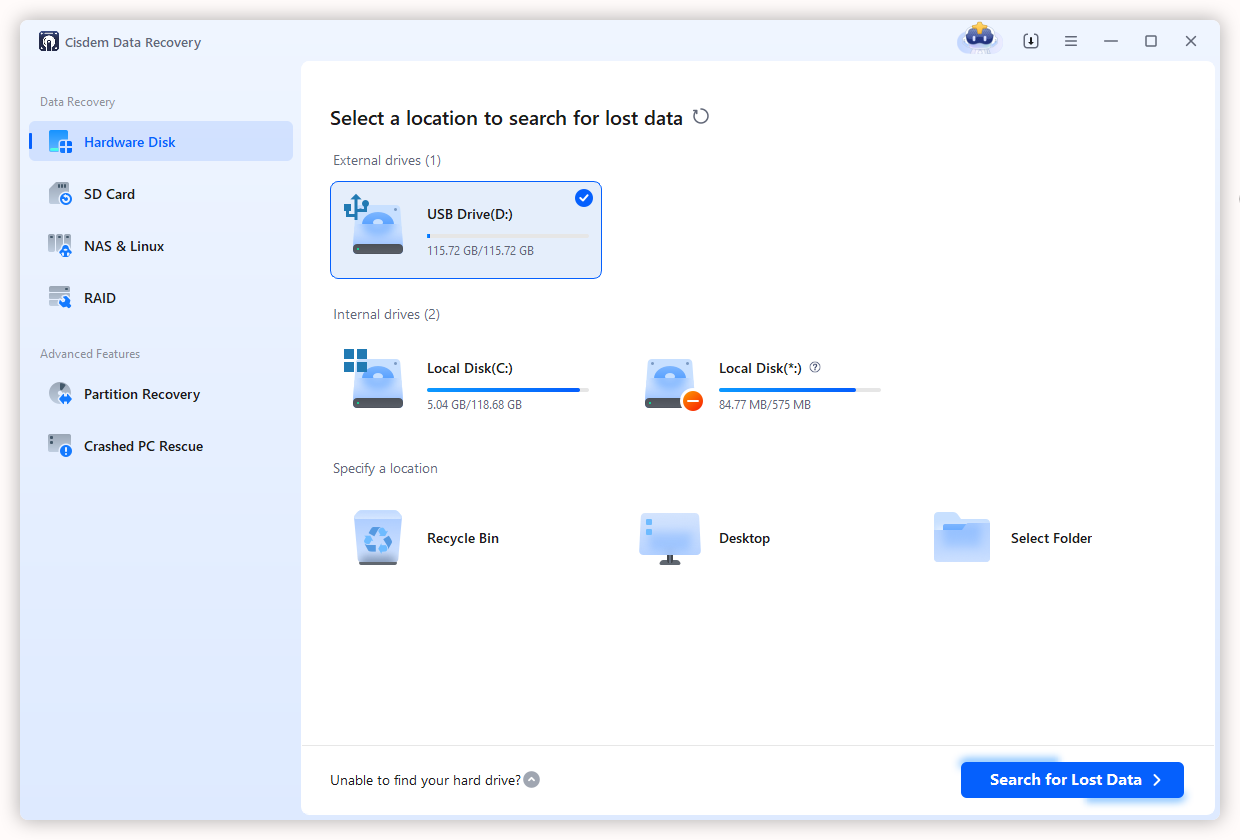
- Open Cisdem Data Recovery, go to Data Recovery, select the floppy disk and click Search for Lost Data.
![recover floppy disk cisdem 01]()
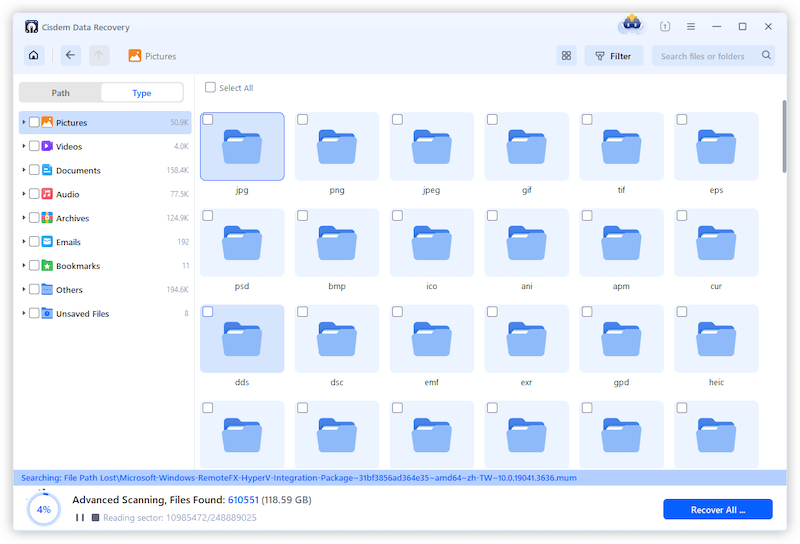
- Go to Type, check the recoverable items in your floppy disk. Or use the filter tool to quickly find a deleted file from the disk.
![recover floppy disk cisdem 02]()
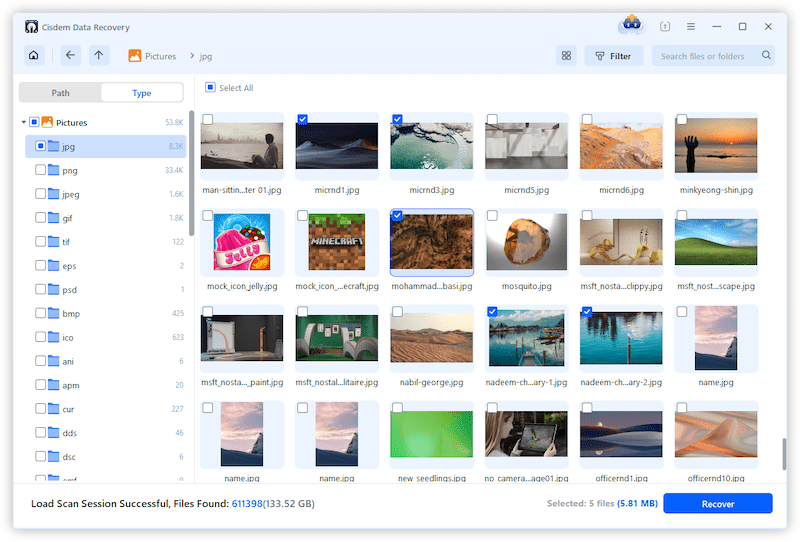
- Double click the file to preview and select them, then click Recover button.
![recover floppy disk cisdem 03]()
 Martin's Recovery Story
User: Martin, 59 years old, health information manager
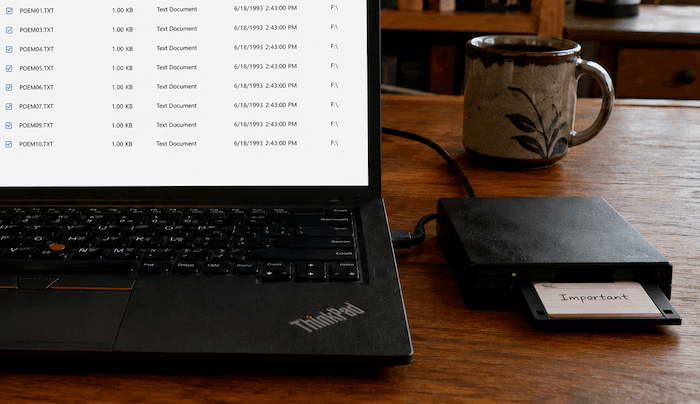
Problem: While cleaning out his parents’ old belongings, Martin discovered a 3.5-inch floppy disk stored in a drawer, with a label said “Important.” Curious about what was stored inside, Martin bought a second-hand USB floppy disk drive online, then connected the floppy disk to his computer. However, the disk was empty. He really wanted to recover the data before the aging floppy disk became unreadable.
Device: 1.44-MB 3.5-inch floppy, Lenovo ThinkPad laptop running Windows 11
Solution: To avoid overwriting the deleted data, Martin installed Cisdem Data Recovery on local D drive of his laptop first and ran it. Then connect the USB floppy drive to his laptop, Cisdem recognized the drive very fast. He selected the drive in Cisdem, and clicked Search for Lost Data. Within seconds, 13 files were found and listed under the Documents/Others category from Type tab. He checked the file info, then selected all the files and clicked Recover button, saved the recovered files to his external USB drive.
Result: 13 files were found and all were recovered. Most of these files were created in 1993, 3 DOS utilities, and 10 text poems that his father had written for his mother. It is pitiful that he could not open those DOS games on his modern PC, but he still felt very happy to reconnect with a forgotten part of his parent’s life.
Way #2: Use Free Floppy Disk Recovery Software
Getting a piece of free floppy disk recovery software may be the first thought of a part of users. While such freeware come with limited features, there are some reliable floppy disk recovery software that you can install on your PC and restore floppy disk data. Recuva, if you have ever heard about it, is the best free one.
Recuva is not only the number free data recovery program for PCs but also the best free data recovery program overall, as it is 100% free to recover various files from internal hard drive, SD card, USB drive, floppy disk and so on. Recuva use both basic scan and deep scan to find lost files as many as possible, it can analyze damages and evaluate if a file can be recovered or not. However, it has shortcomings, including lower recovery rate when comparing with other paid data recovery programs, and slow scanning, misnaming files.
- Download and install Recuva on your PC.
- Connect the floppy disk to your PC.
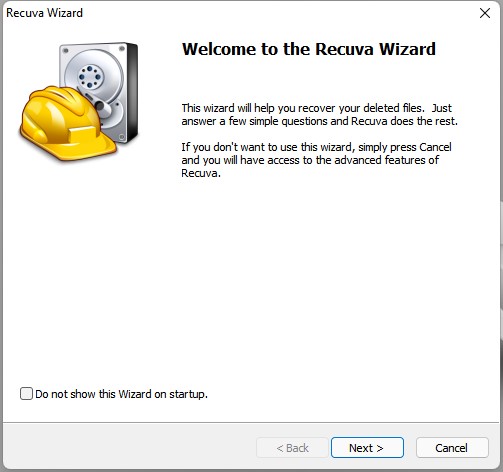
- Run Recuva Free and enter into the Wizard interface, click Next.
![recover floppy disk free 01]()
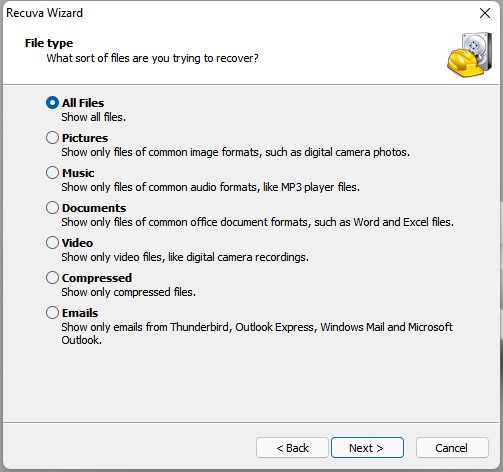
- Choose the file type you want to recover from the disk and continue with Next.
![recover floppy disk free 02]()
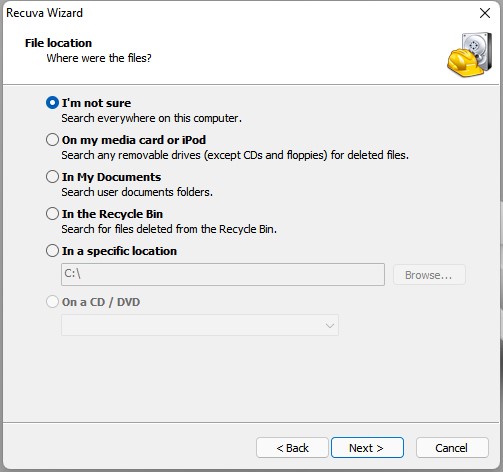
- Choose file location "On my media card or iPod".
![recover floppy disk free 03]()
- Then click Start to scan the floppy disk.
![scan with recuva]()
- Check all the recoverable files, especially those green ones with a higher recoveryrate, you can preview the files by clicking on Switch to advanced mode.
![recover floppy disk free 04]()
- Then select and click Recover to restore files from floppy disk for free.
![recover floppy disk recuva]()
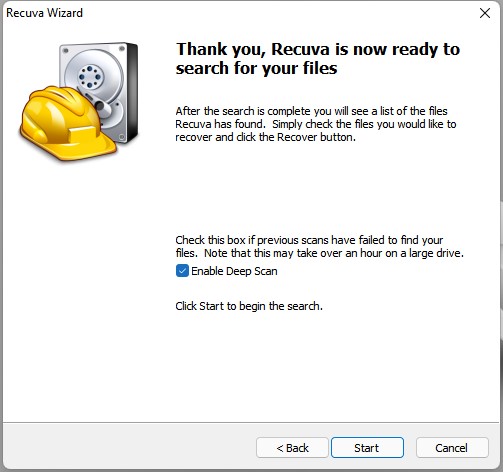
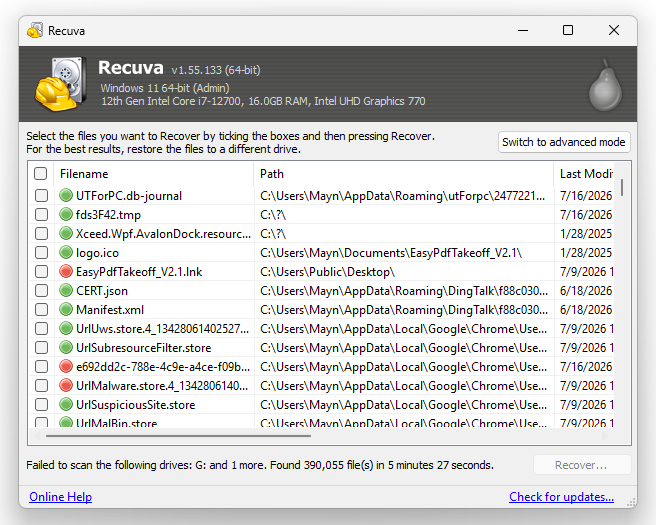
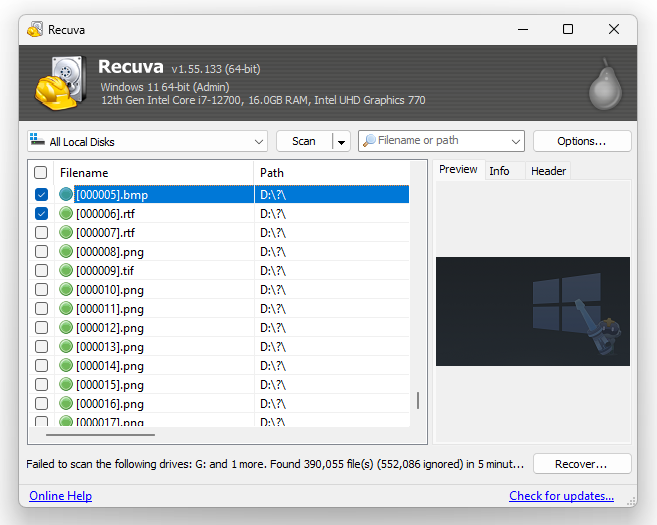
Way #3: How to Recover Damaged Files from Floppy Disk?
Due to wear-out, virus attack, bad sector, file corruption, physical damage or improper removal, your floppy disk may become corrupted and you won’t be able to access the data. But no worries, we can create a disk image from the disk first, then mount the disk image on your computer to regain access to the data.
Disk image is a file that contains an entire copy of the original disk, including all the media files, program files, system structure and so on. To open the disk image and extract the data from it, you need to mount the disk image first. Here we will use Power ISO to create a floppy disk image, it is an excellent image file processing tool to open, extract, burn, create and edit disk image files on Windows.
- Download and install PowerISO on your PC.
- Connect the floppy disk to your PC with a drive.
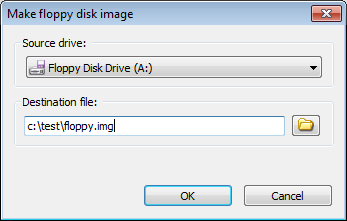
- Open PowerISO, choose Tools > Make floppy disk image file.
![recover corrupted floppy 01]()
- Select the floppy disk and choose the destination path, click OK.
![recover corrupted floppy 02]()
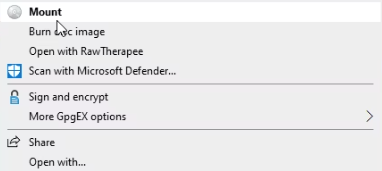
- Wait for the disk image to be created, then right click on the disk image and choose Mount.
![recover corrupted floppy 03]()
- Finally open the mounted disk image, check the contents and transfer the data to a preferred path.
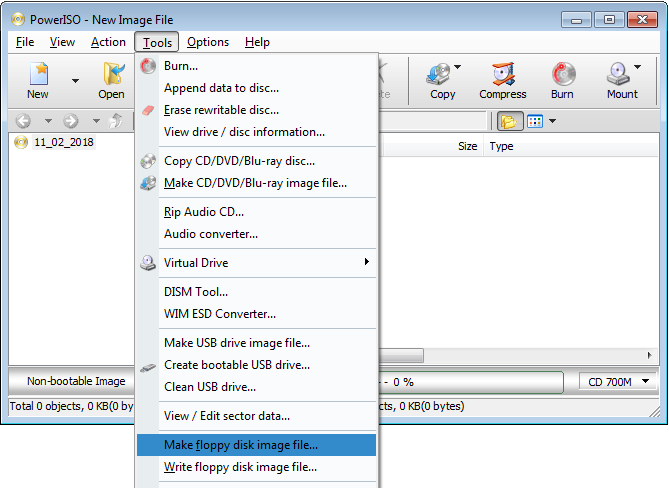
Way #4: How to Find Floppy Disk Data Recovery Service Near Me?
There is another method to recover files from floppy disk---finding a good data recovery service in your area. It sometimes can be daunting to pick a service, but if we take all major factors into our consideration, it could be easier.
Your locations, surely, is the most critical factor when picking a data recovering service. You can enter “data recovery service near me” into Google browser or any other search engine, and use your precise location to find the services near you. Or you can open your Map app and check the results.
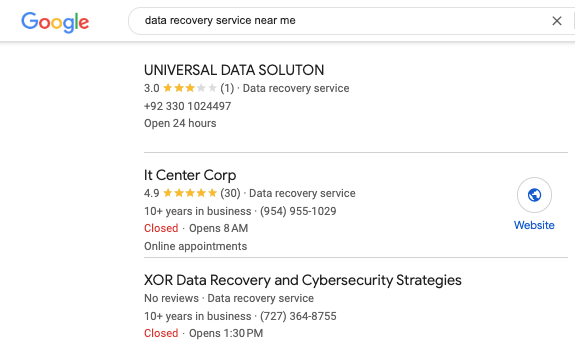
Then you need to find information about this local service as much as possible, including scope of services, ratings, user feedback, contact information, etc. And to know some more specific information, you can call then before a visit.
Conclusion
Floppy disk will completely disappear from the storage media market soon, it is the time to copy those valuable data from your floppy disk to a more portable device, or recover the files from the floppy disk before the data is gone forever. In this guide, we recommend this great tool, Cisdem Data Recovery, it offers the most straightforward and efficient way to recover different types of data from a floppy disk, also from other storage devices.

Zoey shows a great interest in what she does. Although not long with Cisdem, she has possessed a professional understanding of data recovery.

JK Tam is the lead developer at Cisdem, bringing over two decades of hands-on experience in cross-platform software development to the editorial team. He is now the lead technical approver for all articles related to Data Recovery and DVD Burner.
Shari
I actually had a box of old 3.5" floppy disks from my college days and assumed the files were long gone. This guide helped me figure out how to read the disk on a modern computer and recover some old documents and photos. Didn’t expect those files to open again in 2026, but it worked better than I thought.