


PDFgear Review: Is It Safe and Free?
 3.1K
3.1K
 0
0




Cisdem PDFMaster
Mighty AI-Powered PDF Editor for Advanced Uses


With the growing demand for digital documents editing, a variety of PDF tools have sprung up in recent years. Among the numerous options, PDFgear is ubiquitous in the reddit community and has received a lot of attention. It is praised for its free access and simplicity. But does it really live up to its promise?
In this PDFgear review, we’ll detail its security, features, strengths and limitations to help you decide if it's the right fit for your workflow. Yet, we also go beyond PDFgear and introduce a feature-rich editor for those requiring advanced capabilities.
What Is PDFgear?
PDFgear is a versatile PDF editor designed to simplify the document management. It is a fully compatible application that runs on Windows, Mac and mobile devices, and can also be accessed through a web browser. This handy software offers essential features like text and image editing, annotation tools, conversions between PDF and popular file formats, file merging & splitting, and pages manipulating.
Is PDFgear Completely Free to Use?
The answer is yes.
PDFgear official claimed that this PDF software is completely free at this stage. It is a strategy to rapidly expand the user base and gathered honest feedback. In the future, basic functions will remain free, while advanced features such as AI-driven tools may require payment. Therefore, if you have lightweight demands for handling documents, PDFgear is a suitable option for you.
Is PDFgear Safe to Download? Can It Be Trusted?
Many users are worried that PDFgear’s free offer is a scam. They considered it a malware or thought that it has leaked users’ private information to make money.
Well, PDFgear has undergone the security testing and received positive reviews from several authoritative sources. And it is generally safe if downloaded from PDFgear official sources. But the software got from third-party platforms may contain malicious programs.
Comprehensive PDFgear Reviews
Now let’s take a deep dive into the PDFgear software.
User Interface
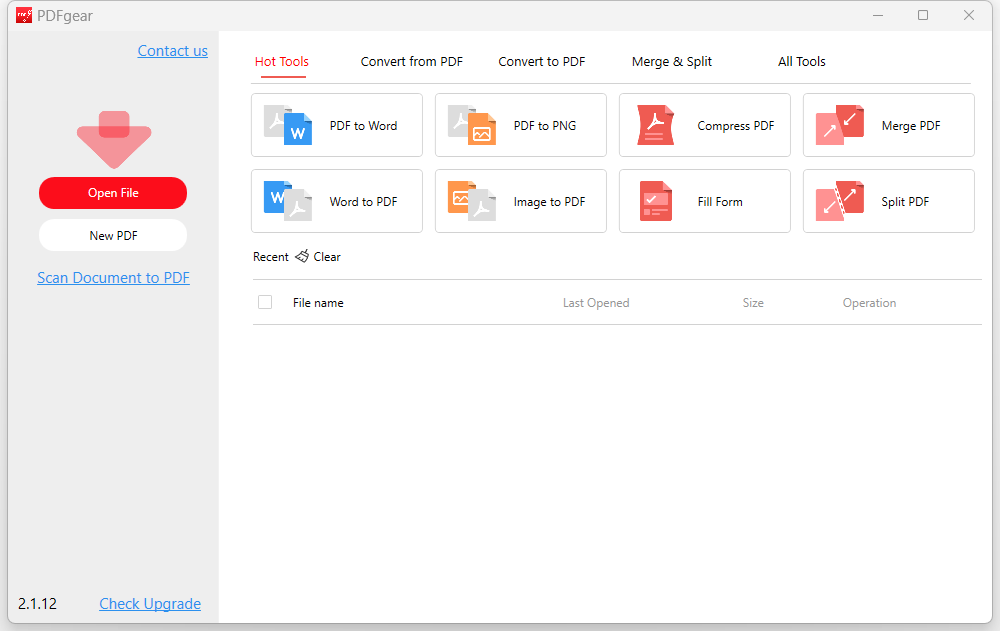
PDFgear offers an extremely intuitive interface, which displays several hot tools on the home interface. You can quickly access to your desired function with one click. Meanwhile, recently opened files will be listed under tools.
Key Features
After opening a PDF in PDFgear, there are 7 main tabs in the working interface, with various tools in the secondary menu.
1. Edit Text and Images
PDFgear is capable of modifying and adding the text, images, links and other objects. The selected text can be modified by font family, font size and color. In addition, it provides useful tools to add watermarks, page numbers and header & footer.

2. Add Annotations and Markups
There are a wealth of annotation tools under the Comment tab. You can highlight, underline and strike through the text simply. Plus, it lets add shapes, drawings, text boxes, notes and stamps to PDF.

3. Fill in and Sign Forms
PDFgear enables to handily highlight the form fields in the PDF document. Then you can type the text or insert icons in the text fields, or create a signature in the signature field.

4. Organize PDF Pages
PDFgear is a good assistant to manipulate PDF pages, be it extracting, deleting, inserting, cropping and rotating pages. Also, you can click and drag your mouse to move the selected page at will.

5. Convert PDF to/from Other Formats
This PDF editor supports converting PDF to 9 common file formats, such as Word, Excel, PPT, PNG, TXT, HTML and XML. Meanwhile, it lets create PDF from 6 file formats, including Word, Excel, Image, PPT, RTF and TXT.

6. Several Useful Tools
Besides the above main features, PDFgear still offers some handy tools --- compress, merge, split and set password. Batch processing is enabled to improve efficiency.

Pros and Cons of PDFgear
 Pros:
Pros:
- The interface adopts a user-friendly design, and even novices can quickly get familiar with the software.
- All the features are accessible for free currently. It doesn’t require any sign-up and registration.
- PDFgear offers both offline application and online services, which allows users to run it on various devices, like Windows, Mac and iOS.
 Cons:
Cons:
While the software does have a simple user interface, it lacks an organizational structure. The small tools are not regularly grouped under a function tab. It seems as if the tools are randomly placed somewhere. For example, the Signature tool is placed under the Edit, Form and Signature tabs simultaneously, which is very confusing.
In the test of converting a PDF file to a Word document, we found that some images in the original PDF were lost and turned into strange elements.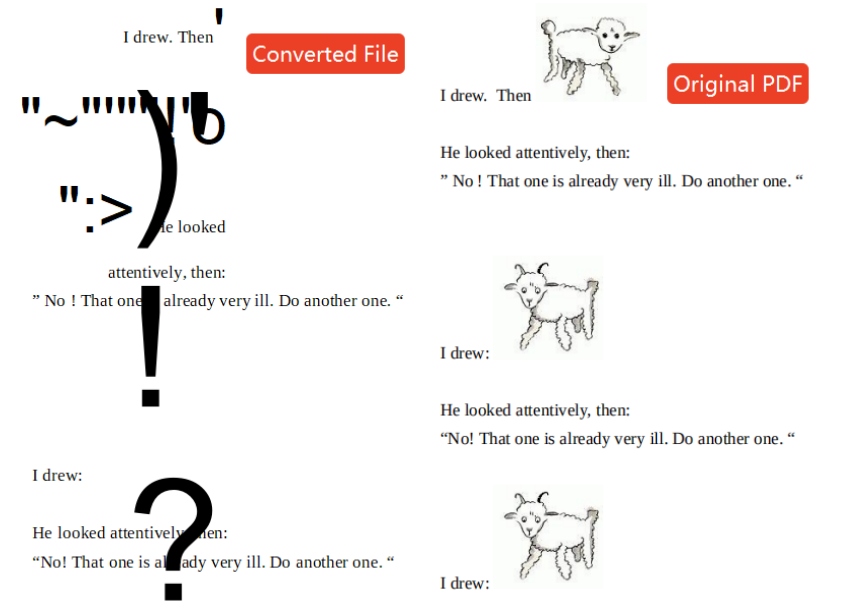
In addition, when importing a fillable form into the program, its Highlight Form Fields tool didn’t accurately detect and highlight the interactive form fields in the PDF at all.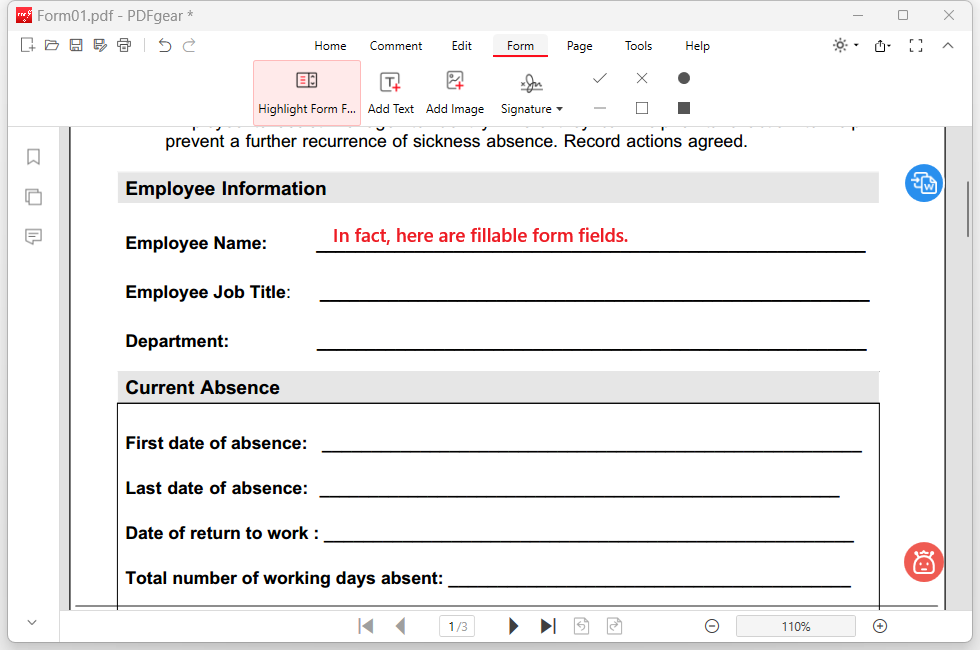
In a word, PDFgear operates on a freemium model that covers users’ basic needs, but performs just so-so and restricts advanced features like redaction and form creation. If you are a professional handling complex workflows or sensitive data, PDFgear may not be able to live up to your expectations.
 Cisdem PDFMaster
Mighty AI-Powered PDF Editor for Advanced Uses
- Provide a wide range of basic features and advanced tools.
- AI tools to summarize, rewrite, proofread and translate PDF files.
- Edit, delete and add text, images, links and other objects.
- Create and fill out the interactive PDF forms.
- Convert (scanned) PDF into searchable PDF or editable file formats.
- Redact sensitive information, set passwords and sign digitally.
- Measure the length, perimeter, area and angles of the drawings.
- Compress, merge, add watermarks, stamps, background, header & footer, etc.
- Available on Windows and Mac.
 Free Download macOS 11 or later
  Free Download Windows 10 or later
Earlier than macOS 11, click here
Trustworthy and Powerful Alternative to PDFgear
Since PDFgear has some limitations for power users, is there a reliable yet affordable alternative that provides more robust functionalities? Yes, Cisdem PDFMaster is exactly what you need.
It is a feature-rich PDF software dedicated to streamlining complex document workflows with ease, security and precision. This desktop solution combines an intuitive user interface with extensive toolkit, including high-accuracy OCR to extract text from scanned documents, various form fields to create fillable PDF forms, redaction tools to protect confidential information and so on.
Whether you’re editing a resume, e-signing a contract, filling out a form or managing batch conversions, Cisdem PDFMaster can provide you with high efficiency and security.
Advanced Features and Steps for Professional Workflows
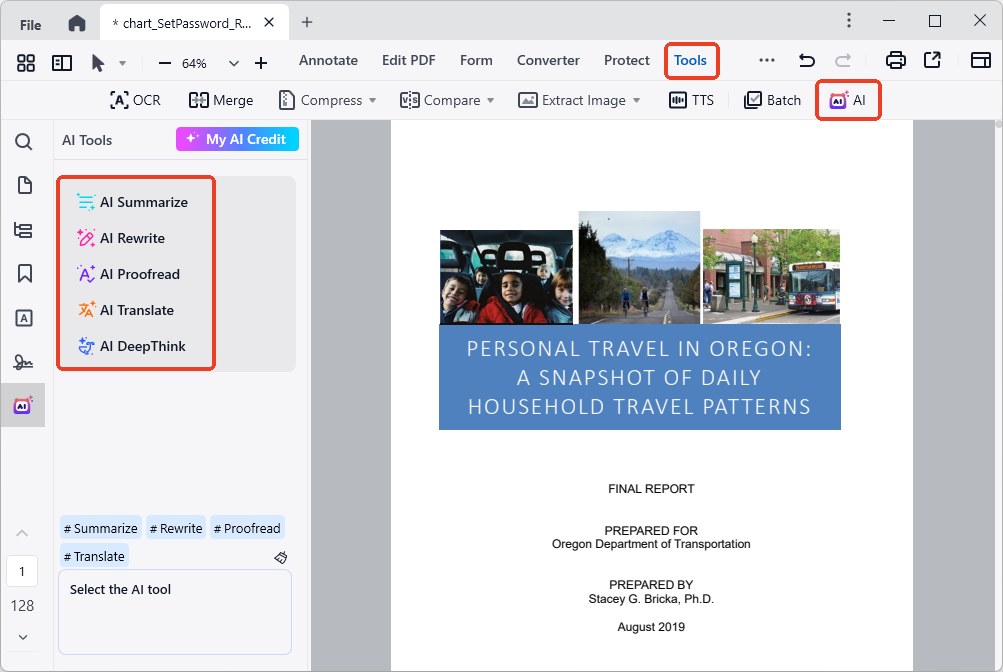
- AI Tools: Go to Tools > AI, here you can summarize, rewrite, proofread and translate a PDF with integrated AI tool. Also, AI deep thinking is supported.
![pdfgear alternative cisdem01]()
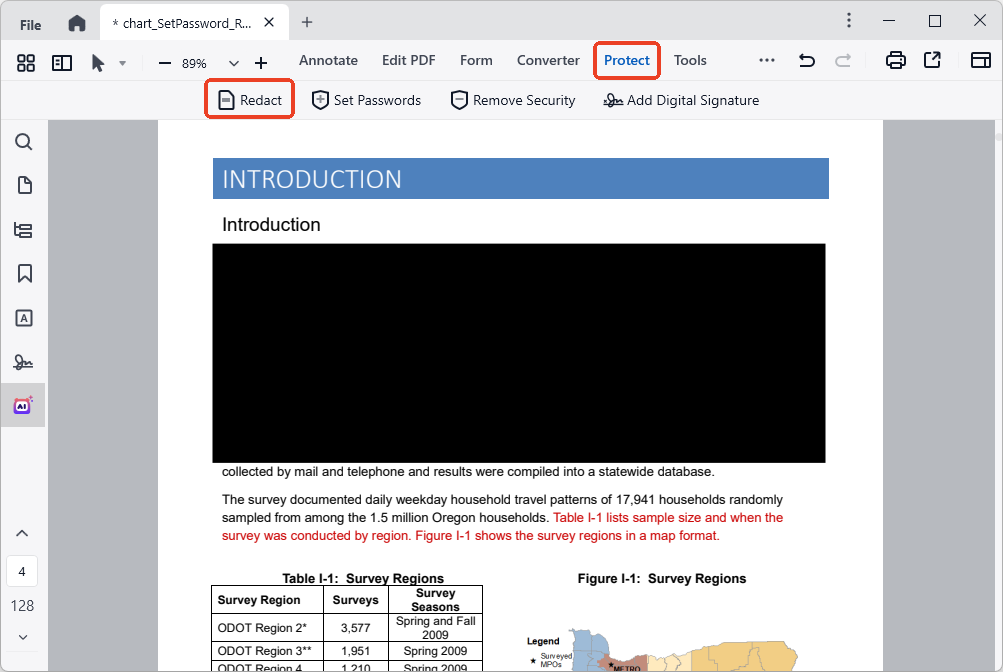
- Redact PDF: Go to the Redact tab and choose Redact. Drag your cursor to select the sensitive information to redact it.
![pdfgear alternative cisdem02]()
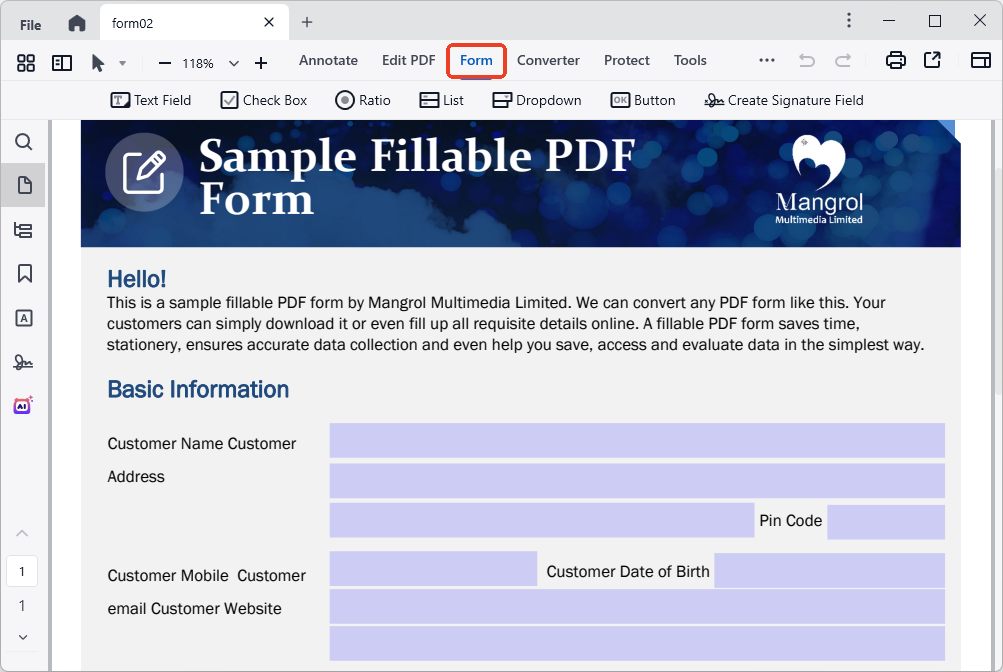
- Create Form: Select the Form tab and choose a desired form field type. Place the field at the position where you want to add it and change its appearance as needed.
![pdfgear alternative cisdem03]()
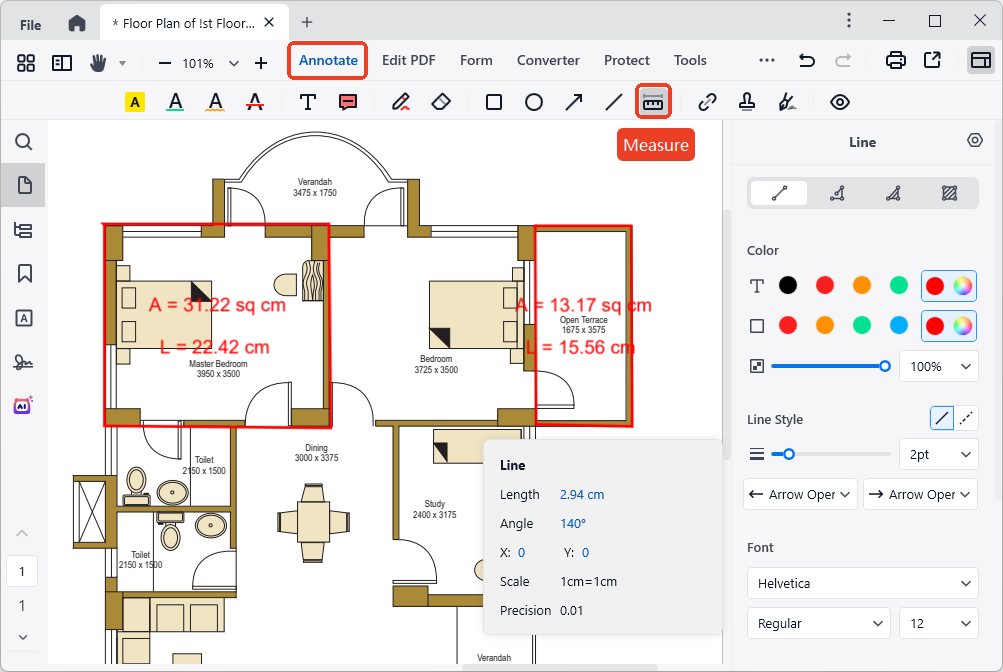
- Measure PDF: Go to the Annotate tab > Measure tool, here are 4 measurement tools. You can measure the length, width, perimeter and area, etc.
![pdfgear alternative cisdem04]()
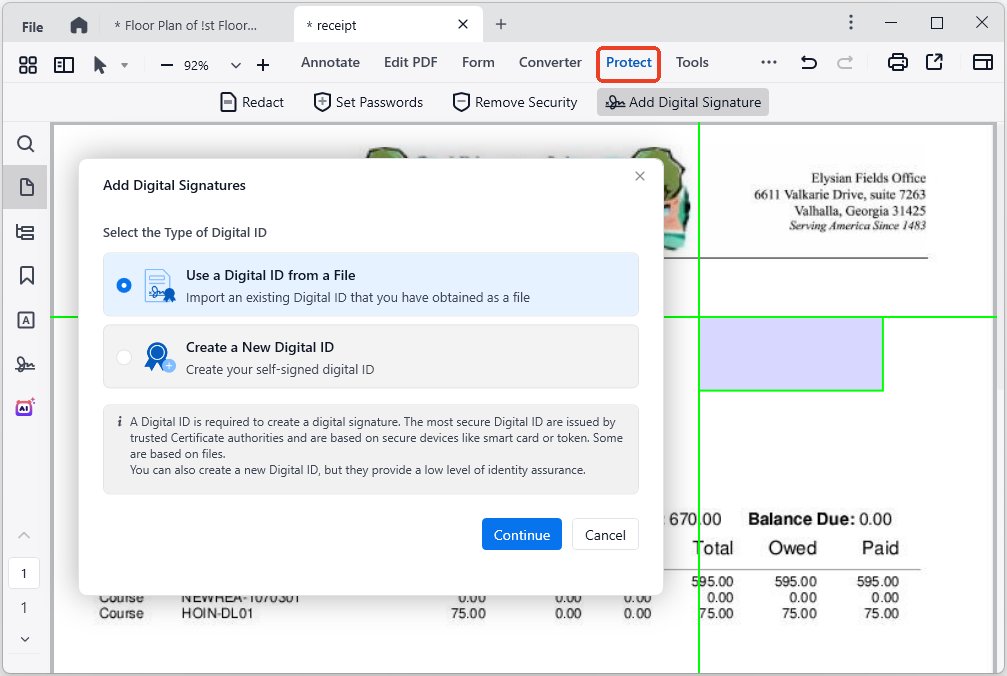
- Digitally Sign: Choose the Protect tab, click Add Digital Signature to add a blank signature field first. Then choose a type of digital ID to digitally sign a PDF.
![pdfgear alternative cisdem05]()
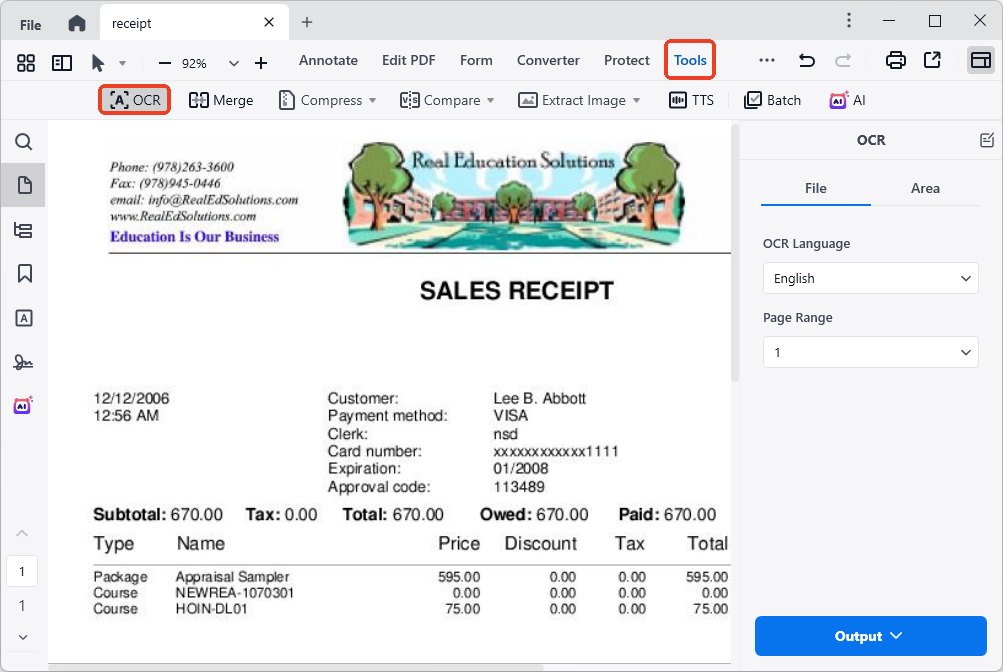
- OCR Scans: It provides over 50 OCR languages to recognize the text in the scanned images and PDFs. Also, you can save the OCR results as text or PDF.
![pdfgear alternative cisdem06]()
Final Verdict
While PDFgear is a decent free tool for lightweight tasks, Cisdem PDFMaster delivers unmatched value for power users. Its robust functionality, guaranteed security, and affordable price make it a wiser long-term solution for professionals, businesses, or anyone seeking efficient and simplified workflows.
Free Download macOS 11 or later Free Download Windows 10 or later
Earlier than macOS 11, click here

Bianca is a senior tech editor and strategist at Cisdem with Over 10 years of experience on PDF related solutions which covers all document editing, annotating, converting and managing etc.

Liam Liu takes charge of the entire PDF product line at Cisdem and serves as the technical approver for all related editorial content. He has deep expertise in PDF and document management technologies and nearly a decade of development experience.