


5 Methods to Repair Corrupted RAR Files 2026
 74.8K
74.8K
 1
1


You are much likely to have a file in the format that comes with .rar extension. Standing for Roshal Archive, RAR is a proprietary archive file format that supports data compression, error correction and file spanning, which enables users to free up disk storage space and transfer data faster.
However, a RAR file can be easily corrupted for different reasons. And it is very annoying when a damaged RAR archive enclosing a bunch of important files. Relax, this post will provide a quick guide on repairing corrupted RAR and get your files back.
Key Takeaways
- A RAR file gets corrupted due to various reasons, including source file corruption, interrupted compression/download/transfer, split archives, bad sector on the storage drive, software bugs, virus infection, etc. And it is possible to repair.
- There are online free tools available to repair a corrupted RAR file, FabConvert is the best one.
- WinRAR builds in a repair tool to fix damaged archives, though not always successful, it is worth a try.
- You can also use Recovery Toolbox for RAR, which is free to use, to repair your RAR files, if WinRAR fails to repair.
- In the case that you want to fix important videos, photos or documents in a RAR file, Cisdem Data Recovery delivers the best result.
 Best File Repair for Windows and Mac
Repair Video, Photos and Documents in RAR Easily
- Repair files in different archives formats: RAR, ZIP, ISO, etc.
- Repair damaged videos: MP4, MOV, MKV, AVI, etc.
- Repair corrupted photos: JPG, PNG, TIFF, GIF, etc.
- Fix damaged documents: Word, Excel, PowerPoint, PDF
- Filter corrupted files quickly by keyword, date created, file size, etc.
- Save repaired files to local drive or cloud storage platforms
- Also recover deleted and lost RAR, or other 1000+ file types
- Recover unsaved Word, Excel, PowerPoint documents
- Support crashed computer recovery
- Create disk image to back up data on a drive
 Free Download Windows 11/10/8/7
 Free Download macOS 10.15 or later
Why Do RAR Files Get corrupted?
There are many reasons causing RAR corruption, following are the common ones:
- The RAR opener cannot recognize the header file accurately
- Transfer error when downloading the RAR file
- Incomplete download of a RAR file
- Bad sector or physical damages of the hard disk where you save the RAR file
- Virus
- The RAR file is too large
- Software glitches
Basing on these reasons, you are recommended to open the RAR file with another RAR viewer to make sure the file itself is corrupted or not. If damaged, in face of this challenge, 5 potential avenues are offered for fixing corrupted RAR archive files freely.
Method 1. Force Extract Corrupted RAR Files
To deal with RAR file corruption and damage, force extracting the archive files while overlooking the error messages could be a quick approach. WinRAR app, or other preinstalled RAR opener on your computer can be used here to force extract.
How to extract corrupted RAR files?
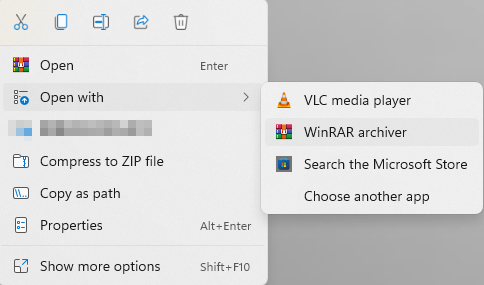
- Right click on the corrupted RAR archive > select "Open with" > WinRAR archiver.
![force extract rar 01]()
- From WinRAR tool bar, choose "Extract to" option.
![force extract rar 02]()
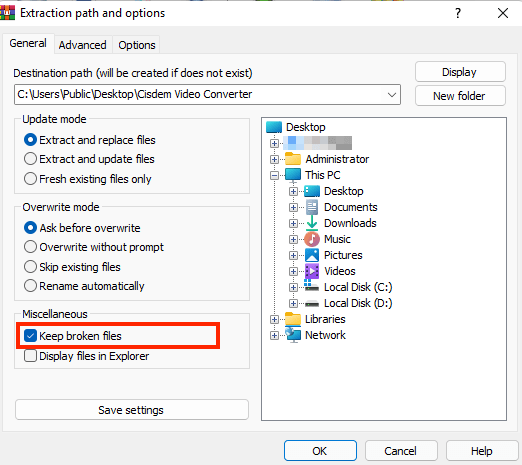
- The Extraction path and options window will pop up. Choose a destination path to store the extracted RAR file.
- Tick "Keep broken files" option under Miscellaneous section.
![force extract rar 03]()
- Select OK button to start the extraction of your broken RAR archive file. Ignore any error messages if popping up. Finally check to see if you can access to the extracted file.

Method 2. Repair Damaged RAR File Online Free
To repair a RAR file with minor corruption, you may find some online RAR files repair websites. FabConvert is such a tool for your reference. It can analyze the RAR contents and attempt to repair automatically. Also, it is capable of repairing other files like JPG, PNG, PDF, MP3.
Here’s the tutorial about using it to repair your RAR archive online for free.
- Visit https://fabconvert.com/file-repair/rar with your browser.
- Drag the damaged RAR file into the repair box, or click Select File(s) to upload the archive.
![repair rar online 01]()
- This online tool will analyze and check the contents.
![repair rar online 02]()
- Then click on Repair to fix the damaged RAR file, and download it your drive.


Method 3. Use WinRAR to Repair
WinRAR is a reputable archiver and archive manager all over the world. The software is versatile enough not only to compress, package, encrypt, backup files on your computer, but also read the contents of a RAR file without extraction. Its built-in file repair function is possible a useful way to get your corrupt RAR files back to their normal state.
How to repair corrupted RAR file with WinRAR?
- Download and install WinRAR on your PC.
- Locate the corrupt RAR file. Right-click on it and choose "Open with WinRAR".
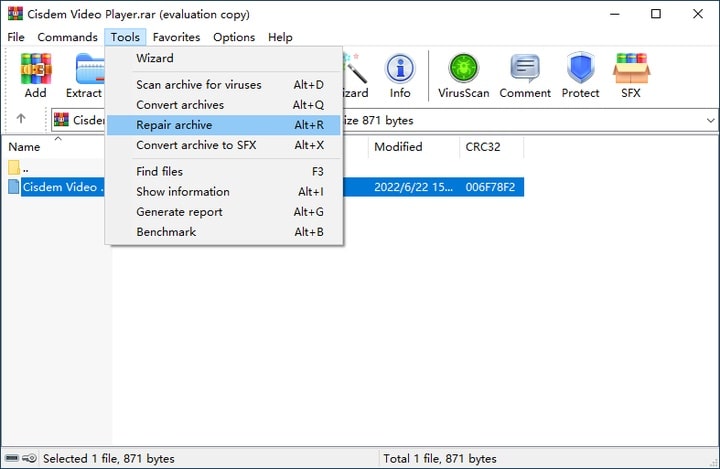
- Click "Tools" at the toolbar and select "Repair archive" from the drop-down menu.
![winrar repair 01]()
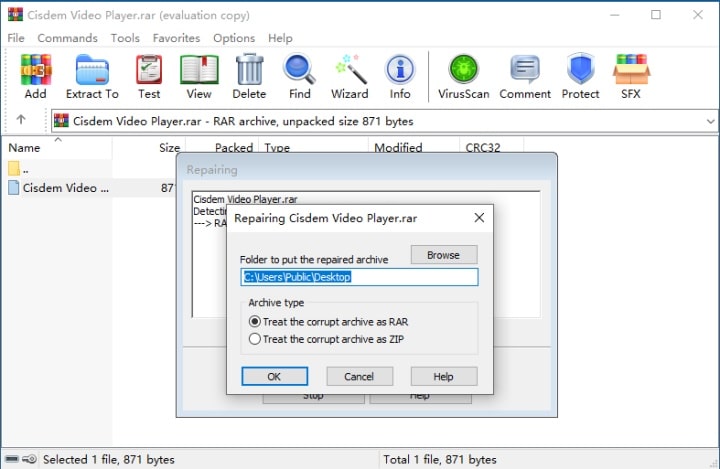
- In the pop-up window, click "Browse" to select a destination location for saving the repaired RAR file. Keep the archive type as RAR and click OK to start repairing.
![winrar repair 02]()
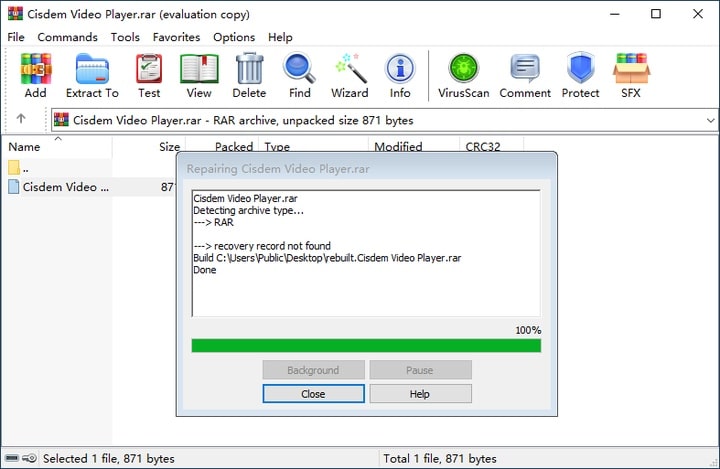
- Within a few seconds, the corrupt RAR file will be recreated completely. Click the "Close" button.
![winrar repair 03]() Go to the destination location you selected earlier. The name of your repaired RAR file will be "rebuilt.file name.rar".
Go to the destination location you selected earlier. The name of your repaired RAR file will be "rebuilt.file name.rar".
 Go to the destination location you selected earlier. The name of your repaired RAR file will be "rebuilt.file name.rar".
Tips: If by any chance the damaged RAR file cannot be repaired, it indicates that “Recovery Records” option has not been added during file compression with WinRAR. In this instance, Cisdem Data Recovery can be tried to recover the irreparable RAR file without recovery record.
Method 4. Use Recovery Toolbox to Repair RAR Files Free
In addition to WinRAR, there is one more corrupted RAR file repair software you can try for free --- Recovery Toolbox for RAR. This archive repair tool is designed to recover information from corrupted archives in RAR format, which can be used to completely avoid or at least minimize losses due to compressed data.
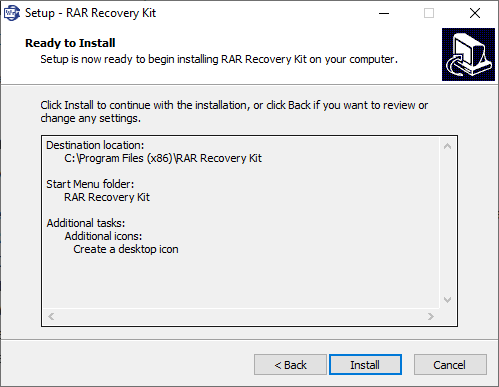
- Download and install this RAR Recovery Kit on your PC from its website.
![recovery toolbox for rar 01]()
- After installation, this repair software will automatically open.
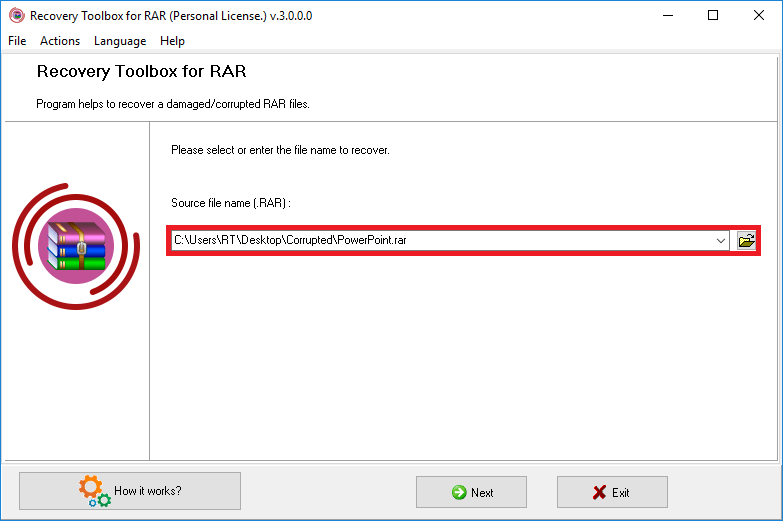
- Select the damaged RAR file to be repaired > click Next.
![recovery toolbox for rar 02]()
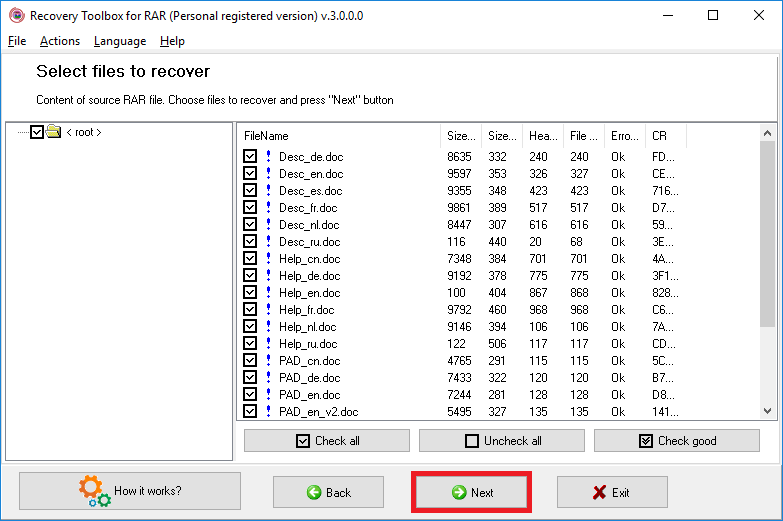
- Select the files or folders you need to keep from the damaged RAR archive > click Next.
![recovery toolbox for rar 03]()
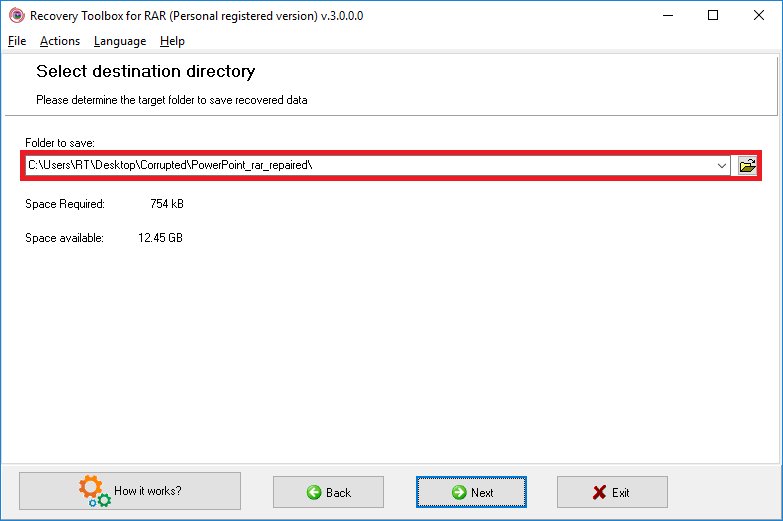
- Select a destination directory to save the recovered data > click Next to finish. Finally you can get the repaired RAR in the selected path.
![recovery toolbox for rar 04]()
Method 5. Fix Damaged RAR Files with Cisdem Repair Tool
Essentially, RAR files have little difference from any other data in normal formats. If you can extract the contents from the archive, but the files in it are corrupted, a data recovery tool can come to the rescue in event of RAR archives corruption.
Among a considerable number of RAR file retrieval programs in the market, Cisdem Data Recovery for Windows or Mac is highly recommended. This software is capable of restoring trash-emptied, permanently-deleted, formatted files or any other files lost because of various situations, also repair damaged videos, photos and documents in the RAR archive. It has the reputation for high recovery rate, professional research teams and responsible customer service.
Highlights of Cisdem Data Recovery:
- Recover 1000+ types of files (image, video, audio, document, archives, etc.), including RAR
- Repair damaged videos, photos, documents in the RAR format
- Repair corrupted videos in mp4, mov, avi, mkv, m4v and so on
- Support automatic repair of corrupted images and documents
- Preview files before recovery to pick the wanted ones only
- Quick scan and deep scan both applied to find most files
- Scan status loaded for resuming scanning at anytime
How to repair files in RAR archives with Cisdem Data Recovery?
- Extract all the contents from the archive first, and save it on your computer.
- Download and install Cisdem Data Recovery.
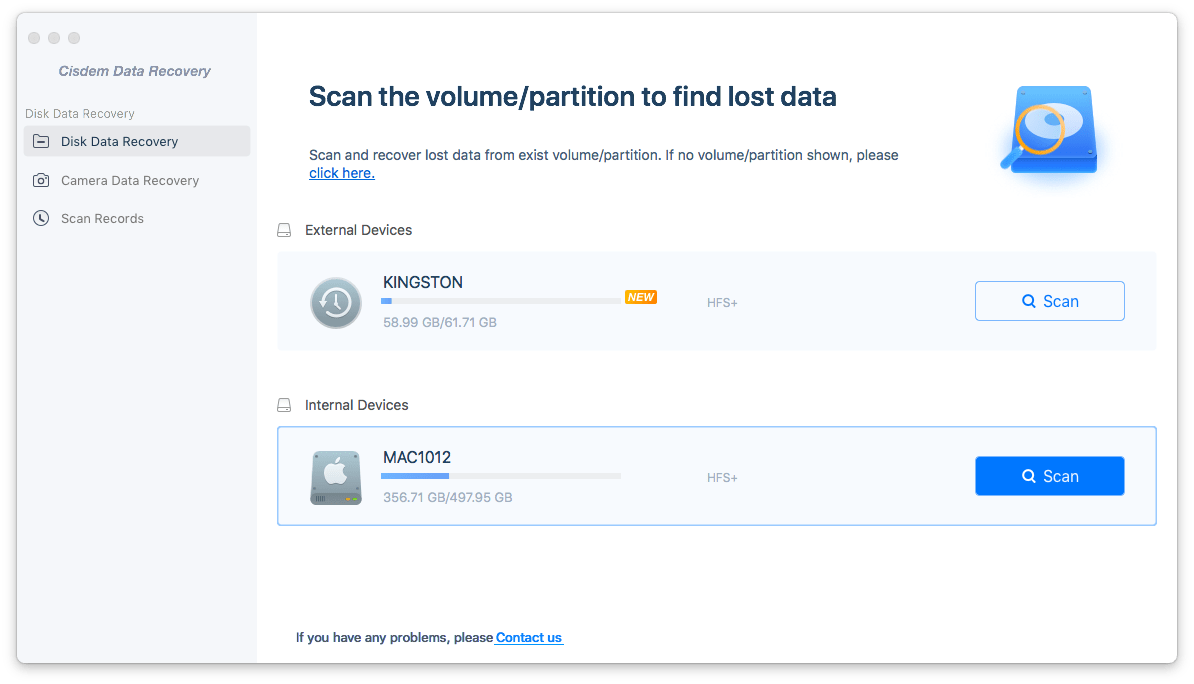
Free Download Windows 11/10/8/7 Free Download macOS 10.15 or later - Select and scan the drive.
Go to Hardware Disk. All storage partitions detected by the program will be listed on its right panel. Select the exact drive where your RAR contents are saved. Then click Search for Lost Data.![cisdem data recovery 01]()
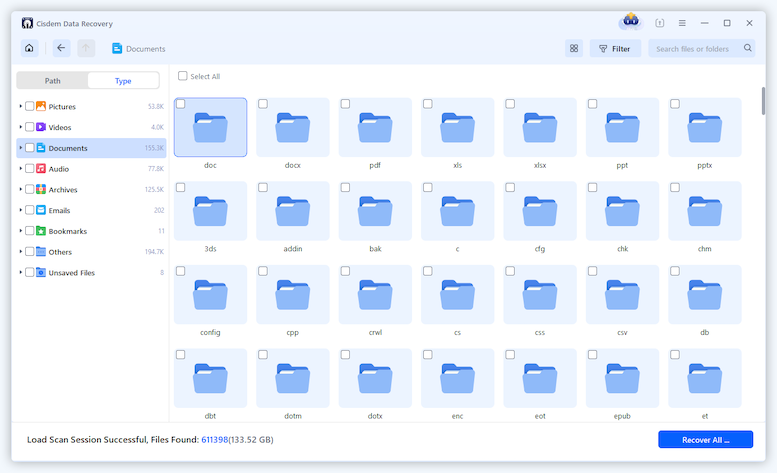
- Locate the files in corrupted RA.
After scan completion, scan results will be displayed on the left panel based on different categories. Go to Type, check different folders to locate RAR contents by file type, such as Pictures, Videos, Documents.![repair rar 02]()
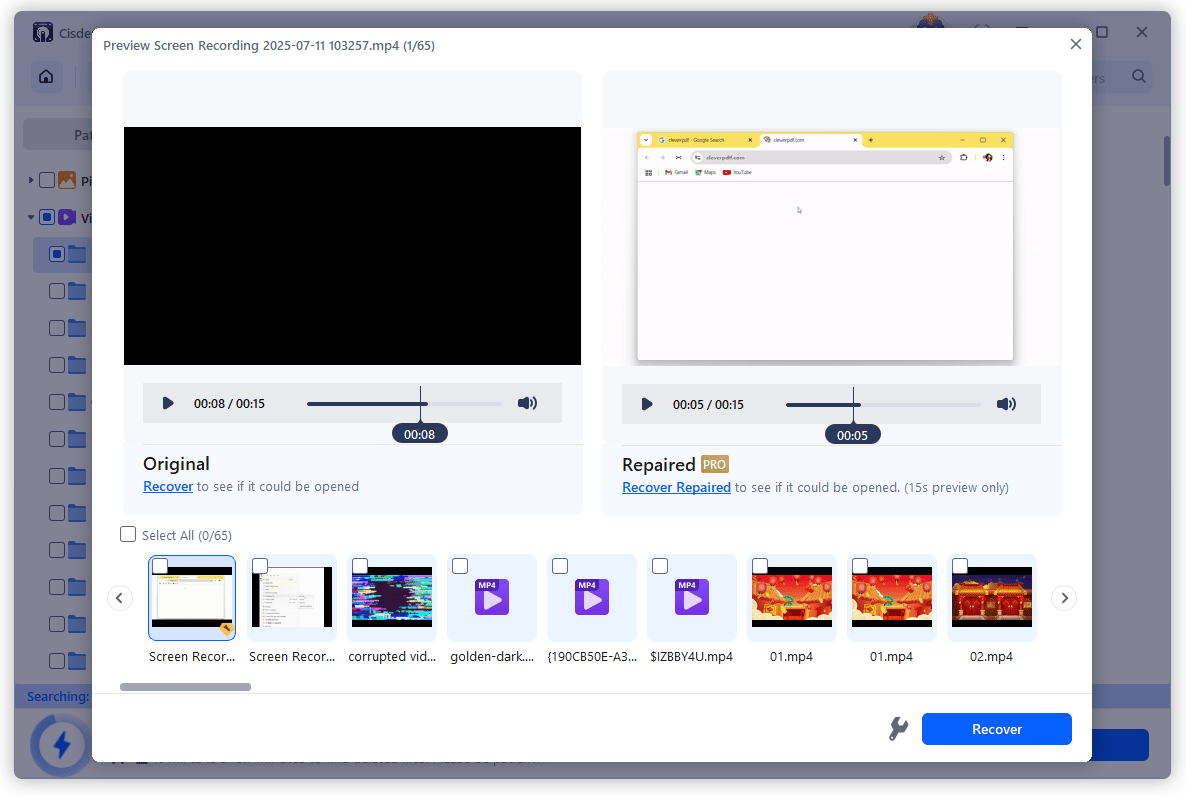
- Repair the files.
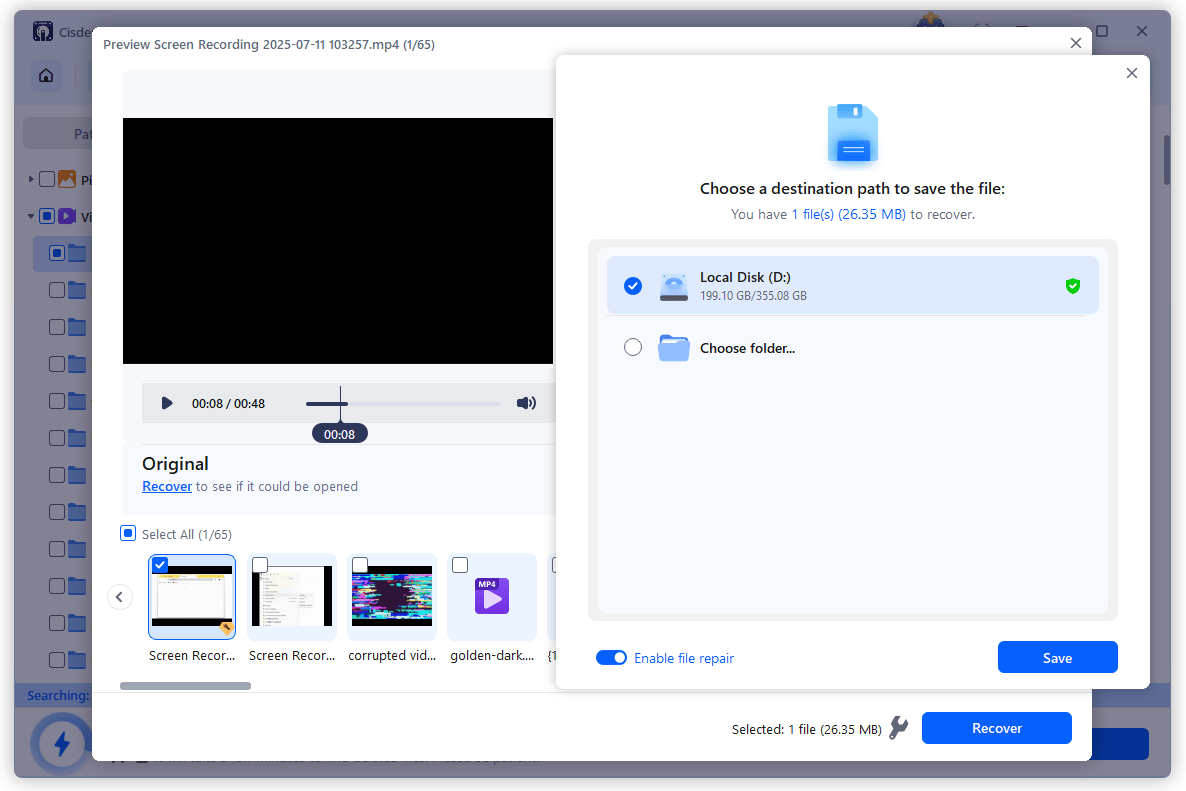
Double click on the corrupted files, the Preview will show as black image, then click on the File Repair tool on the bottom of the interface to start repairing.![repair rar cisdem 03]()
- Select the fixed files and click "Recover" to save to your computer.
![repair rar cisdem 04]()
Tips to Prevent RAR Files Corruption
As an old proverb goes, a fall into the pit, a gain in your wit. After feeling frustrated about corrupted RAR files and searching hard for solution, it would be wiser for you to take some precautions for avoiding RAR archive corruption in days to come. Check the tips below:
- Apply formal and official RAR compression/extraction programs only.
- Do not download RAR archive files from insecure websites.
- Check internet connect and device battery before downloading to avoid incomplete download
- Install a reliable anti-virus application on your computer and keep updating its latest version.
- Avoid unrestrained use of your computer.
- Check disk performance and repair in time
Final Words
Corrupted RAR files and deleted RAR files are totally 2 different things, you need different solutions to fix or restore the file. And it is always helpful to have Cisdem Data Recovery loaded onto your computer, which recovers deleted and lost RAR files, also repairs corrupted documents, videos or photos in a RAR.

Connie Yu has been a columnist in the field of data recovery since 2011. She studied a lot of data loss situations and tested repeatedly to find a feasible solution tailored for each case. And her solutions are always updated to fix problems from the newest systems, devices and apps.

JK Tam is the lead developer at Cisdem, bringing over two decades of hands-on experience in cross-platform software development to the editorial team. He is now the lead technical approver for all articles related to Data Recovery and DVD Burner.
Delia Wright
You are right. Online or free RAR repair tools are mostly not reliable. But in contrast, WinRAR is a worthwhile application to deal with corrupted RAR archives.