


5 Best Completely Free Website Blockers of 2026: All Tested
 1.6K
1.6K
 0
0


Want to reduce distractions at work? Looking to protect your children from inappropriate online content? You just need a website blocker! And there are even free options available. Read on to check out those free website blockers and choose the one that best suits your needs.
 Cisdem AppCrypt
Easy & Effective Website Blocker
- Block websites on Chrome, Safari, and more with a password
- Block specific sites or only pages, URLs with certain keywords, and categories (e.g. social media, adult, etc.)
- Block all websites except the ones you allow
- Lock apps with a password
- Block websites and lock apps 24/7 or during scheduled times
- Easy to use
- Hard to bypass
- Help with productivity, parental control, and more


At a glance
If you search for "free website blocker" on Google, you will find many results, including tools mentioned in AI Overview. Are they really free? What features do they offer? Can they meet your needs?
I tested over ten tools found online and selected five of them to share here. These five tools are completely free to use. Some of them are apps, and some are browser extensions. No matter you are using a Windows PC, Mac, iPhone, or Android device, you can find an option.
Here's a comparison of these tools. Since they may support different operating systems, this isn't a very strict comparison.
(Below the comparison, you will find reviews of each tool. Click the app name to jump to its review.)
| App name | Cold Turkey Blocker Free | Block Site | Cisdem AppCrypt (Mobile) | Screen Time | StayFocusd |
|---|---|---|---|---|---|
| Type | App | Extension | App | Settings | Extension |
| Compatibility | Windows, Mac | Windows, Mac, Linux, ChromeOS | Android, iPhone | Mac, iPhone | Windows, Mac, Linux, ChromeOS |
| Supported browsers | Safari, Chrome, Edge, and 4 others | Chrome | Most browsers on Android, all browsers on iPhone | Safari on Mac, all browsers on iPhone | Chrome, Edge |
| Block websites | Yes | Yes | Yes | Yes | Yes |
| Block keywords | Yes | Yes | Yes | No | Yes |
| Block categories | Yes | No | No | No | No |
| Permanent blocking | Yes | Yes | Yes | Yes | Yes |
| Scheduled blocking | No | No | Yes | No | No |
| Effectiveness | Hard to bypass | Easy to bypass | Hard to bypass | Hard to bypass* | Easy to bypass |
| Ease of use | A bit challenging | Effortless | Effortless | Easy | Complicated |
*Note: Websites blocked by Screen Time on a Mac can be easily bypassed if one uses an administrator account.
Reviews of 5 best free website blockers
Cold Turkey Blocker Free
Compatibility: Windows, Mac
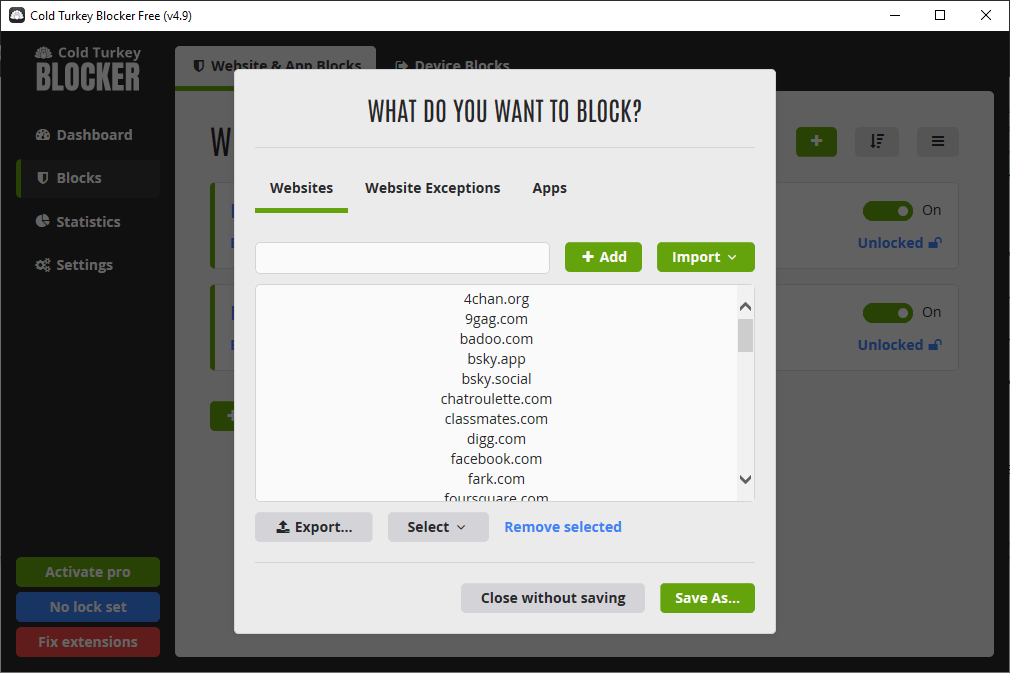
Cold Turkey Blocker Free is the free version of a paid app called Cold Turkey Blocker. The paid version is feature-rich and highly configurable. Although the free version is very limited, it's still useful and can help you block any unwanted websites.
Key features
- Block specific websites, such as youtube.com
- Filter URLs by keyword, such as casino
- Restrict websites by category, such as Games
- Let you create different blocking profiles
- Allow you to lock blocking to prevent bypassing
Pros
- Multiple ways to add websites to the block list
- Make it hard for users to bypass restrictions
- Track website usage and blocking stats to help monitor online activity
Cons
- Not very user-friendly
- Might close your browser when you're not trying to bypass
Editor's note
If you are not very comfortable with technology or prefer a simple tool, Cold Turkey Blocker Free is not your best choice. If you are looking for an effective tool to make sure that you or your kids won't visit certain websites, I highly recommend trying this tool. Its strength lies in its bypass prevention measures. However, sometimes this may go too far. (Cold Turkey Blocker Free requires users to install its extension to apply blocking on browsers. If you try to remove or disable the extension, your browser will close automatically, preventing you from accessing restricted sites. However, in the test, my Chrome occasionally closed when there wasn't any triggers.)
Need a Highly Effective, User-Friendly Website Blocker?
Check out Cisdem AppCrypt - a website blocker and app locker in one, with a scheduling feature. Thanks to password protection and other measures, it's difficult to bypass. It's easy to set up, user-friendly for everyone.
 Free Download Windows 10 or later
  Free Download macOS 10.15 or later
Block Site
Compatibility: Windows, Mac, Linux, ChromeOS
Block Site is a Chrome extension provided by blockerwebsite.com. It's a popular extension in the Chrome Web Store and has received positive feedback from users. However, without a measure like Cold Turkey Blocker Free's, users can get around blocking by disabling or uninstalling the extension.
Key features
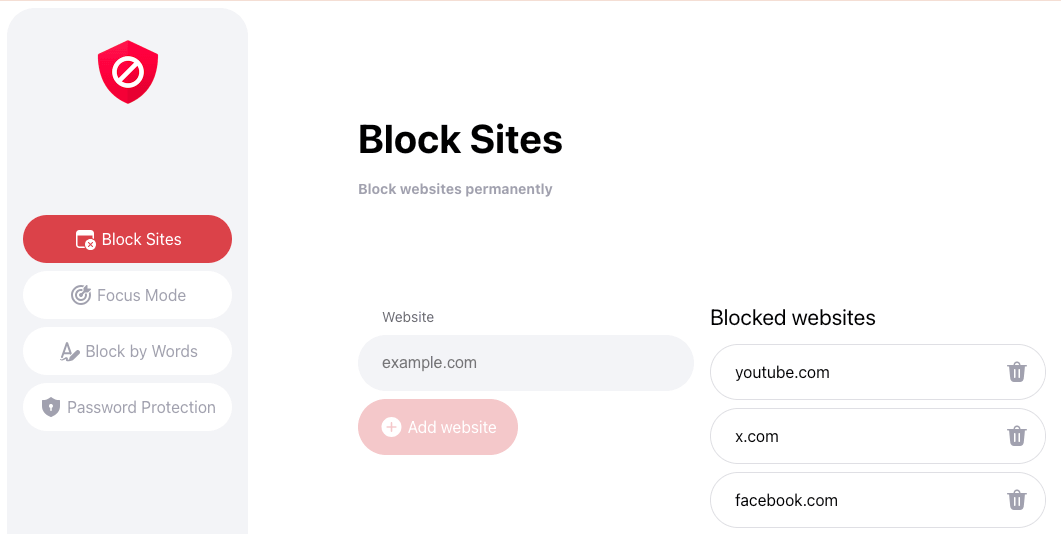
- Block specific websites
- Filter URLs by keyword
- Provide two separate block lists, one for 24/7 blocking, and one based on a Pomodoro timer
- Lock your extension settings with a password
Pros
- Simple and user-friendly
- Provide a Block current site button
Cons
- Only work with Chrome
- Can be easy to bypass
Editor's note
In Block Site, the websites added to the default block list will be restricted permanently. The sites added to the Focus Mode list will be automatically blocked and unblocked based on a Pomodoro timer, letting you enjoy your favorite sites during breaks. This extension creates a barrier between you/children and distracting/inappropriate sites. However, one can easily disable or remove the extension, which can't be prevented by the extension's Password Protection feature. If you are looking for an effective solution, Cold Turkey Blocker Free is definitely a better choice.
Cisdem AppCrypt (Mobile)
Compatibility: Android, iPhone
Cisdem AppCrypt has two versions: a desktop version (paid), and a mobile version (free). No matter you are using an Android device, iPhone, or iPad, you can use Cisdem AppCrypt to easily restrict website access for free.
Key features
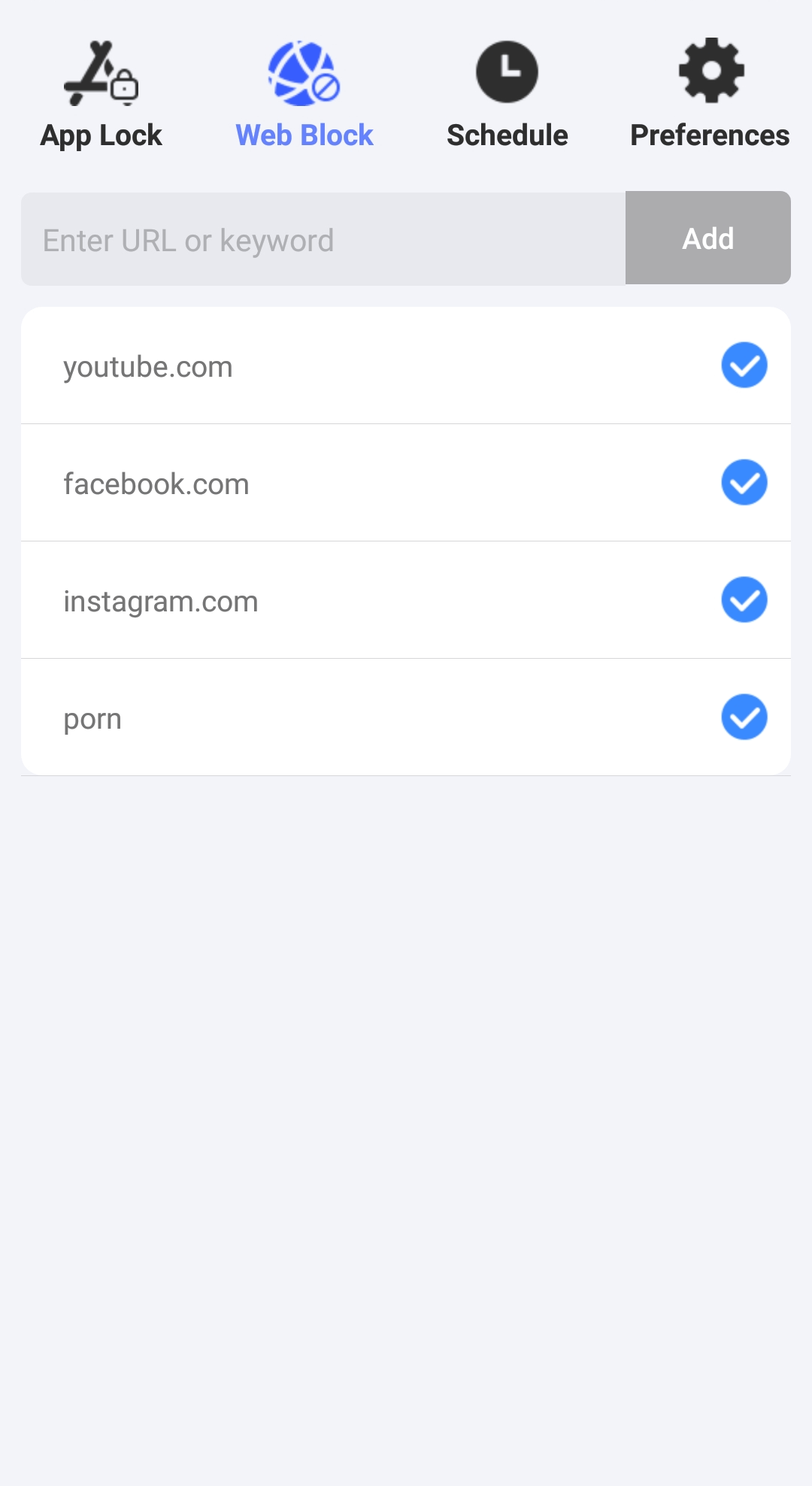
- Block websites and keywords
- Allow you to schedule blocking
- Protect blocking with a password
Pros
- Simple and easy to use
- Difficult to bypass
- Offer an app locker feature
Cons
- Keyword blocking not available for iOS and iPadOS
Editor's note
Cisdem AppCrypt (Mobile) makes it easy for users to limit websites on their phones and tablets. With its scheduling feature, you can select specific times of the day and days of the week when restrictions will be active, which is flexible and convenient. However, it lacks the Custom Schedule feature available in the desktop version. If that features were available on mobile, users could set different schedules for different restricted websites.
Screen Time
Compatibility: Mac, iPhone
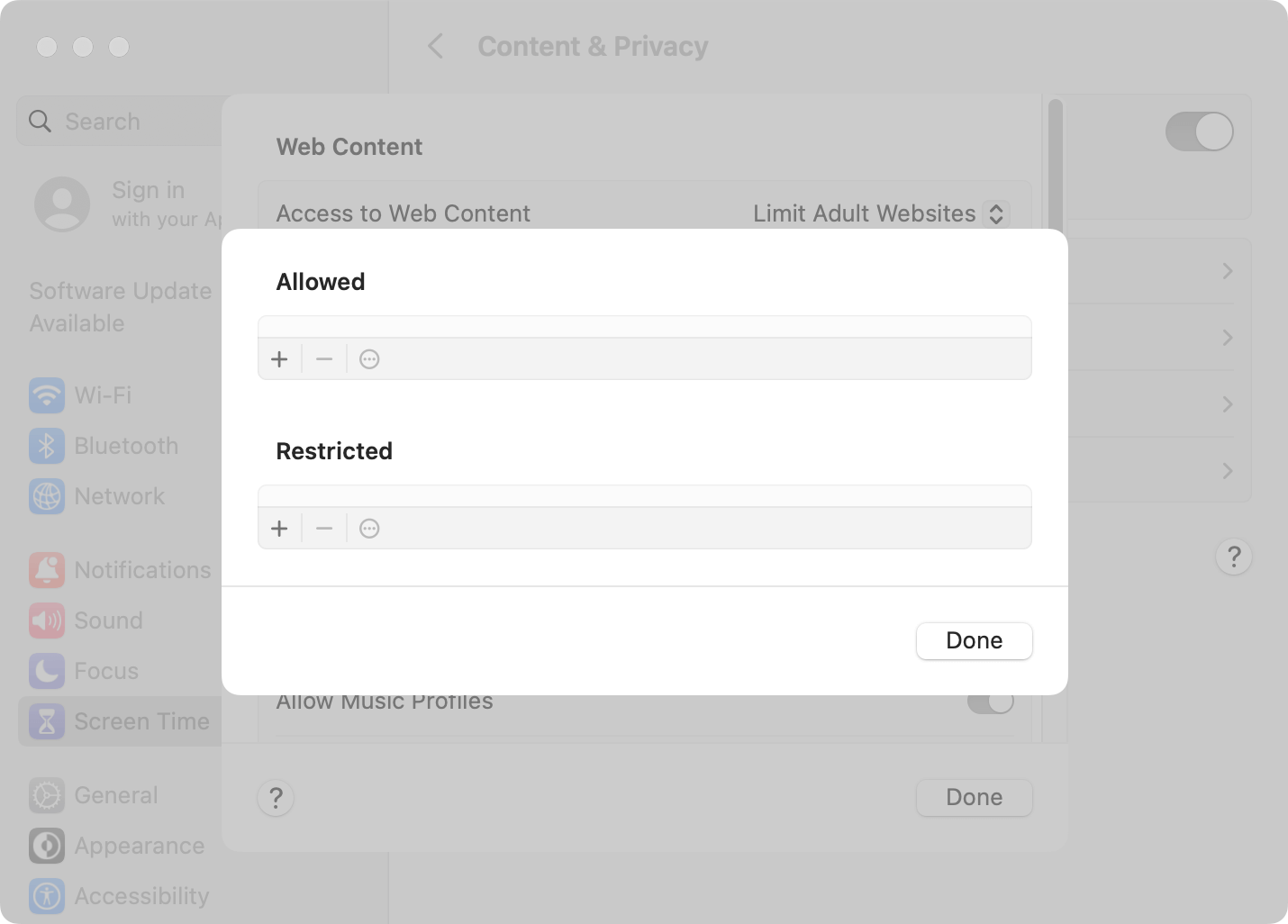
Screen Time is actually part of System Settings in macOS, iOS, and iPadOS. In other words, it's a native website restriction solution by Apple. Screen Time is turned off by default, so you need to turn it on first.
Key features
- Limit adult websites with a click
- Block user-specified websites
- Set time limits on certain websites
- Protect blocking with a passcode
Pros
- Included with your operating system
- Easy to set up
Cons
- Only support Safari on Mac
- Passcode protection not available for the administrator user account
Editor's note
Screen Time is a set of settings. To permanently stop access to certain websites, use the Content & Privacy settings. To automatically block a website when the time limit is reached, use the App Limits settings (despite the name). I believe Screen Time is enough if you are looking for a basic website blocker with a password. However, if you need more features or want to effectively block websites as an an admin on Mac, you will need a more powerful app.
StayFocusd
Compatibility: Windows, Mac, Linux, ChromeOS
Just like Block Site, StayFocusd is a browser extension. Although you can use it to block any unwanted websites, it's most effective for restricting distracting sites.
Key features
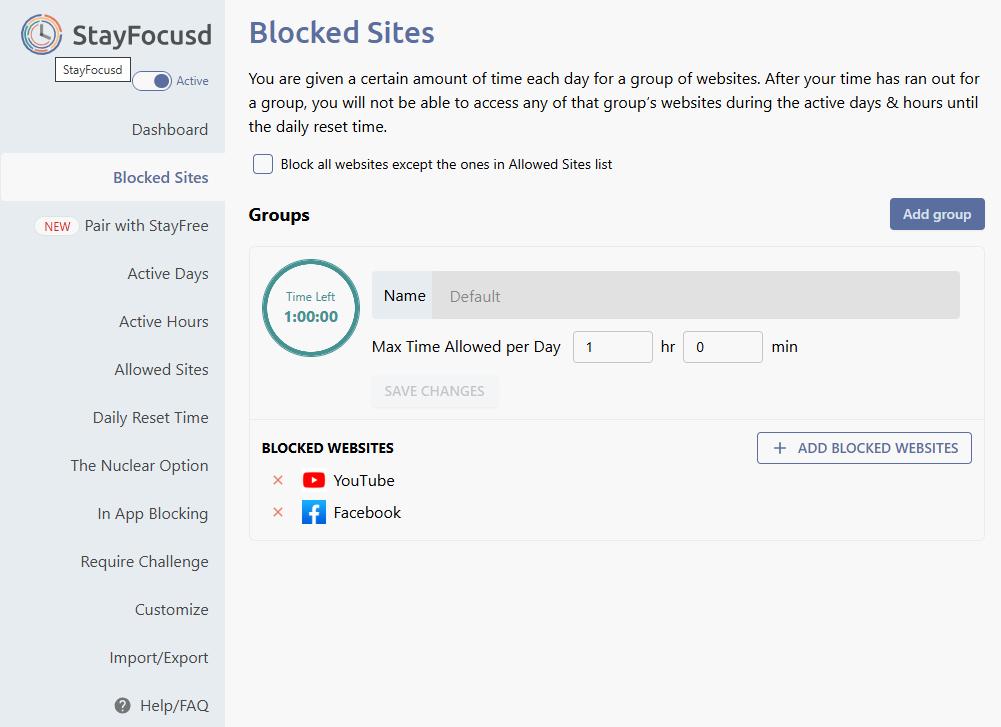
- Set time limits on groups of websites
- Offer the Nuclear option for stricter restrictions
- Block certain contents on youtube.com, tiktok.com, and instagram.com
Pros
- Very customizable
- Versatile
- Track website usage time to help you understand how your time is spent
Cons
- A bit overwhelming
- Can be easy to bypass
Editor's note
With StayFocusd, you can categorize unwanted sites into groups and set different time limits for each group. These groups of sites will be automatically blocked when their limits are reached. StayFocusd is not your average website blocker extension. It's feature- and option-rich, powerful and highly configurable. Therefore, beginners may find the extension a bit overwhelming and complicated to set up, while power users may find it versatile and helpful. Although the extension is useful, it can be easily disabled or uninstalled.
FAQs
Is BlockSite a free website blocker?
No, strictly speaking, it's not. BlockSite by blocksite.co (not to be confused with Block Site by blockerwebsite.com) is a paid extension, although it allows you to block up to three websites or keywords for free.
How do I block a website on Google Chrome for free?
On a Windows PC or Mac, you can use Cold Turkey Blocker Free, Block Site, or StayFocusd. On an Android device, you can use Cisdem AppCrypt. On an iPhone or iPad, you can use Screen Time or Cisdem AppCrypt.

Norah Hayes likes to share her tips on how to improve focus and stay motivated at work. She believes it is essential to eliminate all online distractions during work hours.

Ethan Long joined Cisdem in 2015 as a developer and now serves as the editorial advisor for Cisdem AppCrypt. He actively tests and uses Cisdem AppCrypt and other screen-time management tools to ensure AppCrypt meets its promises in real-world scenarios.