


DVDFab DVD Ripper Review: Is It Any Good?
 78
78
 0
0


DVDFab DVD Ripper is one of the most famous DVD ripping software for converting DVDs into digital files. But is it any good? Should you buy only the DVD Ripper module or get the complete suite? Can it rip DVDs at high speed and quality? Read this DVDFab DVD Ripper review to find out.
 Cisdem VideoPaw
More Affordable All-in-One Alternative to DVDFab DVD Ripper
- Rip both DVDs and Blu-rays disc, folder, and ISO image
- Decrypt commercial discs, including latest releases
- Rip to 1000+ digital formats including MP4, MKV, and MOV
- Choose titles, audio, subtitle to rip
- Merge, trim, crop DVD titles, add watermark, chapters, and more
- Preview output with built-in DVD player
- Also convert, download, record, and compress video files
- Easy to use with fast processing and high-quality output
- One license, all features included
 Free Download macOS 10.15 or later
  Free Download Windows 10 or later
What is DVDFab DVD Ripper?
DVDFab is an all-in-one multimedia suite that combines DVD/Blu-ray/UHD/4K Recorder ripper, copy, creator, and more disc processing tools.
DVD Ripper is one of its modules. It's designed to rip DVD discs, folders, and ISO files into digital formats such as MP4 and MKV on Windows and Mac. It allows you to keep selected or all titles and tracks. Before conversion, you can also edit videos, adjust format advanced settings, and preview the output.
For faster processing, DVD Ripper leverages hardware acceleration technologies to reduce conversion time without compromising output. If you want to improve DVD video quality, DVDFab also integrates AI tools into its DVD Ripper workflow.
Pros:
- Cloud Decryption Service handles newly released discs, no waiting for official updates
- Hardware acceleration can greatly speed up DVD ripping (50%+ increase in my tests)
- Good compression quality with minimal noticeable quality loss
Cons:
- Require separate licenses for different features or modules, and the pricing is expensive
- The UI can feel overwhelming with too many options for most users
- Lifetime licenses might not include major version upgrades, like from v12 to v13
Is DVDFab DVD Ripper Safe?
It's safe. I checked the installer via VirusTotal. The scan shows that 0 out of 71 security vendors flagged it as malicious. The installer reaches out to DVDFab's servers during setup. It's normal, simply used for license checks and cloud decryption. I also monitored my system during and after the testing, no suspicious processes or leftover files.
To ensure safety, download DVDFab only from official site or trusted software sources. The official file is digitally signed by DVDFab Software Inc. via GlobalSign. You can see this info in VirusTotal.
Is DVDFab DVD Ripper Free?
DVDFab isn't completely free software. It follows a free trial + paid version model. Each module has its own separate trial limit. The trial usage for one module does‘t affect the trial availability of other modules.
For DVD Ripper, the trial version allows you to rip up to 3 discs and access all DVD ripping features, not including AI.
After the trial limit expires, the DVD Ripper module switches to HD Decrypter, a permanently free but limited version. While HD Decrypter supports basic DVD ripping, it:
- Can't handle newer commercial discs.
- Only allows choosing 2 output options: MKV Passthrough MP4.Free.
- Doesn't support GPU acceleration, so the conversion speeds will be slower than the paid version.
Pricing and Plans
Note: Prices are based on the time of writing and may vary due to promotions
DVDFab DVD Ripper is available with the following licensing options:
| Plan | Price |
|---|---|
| 1-Year License | $59.99/year |
| Lifetime License | $59.49–$84.99 |
| DVD Full Suite (Lifetime) | $146.99–$229.99 |
| All-In-One (Lifetime) | $279.99–$399.99 |
DVDFab often discounts its lifetime licenses, and the the price may close to or even lower than the yearly plan, making it the best option for long-term users.
The bundled plans are worth considering. Need multiple DVD tools like DVD Creator or DVD Copy? DVD Full Suite (including 6 products) is more cost-effective than buying them separately. Need unlock all 23 products, including NVIDIA AI Enhancer, AI Upscaler, and Blu-ray tools? Buy All-In-One Lifetime License. However, if your main purpose is DVD ripping, the standalone DVD Ripper Lifetime License is enough.
DVDFab DVD Ripper Performance Test: How Fast Is It? What's the Quality?
I tested DVDFab DVD Ripper with a same commercial DVD on Mac and Windows to evaluate its conversion speed, output quality, and file size.
Test setup
Mac: macOS Sonoma with an Apple M1 chip
Windows: Windows 11 with an Intel i7 processor and NVIDIA RTX 2060 GPU
Test DVD disc:
| Title | Transformers: The Last Knight |
|---|---|
| Type | Commercial DVD with UOPs (User Operation Prohibitions) protection |
| Format | DVD-9, NTSC, 16:9 widescreen |
| Runtime | 02:34:40 |
| Full DVD Folder size | 4.68 GB |
| Main movie title size | 4.32 GB |
Testing method:
- I converted only the main movie title.
- Each conversion was timed manually, and the final output size was recorded.
- The Mac test was performed without GPU acceleration (I only purchased the Windows license, while the Mac version was tested using the free HD Decrypter mode).
- The Windows test used hardware acceleration.
- I tested both full MP4 (H.264) conversion and MKV Passthrough (without re-encoding).
Mac test results (without GPU acceleration)
| Output profile | Time | Quality | Software estimated size | Actual size |
|---|---|---|---|---|
| MP4 (Standard) | 21:06 | Good | 2,400 MB | 2,570 MB |
| MP4 (Fast Speed) | 20:42 | Lower | 1,305 MB | 1,413 MB |
| MP4 (High Quality) | 21:01 | Best | 4,591 MB | 4,780 MB |
| MKV Passthrough | 19:19 | Original quality | 2,400 MB | 2,785 MB |
Windows test results (with GPU acceleration)
| Output profile | Time | Quality | Software estimated Size | Actual size |
|---|---|---|---|---|
| MP4 (Standard) | 09:06 | Good | 2,400 MB | 2,770 MB |
| MP4 (Fast Speed) | 08:52 | Lower | 1,305 MB | 1,390 MB |
| MP4 (High Quality) | 09:18 | Best | 4,591 MB | 5,150 MB |
| MKV Passthrough | 07:24 | Original quality | 2,400 MB | 2,795 MB |
What did I find?
1. Hardware acceleration makes a big difference
The Windows test also had GPU acceleration enabled, while the Mac test did not. You can see the Windows version was much faster. MP4 (Standard) conversion finished about 12 minutes faster than on Mac, and MKV Passthrough was also around 12 minutes faster.
2. MKV Passthrough delivers the fastest conversion
MKV Passthrough was the fastest option on both Mac and Windows, because it doesn't re-encode the video. It just places the original DVD video and audio streams into an MKV container. The output size was just a little larger than MP4 (Standard). If you used the video for DVD archiving or Home media servers, choose this option.
3. Quality settings affect file size more than ripping speed
One interesting result was that the three MP4 modes finished in almost the same amount of time. There were only a few seconds apart on both Mac and Windows.
The bigger difference was file size. Fast Speed created files about half the size of Standard mode, while High Quality files were nearly twice as large. So, choosing a profile is really about finding the right balance between quality and file size.
4. DVDFab's file size estimates are useful but not exact
DVDFab's built-in file size prediction was always lower than the final output size in my tests. The difference was not huge. The actual output size was a few hundred megabytes larger, so you'd better keep some extra space available just in case.
5. MP4 High Quality faster than Standard on Mac (21:01 vs. 21:06)? Why?
The 5-second difference is too small to be meaningful. Since both profiles use the same encoding process, High Quality may not be actually faster than Standard. The difference was likely caused by normal variations in CPU usage, background processes, or overall system load during testing.
DVDFab DVD Ripper Features
1. Rip newly commercial DVDs
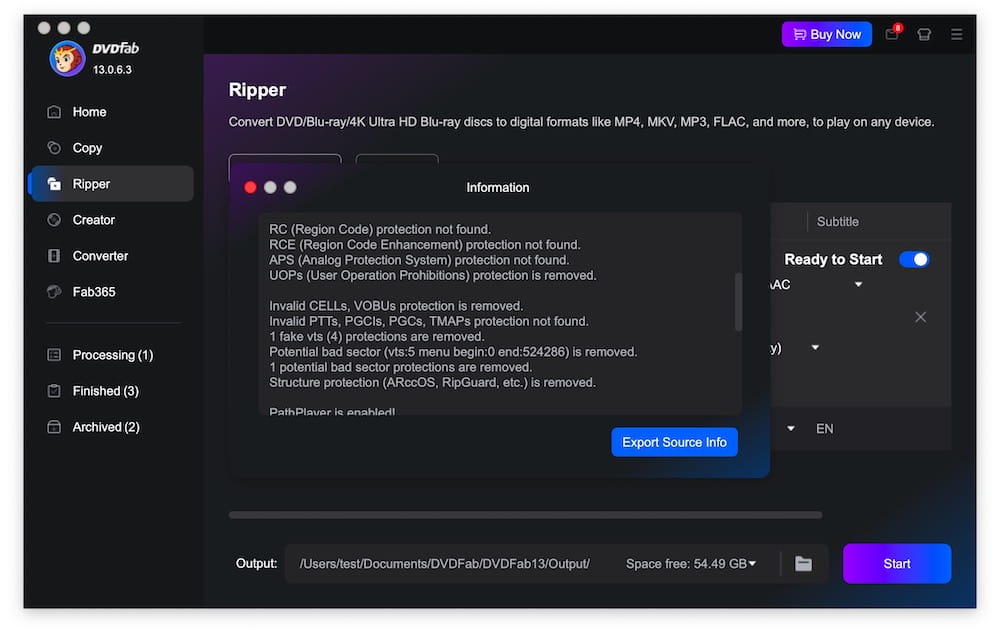
During my testing, DVDFab DVD Ripper successfully detected and processed a commercial DVD with UOPs. The main movie title was recognized correctly, and I was able to convert it without manually removing protections.
Meanwhile, the app can send disc information to its cloud server and receive updated decryption solutions. So it's useful for users who regularly rip newly purchased DVDs.
2. Digitize DVDs and control quality
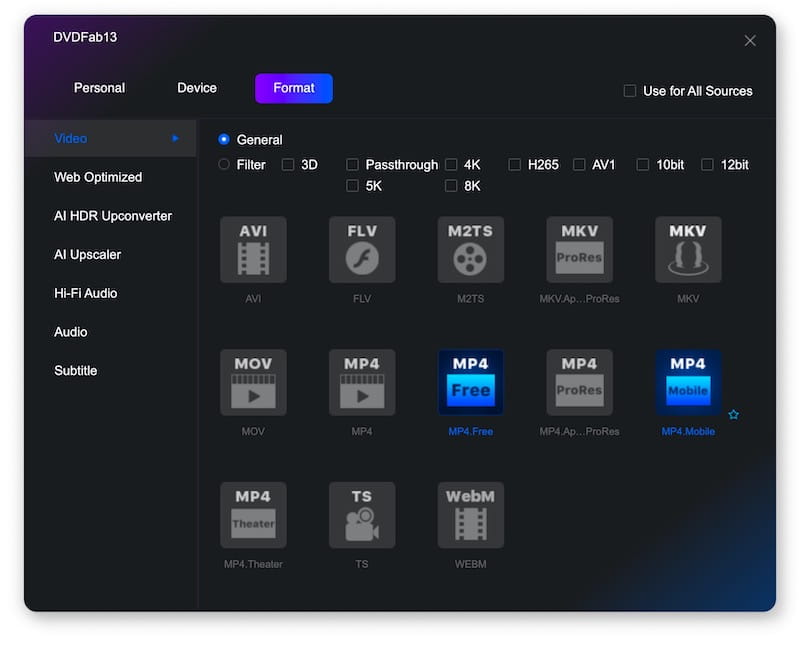
DVDFab DVD Ripper offers a wide range of output options. It supports common video and audio formats like MP4, MKV, AVI, ProRes, AAC, MP3, AC3, EAC3, TrueHD, and more. MP4.Free option includes multiple profiles and allows choosing between faster ripping, higher quality, and smaller file sizes.
It also provides Apple, Samsung, Sony, Microsoft, Xbox, PlayStation, and other popular devices. No need to manually adjust settings for your devices.
The format support is extensive enough for most users. However, free users are limited to MP4.Free and MKV Passthrough, while the paid version unlocks the full range of output options.
3. Select any DVD content
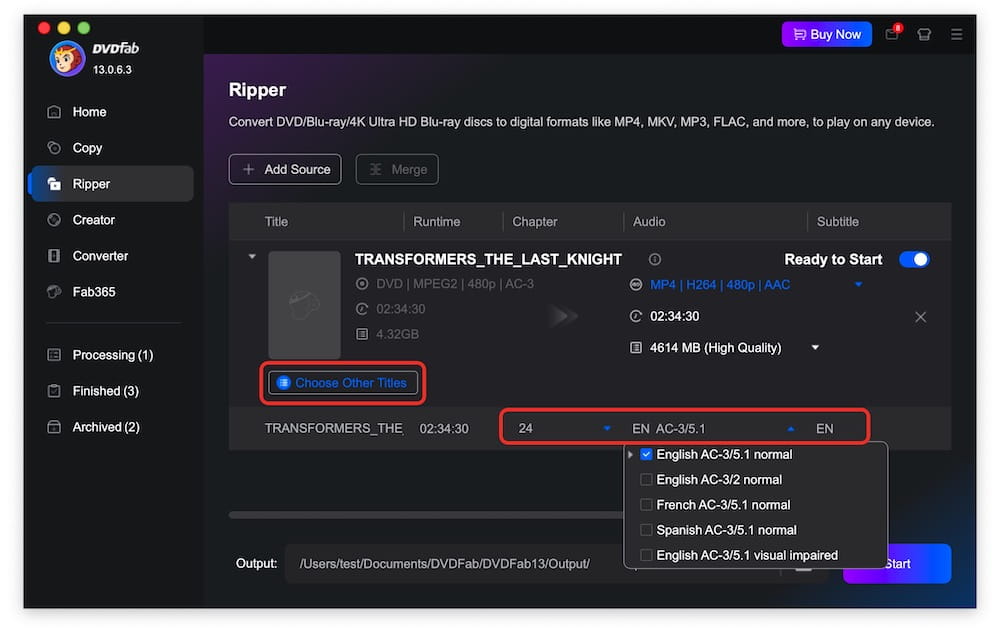
If your DVD contains multiple titles, audio tracks, subtitles, or chapters, DVDFab lets you choose what to include in the final output. In my test, it accurately identified the main movie title and allowed me to remove unwanted tracks before conversion, helping reduce unnecessary content and file size.
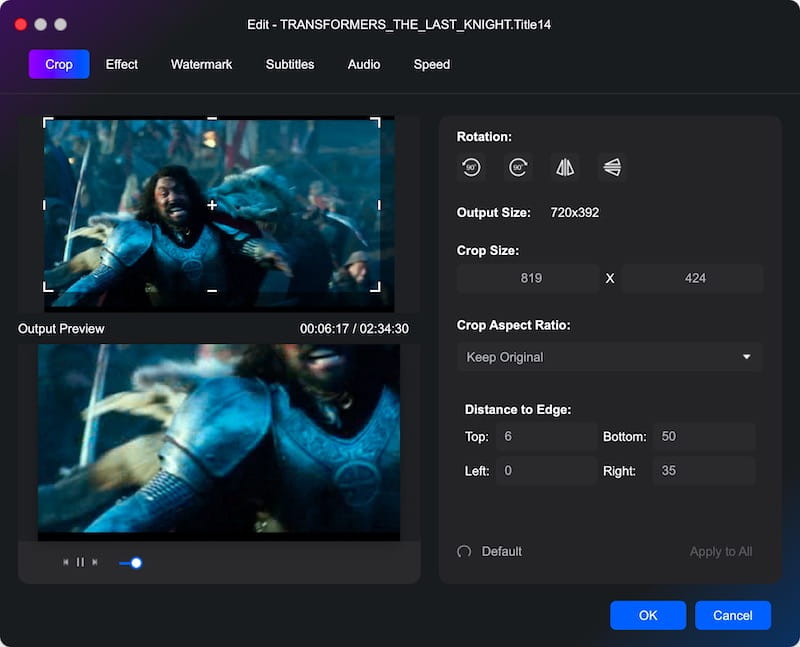
4. Offer built-in video editor
Before ripping a DVD, DVDFab allows users to make basic and quick edits without using additional video editing software. Available editing options include:
- Trim unwanted scenes
- Crop video dimensions
- Adjust picture settings
- Add watermarks and subtitles
- Enhance dialogue and remove background noise
5. Customize output settings
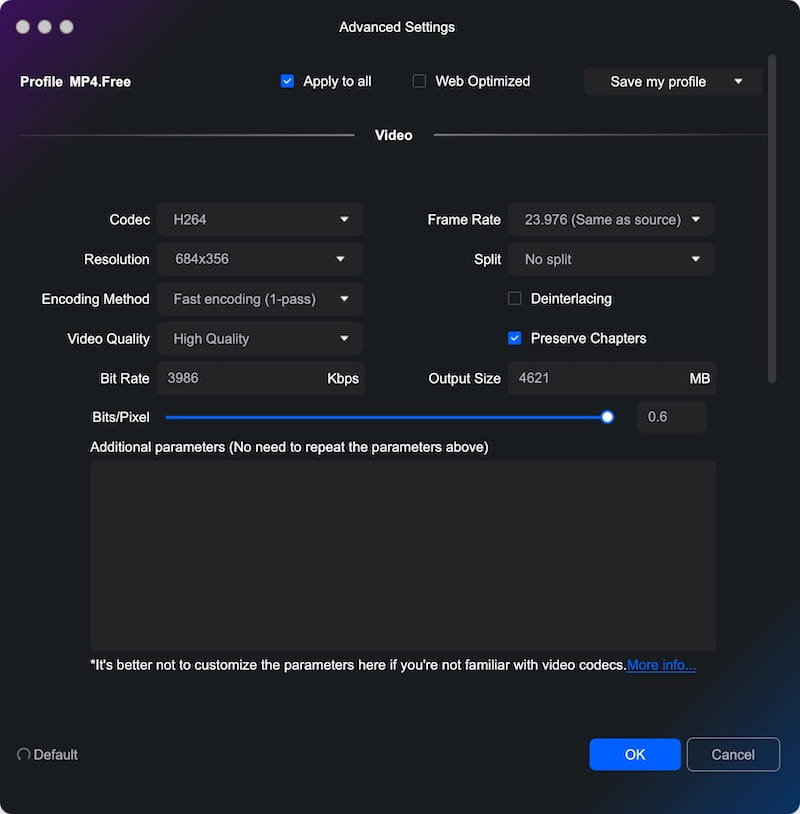
DVDFab DVD Ripper provides advanced output settings that let you manually configure parameters such as codec, bitrate, encoding method, and output size. It also allows you to split DVD titles into chapters for easier navigation. Beginners can use the default profiles, while advanced users can fine-tune settings for more control.
6. Upscale your DVD sources with AI (need pay additionally)
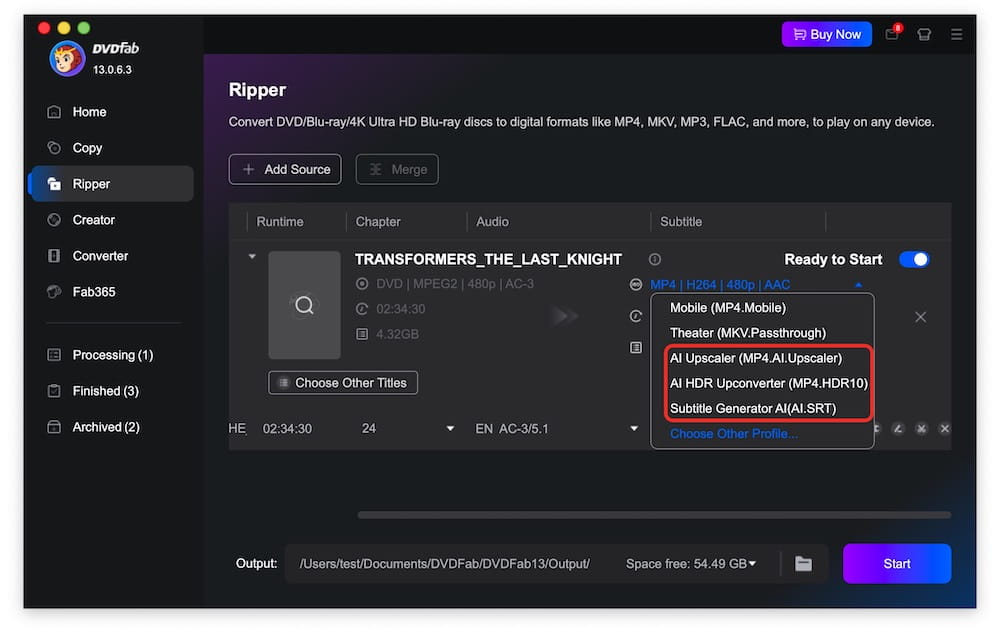
DVDFab DVD Ripper integrates AI features - AI Upscaler and AI HDR Upconverter into its ecosystem to improve video quality. Its Subtitle Generator AI can also convert DVD subtitles to SRT using OCR technology. But these AI tools require an additional purchase and are not included with the standard DVD Ripper license.
DVDFab DVD Ripper vs. Alternatives
DVDFab isn't the only DVD ripping tool. Depending on your needs, it might not even be the best one. Let’s compare it with other 3 popular tools to help you decide which tool is more suitable for you.
| DVDFab DVD Ripper | HandBrake | MakeMKV | Cisdem VideoPaw | |
|---|---|---|---|---|
| Decrypt commercial DVDs | Yes | No | Yes | Yes |
| Latest DVD support | Yes (via Cloud Decryption Service) | No | No | No |
| GPU hardware acceleration | Yes | Yes | No | Yes |
| Built-in editing | Yes | Limited | No | Yes |
| Lossless passthrough | MKV.Passthrough | Limited | 1:1 original quality | Yes |
| Multiple output support | Yes | 4 formats | MKV only | Yes |
| Easy to use | Many features and pop ups, can be overwhelming at first | Many options, require some time to learn | Yes | Yes |
| Platform | Mac, Windows | Mac, Windows, Linux | Mac, Windows, Linux | Mac, Windows |
| Price | All-in-one software but $59.99/year for DVD Ripper only, bundles cost more | Free | Free | All-in-one tool, $49.99/year to unlock all features |
Which one to choose?
To rip the newest commercial DVDs, use DVDFab DVD Ripper. If you have the budget and also need tools like DVD Creator, Blu-ray Ripper, or AI-powered features, you can unlock other modules or buy one of DVDFab's bundles.
To digitize your DVDs and don't have any specific format needs? Free tools like HandBrake, MakeMKV, or DVDFab's free HD Decrypter can get the job done.
If you're looking for the best value with DVD/Blu-ray ripping, video conversion, downloading, compression, editing, and screen recording in one package, Cisdem VideoPaw is a strong alternative to DVDFab DVD Ripper.

Jenny is a technology editor who has been blogging since she was a student. Since joining Cisdem, she focuses on writing articles about video software and how-to guides. She loves exploring new tools and techniques.

Ryan Li is a senior developer at Cisdem. Since joining the company in 2017, he has led the development of Cisdem VideoPaw and now serves as the editorial advisor for all articles related to Video Converter.