


4K Video Songs Download from YouTube 2026 (Free Online Included)
 98.2K
98.2K
 0
0


We've entered the 4K era, and 4K video songs on YouTube are a great way to experience it. While many YouTube users download 4K songs for offline listening, not everyone knows that 4K video song downloaders are readily available. Here I’m going to share with you some of the best tools to download 4K video songs from YouTube, along with a list of popular 4K videos to get you started.
Benefits of 4K Video Song
The biggest advantage of 4K resolution is significantly finer details and better picture quality, which is the result of the approximately 4,000 pixels, four times the size of 1080p aka full HD. It’s also known as 4K uhd (ultra high definition) for good reasons. As the biggest name and pioneer in the video-sharing industry, YouTube happily announced the availability of 4K content on its site as early as 2010. Over the years, an increasing number of 4K videos are shared on the site on all types and topics such as song, gaming, comedy, film, education, pets, and cooking. The YouTube music videos beautifully shot in 4K are sheer visual feasts.
4K Video Song Downloaders for Computer and Mobile
You don’t need to be an expert to download these great 4K video songs from YouTube. Below are the three best 4K ultra HD video downloaders that can help you out.
#1 Cisdem VideoPaw for Windows/Mac
Cisdem VideoPaw (originally Cisdem Video Converter) is also a powerful video downloader, in addition to its conversion function. You can use this tool to easily download video songs from YouTube, Facebook, Yahoo, MTV, Myspace, LiveLeak, AOL, Livestream, Dailymotion, Vimeo, Instagram, Break, BBC, Metacafe, FC2, FOX, Ustream, and other 10000+ sites. It only takes a few simple steps.
Best tool for 4K video songs download:
- Download 1080p, 4K, 5K, and 8K high quality video songs
- Download 4K video songs from all popular video sites
- Convert video songs to MP4, AVI, MP3, FLAC, iPhone, iPad, etc.
- Perform 4K format conversion, e.g., changing MP4 4K to MKV 4K
- Allow bulk downloading and converting of video songs
- High processing speed
- One-stop solution: convert, download, compress, edit downloaded videos, digitize DVDs/Blu-Rays
 Free Download
 Free Download
Steps for 4K Video Songs Download on Windows or Mac
Step 1. Download, install and launch
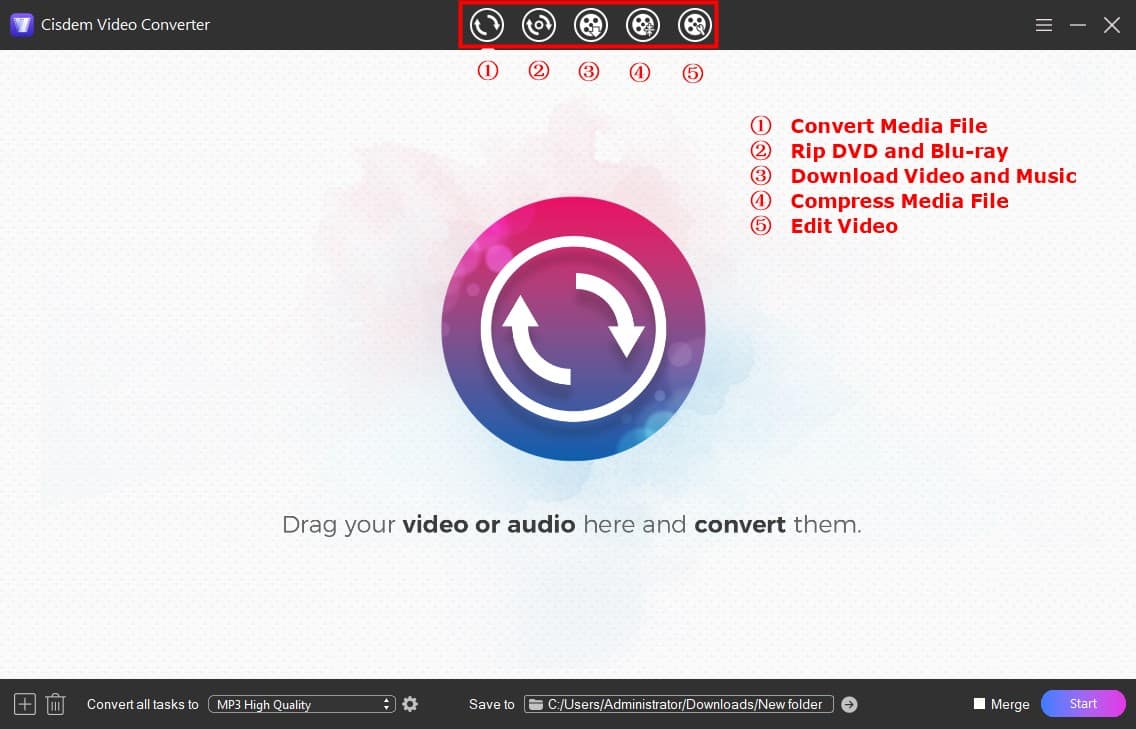
Download Cisdem VideoPaw and install it. Launch the software, and you can see the main interface where you will find five icons at the top. To use the download feature, you click the third icon.
Step 2. Copy & paste video URL
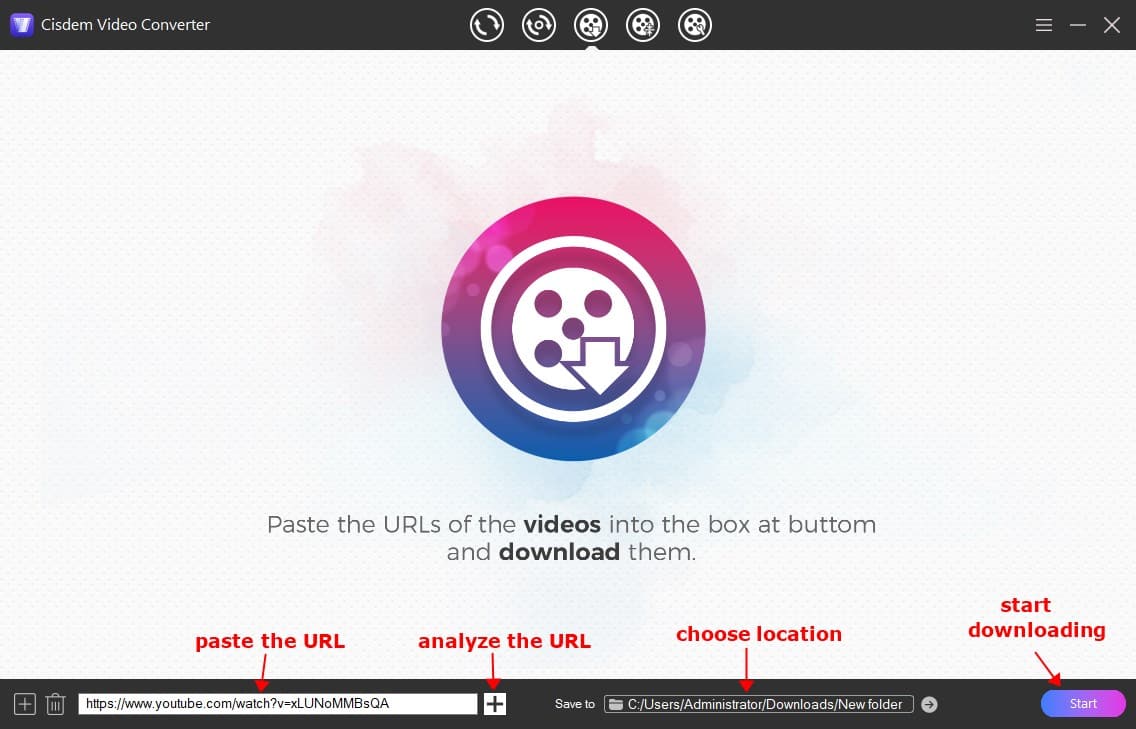
Copy the URL of the video song you want to download from YouTube and paste it into the URL field.
As you may have noticed, this 4K video song downloader supports batch download, which is a great way to save your time.
Step 3. Click the button to download
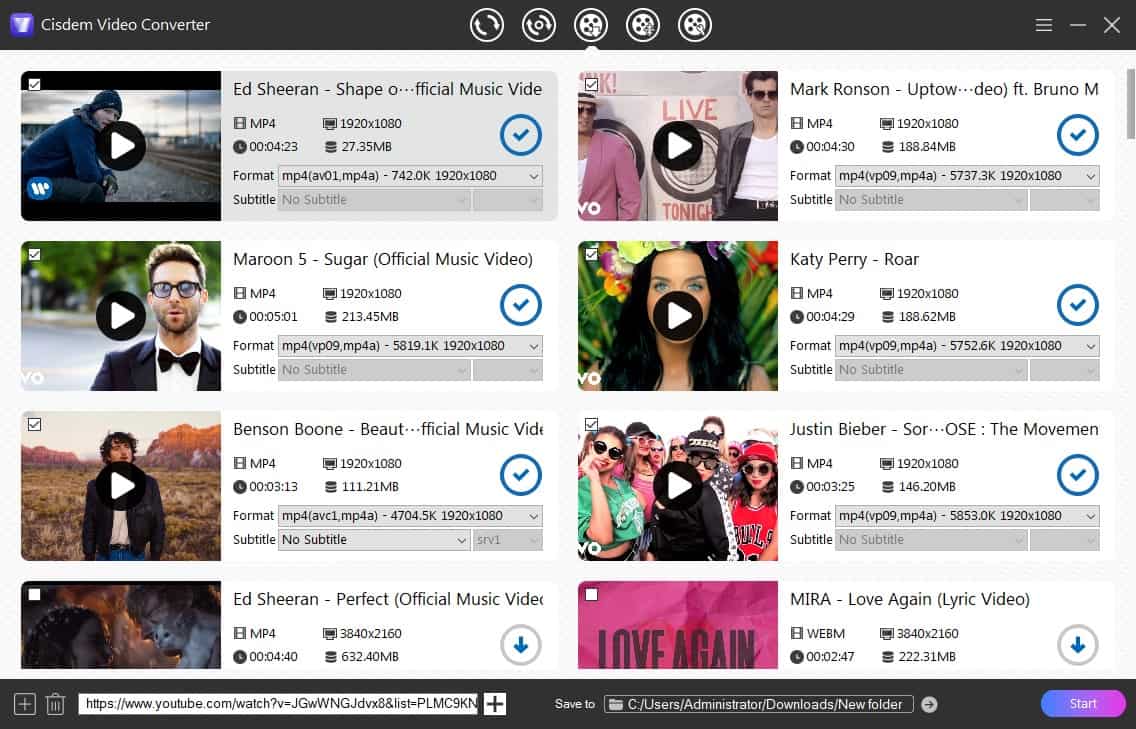
After entering the URL, analyze it and choose a format from the list. Usually MP4, WebM and M4A with different resolutions and bitrates are displayed. Press the "Enter" key or the "Start" button to download 4K video songs on Windows PC or Mac. If you don’t change the default setting, the downloaded videos will be found in the Download folder of your computer.
Tip: Convert downloaded 4K videos
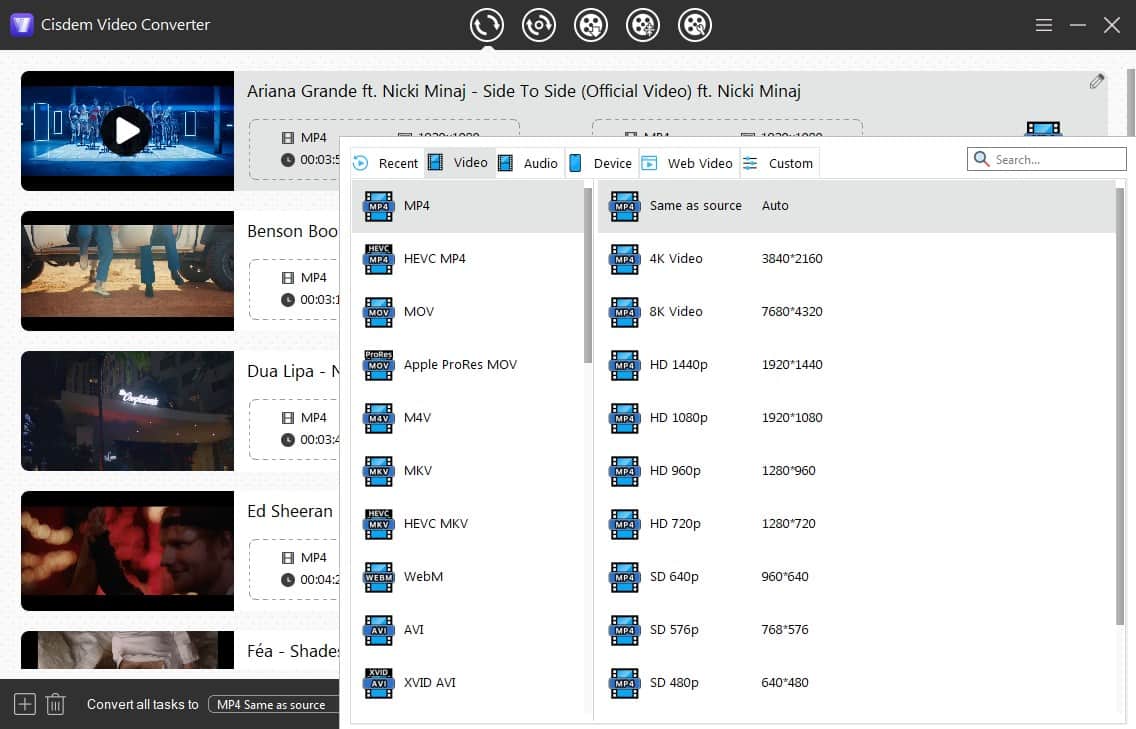
If you’d like to save and watch the video on your mobile devices but find the downloaded video in a non-supported format, you can use the same software to quickly convert the video to a proper format.
#2 Videoder for Android
Videoder is an Android-based app for 4K video songs download. It offers 50+ video streaming websites that it can work with, such as YouTube (entire playlist and channel included), Veoh, Vimeo, Blip.tv, Youku, Myspace DailyMotion, and so on. The app can save 4K video songs as MP4, MKV, AVI, FLV, M4A, etc., depending on different download sources. But sometimes even for 4K music videos, Videoder can only recognize up to 1080p.
Steps for 4K ultra HD video songs free download on Android:
- Install Videoder app on your Android device, and open it.
- Navigate to the 4K HD video song you intend to download using the built-in browser.
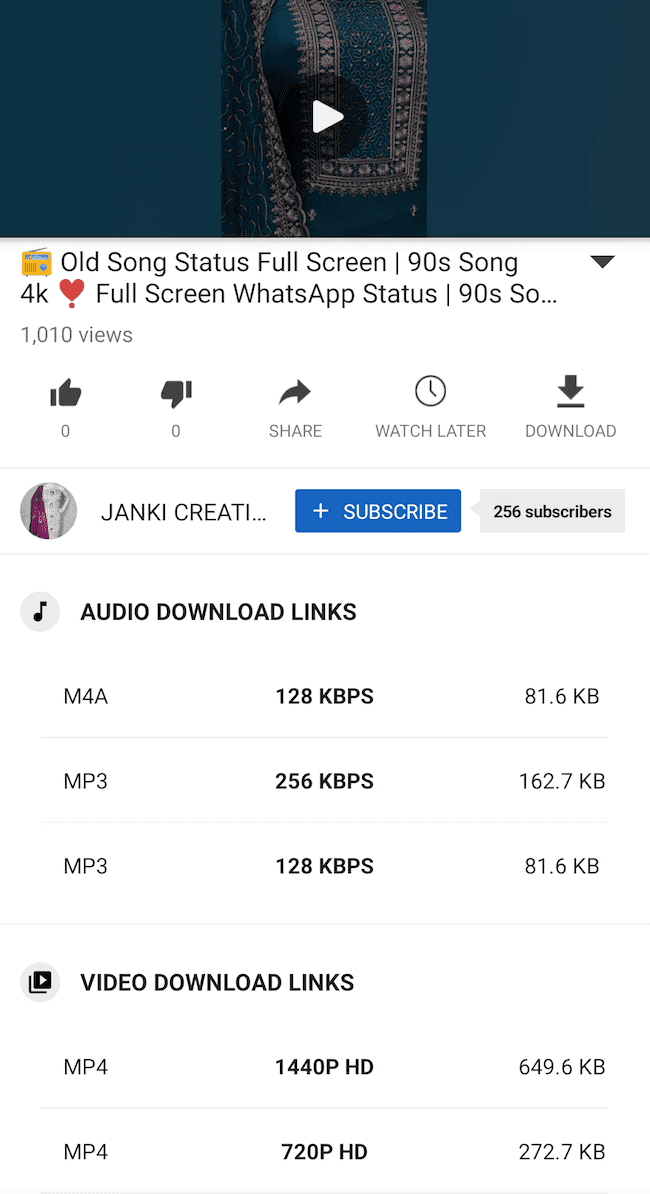
- Once the video is playing, the “DOWNLOAD” button appears on the screen. Tap “DOWNLOAD”.
- Tap the desired format and resolution.
- Tap on the “START DOWNLOAD” button, and your 4K video song will be added to the download list. Just check the process in the “Downloads” tab.
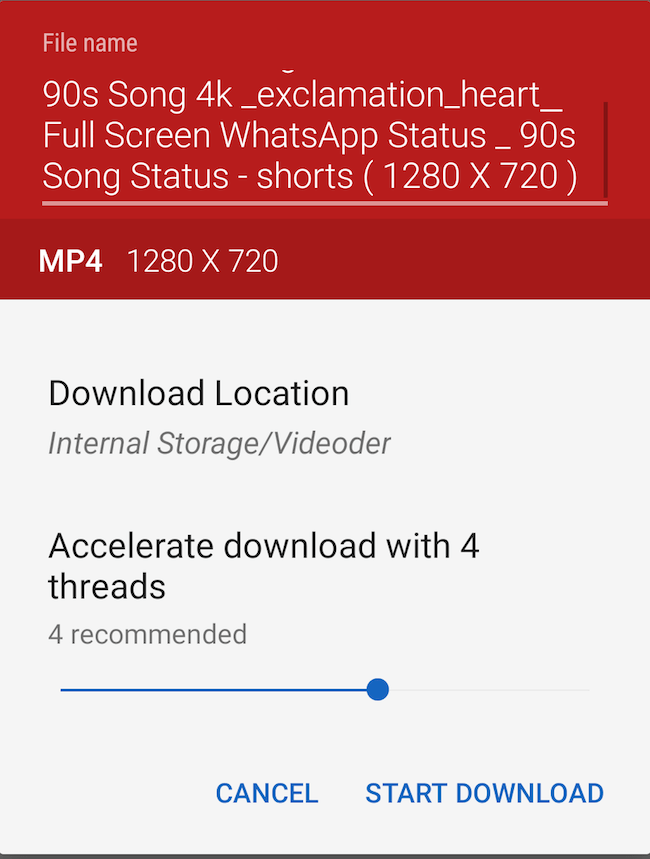
- Continue to add more music to the list.
#3 Documents by Readdle for iPhone
Despite its name, Documents by Readdle is an innovative 4K music downloader for iPhone users, considered among the top options in its category. It uses the inbuilt browser to access an abundance of video websites like YouTube, Dailymotion, Vimeo, etc. Not only can it download 4K music videos, but also manage/share/convert files and play multimedia content. While the program does have some benefits, the download speed is not as efficient as it could be.
Steps for 4K ultra HD video songs (3840x2160) download on iPhone:
- Copy the link of the 4K music video you need to save locally.
- Initiate the Documents by Readdle app on iPhone.
- Tap the "Web Browser" icon on the bottom navigation bar.
- Go to y2mate.com and paste the URL into the text box.
![y2mate interface]()
- Select one of the file types and file sizes. Tap “Download video”.
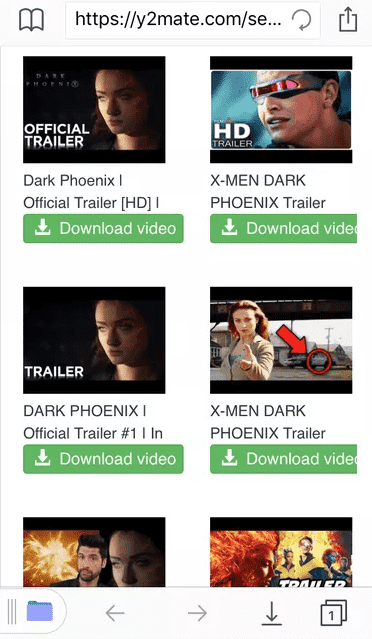
- Wait for the download to finish and check the progress in the Downloads folder within the app.
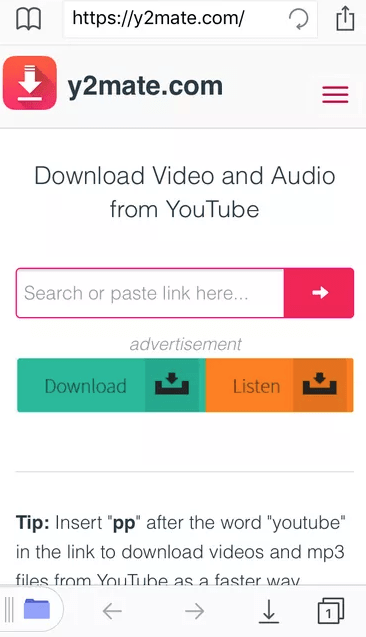
Download 4K Video Songs Online
Based on my test, most online services don’t support 4K-resolution video songs free download, but 1080p, 720p, or 360p video download. And some of them like Clipconverter.cc can't catch videos containing music.
Few online 4K video downloaders allow you to download 4K videos but may result in quality loss compared to the original or no sound, on sites like Y2meta.net and Loader.to.
#1 Y2meta.net
Y2meta.net is a newer online site to download music videos with audio. It's no need to install and supports high-resolution downloads up to 2160p (4K).
Music videos downloaded in 4K use modern AV01 and Opus codecs, which means they won't play with your computer's default media player. You can install a free third-party player like VLC to watch them.
Steps to download 4K music videos via Y2meta.net online:
- Open Y2meta.net service in the browser.
- Copy the URL of the video song you need to download and paste the URL.
- Select MP4 2160p as the resulting format. Click "Download".
- In the pop-up video, Click "Download" again and save it.
![savefrom.net]()

#2 Loader.to
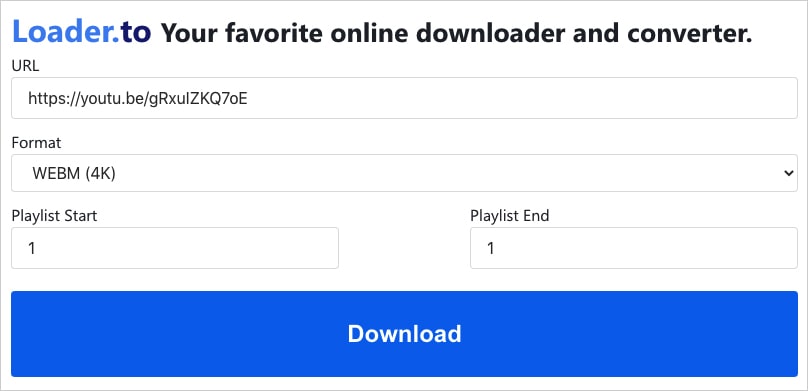
It only fetches video songs to WEBM 4K and 8K without sound. Compared with Savefrom.net, although it doesn’t support MP4 4K, it provides 8 audio formats. Plus, it’s capable of downloading the YouTube playlist with up 20 video songs.
No matter which country you are from, Loader.to makes it easy to understand and use, because it lists 40+ languages for switching.
Steps for 4K video songs download online with Loader.to:
- Visit the site - Loader.to.
- Copy & paste the song’s URL into the bar.
- Choose the video format – WEBM (4K).
- Click the first “Download” button to analyze the 4K video.
- Hit the second “Download” button that appears.
![loader.to]()
Popular 4K Video Songs on YouTube
I’ve come up with a list of some popular 4K video songs worth watching, listening and downloading from YouTube. You can use the above 4K video song download tools for Mac and Windows to save these videos in high quality.
1. a-ha - Take On Me (Official Video) [4K]
2. Michael Jackson | SMOOTH CRIMINAL 4:3 | 4K
3. Shakira - Hips Don't Lie (Official 4K Video) ft. Wyclef Jean
4. Justin Bieber - Confident ft. Chance The Rapper (4K 60FPS) (Official Video)
5. Ahzee - We Got This (Official Music Video 4K)
Conclusion
That 4K video songs download will become a common task due to the increasing popularity of online 4K content. The dedicated 4K Ultra HD video downloader like Cisdem VideoPaw can help you download 4K Hollywood/Bollywood/Tamil songs, movies from most main video streaming sites. It's powerful, safe, and will finish your task with a minimum of fuss. If you do need to use a web-based tool, Y2meta.net is an option to download 4K videos with sound.
If you find the 4K video song downloader in this post useful and effective, share it. Also, feel free to leave a reply if you’d like to share your thoughts on 4K technologies.
Copyright Disclaimer
Videos downloaded via the tools mentioned in this article are for personal and educational use only. Sharing or commercial use is not allowed unless you get permission first. The website fully respects copyright laws and will act upon any valid removal request.

Emily is a girl who loves to review various multimedia software. She enjoys exploring cutting edge technology and writing how-to guides. Hopefully her articles will help you solve your audio, video, DVD and Blu-ray issues.

Ryan Li is a senior developer at Cisdem. Since joining the company in 2017, he has led the development of Cisdem VideoPaw and now serves as the editorial advisor for all articles related to Video Converter.