


Top 4 Spotify Duplicate Removers for Computer & Phone
 440
440
 0
0


Spotify is the most popular music streaming service, used and loved by millions of people. Spotify allows users to add their favorite songs to Liked Songs and (custom) playlists, making it easy to manage songs. However, duplicates may accumulate over time, likely making your listening experience less enjoyable.
In this article, I will share a few tools that can help you easily find and remove duplicates in Spotify.
 Cisdem Duplicate Finder
Duplicate Song Remover
- Identify duplicate audio files, videos, photos, documents and other duplicate files
- Identify similar photos
- Find duplicate files on computers, phones, external hard drives, SD cards, etc.
- Automatically select all but one item for removal in each set of duplicate files
- Allow manual selection of files
- Also offer preset rules (e.g., Select Newest) for mass selection
- Help you find and mass delete duplicates in Spotify's downloaded songs
- Easy to use and customize
-
Available for Windows, Mac, Android, iPhone, and iPad


Why do duplicate songs appear in Spotify?
Spotify allows you to add the same song to a playlist more than once. However, a message will pop up, telling you the song is already added and providing an Add anyway option. It won't remind you when you add the same song to different playlists, such as Playlist A for work hours and Playlist B for before bedtime.

Therefore, duplicate songs in your playlists may be caused by the following reasons:
- You added a song to the same playlist multiple times, despite Spotify's reminder, which can be rare though.
- You added the same song to different playlists. In this case, Spotify will not remind you that it already exists in other playlists.
- Some Spotify songs may have different versions, for example, the original version, the live version, the remixed one, and more. Spotify cannot recognize these duplicates.
- Duplicate songs may also be created when you import songs from different services to Spotify.
Top 4 spotify duplicate removers to remove duplicate songs in Spotify
For better listening experience, it's a good idea to regularly remove duplicate songs in Spotify. I’ve selected the 4 best Spotify duplicate removers. You can choose the one(s) that best suits your needs.
Cisdem Duplicate Finder
Suitable for: Removing duplicates from downloaded Spotify songs
Cisdem Duplicate Finder is a powerful and user-friendly tool designed to find and remove duplicate audio files on computer, including duplicates among songs you downloaded from Spotify for offline access.
You might download the same song from Spotify multiple times unknowingly, which can clutter your offline library. This Spotify duplicate songs remover uses advanced algorithm to identify duplicates based on file content. With it, all duplicate songs (exactly identical regardless of file names) in your offline Spotify library can be accurately detected, including those with different titles.
In addition to Spotify, it also helps remove duplicate songs in Apple Music, iTunes, and more.
To delete duplicate songs in Spotify using Cisdem Duplicate Finder:
1. Download and install Cisdem Duplicate Finder on your computer.
 Free Download macOS 10.11 or later
  Free Download Windows 10 or later
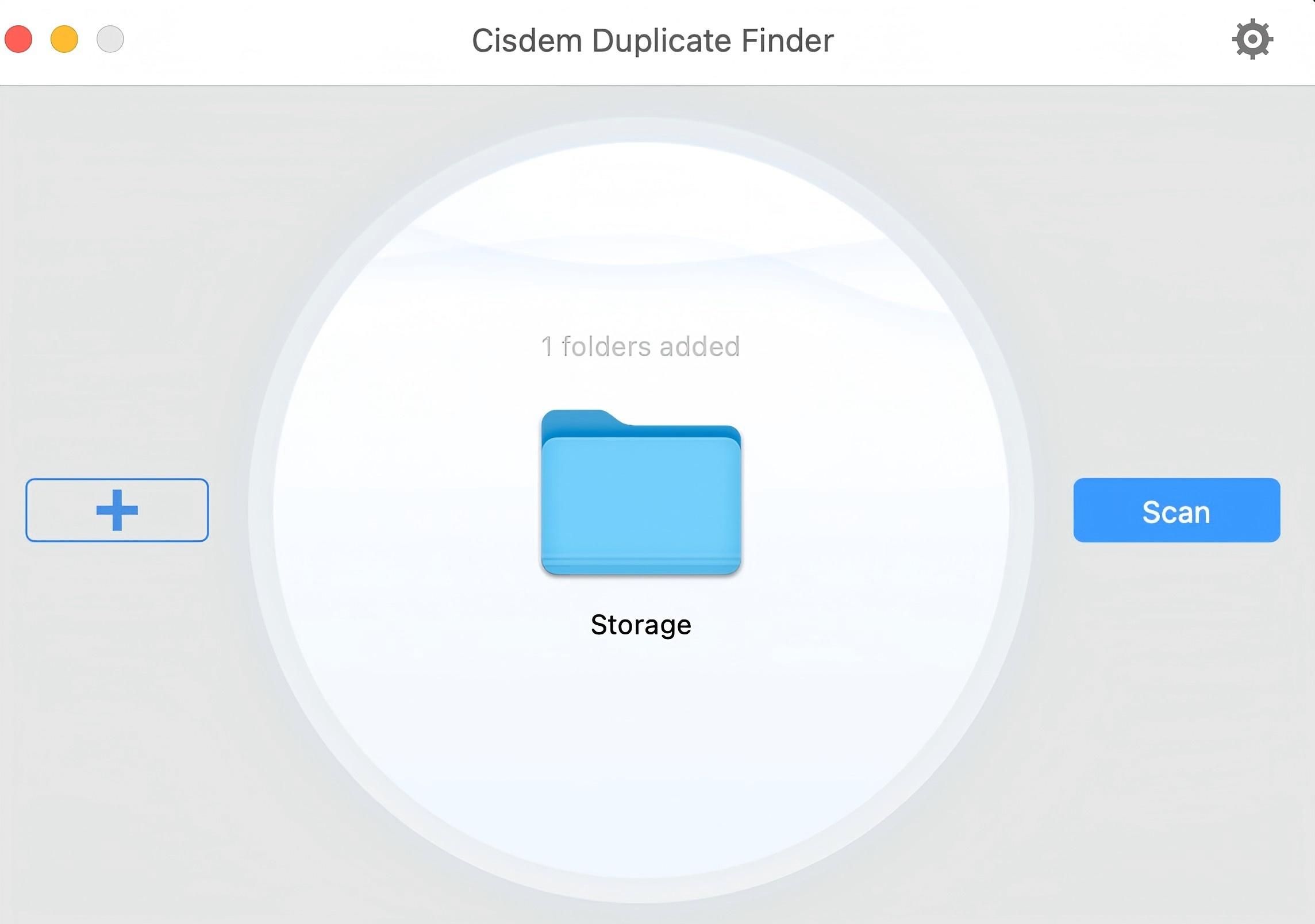
2. Open it. Click the plus icon. Navigate to the Spotify Storage folder where you saved the downloaded Spotify songs. Click Open.
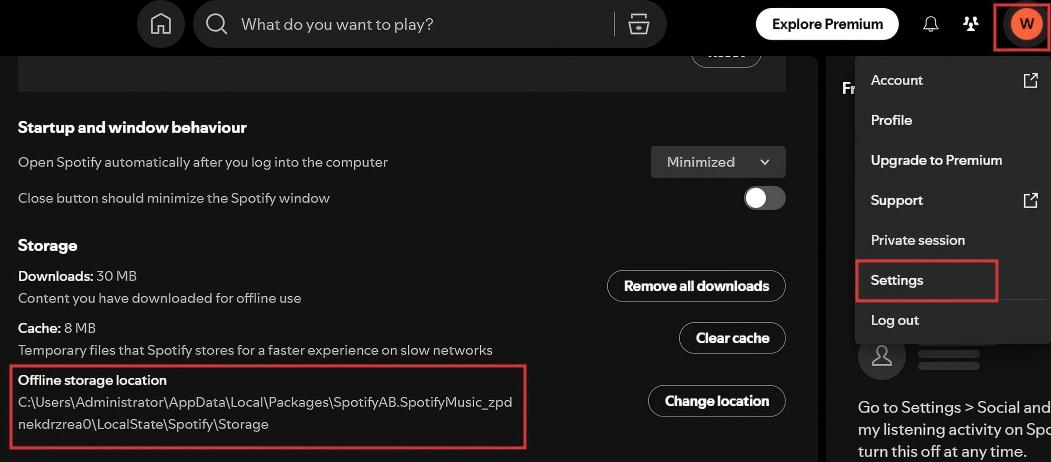
To find the Storage location, open the Spotify app. In the upper right corner, click your profile picture. Go to Settings > Storage > Offline storage location.
On Mac, it’s usually in: C:\Users\username\Library\Caches\com.spotify.Client\Storage.
On Windows, it’s usually in C:\Users\User Name\AppData\Local\Spotify\Storage.
3. Click Scan.
4. It scans fast and displays the detected duplicate songs in Spotify for you to view.
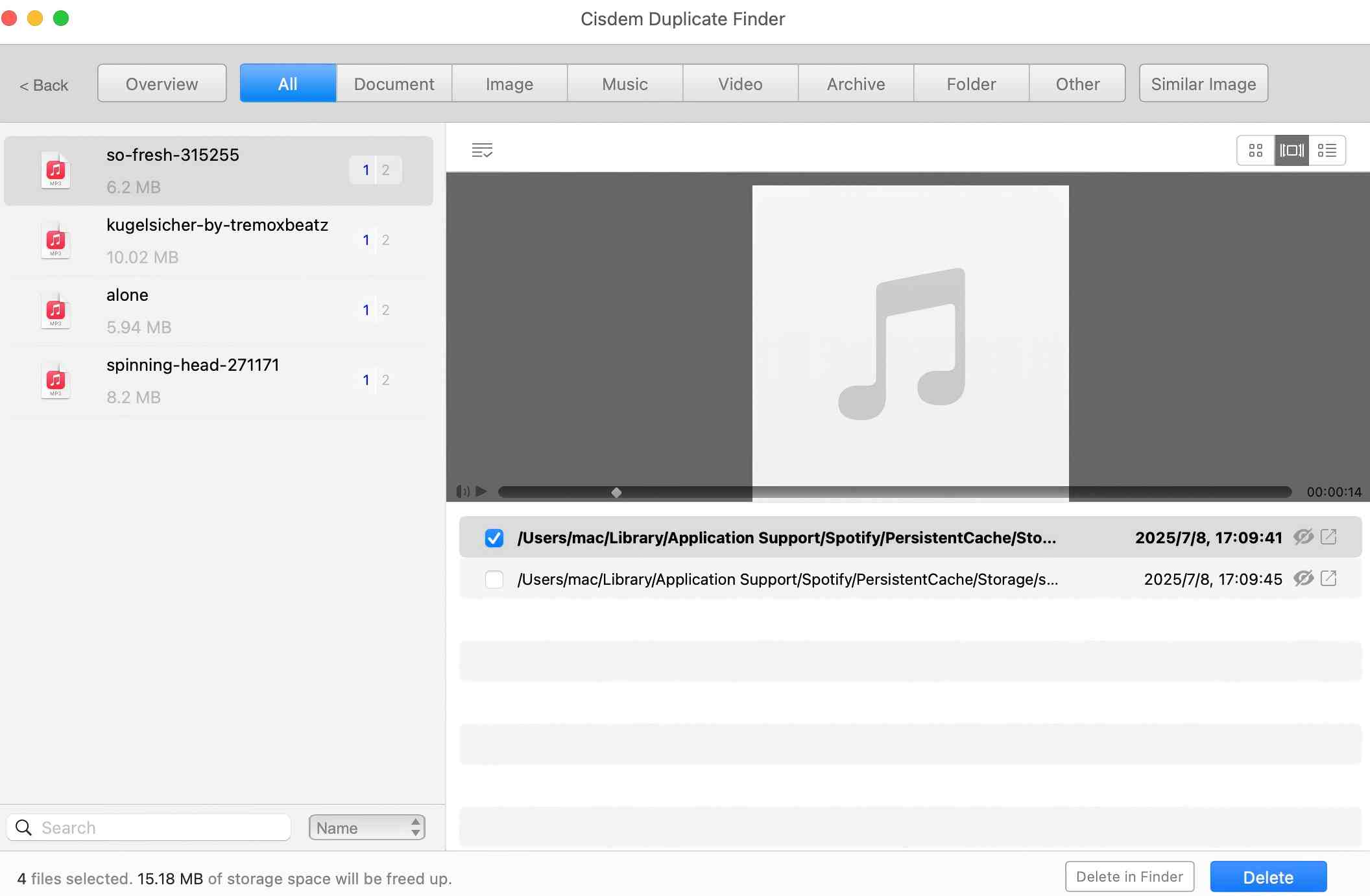
5. This Spotify duplicate remover has selected all but one song in each set of duplicate songs for you to remove. You can click Delete to remove them with 1-click.
Or use the select rules, such as Select oldest.
It also lets you manually select or deselect Spotify songs to remove.
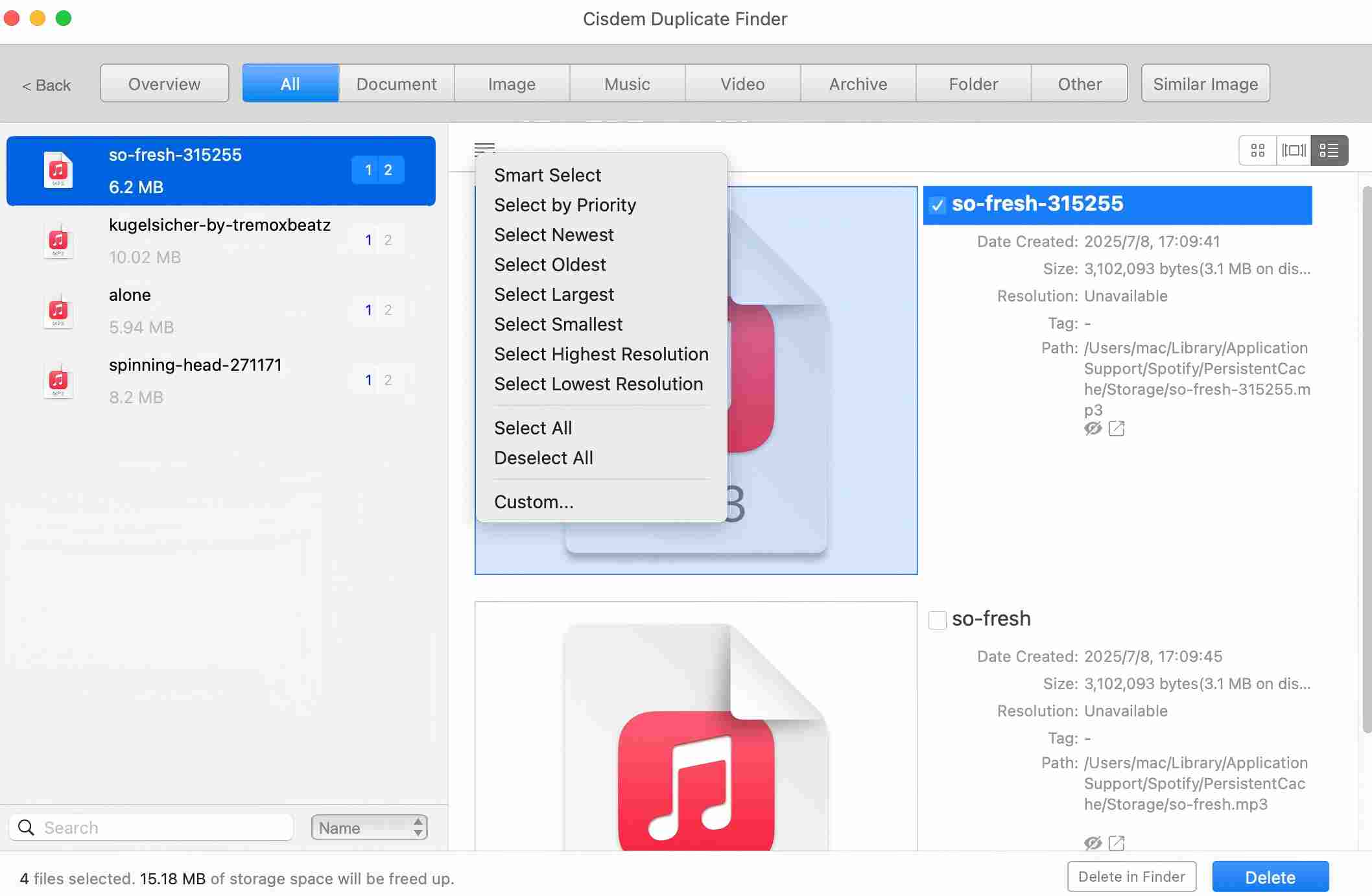
The deleted Spotify songs will be moved to Recycle Bin/Trash on your computer.
Spotify Dedup
Suitable for: Removing duplicate songs from your Spotify account
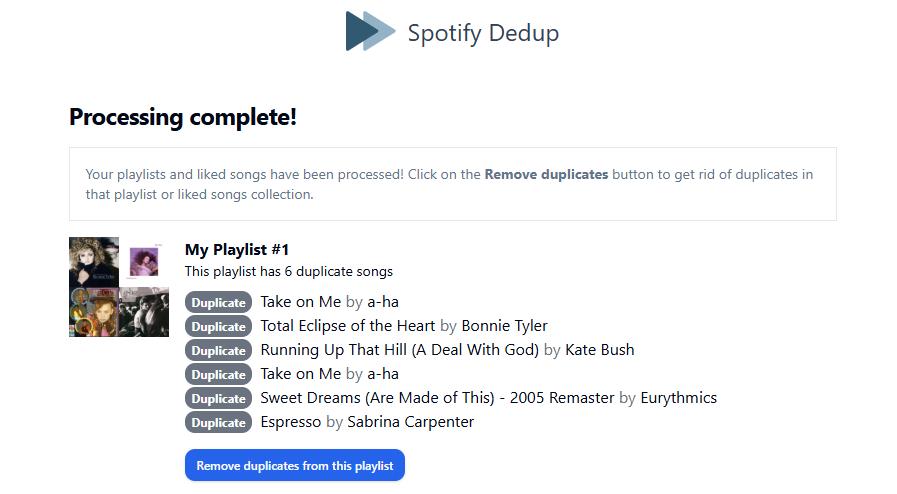
This Spotify duplicate remover helps you remove duplicate songs in your Spotify playlist or like songs for free. It is a web-based tool that does not require the installation of additional software. You only need to log in to your Spotify account on this website, and then it will find all duplicate songs for you.
However, it has some limitations. Spotify Dedup can only identify exact duplicate songs. That is, only Spotify songs that have the name, artist, and album can be identified as duplicates. In addition, it does not have any advanced features, such as playing the song before deleting it (it only lets you preview the song name, artist of the detected duplicate songs), or selecting unwanted songs to delete by yourself (it only lets you delete all duplicates with one click).
The steps to delete duplicate songs using this Spotify duplicate songs remover are as follows:
1. Open your browser. Go to the official website of Spotify Dedup.
2. Click Log in with Spotify. Log in with your Spotify account.

3. Then it will automatically scan your Spotify playlists and Liked Songs for duplicate songs. The result page will list all detected duplicates.
4. Click the Remove duplicates button to delete all duplicate songs in one click.
Playlist Manager
Suitable for: Merging duplicate songs across Spotify playlists
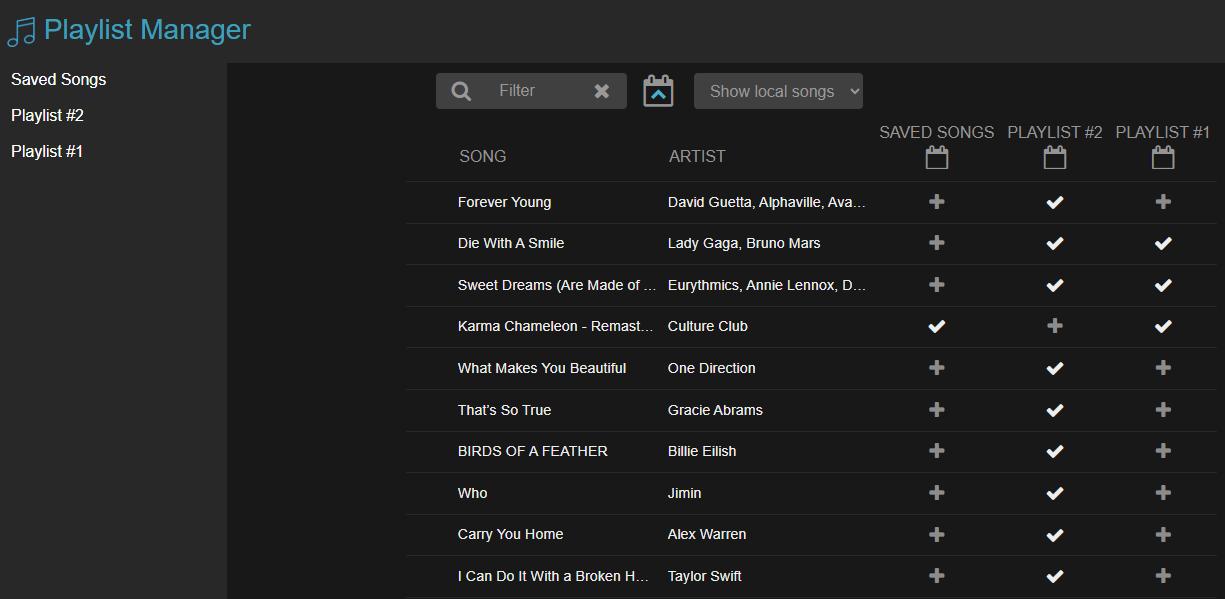
Playlist Manager is also an online Spotify duplicate remover worth trying. With the help of it, you can find and remove duplicate songs across multiple playlists in Spotify. However, since it merges the songs of selected playlists into one view, it cannot help you find duplicates in the same playlist.
With Playlist Manager, you can also sort songs by title, artist, or time added for better manager.
Below are steps to use Playlist Manager:
1. Visit the official site of Playlist Manager.
2. Click the LOG IN WITH SPOTIFY button. Log in with your Spotify account.

3. Allow it to access your data, see your activity, as well as perform actions in Spotify.
4. It lists all the songs in your Spotify account for you to view and manage. And shows you which playlist(s) each song belongs to. You can easily find songs that appear in two or more playlists. Then simply click the “√” button under a playlist to removing the song from this playlist.
SpotifyFinder
Suitable for: Identifying Spotify duplicate songs by the track ID
Here's another online Spotify duplicate finder and remover. It's more configurable than the previous tools and excels at identifying exact duplicates (based on Track IDs) in and across playlists. However, it's not very effective in identifying by title, artist, and duration. It may also be less intuitive in design.
1. Visit SpotifyFinder in your browser.
2. Click Log in with Spotify and allow it to connect to your Spotify account.
3. On the page that appears, choose the Duplicates tab, and the tool will automatically start finding duplicates by default settings.
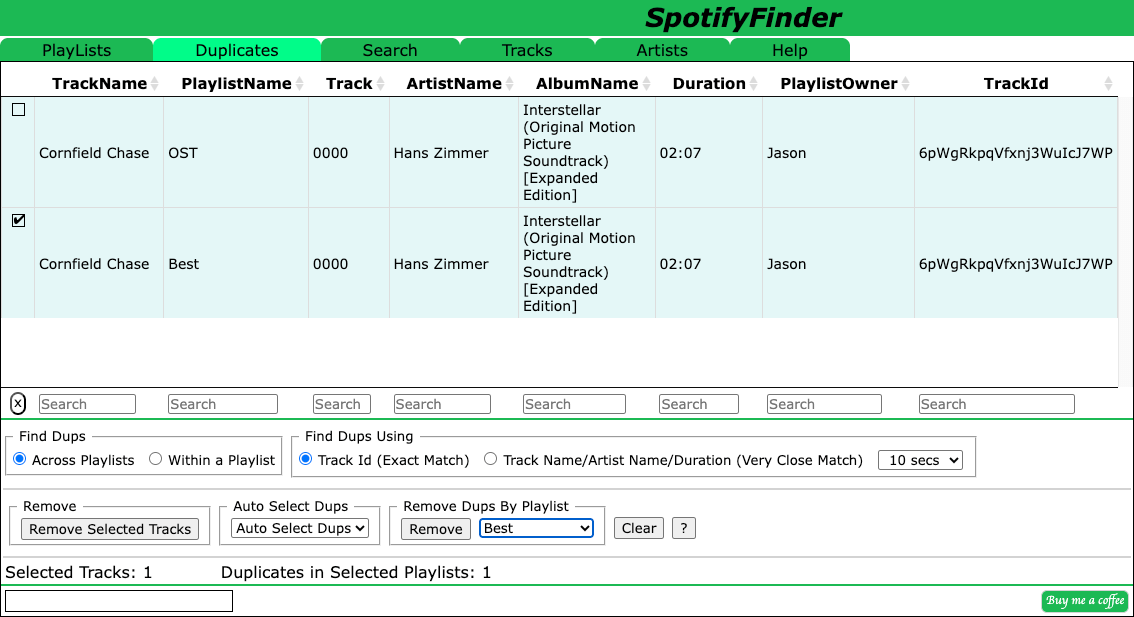
4. Optionally, if you are not happy with the results, customize settings based on your needs.
5. Use the three features (such as Auto Select Dups and Remove) relevant to selecting and removing duplicates to quickly clean up unwanted tracks.
Can I manually find and delete Spotify duplicate songs?
Yes, you can also delete duplicate songs in Spotify manually. However, in most cases, you can only find those duplicates with the same titles, and in one playlists. In addition, if you have large numbers of songs in Spotify, the process can be very time-consuming.
Here are the detailed steps:
1. Open Spotify on your computer or phone.
2. Select a playlist.
3. Sort songs by title or artist name to make it easier to spot duplicates.
On computer: click the 3-line icon in the upper right corner. Select Title or Artist.
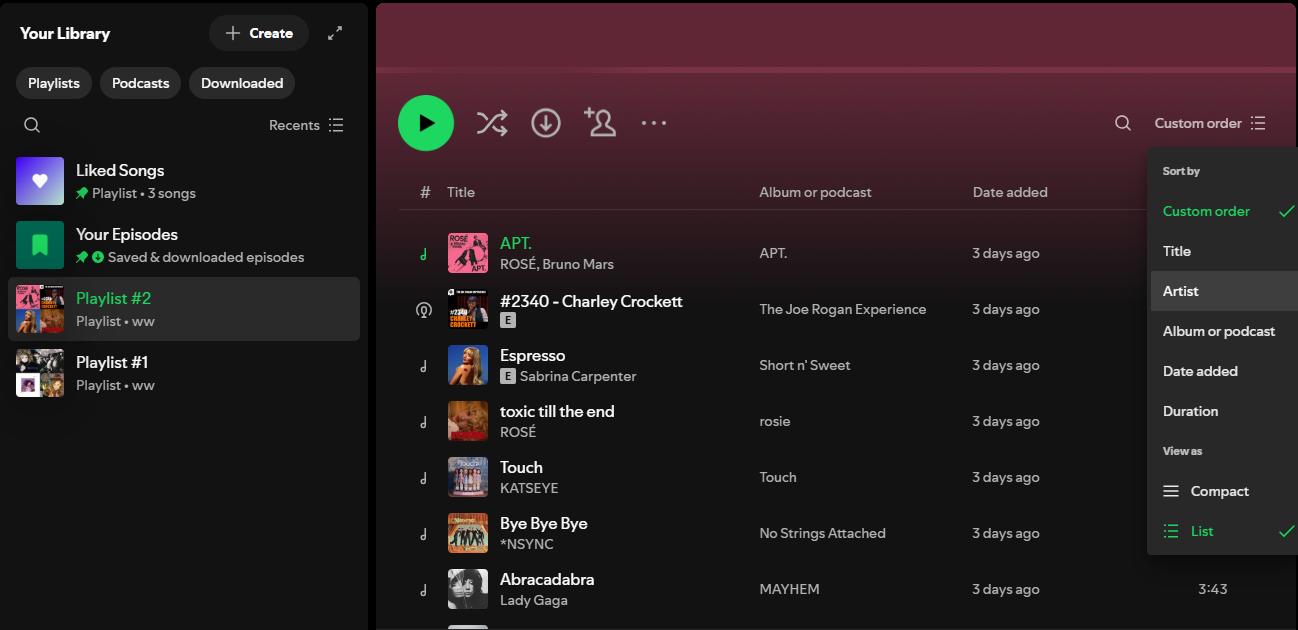
On mobile phone: click the Sort button. Select Title or Artist from the drop-down menu.
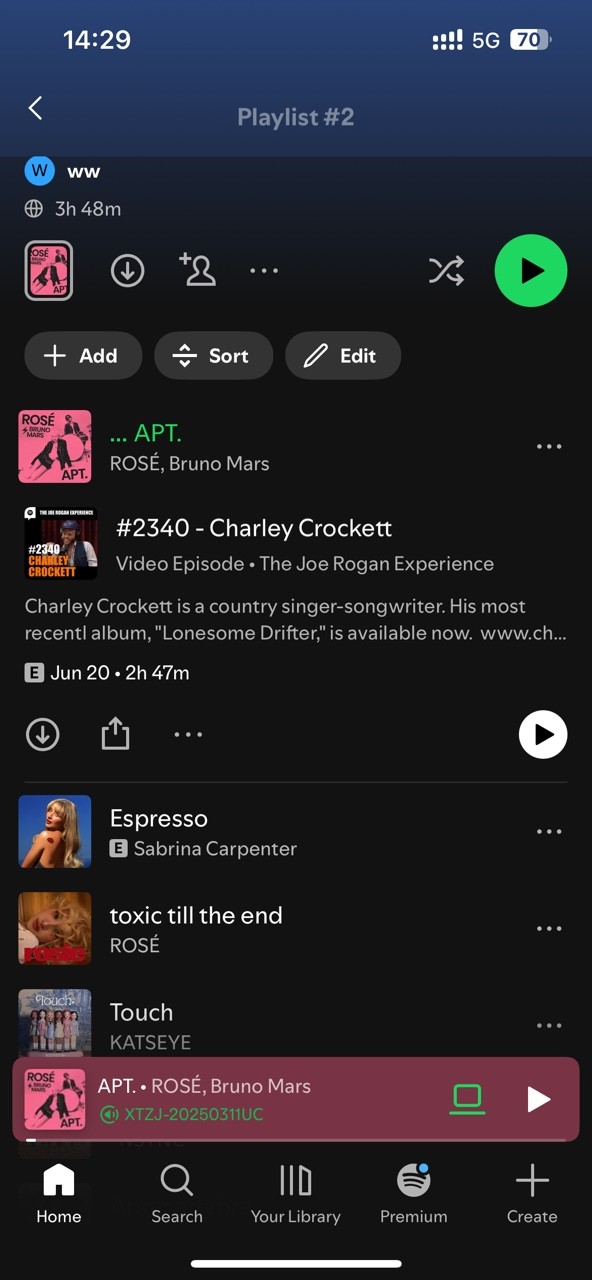
4. Scroll through the playlist. Check if there are any duplicates. Click the 3-dot icon next to the song you wish to delete. Click Remove from this playlist.
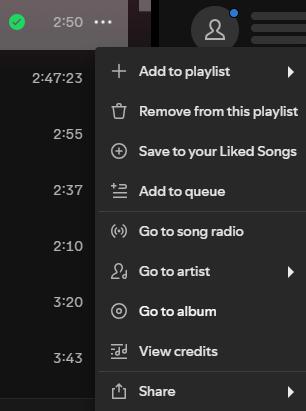
If you have multiple playlists in Spotify, repeat these steps for each playlist.
How to prevent duplicate songs in Spotify playlist
Here are some tips that may be helpful for you:
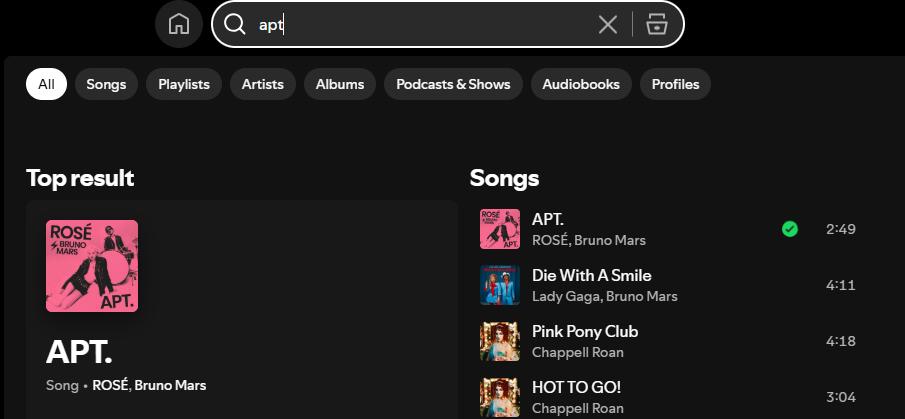
- Check if a song already exists before adding it. You can use the search function at the top. This simple step can prevent you from adding duplicates accidentally.
![search songs in Spotify]()
- There may be multiple versions of the same song. If you prefer one version, such as the original, always select this version to avoid adding different versions of the same song multiple times.
- Avoid bulk imports from other sources. Importing songs in bulk from other sources can easily lead to duplicates.
Conclusion
The four Spotify duplicate removers introduced in this article can help you find and delete duplicate songs in Spotify quickly and accurately. They are suitable for users with different needs. For example, Cisdem Duplicate Finder can process a large number of downloaded Spotify songs at once and can find duplicates with different titles, or located in multiple locations. If you don’t have many songs in Spotify, the manual method is also good for you.

With a passion for tech and writing, Sarah joined Cisdem, where she focuses on creating articles about using utility tools to enhance file management and simplify contact management.

Adrian Li is Cisdem’s Chief Engineer and serves as the editorial advisor for Duplicate Finder and ContactsMate. His work and insights have been featured in leading tech publications such as Fossbytes, TUAW, Redmond Pie, SafetyDetectives, and BestForAndroid.