


How to Easily Download M3U8 to MP4 on PC/Mac/Mobile
 17.6K
17.6K
 1
1


M3U8 files are commonly used for streaming video content. These plain text playlists contain links to multiple video and audio segments.
You may often encounter M3U8 videos on live streaming and on-demand platforms, but downloading them for offline use isn't always straightforward.
This tutorial will guide you step-by-step through downloading M3U8 to MP4 on computer and mobile with the right tools.
 Cisdem VideoPaw
Fast and Easy M3U8 Video Downloader
- Download M3U8 to MP4, MP3, MKV, or any media format
- Download M3U8 live streams, geo-restricted and private videos
- Offer source video quality options - HD, 1080p, 4K/8K, etc.
- Download video from 10000+ websites, including YouTube
- Batch download with 30x faster speed
- Download an entire playlist in one go
- All-in-one: also convert/edit/compress/record videos, rip DVDs/Blu-rays to digital formats
- 100% safe to use, no ads or bundled software
 Free Download Windows 10 or later
  Free Download macOS 10.15 or later
How to Extract M3U8 URLs
To download M3U8 video from a website, you need to obtain the correct M3U8 download URL first, then use a video downloader tool to parse the link, download the video segments, and save them to an MP4 file. You can extract the M3U8 links with the help of a stream detector or the browser's Network tool.
Easy Way: Use The Stream Detector browser plugin
- Install “The Stream Detector” browser extension for Chrome or Firefox, and pin it to the extension toolbar for easy access.
- Play the M3U8 video you want to download in a new tab.
- Click on the extension icon, a panel will pop up displaying all .m3u8 files it detects in the current tab.
- Click on an M3U8 filename to copy the URL to your clipboard.
![m3u8 link detector extension]()
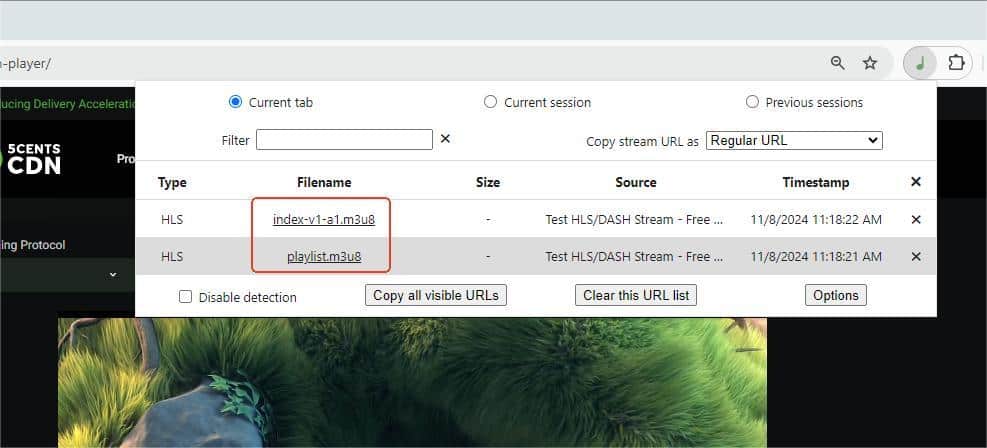
Another good option is 'm3u8 Sniffer TV', which displays the m3u8 link of the current stream in a box that overlays the web page.
Manual Way: Find M3U8 links from browser DevTools
- Access browser devtools: Press F12 key, or right-click on the video page and select “Inspect”. In Safari on Mac, you first need to go to Preferences > Advanced > check “Show Develop menu in menu bar”.
- Go to the Network tab, type “m3u8” in the Filter box, then refresh the video page and play the video.
- Right-click on an entry related to .m3u8 and copy the URL.
![copy m3u8 link from browser]()
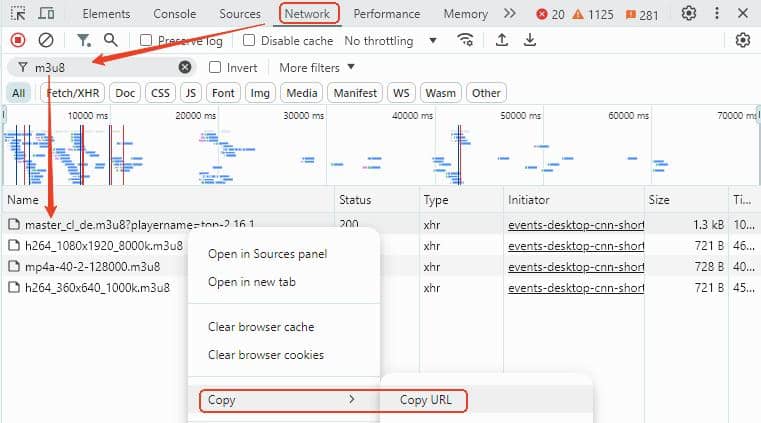
Which M3U8 link should I choose?
Each site may have a slightly different template for M3U8 playlist files. Generally it's recommended to choose the “master” or “index” m3u8 URL that allow you to select the quality level. You can also choose the URL that specifies the quality you prefer.
Download M3U8 to MP4 with Cisdem VideoPaw [Recommended]
Cisdem VideoPaw (originally Cisdem Video Converter) is an all-in-one video downloader and converter, capable of downloading M3U8 and HLS videos from a wide range of websites, including YouTube, Facebook, Twitch, Brightcove, JW Player, Plex, 123movies, etc. It can handle AES encrypted M3U8 files and private videos requiring login. Also, this premium software keeps regular updates to maintain functionality to download various streaming videos.
Download the free trial version with the safe download buttons below, and follow instructions to download M3U8 videos now.
Free Download Windows 10 or later Free Download macOS 10.15 or later
How to batch download M3U8 videos to MP4 on Windows/Mac:
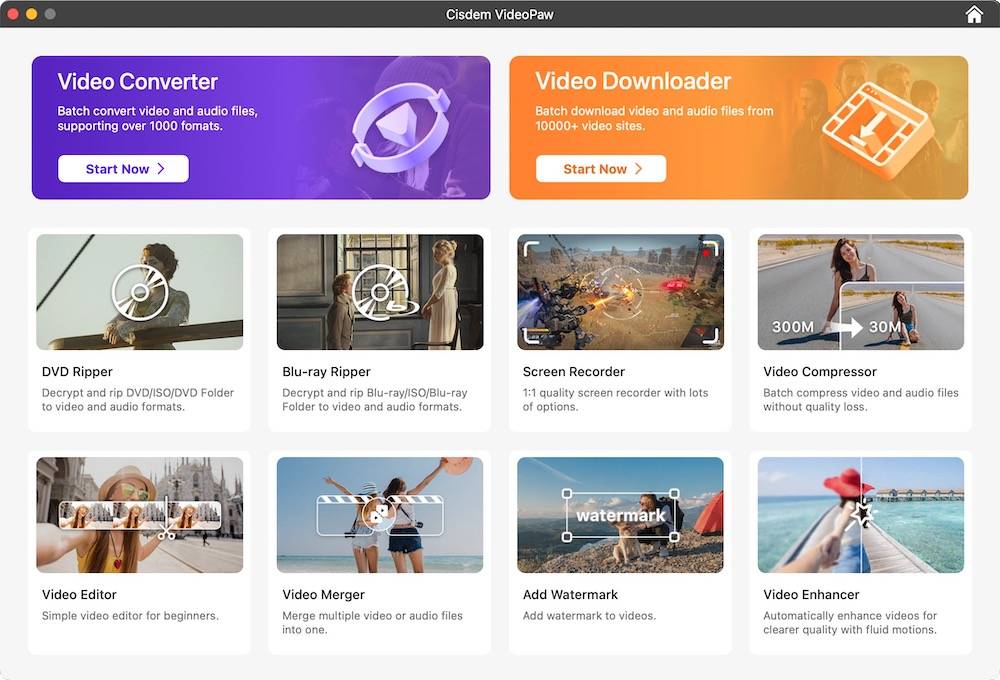
Step 1. Launch Cisdem VideoPaw, then go to the Video Downloader module.
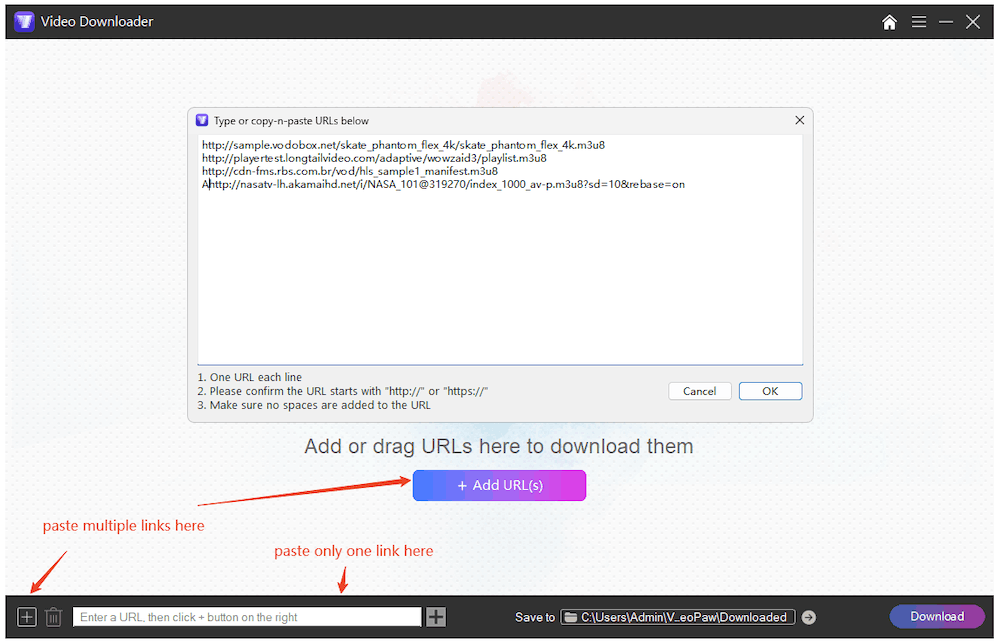
Step 2. Copy the master M3U8 link following steps above, and paste it to the bottom URL field of VideoPaw, then press Enter to analyze the link.
Tip: To add multiple URLs and load them at once, click either the "Add URL(s)" button or  icon in the bottom-left corner.
Step 3. When video is loaded, click Format drop-down list to select video resolution. The best quality should have been selected by default.
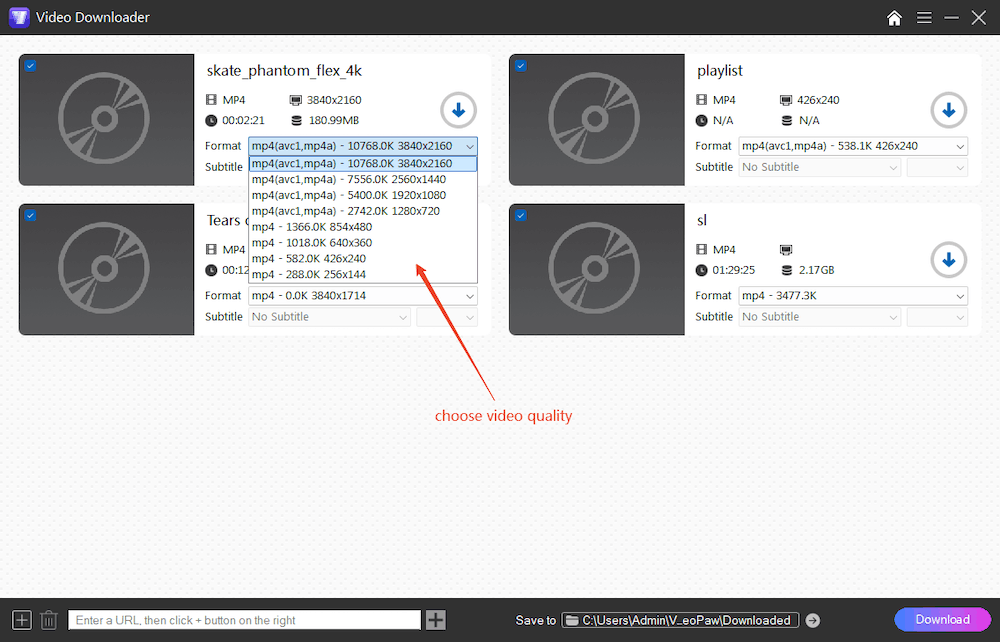
Step 4. (Optional) Double-click the video title to rename it, and click the “Save to” field to specify the output folder.
Step 5. Click the Download button in lower right corner to initiate the download process.
Once download is complete, click the check icon to quickly find the downloaded MP4 video in folder.
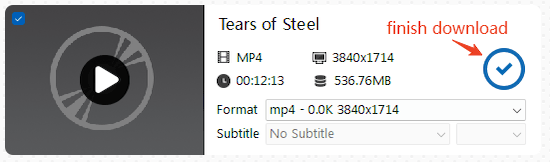
Optional step: Convert downloaded videos to other formats
If needed, click the first tab of Cisdem to switch to the Convert module, drag the downloaded videos to the interface, and select an output format under different categories, such as MP3, MP4 HEVC, MOV, iPhone, iPad, etc.
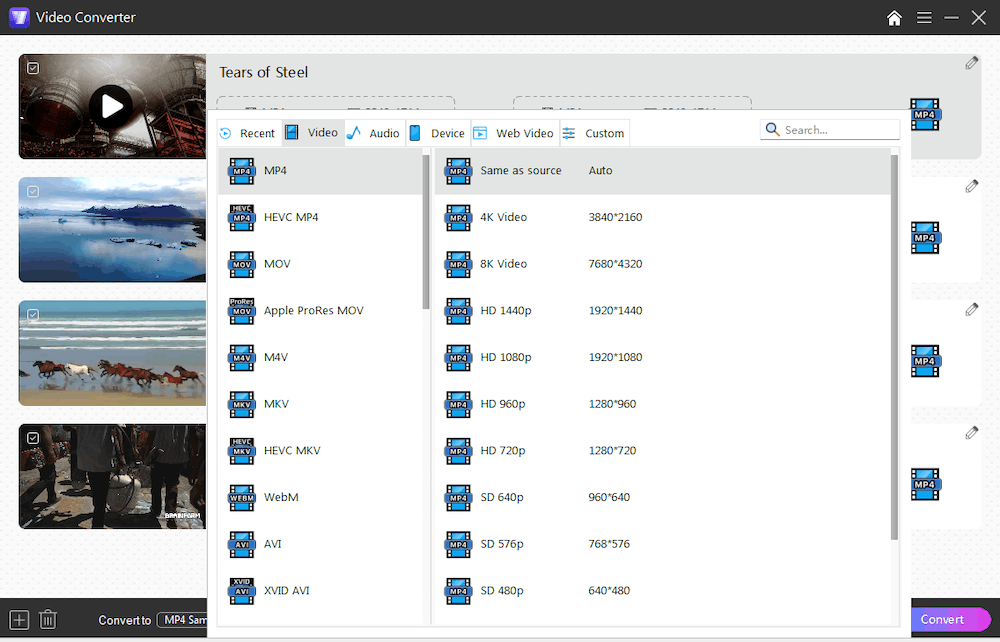
Convert M3U8 to MP4 with VLC
VLC is a free and multifunctional player available for Windows, Mac, and Linux. It can stream M3U8 video and convert it to MP4. Many forums recommend it as a free option for downloading M3U8 videos.
Note: VLC can‘t select video quality, can't handle separate audio/video streams, and often fails to complete downloads. Because VLC is a media player, not a downloader, it doesn't properly handle stream timeouts or session expiration, downloads frequently get stuck halfway or save only part of the video.
If you haven’t installed VLC on your computer, download the latest version from its official site.
Step 1. Import M3U8 URL.
- On Windows: open VLC, and go to “Media” > “Open Network Stream”, enter M3U8 URL.
- On Mac: Open VLC, click “File” > “Open Network”, and enter your M3U8 link to the URL field.
Step 2. Set output format.
- On Windows: click on the drop-down icon (▽) next to the Play button, and select “Convert” option. In the Convert window, choose MP4 from the “Profile” drop-down list, and click “Browse” to set output filename and destination folder.
![download m3u8 to mp4 with vlc on windows]()
- On Mac: Check “Stream output”, and click the “Settings” button. In the window pops up, click browse button, and enter a filename with “.mp4” extension, and choose an output folder. From the “Encapsulation Method” drop-down menu, select output format as MPEG4 or QuickTime. Click “OK”.
![download m3u8 with vlc on Mac]()
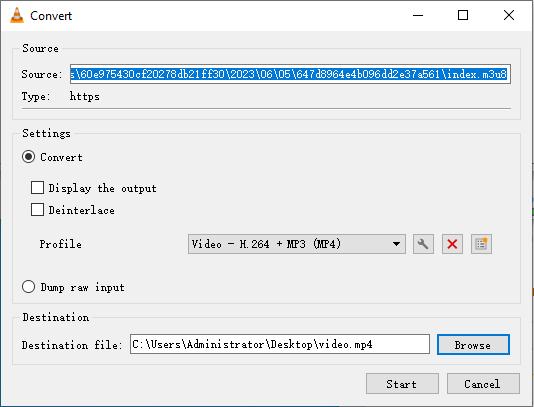
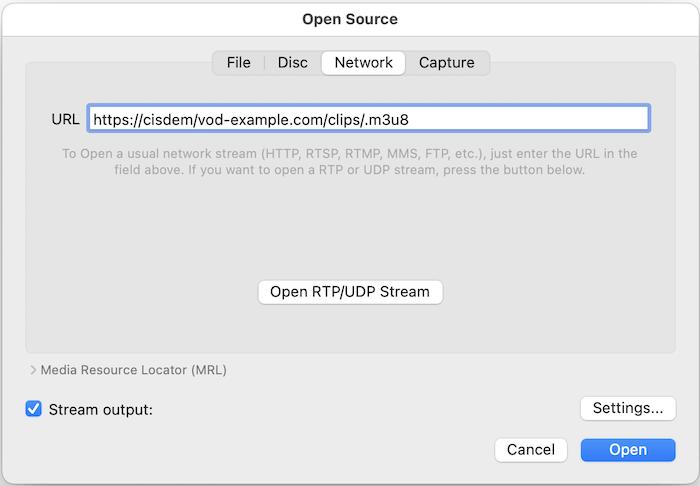
Step 3. Start M3U8 to MP4 conversion process.
- On Windows, click the “Start” button.
- On Mac, click the “Open” button.
Save M3U8 to MP4 with Browser Extensions
Some browser extensions can detect M3U8 stream in the page and download & merge the video segments to an MP4 file within the browser, no companion software needed.
#1. Stream Recorder (for Chrome & Edge)
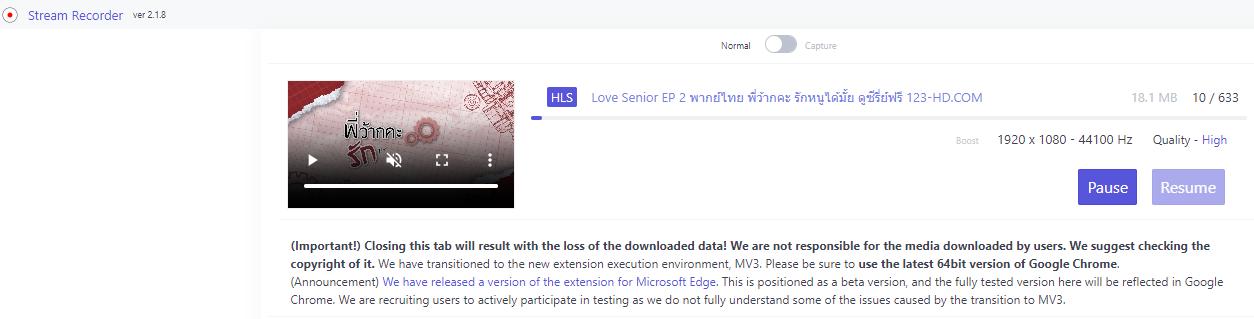
"Stream Recorder - HLS & m3u8 Video Downloader" offered by hlsloader.com is a popular Chrome extension designed to capture streaming videos delivered in HLS M3U8 format, also available for Microsoft Edge.
- Find this M3U8 downloader in Chrome Web Store and install it.
- Play your desired video in a new tab, and then click the extension icon that looks like a red dot.
- Wait for the m3u8 index file to be read in the pop-up tab, and the download process will then start automatically.
- Once the download is complete, save the video to your computer. You should find the MP4 video in the downloads folder.
![m3u8 downloader for Chrome]()
#2. Live Stream Downloader (for Firefox)
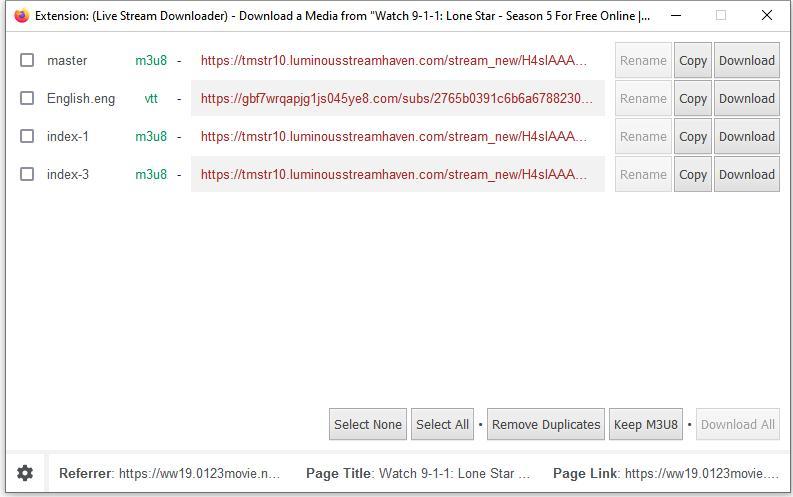
If you’re using Firefox, “Live Stream Downloader” by Chandler Stimson is a great M3U8 video downloader choice. It lets users to select specific m3u8 link for download and choose video resolution.
- Install this M3U8 downloader from Firefox add-ons store.
- Go to a website and play the m3u8 video you want to download.
- Click on the extension icon in the toolbar, select an M3U8 stream you need in the prompt window, and click the Download button.
![m3u8 downloader for firefox]()
- Select a video resolution option and start the download progress.
Note: Browser extensions are not compatible with some major video sites. If they fail to download some M3U8 videos, try Cisdem VideoPaw that supports widest range of sites.
Download M3U8 to MP4 with Command-line Tools (programmatic method)
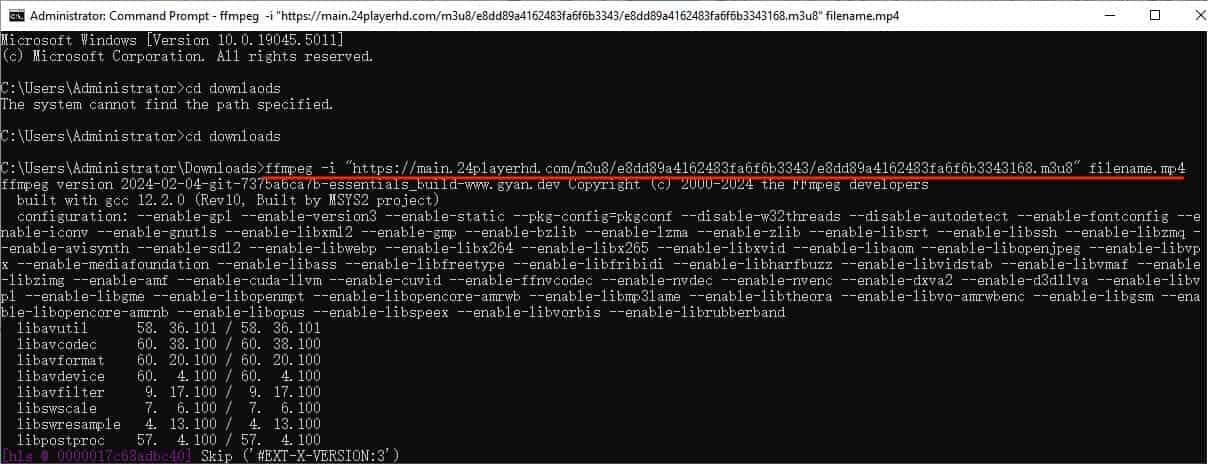
There are more than one command-line tools capable of downloading M3U8 to MP4, such as FFmpeg, yt-dlp, N_m3u8DL-CLI and more. From personal experience, the combination of yt-dlp plus FFmpeg is still the best option - yt-dlp offers excellent download speed, and FFmpeg helps to combine the video chunks and merge audio. But it may take you some time to figure out how it works if you know little about command-line interfaces.
How to download M3U8 to MP4 with yt-dlp + ffmpeg:
Step 1. Download and install yt-dlp and FFmpeg tools on your computer. If you've installed the downloader before, use the command yt-dlp -U to update to latest version.
Step 2. Launch the command-line interpreter. On Windows, type “cmd” in the search bar to find the Command Prompt and open it. On Mac, open the Terminal app from applications .
Step 3. Type yt-dlp "URL", and hit Enter to execute the command. Replace URL with the actual M3U8 link you copied in advance.
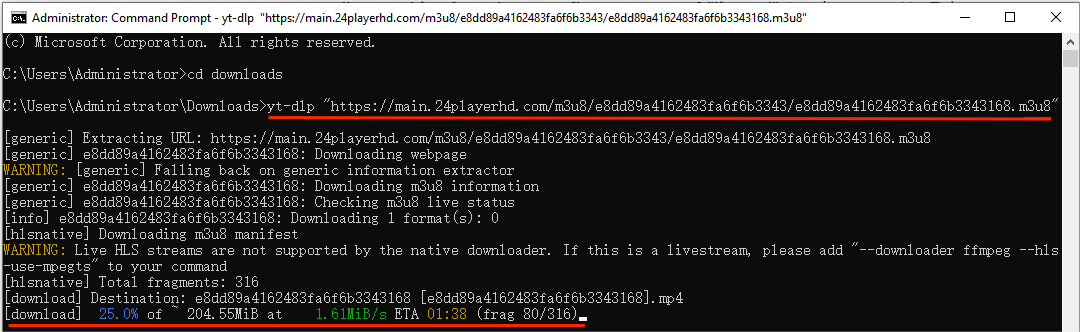
This basic command will fetch the best quality for you. If the video and audio are separate files, FFmpeg will merge them automatically after downloads.
Bonus: How to convert M3U8 to MP4 with FFmpeg alone:
If you only have FFmpeg installed, it can also convert M3U8 to MP4 video without yt-dlp, but the speed can be somehow slower.
In the command-line interpreter, type ffmpeg -i “m3u8-URL” -c copy output.mp4 and hit Enter to run it.
This will also preserve the best quality and save to MP4 format with original codecs without re-encoding.
Download M3U8 to MP4 with Mobile Apps
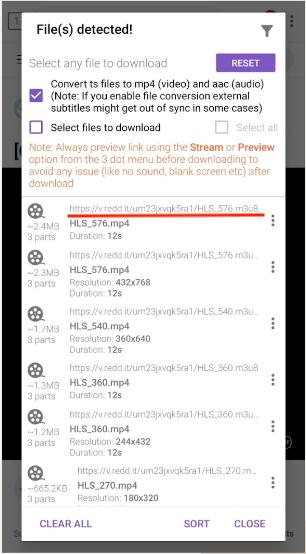
This section is for mobile users who want to download M3U8 streams on Android or iOS devices. These two M3U8 downloader apps can detect M3U8 URLs from the site you visit and convert the video to MP4.
#1. 1DM: Browser & Video Download (for Android)
- Install this downloader from Google Play app store on your phone.
- Open the app, navigate to the website containing the M3U8 video using the built-in browser.
- Once the video is detected, select the stream you want, tap the three-dot icon and select Download. You can also preview the video first.
![download m3u8 to mp4 on android phone]()
- Rename the video, choose where you want to store it, and tap Start to begin downloading M3U8 to MP4.
#2. M3U8 Mpjex (for iOS)
- Download and install this M3U8 downloader from the App Store on your iPhone or iPad.
- Go to device Settings > Safari > Extensions, then turn on the M3U8 Mpjex extension.
- Browse to the video page in Safari and copy the M3U8 URL with the extension.
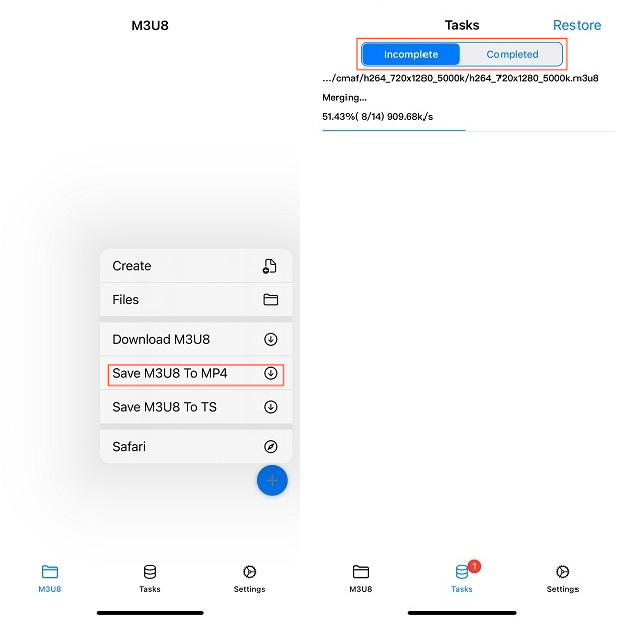
- Launch the downloader app, tap the blue + button and select “Save M3U8 To MP4” option.
- Paste the copied link into the URL field and tap OK. Select a video resolution and begin download.
- You can find the video file in the Tasks tab.
![download m3u8 to mp4 on iOS]()
Can I Download M3U8 to MP4 Online?
Maybe, visit https://m3u8.dev/ to have a try. When I entered a test M3U8 link and clicked "MP4 Download", it didn’t respond at all. Then I selected “TS Download”, and it successfully downloaded the video in TS format, but the saved .ts video file cannot be opened or converted to MP4. So either it only supports a small number of M3U8 links or it’s broken now. If you have a different experience with this online M3U8 downlaoder, feel free to share in the comments section at the end of the page.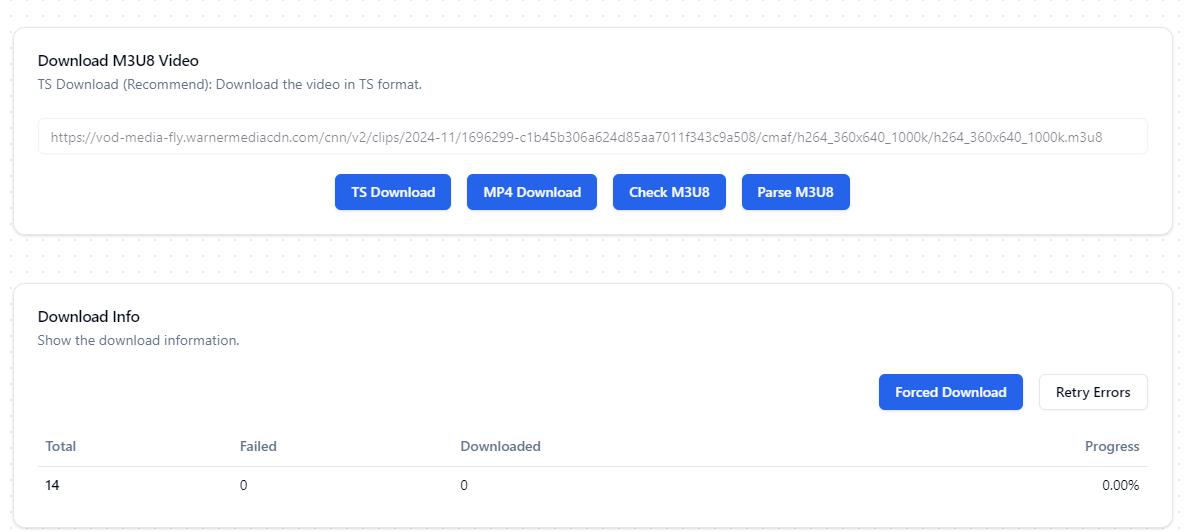
Troubleshooting Tips
Fix some common issues you may encounter when downloading M3U8 to MP4.
1. Downloaded video has no audio/video.
If this happens, make sure you have the right M3U8 link first, not the single audio or video stream link. If you’re using VLC or browser extensions, try to download the video and audio files separately and merge them manually later; or try to use a more powerful video downloader or the FFmpeg method.
2. Fail to load/detect/open the M3U8 link.
The M3U8 URL may be expired and invalid. Many web servers set expiry time for M3U8 URLs to prevent unauthorized sharing and downloading. Please refresh the video page and copy the active M3U8 URL again, then download it immediately.
3. Can't download some M3U8 streams.
Some M3U8 streams are protected by Digital Rights Management (DRM) or from a paid service, they are not downloadable. In such cases you might have to use a recording program like OBS to record the video.
Conclusion
By following the methods above, you can download most M3U8 streams to MP4 for easy playback on all devices and media players. There isn't really a one-size-fits-all approach to downloading all M3U8 videos, it depends on the site and your own needs. Cisdem VideoPaw is a user-friendly and versatile downloader that tends to offer the most control and quality. Other tools are also viable options but less reliable.
Copyright Disclaimer
The video/audio download methods provided in this article are for personal and educational use only. Sharing or commercial use is not allowed unless you get permission first. The website fully respects copyright laws and will act upon any valid removal request.

Emily is a girl who loves to review various multimedia software. She enjoys exploring cutting edge technology and writing how-to guides. Hopefully her articles will help you solve your audio, video, DVD and Blu-ray issues.

Ryan Li is a senior developer at Cisdem. Since joining the company in 2017, he has led the development of Cisdem VideoPaw and now serves as the editorial advisor for all articles related to Video Converter.
peppercornanthony
Never knew M3U8 was just a playlist file pointing to video chunks. Always thought I couldn't download those streams. This guide showed me how. Got my video as MP4. Thanks.