


How to Block NSFW on Reddit on Computers and Phones
 1.6K
1.6K
 0
0


NSFW content (such as content containing porn or violence) is allowed on Reddit. If you are a parent, you might want to block NSFW content on Reddit for your children. Also, sometimes adults may need to block NSFW posts to prevent embarrassment or stop themselves from being addicted to content of such nature. This article covers these situations and shows Reddit users how to:
 Cisdem AppCrypt
Block NSFW Content on Reddit & Elsewhere
- Block websites on Chrome, Safari, Edge, and more with a password
- Block specific sites and pages, URLs with certain keywords, and categories of sites
- Block all websites except the ones you allow
- Lock apps with a password
- Let you block websites and lock apps 24/7 or during scheduled times
- Easy to use
- Hard to bypass
- Help Reddit users block NSFW content by filtering posts (by keyword in URL), blocking search terms, blocking subreddits, and blocking the entire reddit.com while allowing certain subreddits
- Can be used for parental control and self-control


Method 1. Block NSFW Content from Appearing by Configuring Reddit Settings
Best for: Users who want a quick and free way to reduce NSFW content on Reddit.
Reddit provides several built-in settings to help filter mature content. You can hide NSFW contents in your feed, blur mature images, and mute specific communities that you don't want to see. These settings work on both the Reddit website and mobile app.
Option 1. Hide NSFW Posts
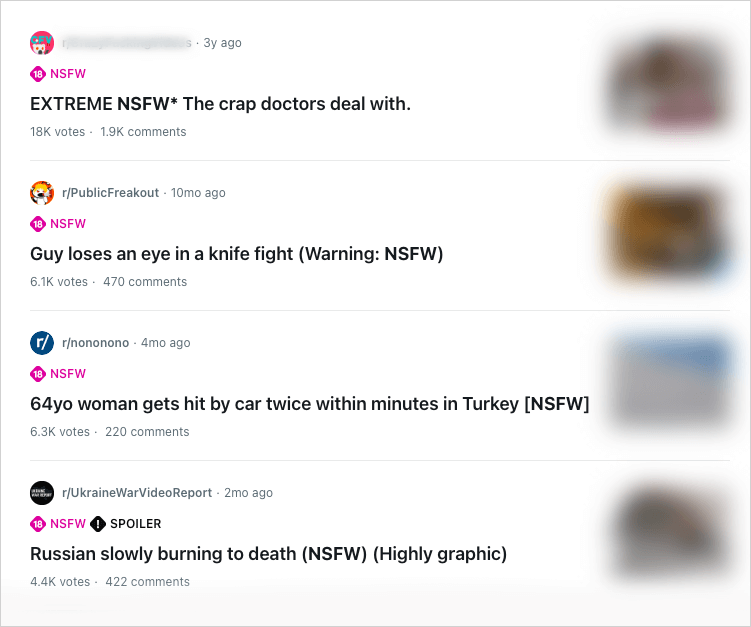
This settings prevent NSFW posts from showing up in your feeds and search results (and blur potentially explicit images, although such images rarely appear due to the setting).
On reddit.com
1. Open Reddit in a browser on your computer.
2. Go to https://www.reddit.com/settings/preferences.
Alternatively, click your profile picture in the top right corner. Click Settings. Click the Preferences tab.
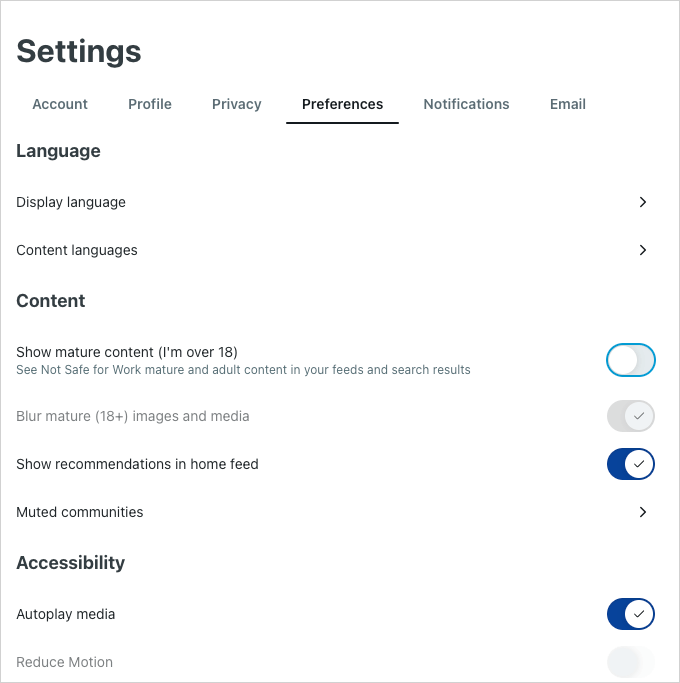
3. In the Content section, turn off the Show mature content (I'm over 18) option.
On the Reddit App
1. Open the Reddit app on your iPhone or Android phone. Sign in.
2. Click your profile picture in the top right corner of the screen.
3. Tap Settings.
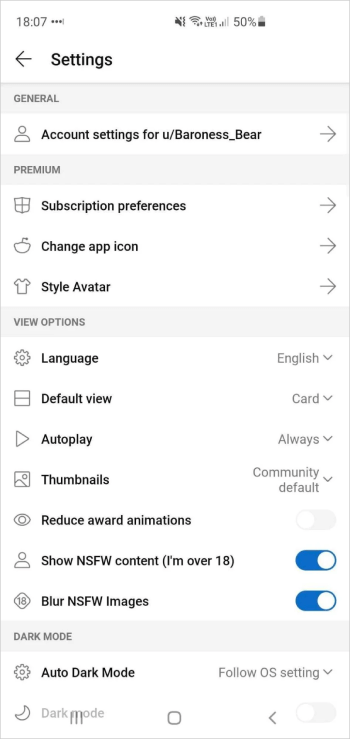
4. Turn off Show mature content (I'm over 18).
Option 2. Blur NSFW Images
If you don't mind NSFW posts in your feed and search results but want to stop images in such posts from being displayed, you can blur images and media in posts marked as NSFW.
On reddit.com
1. Open Settings > Preferences.
2. Turn on Blur mature (18+) images and media.
On the Reddit App
1. Open Settings.
2. Turn on Blur NSFW Images.
Option 3. Mute NSFW Communities
If you are not subscribed to certain subreddits but see recommendations for NSFW content from them, you can mute them individually.
On reddit.com
1. Go to Settings > Preferences.
2. Click Muted communities.
3. Enter the names of the NSFW communities you want to mute.
On the Reddit App
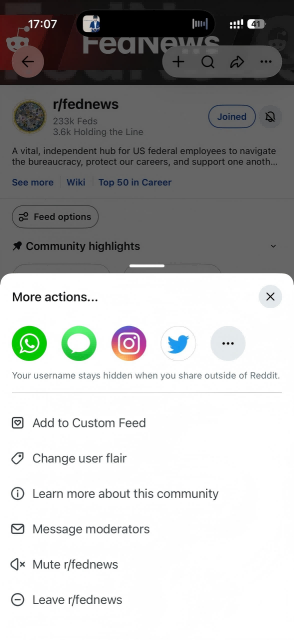
1. Visit the community you want to mute.
2. Click the 3-dot icon in the upper-right corner.
3. Click Mute.
4. A window will pop up asking if you want to mute this community.
5. Click Yes, Mute.
Pros:
- Completely free.
- Built into Reddit.
- Easy to set up on desktop and mobile.
- Lets you choose between hiding or blurring mature content.
Limitations:
- These restrictions can be easily removed by changing settings.
- There’s no password protection.
- Users can bypass the restrictions by using another Reddit account.
Method 2. Block Access to NSFW Content on Reddit using AppCrypt
Best for: Parents, students, and anyone who wants stronger control over Reddit than the built-in settings can provide.
This method uses a website and app blocker called AppCrypt and applies to reddit.com on Mac and Windows computers. (AppCrypt can also help iPhone and Android users block the Reddit website and app at all times or during certain hours.)
Let’s first check out how to set up AppCrypt and then look at the various ways this tool provides to help you limit access to inappropriate Reddit content.
How to Set up
1. Download and install AppCrypt.
 Free Download macOS 10.15 or later
  Free Download Windows 10 or later
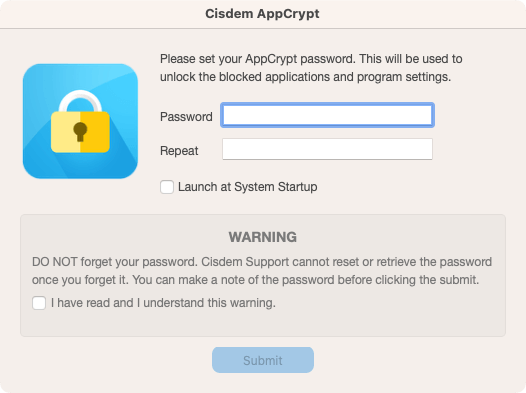
2. The first time you open it, set a password.
(If you use the tool for yourself, you can ask someone else to set the password for you.)
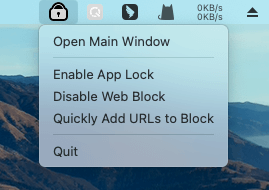
3. On a Mac, click the AppCrypt icon in the menu bar. Choose Open Main Window.
On a Windows PC, simply click the icon in the taskbar.
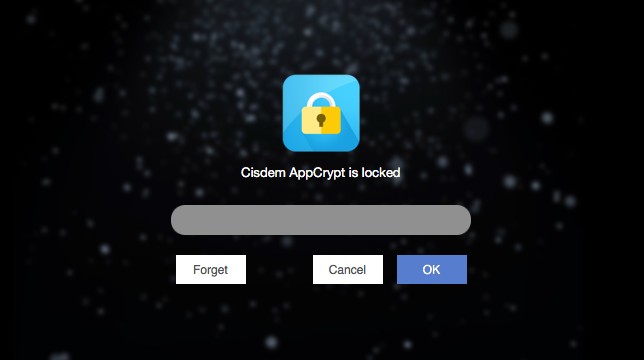
Then enter the password to access the main window.
How to Restrict NSFW Content
In the main window, you can do any of the following things.
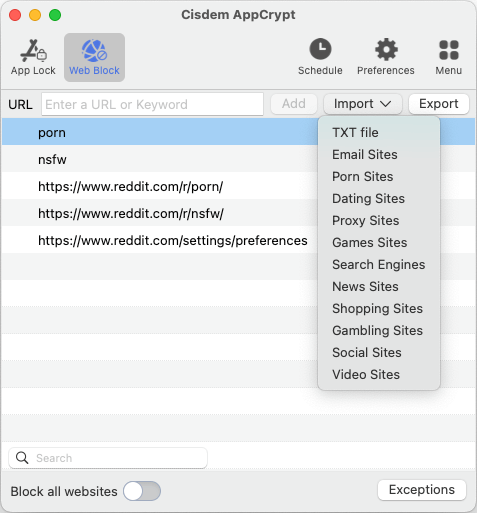
- Block by keyword: Enter a keyword such as “nsfw” or “porn” in the URL field. Click Add. Continue adding other keywords. This will prevent these words from being searched on Reddit and also block URLs containing them.
![]()
- Block by subreddit: Add the specific NSFW subreddits (such as https://www.reddit.com/r/nsfw) that you want to stop access to. This way, you or your children won’t be able to visit these subreddits and posts from them.
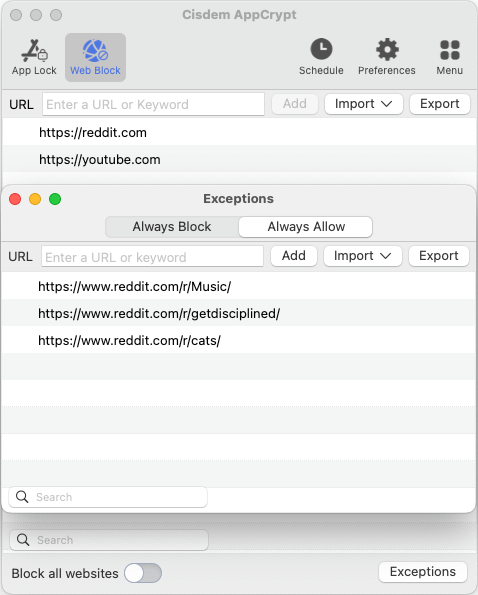
- Allow only certain subreddits: Add reddit.com to the block list. Click Exceptions in the bottom right corner. Add the subreddits (e.g., /r/Music/ and /r/getdisciplined/) that you allow yourself to visit to the Always Allow list. This way, the entire Reddit is blocked except for those allowed subreddits and posts from them.
![]()
- Protect your Reddit settings: Add https://www.reddit.com/settings/preferences to the block list. This way, only people who know the password (set in step 2) can access this page. So you can use it together with the first method.
Note: These restrictions apply to Chrome, Safari, Edge, Firefox (Windows only), Opera, and Brave. And you can use AppCrypt’s App Lock feature to block unsupported browsers if needed. To bypass restrictions and regain access to blocked NSFW content, one needs to know the password. Therefore, this method can be effective.
Pros:
- Let you block NSFW content by keyword, subreddit, or allow only certain subreddits.
- Much harder to bypass than Reddit's built-in settings.
- Flexible blocking options for different needs.
- Supports scheduled blocking.
Limitations:
- Requires installing third-party software.
Method 3. Hide All Images on Reddit
Best for: Users who want to browse Reddit without seeing any images.
Method 1 already shares a way to block inappropriate images from being seen. Method 3 is about disabling all images on reddit.com on a computer, and there are two ways available.
Option 1. By Configuring Chrome Settings
If you are a Chrome user, you can consider this way.
1. Open the Chrome browser on your computer. Click the three-dot icon in the top right corner. Choose Settings.
2. Choose Privacy and security > Site settings.
3. Scroll down to find and click Images.
4. Go to the Customized behaviors section, click Add next to Not allowed to show images.
5. In the dialog that appears, enter https://www.reddit.com/ and click Add.
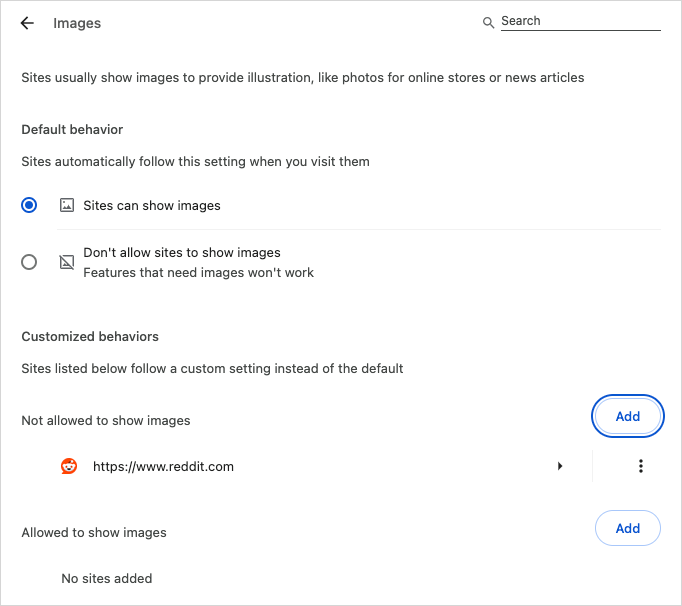
From now on, all explicit images (and other images as well) on reddit.com won’t display. Any other content is still accessible.
Option 2. By Using a Browser Extention
If you are using a different browser, you can use a browser extension called Wizmage Image Hider to achieve the same (well, not exactly the same). It’s available on Chrome, Firefox, and Edge.
1. Add the extension to your browser.
2. Open its setting. (For example, if you are using Chrome, open settings by clicking the extension icon in the toolbar and choosing Options.)
3. Switch to the Black List mode and then add https://www.reddit.com/.
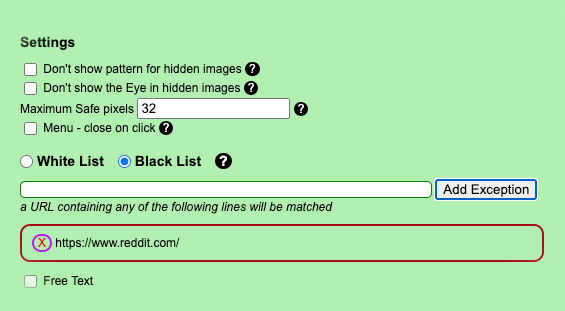
From now on, most images on reddit.com will be hidden. However, certain images, such as video thumbnails, are still visible. Therefore, there’s still possibility to see inappropriate images.
Final Thoughts
Reddit is not safe enough for children and teens due to the NSFW content on it. By blocking porn and other inappropriate content in it, parents can help make this platform safer for their kids. In addition, some adults may also need to restrict NSFW content on Reddit to reduce porn addition. Another possible reason is they want to prevent explicit content from being seen when they are in a public place like an office or library.
The methods talked about in this article are helpful. But they are not perfect. And, in fact, there isn’t a perfect solution out there. That being said, you can use one of the method or a combination of them to put restrictions.

Norah Hayes likes to share her tips on how to improve focus and stay motivated at work. She believes it is essential to eliminate all online distractions during work hours.

Ethan Long joined Cisdem in 2015 as a developer and now serves as the editorial advisor for Cisdem AppCrypt. He actively tests and uses Cisdem AppCrypt and other screen-time management tools to ensure AppCrypt meets its promises in real-world scenarios.