


Top 8 Best Duplicate Photo Finder Tools for iPhone
 1.3K
1.3K
 0
0


It's common to have duplicate photos on iPhone. For example, capturing photos in burst mode can result in many similar photos. Syncing photos across devices with a cloud service like iCloud may also create duplicates.
Duplicate photos can be annoying. They not only take up valuable storage space, but also make it difficult to organize photos.
In this article, I will introduce eight of the best duplicate photo finders for iPhone. Let’s take a look at their main features, advantages, disadvantages, and more, which can help you choose the one that best suits your needs.
 Cisdem Duplicate Finder
The Best Free Duplicate Photo Finder for iPhone
- Accurately identify duplicate photos and videos
- Effectively detect similar photos, allowing you to adjust the similarity threshold for comparing images
- Work with the Photos app
- Display duplicates and similar photos for you to easily view
- Automatically select all but one file for deletion in each set of duplicates, enabling you to remove all duplicates at once
- Allow you to adjust selections manually, or choose from 8 rules (Select by filename, Select newest, Select high-resolution, etc.)
- Easy to use for everyone
- Free to use


Comparison of top duplicate photo finders for iPhone
| Name | Best for | Price | Rating (Scale of 1–5) |
|---|---|---|---|
| Photos’ Duplicates | Find and merge duplicates and some similar photos without using a third-party tool. | Free | 4.8 |
| Cisdem Duplicate Finder | Find and bulk remove duplicate photos and similar photos based on your specific needs. | Free | 4.8 |
| Cleanup | Find and remove unnecessary files including duplicate photos, large videos, similar videos etc. on your iPhone & iCloud. | $29.99 per year | 4.8 |
| CleanMy®Phone |
Free up storage space on your iPhone by deleting duplicate photos, similar images, blurred images, and old screenshots. |
$24.99 per year | 4.7 |
| Cleaner | Eliminate duplicate photos, videos and contacts on your iPhone with 1 click. | $34.99 per year | 4.6 |
| Duplicate Photos Fixer | Search duplicate photos and similar photos on iPhone with custom settings. | $39.95 per year | 4.9 |
| Phone Cleaner | Sort photos, videos in your gallery and remove duplicates. | $2.99 per month | 4.7 |
| dodo |
Quickly find tons of similar photos on iPhone and remove unwanted ones manually. |
Free | 4.5 |
Review: The best duplicate photo finders for iPhone
#1 Photos’ Duplicates
Applies to: iOS 16 or later
Best for: Find and merge duplicates and some similar photos without using a third-party tool.
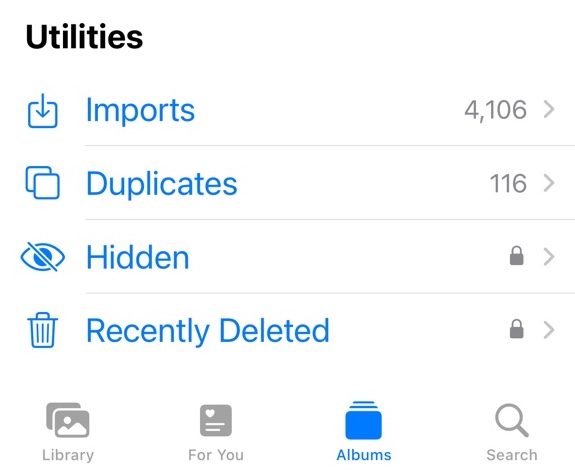
The Photos app on iPhone provides a built-in duplicate detection tool to help you handle duplicate photos and videos. You don't need to find a third-party solution. That's why I rank this first.
Where do you find this tool? In the Photos app, tap Albums and scroll down to find and tap Duplicates under Utilities. You will see detected duplicates there. (If you don't see Duplicates under Utilities, try upgrading your iOS version.)
Is this tool effective? Let's take a close look.
The detection is not instantaneous. It usually takes several days or months, depending on the size of your library. Once it finishes detecting, you will see identical and similar photos in Duplicates. It may not be efficient if you want to find duplicates immediately.
While the tool excels at finding duplicates, it isn't very good at detecting similar photos. In the test, it failed to find photos that looked similar, such as those taken from different angles. Similar image detection isn't configurable, which means it may miss similar photo versions that you want to find.
When it comes to the removal process, the tool allows you to manually select unwanted items to delete. It also provides a merge option, which removes duplicates by merging them. As a result, you will only have one copy or version of a specific picture, and metadata will be combined into the kept copy or version.
Advantages:
- Built-in to iOS.
- Find both identical and similar photos.
- Work with videos as well.
- Easy to use and straightforward.
- Allow you to delete duplicates manually.
- Provide a merge option to automatically remove duplicates based on its suggestions.
- Merge metadata from deleted photo copies or versions.
Disadvantages:
- Not available for iOS 15 or earlier.
- Can be very slow, ranging from days to months.
- You can't force detection to start.
- May miss many similar photos.
- Not very customizable for which copies or versions to delete.
#2 Cisdem Duplicate Finder
Applies to: iOS 15.0 or later
Best for: Find and bulk remove duplicate photos and similar photos based on your specific needs.
Cisdem Duplicate Finder is an excellent and easy-to-use duplicate photo finder for iPhone. This free app detects duplicate photos in the Photos app on your iPhone, regardless their filenames. It also identifies similar photos by comparing actual image content, allowing you to customize the level of similarity desired to search for similar photos.
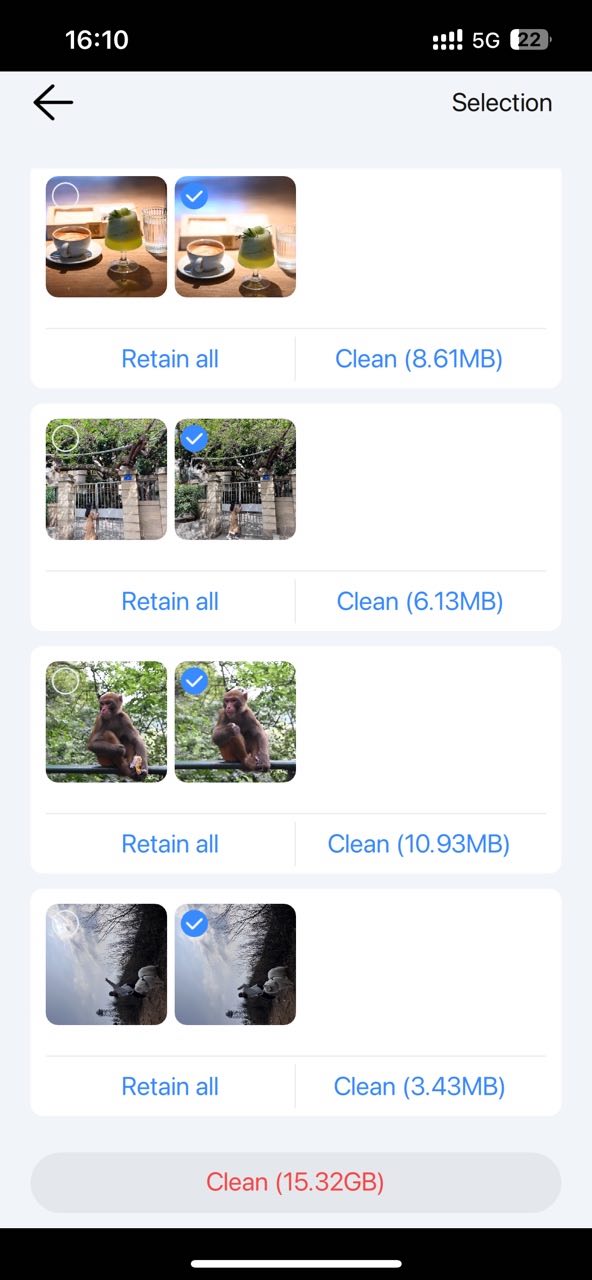
It categorizes all the duplicates it finds into three categories: Duplicate Photos, Similar Photos and Duplicate Videos. Exactly same photos are categorized into “Duplicate Photos", which are typically generated when you download a photo multiple times, or sync the same photo from different sources. In the "Similar Photos" tab, you can find not 100% identical duplicates, such as those look the same but have different file sizes, resolutions, or similar looking photos. The default matching level for similar scan is 60%, which can find a good number of duplicates. If you are not satisfied with the similar images it finds, you can adjust the Histogram similarity and Features similarity in the Settings to better suit you needs and rescan.
It scans your entire photos library for duplicates. If you have a lot of photos on your iPhone, you can wait a few minutes for the scan to complete, or stop the scan midway and view instant results. It automatically selects all but one photo in each set of duplicates for removal. You are also allowed to view the duplicate photos details and manually select unwanted items to delete, or let this tool batch select duplicates for you based on the selection rule of your choice, including Select oldest, Select low-quality, Select by filename, etc.
The deleted photos will be removed to the Recently Deleted album in the Photos app on your iPhone.
Advantages:
- User-friendly interface.
- Free to use.
- It finds both identical and similar-looking photos on your iPhone.
- Let you view and compare the duplicates side by side.
- It will automatically select duplicate photos for you to remove.
- Let you use selection rules to control which photos are deleted.
- It also allows you to mark duplicate photos to remove manually.
- This duplicate photo finder is also available for Mac, Windows, and Android.
Disadvantages:
- No preview of photo info.
#3 Cleanup
Applies to: iOS 15.0 or later
Best for: Find and remove unnecessary files including duplicate photos, large videos, similar videos, etc. on your iPhone & iCloud.
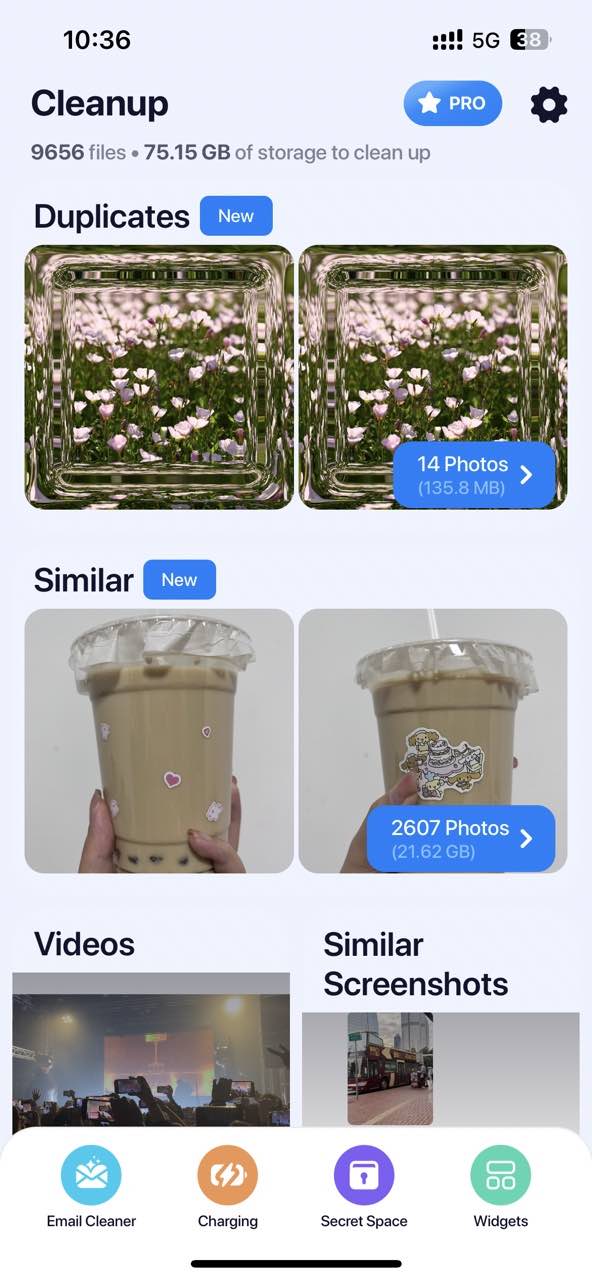
Develoed by DevMeApp, Cleanup app is specially designed to clean up duplicates in your photos library. Once you install this duplicate photo finder on your iPhone, it will ask you for permission to access your Photos and instantly scan it for useless files.
It divides all the files it considers useless into five categories: Duplicates, Similar, Videos, Similar Screenshots, and Other. It lets you delete all duplicate photos at once and keep the original. As for similar images, it also suggests the best results for you to help you delete in bulk. But I don’t recommend using the one-click delete function. After testing, I don't think the similar images it finds are always accurate. You'd better go through each set of images one by one and select the unwanted ones to delete manually. If you think both similar images are necessary, you can add them to the Keep List by clicking the Keep All button in the upper left corner of the set of images. This tool also lets you review all the photos, videos in your photos library and sort them by size or date. Then you can quickly delete unneeded photos and videos that take up space on your iPhone.
In addition to removing duplicates, Cleanup app also offers some other useful features. Such as hide your private photos & videos by creating a PIN, merge duplicate contacts.
Advantages:
- Identify and remove duplicate photos, similar photos, and similar screenshots.
- It helps keep you Photos library organized by sorting all your photos, videos by size or date.
- It finds duplicates faster than most other duplicate photo finders.
- Automatically keep the original version of duplicate photos and mark other copies for you to delete.
- Also help you choose the best version among a set of similar images.
Disadvantages:
- Limited functionality of the trial version.
- The similar image search feature may not work accurately.
#4 CleanMy®Phone
Applies to: iOS 16.0 or later
Best for: Free up storage space on your iPhone by deleting duplicate photos, similar images, blurred images, and old screenshots.
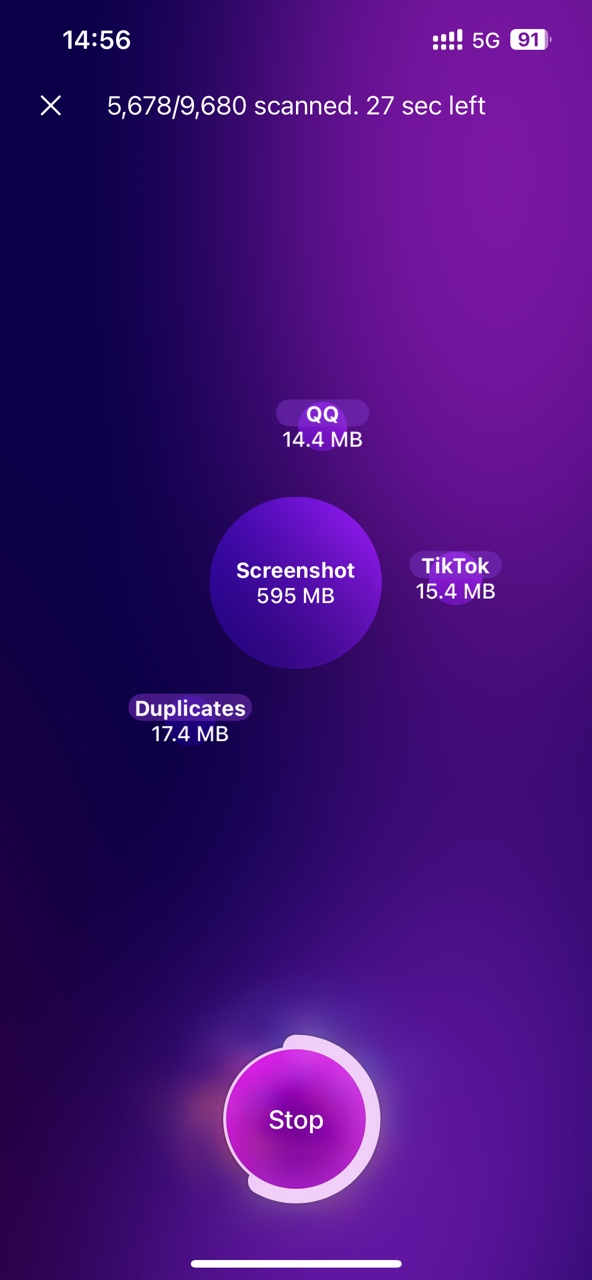
Designed for cleaning up digital space, CleanMy®Phone is one of the best duplicate photo finder for iPhone. Unlike the previous two apps with simple and clean interfaces, this one is colorful, making you less annoyed when dealing with large numbers of disorganized files.
Open this duplicate photo finder for iPhone. Give it permission to access the photo roll. Go to the “Declutter” tab. Then you can start searching for duplicate photos on your iPhone by clicking the “Scan” button on the main window. It categorizes and groups all your photos with the help of AI-powered technology. If you want to clear duplicate images, click on “Duplicates” from the search results. This app also comes with auto select rules that identify copies and helps you keep the best picture on your iPhone. However, like with some other apps on the list, it’d be better to preview the photos carefully before cleaning them.
Advantages:
- Remove digital clutter and organize photos on your iPhone.
- Scan for duplicates, blurred images, screen recordings, and more accurately.
- Also find similar and unneeded media files on your iPhone.
Disadvantages:
- Compare to other duplicate photo finder for iPhone, the scan is slower.
- Any version older than iOS 16 is not supported.
#5 Cleaner
Applies to: iOS 13.0 or later
Best for: Eliminate duplicate photos, videos and contacts on your iPhone with 1 click.
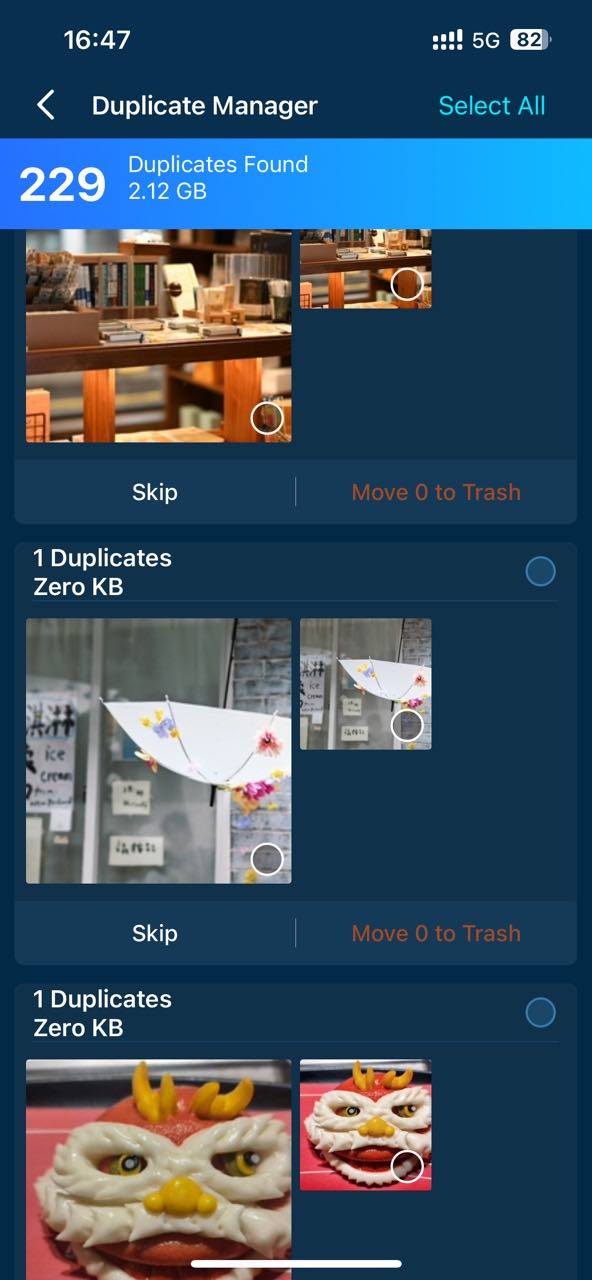
Cleaner-Clean Duplicate Item for iPhone isn't designed specifically to clean up duplicate photos, but it also offers a nice duplicate photo finder feature. It helps save space on your phone by looking for duplicate photos, videos, and similar photos. Additionally, it further categorizes the similar photos it finds into different tabs: Similar Photos, Similar Live Photos, and Similar Burst Photos. Let you handle duplicates in your photos library more clearly.
The tool also has a built-in preview pane that allows you to preview the image before removal. However, each set of duplicates is displayed as one image larger and the other smaller, making it difficult to clearly compare the two images. Be careful when cleaning similar images. If trust the smart selection of it, you can click the “Select All” button in the upper right corner to remove all duplicates with 1-click.
Cleaner also has a feature that is better than other duplicate photo finders for iPhone in dealing with photos. It lets you compress the size of photos. For example, when you have many similar images that take up much space on your phone, but want to keep all of them. You can compress them instead of deleting, which can also save a lot of space.
In addition to duplicate photos, videos, Cleaner app also helps find and merge duplicate contacts on your iPhone.
Advantages:
- It finds duplicate picture in your photos library and lets you remove in batches.
- Accurate automatic selection of duplicate photos for remover.
- Also find similar photos, including similar live photos and burst photos.
- Let you compress photos, videos to a desired file size.
- It can also scan your address book for duplicates.
Disadvantages:
- The preview feature can be improved.
- The price is a bit high.
#6 Duplicate Photos Fixer
Applies to: iOS 8.0 or later
Best for: Search duplicate photos and similar photos on iPhone with custom settings.
Unlike other duplicate photo finder for iPhone in this article, Duplicate Photos Fixer doesn’t provide a free trial. You will be charged for it before you can use the app.
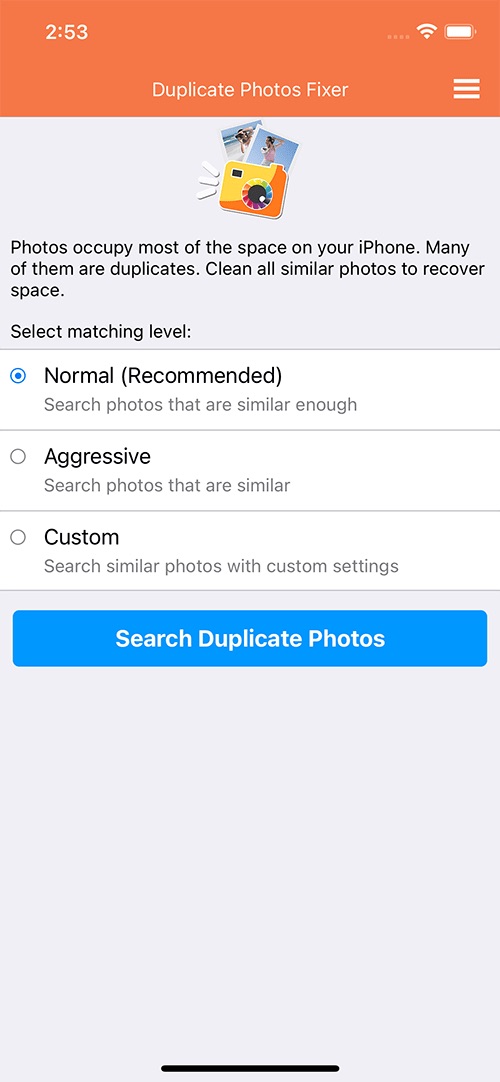
It does an excellent job of scanning and cleaning duplicate images on your iPhone device. And it supports most popular image formats like JPEG, BMP, GIF, Apple Icon Images, MacPaint Images, TIFF, RAW, ProRAW, and many others. The best part about this tool is that it allows you to choose the type of scan you want to run on your device, including Normal scan mode (search photos that are similar enough), Aggressive (Search photos that are similar), and Custom mode (Search similar photos with custom settings). The Normal scan mode will be fine for most users. The Custom mode lets you control the matching level, bitmap size, time interval, etc.
Once the scan is completed, the results will be displayed in the form of image groups. You can click the Trash icon in the lower right corner to immediately delete all duplicates that have been automatically marked.
Advantages:
- Supports a huge number of image formats.
- Excellent for finding duplicate images, similar-looking images.
- Three different scan modes.
- Fast scan speed.
- Help organize photos on your iPhone.
Disadvantages:
- No free trial available on iPhone.
#7 Phone Cleaner
Applies to: iOS 15 or later
Best for: Sort photos, videos in your gallery and remove duplicates.
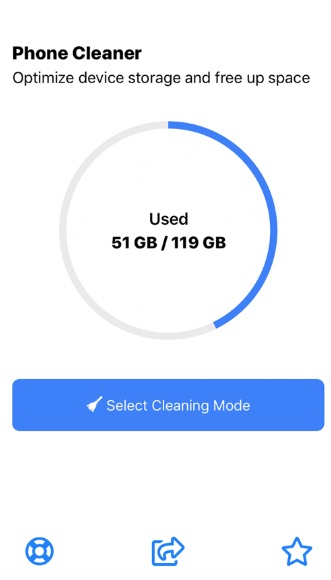
Developed by AlgoTwist Ltd, Phone Cleaner is a wonderful duplicate photo finder app that frees up your iPhone storage space by finding and cleaning duplicate or similar photos, useless or large files.
The app offers, as usual, the most standard and necessary features, such as search for duplicates, image preview and 1-click remover. It also offers a variety of unusual options. For example, you are able to sort the files in your gallery by size. Then look at the larger files and decide whether to delete or keep them. It also allows you to filter files with advanced filters, helping you find useless files that you need to clean, like specific types of media files, files created on a specific date, etc.
Advantages:
- Easy and intuitive interface.
- It offers 4 cleaning mode.
- Find similar photos and duplicate photos.
- It displays the file size in the lower right corner of each duplicate image.
- It also helps find large photos, videos in your gallery quickly.
Disadvantages:
- Lower speed compared to competitors.
- Outdated interface.
#8 dodo
Applies to: iOS 11.0 or later
Best for: Quickly find tons of similar photos on iPhone and remove unwanted ones manually.
dodo – remove duplicate photos is a lightweight, simple, easy-to-use utility designed to detect similar images. Its scanning speed is very fast. I opened the app and it immediately showed me the results of search. However, the search quality is not very good. Some of the similar images it founds are completely different things.
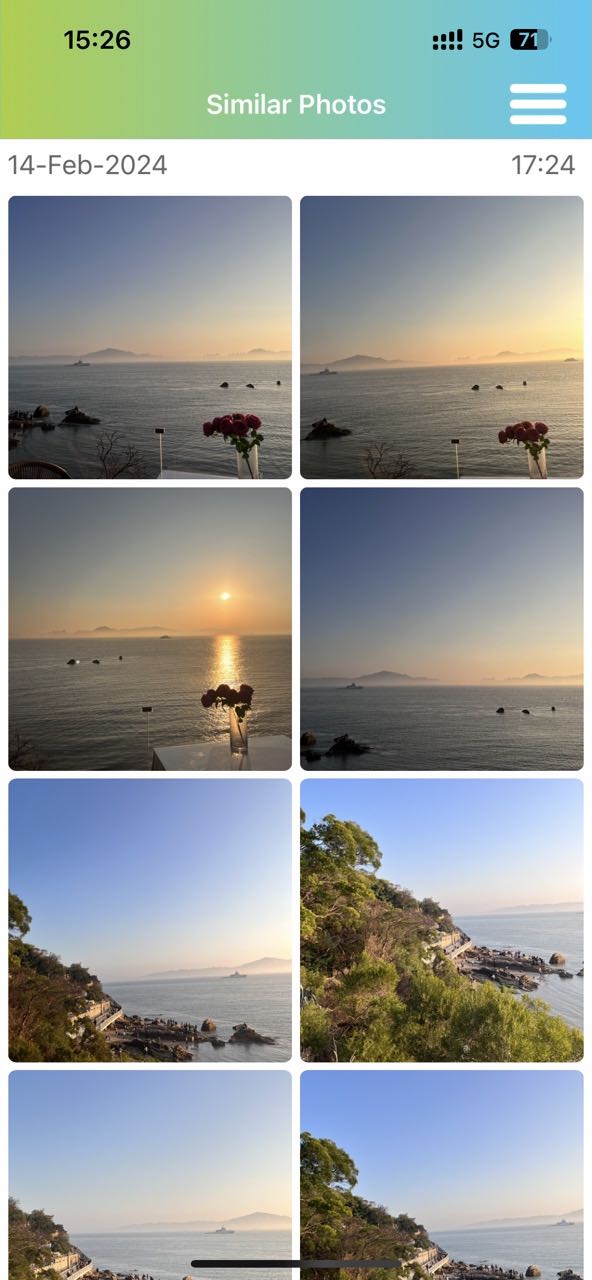
It sorts the images by creation date, with the newest at the top of the list. Unlike other duplicate photo finders for iPhone I mentioned above, this tool does not have any options to automatically mark duplicate photos for deletion. To remove duplicates, all you need to do is to scroll down and choose the photos you wish to delete, click the “Delete All” or “Keep All” button at the bottom of the photo. The deleted photo will go to the “Recently Deleted” album in your Photos app.
Advantages:
- Free program.
- Easy to use.
- Fast speed.
- It can find a large number of similar photos on iPhone.
Disadvantages:
- Lack of automatic selection of duplicates.
- It does not categorize exact identical photos and similar-looking photos it finds.
Conclusion
It’s almost impossible to avoid duplicate photos from appearing over time. Duplicates make our photo library cluttered and take up much space. Maybe you tried the built-in detection in the Photos app but it didn't meet some of your needs. If so, check out the other best duplicate photo finders for iPhone shared in this article. They all do a great job of finding duplicates!

With a passion for tech and writing, Sarah joined Cisdem, where she focuses on creating articles about using utility tools to enhance file management and simplify contact management.

Adrian Li is Cisdem’s Chief Engineer and serves as the editorial advisor for Duplicate Finder and ContactsMate. His work and insights have been featured in leading tech publications such as Fossbytes, TUAW, Redmond Pie, SafetyDetectives, and BestForAndroid.