


How to Download Myspace Music & Videos (Free Included)
 6.0K
6.0K
 1
1


Myspace, once a giant older than Facebook, was a platform that encourages users to share videos, photos, music, as well as concert events. In 2019, a server migration basically nuked all the songs from before 2015. These days, the site’s mostly dead links and glitchy pages.
So, can you still download Myspace songs and videos today? It depends. Some tracks still work, and you can grab them with the right tools. But for lost or unavailable content, you'll need to look elsewhere.
Where to Download Lost Myspace Songs
Thanks to preservation efforts, many old Myspace tracks are not gone forever. Two resources stand out:
1. Archive.org/details/myspace-Music
The Internet Archive has saved nearly half a million Myspace songs. Search by artist, album, or browse the collection, and then download archived songs as MP3 files.
2. LostMyspace.com
This simple tool lets you search the same archive through a clean interface. Just type in a artist or song name, and it will show you what's been preserved.
If you're looking for music that is still on Myspace today, the tools below can help. That said, most artists have moved on to Mixcloud, SoundCloud, and Bandcamp to share music. You can use those platforms instead. But if you're set on downloading from Myspace itself, here are 5 ways for you to try.
Download Myspace Video Using Desktop App
#1 Cisdem VideoPaw
Available on: Windows 11/10, macOS 10.15 or later
Cisdem VideoPaw (originally Cisdem Video Converter) is an uncluttered yet powerful Myspace video downloader for Windows and Mac that meets all your demands of downloading Myspace videos. It also lets you download videos and music from over 10000 different video hosts, such as YouTube, Vimeo, Livestream, Crunchyroll, Reddit, Audiomack, and more.
To play your downloaded Myspace videos on any device you own, it supports converting them to a variety of formats, like MP4, MKV, MOV, AVI, HEVC (H.265), MP3, WAV, Apple devices, Samsung, etc. You can even edit & merge videos, rip DVDs and Blu-rays, compress video and audio, which makes Cisdem VideoPaw a one-stop and versatile My Space video downloader.
Main features of Cisdem VideoPaw:
- Download videos & music from Myspace, YouTube and other 10000+ sites
- Download 4k & HD videos and 320kbps & 128kbps audio
- Convert Myspace media files to 300+ formats
- Batch process all Myspace videos at once
- Cut, Crop, trim, and merge Myspace videos
- Insert subtitles and watermarks to the videos
- Extract music from Myspace videos
- Rip DVD/Blu-ray to digital formats for easy playing
 Free Download Windows 10 or later
  Free Download macOS 10.15 or later
How to Download Myspace Videos on Computer:
Step 1Launch Cisdem VideoPaw
Download and install the program on your Windows or Mac computer.
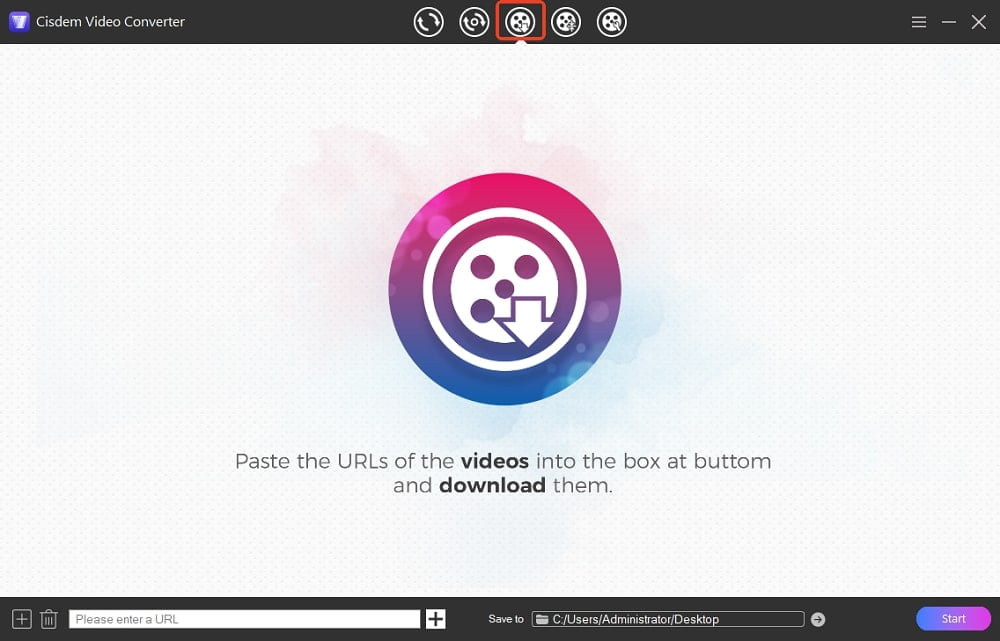
After the software is launched, the “convert” interface is displayed by default. You need to click  button to turn into the “download” interface.
Step 2Get Shared link from Myspace
Go to Myspace.com. Copy the URL of the Myspace video or music you want to download.
Step 3Download Myspace Videos
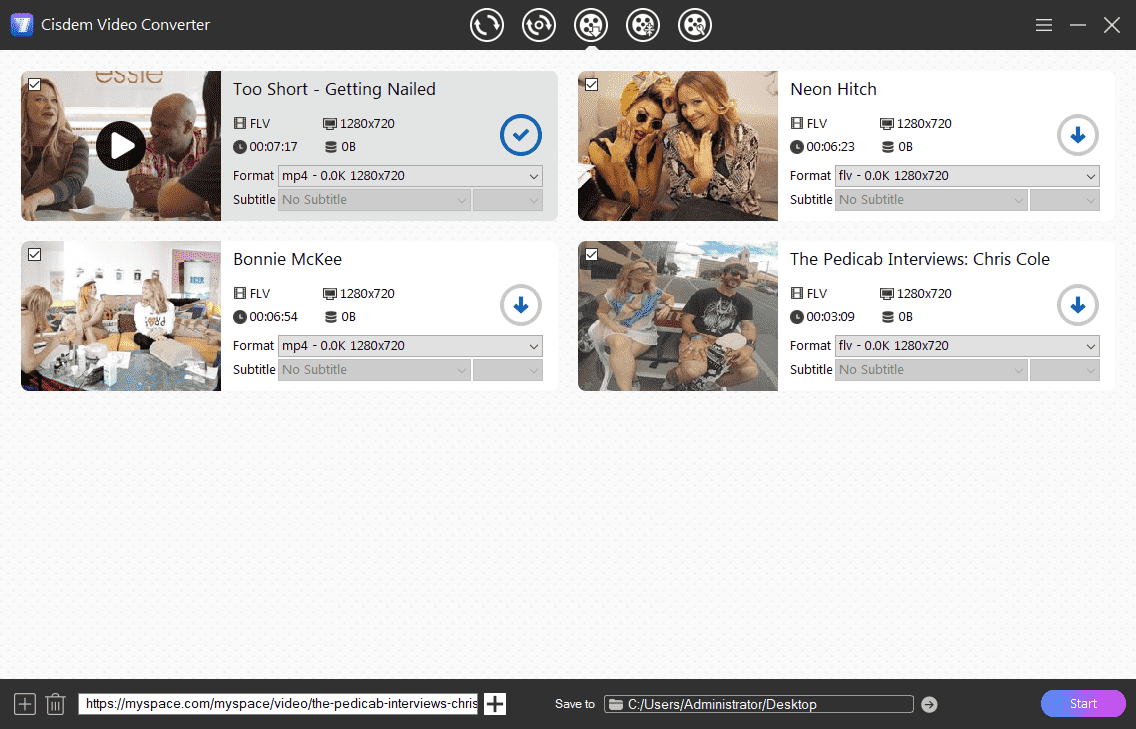
Paste the copied link to the bottom URL field of Cisdem VideoPaw, click "+" to analyze the link, and choose a download option from the Format pull-down list.
Click "Start" button to start downloading Myspace videos on your computer. You can add as many Myspace videos as possible to the download queue by copying & pasting URLs. The software will deal with them simultaneously.
Step 4Convert Myspace Videos to Other Formats (Optional)
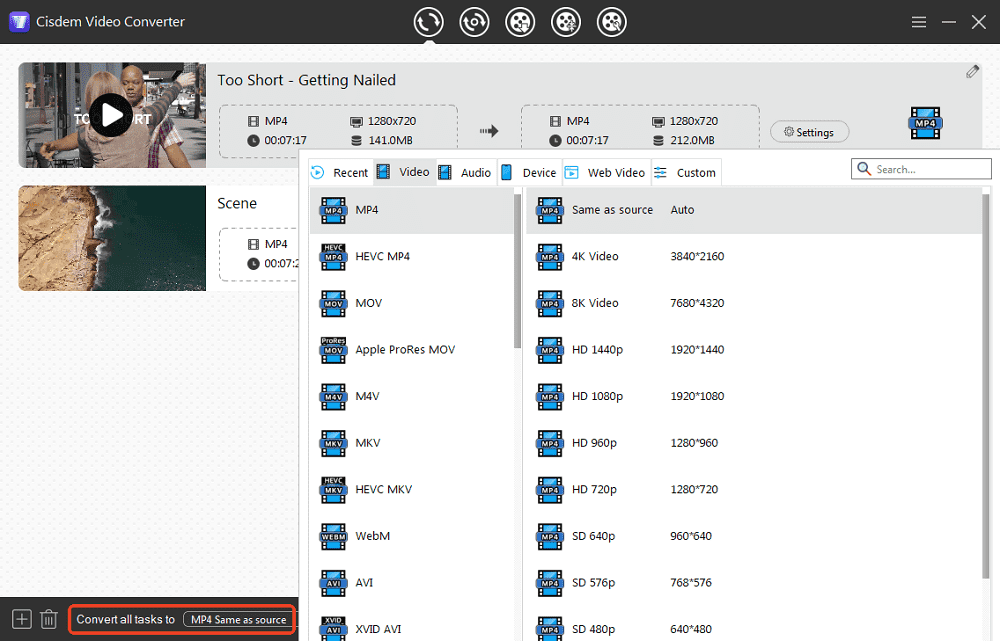
The videos downloaded from Myspace are in FLV or MP4 format.
To convert My Space videos to a format compatible with your video players and devices, you can click  button to access the downloaded videos, and put them to the “convert” interface. Click the "format" icon or the "Convert all tasks to" button to open the format menu and choose your desired format for each Myspace video and music.
Advantages:
- Batch Myspace videos download
- Superfast download speed
- Convert videos to various format
- Preserve original quality
- Support over 1000 websites
- Various media tools
Disadvantages:
- Only download 3 videos for free
#2 WinX YouTube Downloader
Available on: Windows 10,8,8.1,7 and XP (32 & 64 bit)
Embedded with a Multi-thread & Multicast Tech, WinX YouTube Downloader makes it fast to download videos from Myspace, YouTube, Dailymotion, Metacafe, IMDb, Vevo, and other 300+ video sharing sites. This Myspace video downloader can also download 8K/4K/1080p/3D videos without compressing the video quality and save them in MP4, MP3, FLV, or WebM.
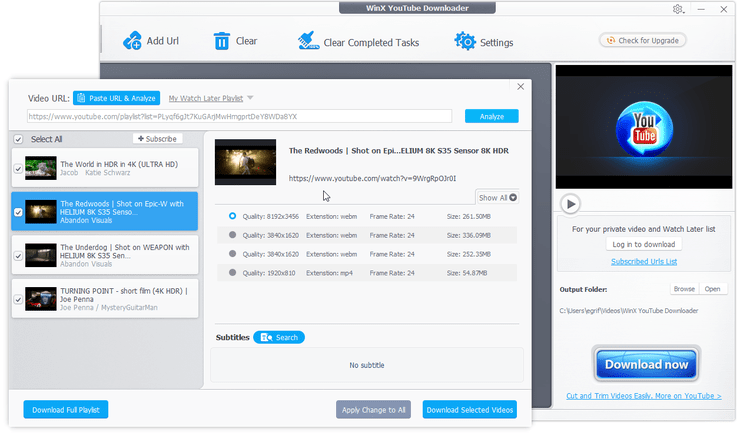
- Download and install WinX YouTube Downloader to Windows PC.
- Navigate to Myspace.com, search the video or music you would like to download and copy the URL.
- Launch the application. Click “Add Url” on the top left.
- Paste and analyze the Myspace video link.
- Select your target output video quality, format, size and code, click “OK”.
- Hit “Download” to begin downloading Myspace video on Windows.
![myspace video downloader windows]()
Advantages:
- Download multiple Myspace videos at the same time
- Support 4k Myspace videos download
- Compatible with a substantial collection of streaming sites
Disadvantages:
- Limited output formats
- Only for Windows users
Download from Myspace on Android
Available on: Android, Windows, and Mac
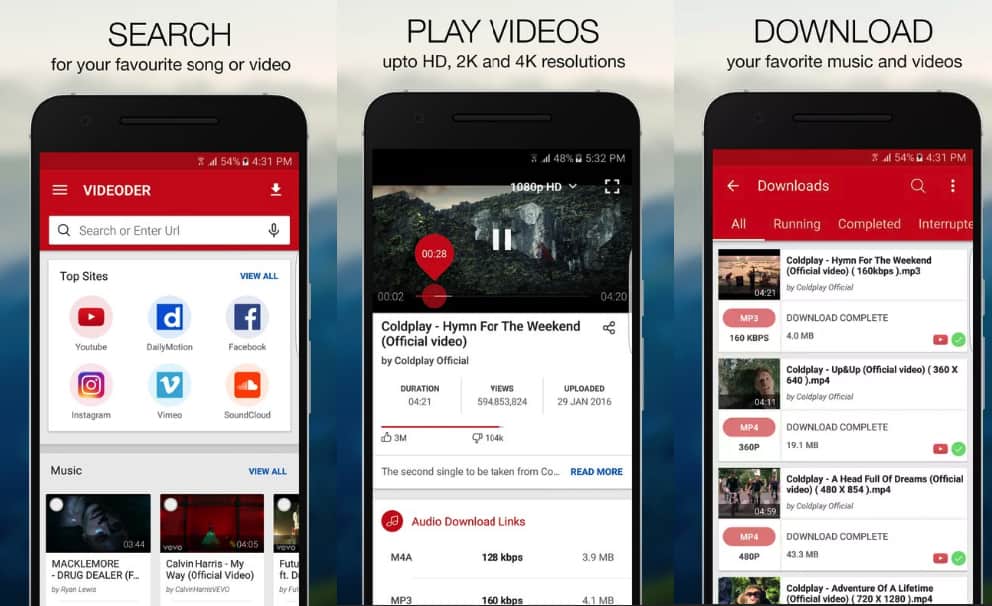
In spite of supporting multi-platforms, Videoder is more commonly used on Android. It' an incredible Myspace video downloader to easily get videos shared from Myspace. Apart from Myspace, it supports a long list of websites, such as YouTube, Instagram, TikTok, 9Gag, Soundcloud, Voot, Vimeo, Vine, YouKu, etc. It contains annoying advertisements. To remove them, you can purchase the Videoder Premium plugin from Play Store.
Steps to download Myspace videos on Android:
- Install and run Videoder on your Android.
- Look for a Myspace video and open it.
- Tap on the download bubble.
- Select the resolution and start your download.
- Tap on the download icon on the top to check your download.
![myspace video downloader android]()
Advantages:
- User-friendly interface
- Integrate a built-in video search engine
- Multiple resolutions are available
- Batch downloading Myspace video
Disadvantages:
- May download ads instead of videos
- Sometimes became slow
Download Songs from Myspace Online
#1 PureDownloader.com
Available on: Mac, PC, Android, and iOS
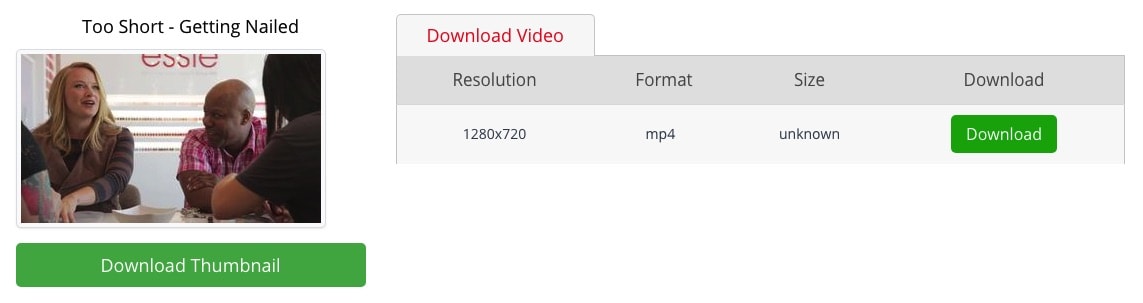
It's considered to be a simple and decent Myspace video downloader online free, helping you download video and thumbnail from Myspace. Although it claims to support over 100 sites, only 34 are listed in total. As same as pastedownload.com mentioned above, it has no ability to download Myspace music. Since myspacemp3.org was gone, I haven’t found any effective Myspace music downloader online.
- Head to https://puredownloader.com/.
- Copy a video link from Myspace, and paste it into puredownloader.com.
- Click the red “Download” button.
![myspace video downloader online free puredownloader 01]()
- Right-click the green “Download” button, choose “Save Link As…” and click “Save” again.
![myspace video downloader online free puredownloader 02]()

Advantages:
- Free of charge
- No installation requirement
- No ads
Disadvantages:
- No conversion feature
- Can’t download Myspace videos in bulk
- Unable to download Myspace music file
#2 Keepv.id
Available on: Mac, PC, Android, and iOS
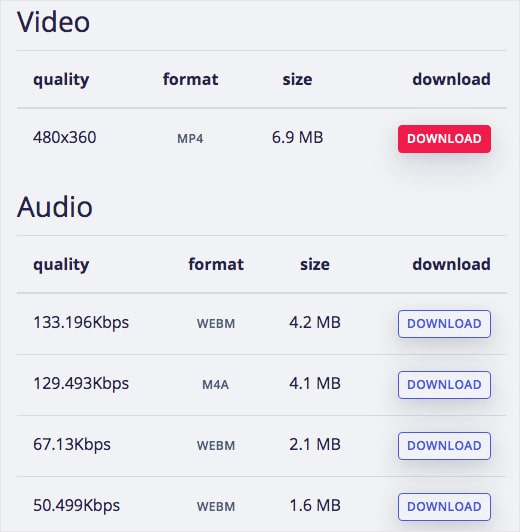
Keepv.id is a Myspace downloader online that aims to be the winner of video download sites. It helps download Myspace videos free to MP4, FLV, M4A, and WebM, but not to MP3. Keepv.id also works on many famous video portals, such as Digg, Flipagram, LinkedIn, Outside TV, Swissinfo, and so forth. With no registration required, one can save video from Myspace online quickly.
- Open a browser and go to https://keepv.id/.
- Copy the video URL to clipboard and paste it to Keepv.id.
![keepvid myspace downloader online 01]()
- Click “Go”.
- Pick a video or audio option to download.
![choose a myspace video format keepvid 02]()

Advantages:
- No need to pay
- Convenient to operate
- Support a few websites
Disadvantages:
- Can't download Myspace music to MP3
- Pop-up ads
- Have to fetch video individually
Download with Browser Extension
Available on: Chrome and Firefox
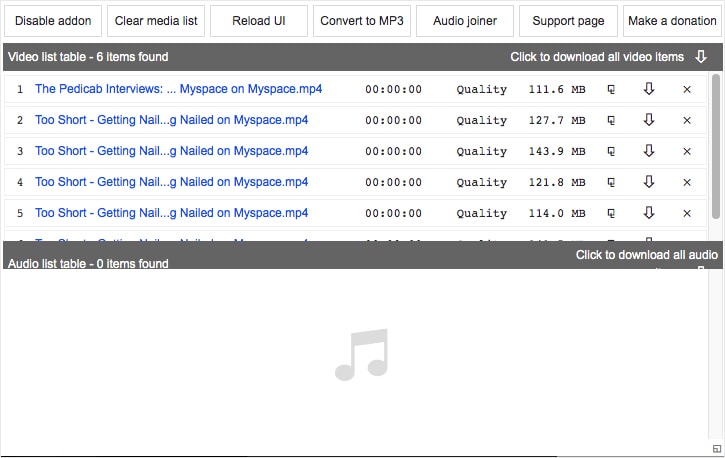
Video & Audio Downloader, offered by chYer, is a free plugin for both Chrome and Firefox. This Myspace video downloader can detect over 40 media file formats such as MP4, MP3, WAV, MPEG, etc. But it doesn’t specify which sites are supported. Based on my test, it's capable of downloading Myspace videos, while the music still can't.
Note: Maybe Myspace music is difficult to catch. I tested many browser plugins like Flash Video Downloader, Video Downloader Ultimate, and Audio Downloader Prime. None of them detect music files in Myspace.
Steps to download Myspace videos using Chrome extension:
- Go to the Chrome Web Store and find Video & Audio Downloader.
- Click “Add to Chrome” > “Add extension” to install it.
![myspace video downloader for chrome and firefox 01]()
- Play a Myspace video and the plugin will detect it.
- Click the extension icon from the toolbar in the upper right corner, and click the download button to save the detected Myspace video.
![myspace downloader for chrome and firefox 02]()

Advantages:
- No payment
- Work fast
- Download all media items as a zip file
Disadvantages:
- Fail to catch music from Myspace and VK
- Can’t download YouTube video due to related policies and restrictions
- Download audio file of zero length
Things Need to Know about Myspace
What is MySpace?
Myspace, founded in 2003, is originally for musicians and bands to share creation and concert. Every user can write blogs, upload videos/photos/design profiles to show your interests and talents. The unfortunate event took place in 2019. Most old Myspace videos, photos, and songs uploaded between 2003 and 2015 were lost attribute to data migration. You can’t download old Myspace videos anymore.
Myspace vs. Facebook
Lots of MySpace users have finally flocked to a new social networking site- Facebook, which has rapidly grown into an Internet giant globally. Despite Myspace's efforts to innovate, the results have been disappointing. Anyway, I believe that the existence of Myspace still has its meaning.
Can I rip music from Myspace via GrabThatFile.com?
No, you can’t!
GrabThatFile.com is the online MySpace music downloader that was all the rage more than a decade ago. You only need to enter the URL of the album, and GrabThatFile.com will display all the songs it covers. This Myspace downloader empowers you to download four MP3 songs from Myspace per day. To grab unlimited songs, you can upgrade your account by donating 2 euros.
But GrabThatFile.com does not exist anymore and its official Twitter account also stopped updating in 2017.
Conclusion
Any of the above Myspace video downloaders are capable of downloading Myspace videos. But they serve for different operating systems. With an intuitive interface and professional performance, Cisdem VideoPaw and WinX YouTube Downloader stand out among all the tools. If you want to save money and don't mind quality & speed, Myspace video downloader online free deserves a try.
Copyright Disclaimer
Videos downloaded via the tools mentioned in this article are for personal and educational use only. Sharing or commercial use is not allowed unless you get permission first. The website fully respects copyright laws and will act upon any valid removal request.

Emily is a girl who loves to review various multimedia software. She enjoys exploring cutting edge technology and writing how-to guides. Hopefully her articles will help you solve your audio, video, DVD and Blu-ray issues.

Ryan Li is a senior developer at Cisdem. Since joining the company in 2017, he has led the development of Cisdem VideoPaw and now serves as the editorial advisor for all articles related to Video Converter.
Recamus
I stopped bothering with Myspace. I just use Bandcamp now. Myspace isn’t like it used to be.