


How to Download Video from Facebook to Computer (Still Working)
 1.1K
1.1K
 2
2


Although Facebook is a social media platform, video is at its core. With roughly 3 billion monthly active users, Facebook naturally ranks among the largest video sites. It's easy to discover videos on Facebook relevant to popular topics and trends. That's why the demand for downloading Facebook videos on Windows PC or Mac keeps climbing.
After much trial and error, I've finally come up with comprehensive and workable methods on how to download video from Facebook to computer. Read my article and hope it proves valuable to you.
 Cisdem VideoPaw
The Best Facebook Video Downloader for PC/Mac
- Download videos from Facebook post, group, comment, album, Ad Library, etc.
- Download Facebook videos from any page - yours, someone else's, or private
- Batch download all Facebook videos at once
- Save and convert Facebook videos to MP4, MP3, MKV, WMV, AAC, iPhone, Android, or other 600+ formats
- Retain unaltered quality and resolution even in 1080p, 4k, 5k, 8k
- Fast download speed
- Adjust Facebook videos’ resolution, codecs, and other parameters
- Offer embedded video converter, video editor, video compressor, media player, DVD/BD ripper, etc.
- Powerful, user-friendly, and safe
 Free Download Windows 10 or later
 Free Download macOS 10.15 or later
How to Download Video from Facebook to Computer with Downloader App
Advantages:
- Work with many websites and keeps high video quality
- Fast and stable with batch download support
- Download and convert Facebook video to a large number of video and audio formats
- All-in-one tool: trim, add subtitles, apply effects, digitizing a DVD or Blu-ray, and more
Disadvantages:
- Paid software ($49.99 per year, a free trial is available)
To download videos from Facebook to computer, the most reliable and effective way is to use a professional-grade program. Cisdem VideoPaw (originally Cisdem Video Converter) is precisely the right Facebook video downloader.
It lets you download an individual or multiple Facebook videos to MP4, MP3, or any format without login. Also, it supports downloading full-resolution videos from channels and playlists on YouTube, Twitter, Pinterest, Dailymotion, Bilibili, TikTok, Reddit, etc.
Free Download Windows 10 or later Free Download macOS 10.15 or later
Download Facebook videos to 1080p to computer in 3 easy steps:
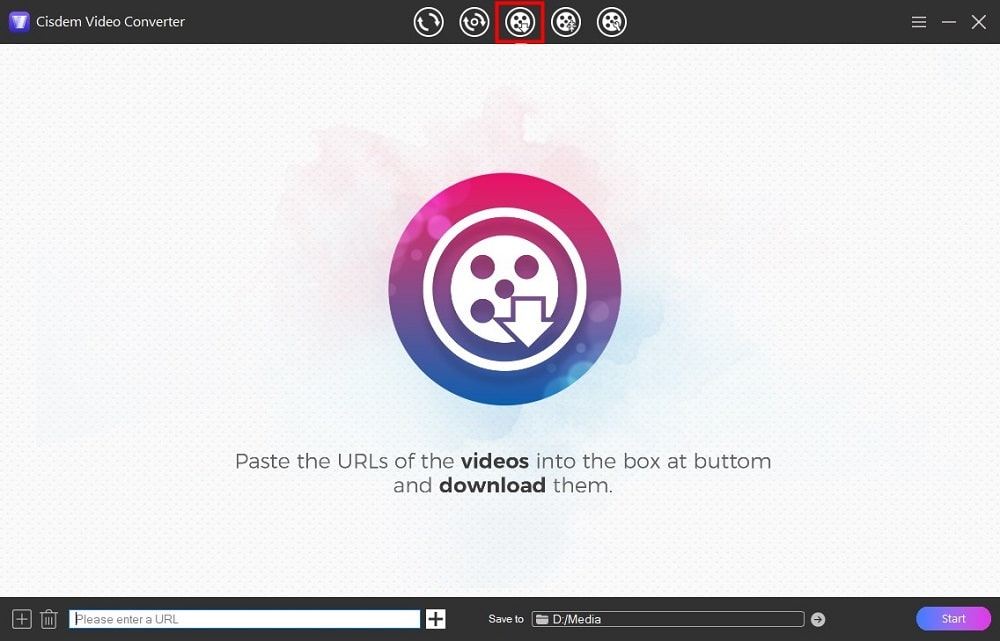
- After installing Cisdem VideoPaw, launch it and go to the “download” interface (the third icon).
![go to download interface]()
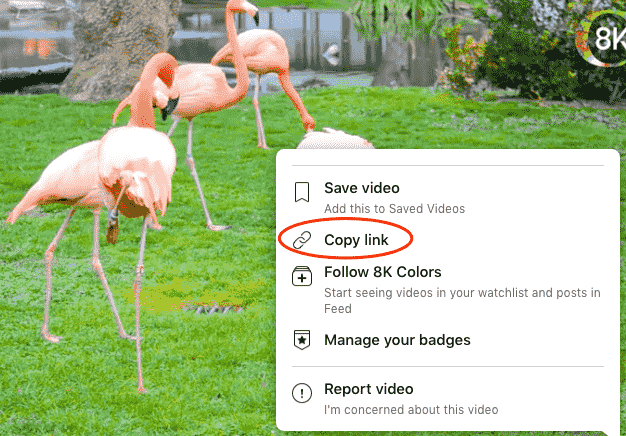
- Copy the Facebook video link.
Open a Facebook video, click on the “Share” button > “Copy link”. If the option isn't available, copy its URL from the address bar.
![]()
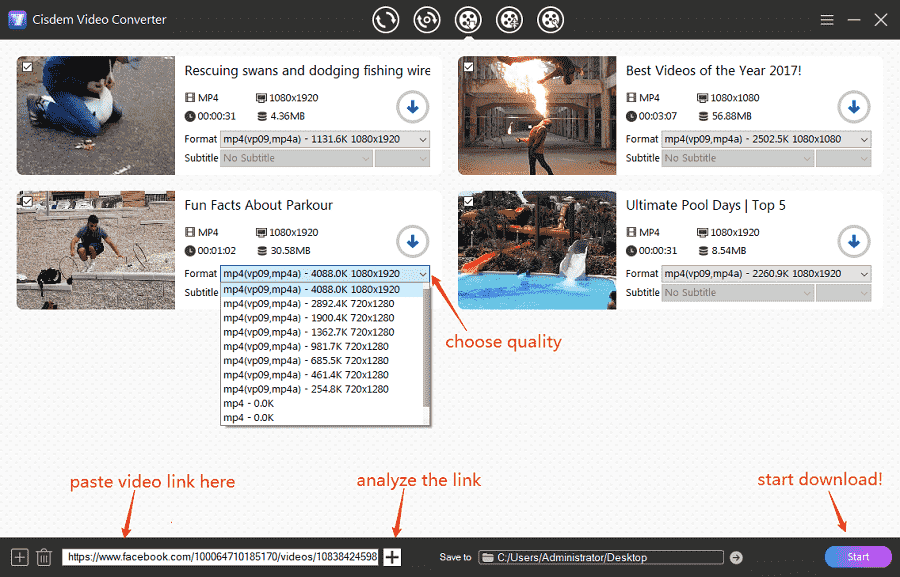
- Paste the link and start downloading.
Paste the FB video link to Cisdem’s bottom box, click “+” to analyze it. Once the link analysis is done, pick a format and resolution, and hit “Start” to download videos from Facebook on PC or Mac.![download facebook videos]()
Expert tips: upgrade your use
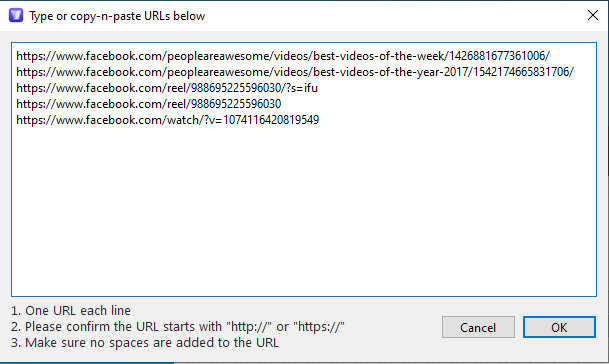
① Download all Facebook videos to computer at once
Click the add  icon, copy & paste FB URLs to the type-in box, one link per line, then click "OK" to load them all at once.
② Convert Facebook to other video formats or audio only
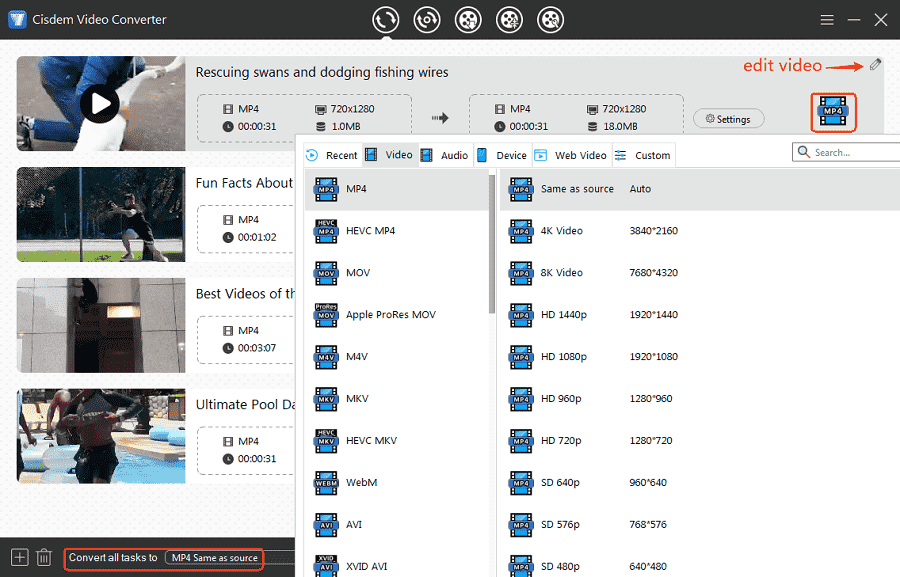
Click the succeed "√" button to locate your downloaded Facebook videos. Drag-n-drop them to Cisdem’s “convert” interface (first tab). Open the format panel and choose any digital format you want.
How to Download a Video from Facebook to Computer Online
Advantages:
- Work on all browsers and no need to install third-party software
- Easy to use and work quickly
Disadvantages:
- Cannot batch download multiple videos
- Limited output format and quality option
- No extra editing features supported
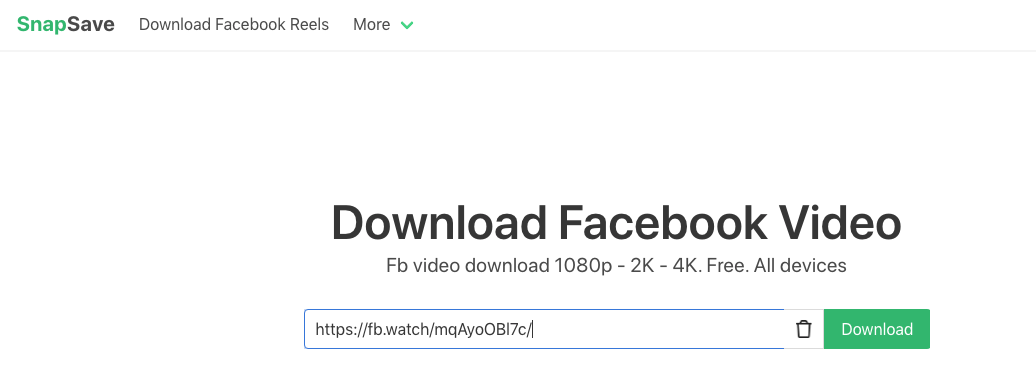
SnapSave.app is an online tool providing the ability to download Facebook videos, including Facebook reels, to computer without installing the app. It can also download videos from Instagram and TikTok. And it is friendly to people from different regions as it provides 25 languages.
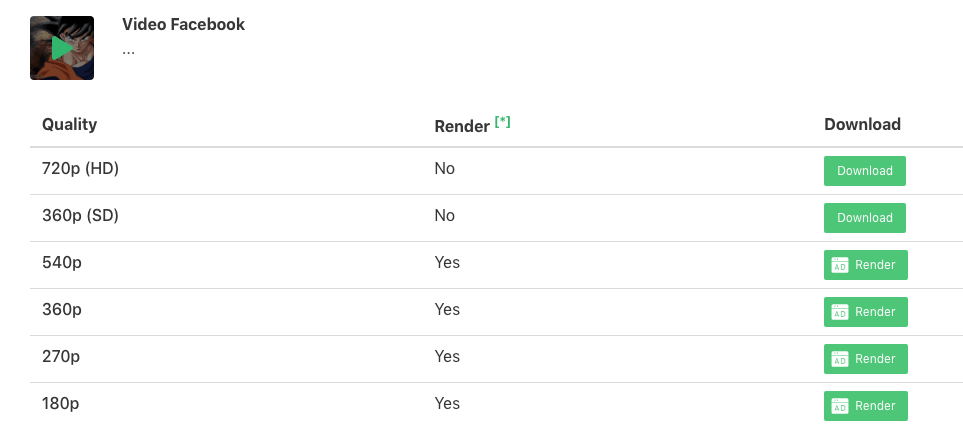
It is, however, limited to downloading videos from Facebook in 720p, despite the fact that the original video is in 4k. And MP4 is the only output format supported. Sometimes, when you copy the link from the top right “three-dot” button or “share” button, it says that the video is private and fails to grab the video. In this case, you need to switch to copy the link from link address bar.
Steps:
- Go to facebook.com and copy the URL of the video you wish to download.
- Visit the website https://snapsave.app/.
![]()
- Place the Facebook link into the URL field. Click “Download”.
- Choose video quality and click the green “Download” button to start to download video from Facebook online, just ignore the popped-up unrelated window.
Use Facebook Video Downloader Extension on Browser
Advantages:
- No need to install entity software and copy-n-paste the video links
- East to master and convenient
- Acceptable speed
Disadvantages:
- Compromise the video quality to some extent
- Can only save to MP4 format
- Provide no advanced features
On Google Chrome
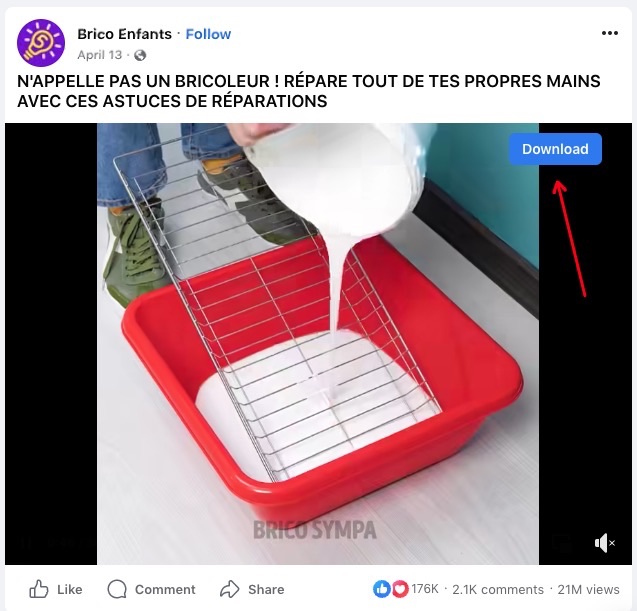
Video Downloader for Facebook, powered by downloaderforfb.com, is self-explanatory in its name. It can detect all Facebook videos with titles on a page, no need to copy and paste links, allowing people to choose to play, locate or download the analyzed videos. Moreover, it prompts a download button on the top right corner of each video, permitting people to save any videos at will.
Unfortunately, it has the same downside as SnapSave.app mentioned above, which is the inability to download video from Facebook to 1080p, but to 360p or 720p.
Steps on how to download a video from Facebook to computer using Google Chrome extension:
- Find Video Downloader for Facebook in Chrome Store and install it on your browser.
- Open the web page that embeds the Facebook video you want to save. The extension will auto-detect the video.
- Click on the icon of Video Downloader for Facebook at the top right corner of the Chrome browser.
Note: If you don't see its icon, click the “Extensions” and pin it to the toolbar. - Hit the download icon to save Facebook video to MP4 format.
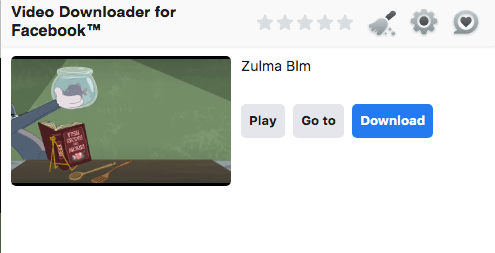 Alternatively, ignore the step 3, directly move to the target video, which can also make it by clicking the appearing “Download” button on the video.
![]()
On Firefox
The Firefox browser's plugins for downloading Facebook videos to computer are less mature than Chrome's. It took me several plugins to save a Facebook video, yet most of them couldn't do so.
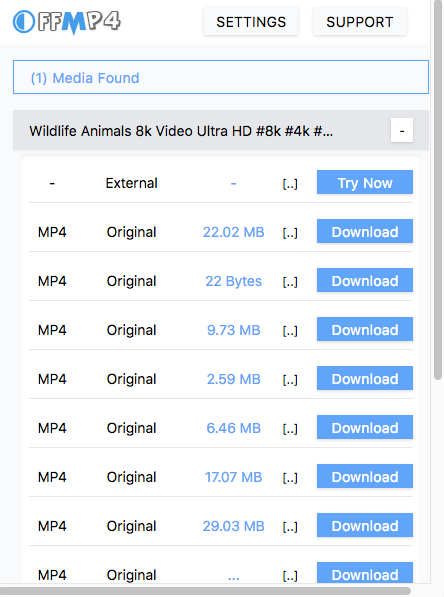
OFFMP4 - Online Video Download Helper by sudovijay is a treasure trove of Firefox add-ons. It can download HD and 4k Facebook videos but at a snail's pace. There is an "External" option in the output. It will take you to the 9xbuddy website to download the video, but sometimes it will prompt you to say, "This Page has no download links or temporarily blocked".
Steps on how to download video from Facebook to computer with Firefox Add-on:
- Go to the official Firefox add-ons website. In the search bar, search for OFFMP4 - Online Video Download Helper and add it to Firefox.
- Open a Facebook video you would like to download. It will start playing automatically.
- Click the plugin icon next to the Firefox URL address bar. A pop-up will appear with different output options.
- Choose one output and begin the Facebook video download on Firefox.
Note: The resolution of each output is not explicitly shown, you can only judge by the size. Generally, the bigger the size, the higher the resolution.![]()
How to Download Your Own Facebook Videos (No Tools Needed)
If you upload videos on FB platform, including Facebook live videos, whether public or private, you can download them directly.
Note: Facebook now saves video uploads as Reels by default. A Reel link looks like this: https://www.facebook.com/reel/xxx. To get the download option, change /reel/ to /watch/?v=, so it becomes: https://www.facebook.com/watch/?v=xxx.
Steps:
- Go to your profile and click the "Reels" tab.
- Select the video you'd like to download and open it.
- If the URL contains /reel/, change it to /watch/?v= and reload the page.
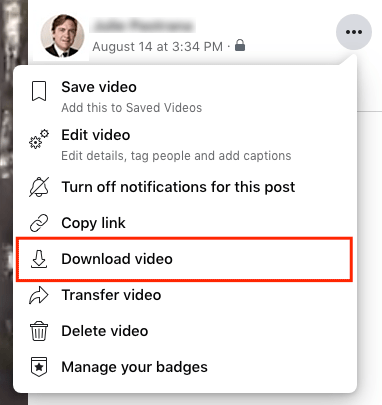
- Click the three dots in the upper right-hand corner and choose "Download video".
Can I Download Private Facebook Video to Computer
Yes, but you can only download private Facebook videos if you have permission to view them (e.g., your own private videos, or videos shared with you in a group or by a friend). If you can see Facebook videos on your screen, you can download them to computer with VideoPaw or fdownloader.net.
Click here to learn more: How to Download Private Facebook Videos.
Can I download video from Facebook group to computer?
Yes. It is also easy to download a video from a Facebook group to computer. The key is that you have to join the group in advance. Once you're a member and can view the video, you can download it using the same methods as regular Facebook videos.
Can I download video from Facebook to computer using Developer Tools?
Not anymore. A few years ago, you could use Developer Tools (Inspect → Network → Media) to grab Facebook videos. But Facebook has changed how their site works, and that trick doesn't work anymore.
Facebook now breaks videos into small fragments. You might see multiple pieces in Developer Tools, but none of them is the full video and you can't download or play them properly.
Can I download a Facebook video to computer by changing "www" to "mbasic" in the URL?
Not anymore. This used to be a simple and popular trick, just replace "www" with "mbasic" in the URL, and Facebook would load a plain, retro version of the page where you could right-click and save the video.
But Facebook has since disabled this workaround. If you're still seeing this method suggested elsewhere, it's outdated.
Can we download Facebook live videos to computer?
To download Facebook live videos, remember to download live video that has already completed. Otherwise, you can only get part of the live that has already come out. For the sake of security, it is highly recommended to use a desktop software, which possesses more powerful and stable technology supporting and shows greater performances from all respects.
For more details, please read the article at: How to Download Facebook Live Video Easily (Yours and Others).
Final Words
Facebook offers a "Save video" option. Despite this, the video is only saved on Facebook for later viewing, not for offline viewing. You can think of it as bookmarking a video.
The above shows workable ways on how to download video from Facebook to computer. And you can also transfer downloaded Facebook videos to iPhone or Android phone. To stay on the safe side of the law and use Facebook videos legally, I recommend downloading videos for personal purposes.

Emily is a girl who loves to review various multimedia software. She enjoys exploring cutting edge technology and writing how-to guides. Hopefully her articles will help you solve your audio, video, DVD and Blu-ray issues.

Ryan Li is a senior developer at Cisdem. Since joining the company in 2017, he has led the development of Cisdem VideoPaw and now serves as the editorial advisor for all articles related to Video Converter.
Kermit
Was stuck with a 1080p video from a private group. Tried a few tools, but none of them worked. Thanks for pointing me to VideoPaw. It worked for me.
Alexis F.
Tried your methods and work fine. The old mbasic trick doesn’t work anymore, but these steps made saving Facebook videos simple.