


 macOS
macOS
Reviews
Read what trusted tech publications and real users think of Cisdem VideoPaw. Determine whether it's the right tool for you based on unbiased and honest insights. Already using it? We’d love to hear your thoughts too.
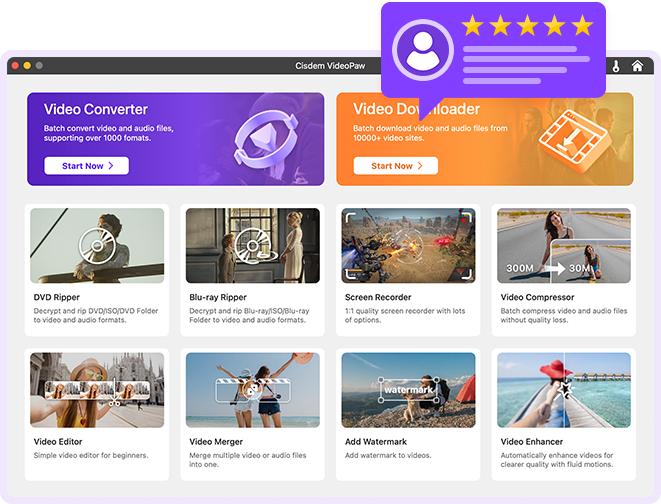
Tech Reviews of Cisdem VideoPaw for Mac

"One of the best converters you can think of is Cisdem Video Converter. Along with converting your MOV files to MP3, you can be assured that the quality of your file won't go down. You can also play with some edits and customization if you are interested."

"Cisdem Video Converter is a Mac exclusive program that can convert videos to numerous formats. Many users install it on their computers for its built-in DVD ripper which can read and convert both homemade and copy-protected commercial discs. It enables users to convert DVDs to MP3, MKV, MP4, AVI, and many other formats."

"Cisdem Video Converter is the most effective MKV to MOV converter for Mac that converts your HD videos at a fast speed. Even if they are big files. It supports up to 500 file formats, including almost all the video, audio formats that you may encounter."

"The best application for doing this is process is the Cisdem video converter. This is a stable and quickest video convertor Mac. This application allows users to convert videos from and to all formats."

"It is recommended to use a DVD ripping tool- Cisdem Video Converter to convert DVD to MP4 on Mac to get rid of a DVD player during your journey. It is considered an excellent toolbox to convert DVD, video, and audio files into more than 300+ formats. It can download online videos, combine multiple video clips, edit videos, etc., apart from conversion capabilities."

"Cisdem Video Converter is dead-simple to use, but has many really awesome features. You can download and convert videos of any format and it also supports rip DVDs. If you need to make some edits and add effects for the video, this app can also help you do it. As for the downloading video quality, this is what makes this app stand out from the rest. You can choose to download videos at 1080p or 4k."

"Cisdem Video Converter is the best video converter for the Mac operating system. It can download videos from streaming sites like YouTube and convert the file into wav and other formats. This Youtube 2 wav converter for Mac gives the users multiple choices for converting and downloading."

"If you are using a Mac computer, you can utilize the Cisdem Video Converter to download your JW Player videos. This third-party JW Player downloader allows you to download all kinds of videos by just pasting their URLs, similar to Real Player. It works with over 500 different formats, so you can rest easy knowing almost all forms are covered. It is important to note, however, that Cisdem only works with macOS."

"Cisdem software is specifically for Mac users. It is free and has tremendous features. It has a myriad of customizable input and output formats. The editing features of this tool are also fun.With Cisdem, you do not need to bother getting a screen recorder. As it also screens records screen activity with audio. Cisdem retains the high quality of videos whilst using a high conversion rate."
User Reviews of Cisdem VideoPaw for Mac
Rated 4,9 out of 5 (160 Reviews)
Scrivi una recensione
Valuta questo prodotto *
Nome *
Riepilogo in una riga *
Scrivi la tua recensione *

Cisdem VideoPaw for Mac
Convert, download, record, compress, enhance, edit video and rip DVD/Blu-ray.

I have tried HandBrake, MacX and various others and this is by far the best combination of speed quality and ease of use. The YouTube download feature is incredibly convenient. Highly recommend to anyone on Mac.
October 23, 2026 | Christopher Lee
I get footage in every format imaginable and needed it all in MP4 for editing and sharing. Cisdem Video Converter for Mac handled MOV, MKV, and AVI without breaking a sweat, and the output kept the original quality instead of looking soft. Dropping files in, picking a format, and going was all it took. For someone who just wants reliable conversion without learning a complicated app, it does exactly that and gets out of the way.
October 11, 2026 | Christopher Mitchell
I have been using this for about a month now and it handles everything I throw at it. The interface is clean and the output quality is outstanding. Highly recommended.
October 10, 2026 | James Wilson
Before sending a video out, I usually needed to cut the dead ends and join a couple of takes, which meant opening yet another editor. Cisdem Video Converter for Mac lets me trim, merge, and add simple effects right inside the converter, so the whole job happens in one place. I also dropped in a watermark on a client piece without extra software. Having light editing built in saves me real time on small tasks.
October 05, 2026 | Richard Taylor
I often need training and tutorial videos saved for flights where there is no Wi-Fi. Cisdem Video Converter for Mac pulls videos from the major sites by pasting a link, and it lets me grab them in up to 4K when the source allows. Batch downloading a whole playlist at once is the feature I did not know I needed. It has become my go-to for building an offline watch list.
September 20, 2026 | Michelle Roberts
I had shelves of DVDs I couldn't watch anymore and wanted them on my Apple TV. Cisdem Video Converter for Mac ripped both homemade and store-bought discs, including a few copy-protected ones, straight to MP4 and MKV without fuss. The quality matched the discs and the files play everywhere in my house now. Turning a dusty collection into a tidy digital library was far easier than I expected.
September 07, 2026 | Jeffrey Walker
I dragged in a folder of mixed-format clips, chose one output setting, and Cisdem Video Converter for Mac processed them all at once noticeably faster than the tool I used before. The interface is clean enough that I was converting within minutes and never opened a help page. Big batch jobs finishing quickly, with quality intact, is the everyday win that keeps me using it.
September 06, 2026 | Richard Davis
I had a download issue with Cisdem VideoPaw and emailed the Cisdem support team last week. They responded quickly and helped resolve the issue in just one day! Really impressed with their speedy and helpful customer service.
August 25, 2026 | Miles
Runs natively on Apple Silicon and the performance is outstanding. I upgraded from an Intel Mac and the difference is night and day. Conversions that took 15 minutes now finish in under 5. Very well optimized.
August 14, 2026 | Stephanie Garcia
I threw every format I had at this converter and it handled them all without breaking a sweat. MKV, AVI, MOV, MP4, even some obscure ones. The built-in player is handy for previewing before conversion too.
August 02, 2026 | David Martinez
Altro