


How to Recover Yahoo Emails from 10 Years Ago [Helpful Guide]
 2.8K
2.8K
 1
1


If you’ve suddenly discovered that your old Yahoo emails are lost, no need to panic. There are several effective ways to recover Yahoo emails from 10 years ago, 2 years ago or further back, and regain access to those sentimental memories or important business data. In this guide, we’ve tested all possible approaches and collected a list of feasible ways to recover old Yahoo emails.
 Cisdem Data Recovery for Windows and Mac
Recover Old Yahoo Emails from 10 Years Ago
- Recover both recently and permanently deleted Yahoo emails
- Restore old Yahoo emails from various devices: PC, Mac, Android phone, USB, SD card, etc.
- Recover both email contents and attachments
- Also retrieve emails from Gmail, Apple Mail, Microsoft Outlook, etc.
- Repair damaged Yahoo attachments: videos, photos, documents.
- Preview documents before recovery
- Support retrieving 1000+ file types: videos, photos, documents, emails, archives, bookmarks, etc.
- Recover unsaved files
- Additional features: recover from NAS/Linux/iCloud/Crashed PC, create disk back up, create bootable installer, etc.
 Free Download Windows 11/10/8/7
 Free Download macOS 10.15 or later
Can You Recover Old Yahoo Emails?
Yes, we can, but it is often a challenge.
For Yahoo emails that are deleted in the past 7 days, we can easily recover from the Trash folder, or ask help from Yahoo Support by submitting a request when they are not available in your Yahoo trash.
For Yahoo emails that are automatically deleted by Yahoo due to inactive account for more than 12 months, it is not possible to recover, because the emails have been wiped from Yahoo server. Even, sometimes in this situation, your account may be removed and you have no access to the account anymore. However, if you once backed up or downloaded your Yahoo emails to a local drive, it is possible to recover from the backup, or use a data recovery program.
While for Yahoo emails that you’ve kept them in your Inbox for more than 10 years or longer, and you are still an active Yahoo email user, as long as you did not delete them, they are still there and you can filter or search easily in the client. If you’ve deleted, it is not possible to recover them from Yahoo server, but it is possible to recover when you once backed up the emails to your computer, mobile phone, USB or other physical storage media. And the recovery rate depends on how frequently you used the media since then, and how much new data you’ve added to the storage device, the more, the less likely you can recover the old Yahoo emails.
Anyway, it is always worth a try on the following methods to recover your old Yahoo emails, if they mean a lot to you.
How to Recover Old Yahoo Emails from 10 Years Ago?
If Yahoo’s servers no longer hold your old emails due to account inactivity, or your Yahoo emails have been in the box for more than 10 years and lost, your best hope lies in local backups or email client archives. Many users might not realize that they had stored copies of emails on their old devices or cloud backup services. Let’s dive into the steps!
#1. Check Local or Cloud Backups
Recall if you manually backed up your emails to a storage device or some cloud-based service. Anyway, try it first.
Option A. Check Hard Drive/External Drive/USB Backups
Yahoo allows users to save the emails as PDF. Also provides IMAP access for downloading Yahoo emails into local folder via 3rd party email clients such as Outlook, Thunderbird, Apple Mail, in the format of PST, MBOX, EML or other formats. If you have such a backup, you should search the files and import to restore.
- Connect your old storage device to a computer if necessary.
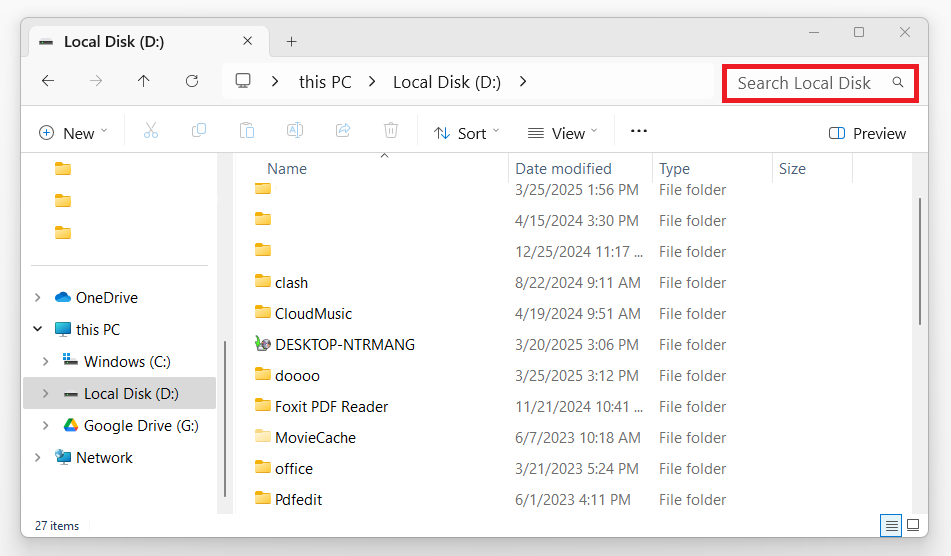
- For Windows: Press Windows + E keys to open File Explorer, choose a location on the left, type in keywords at the top right or enter file extension .eml/.pdf/.pst/.eml/.mbox to search for Yahoo emails backup.
![how to recover yahoo email years ago backup01]() For Mac: Open Finder app in the dock, locate your drive, type in keywords or enter file extension .eml/.pdf/.pst/.eml/.mbox for email search.
For Mac: Open Finder app in the dock, locate your drive, type in keywords or enter file extension .eml/.pdf/.pst/.eml/.mbox for email search.![how to recover yahoo email years ago backup02]()
- Then open or import the email files in Outlook, Thunderbird, Apple Mail to view and recover.
 For Mac: Open Finder app in the dock, locate your drive, type in keywords or enter file extension .eml/.pdf/.pst/.eml/.mbox for email search.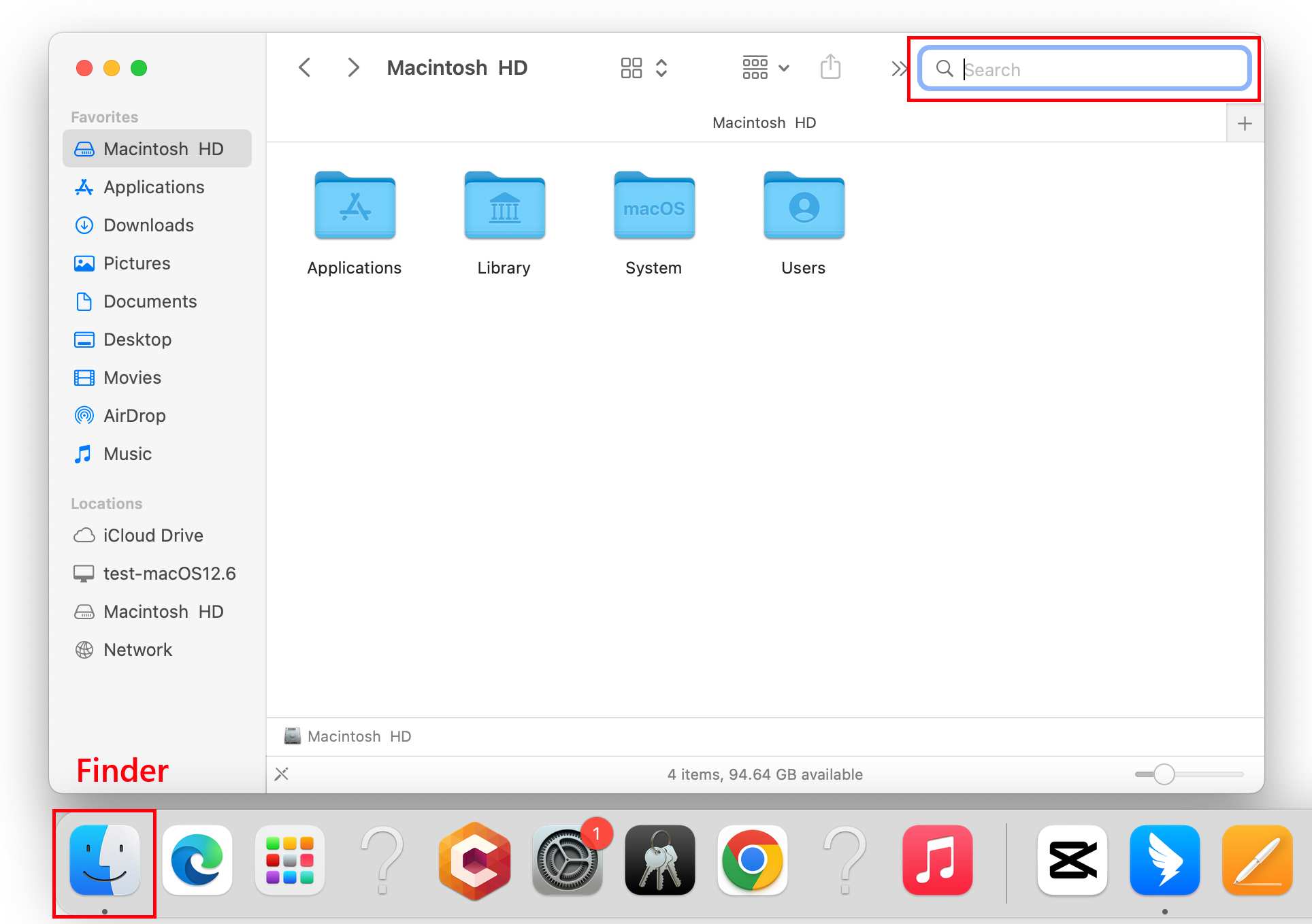
Option 2. Check Gmail/Hotmail/AOL Mail Boxes
Yahoo also allows users to add a Google, Outlook and AOL address to back up the files to Gmail, Hotmail and AOL mail. If you've done this backup settings before, you should check in these mailboxes to see if there is still a copy there.
- Log in to your account. (Here shows Gmail.)
- Search a specific email through the search box or Advanced Search.
![check gmail copy01]()
- Then forward or download the copy as needed.
![check gmail copy]()


#2. Recover from Email Clients
You may have added your Yahoo account to the email client on your device, such as Microsoft Outlook, Apple Mail, Spark, Mozilla Thunderbird, etc. An email client is a piece of software used to receive, send and manage emails. If you’ve dis-enabled the Yahoo email sync in your email client for a while, then you can restore the Yahoo emails via the local backup of such an email client programs.
- Locate the Yahoo emails from a local backup, according to your email client and operating system.
If you are using Microsoft Outlook:
For Windows users --- C:\Users\[username]\Documents\Outlook Files
For macOS users --- /Users/<username>/Library/Group Containers/UBF8T346G9.Office/Outlook/Outlook 15 Profiles/Main Profile
If you are using Apple Mail
~/Library/Mail/V(version number)/
If you are using Mozilla Thunderbird
For Windows users --- C:\Users\<Your Username>\AppData\Roaming\Thunderbird\Profiles\<Your Profile Name>\
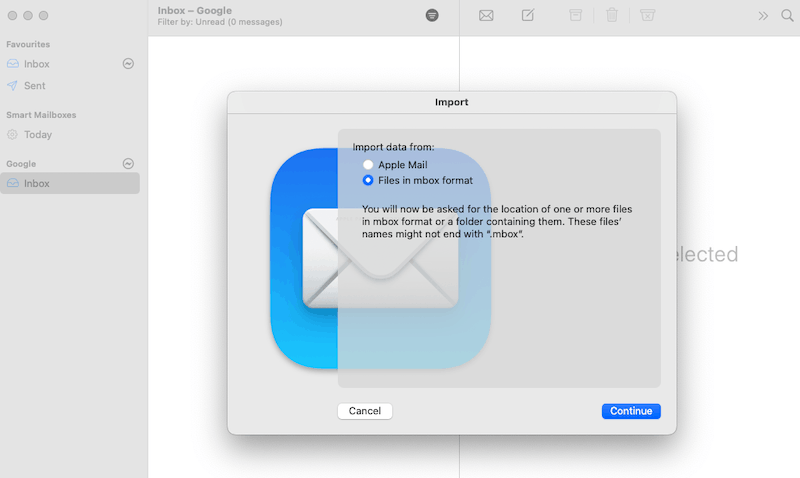
For macOS users --- ~/Library/Thunderbird/Profiles/ - Open or import the Yahoo email copies in the format of EML, EMLX, MBOX, MSG or PDF to your email client, you will be able to regain access to the old Yahoo emails.
![import yahoo emails]()
#3. Recover Yahoo Emails from 10 Years Ago Using Cisdem Data Recovery
The process of manually checking backups is frustrating sometimes, time consuming and fail to recover. In addition, if unfortunate, the attachments in the old Yahoo emails may be damaged or corrupted.
If you have a good habit of backing up emails in the past, or there indeed was a local back up in your email client before, even the backups are not available not, then a specialized data recovery application called Cisdem Data Recovery is the troubleshooter. It is capable of deep scanning the media where the backup was stored to recover Yahoo emails. The whole scanning process is extremely fast, and you can pause or resume it at your will.
Furthermore, this software can restore attachments like videos, photos, documents and so on from a lost Yahoo email. Even it can repair the attachment if there is a corruption. Not only recovers emails, Cisdem Data Recovery supports a wide range of files, including documents, bookmarks, archives, recordings, audio, video, photos, vector graphics, etc.
Main Features of Cisdem Data Recovery
- Recover lost data from both internal and external storage devices
- Support 1000+ file types
- Repair damaged videos, photos, documents
- Recover unsaved documents
- Applicable to different data loss situations
- Support crashed PC/Mac data recovery
- Preview files before recover
- Save recovered files to local drive or to cloud
- Scan fast, pause, stop, resume with ease
How to Recover Yahoo Emails from 10 Years Ago?
- Get this email data recovery tool installed on your device.
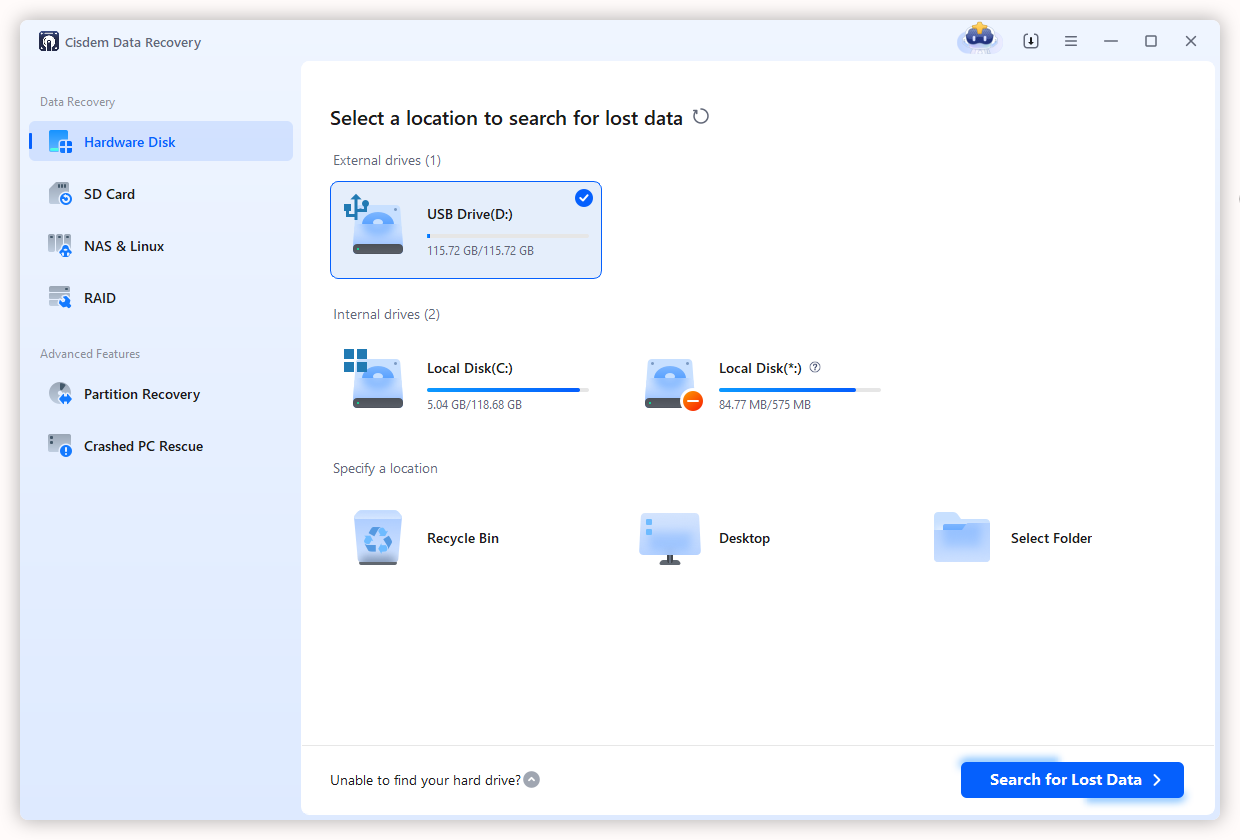
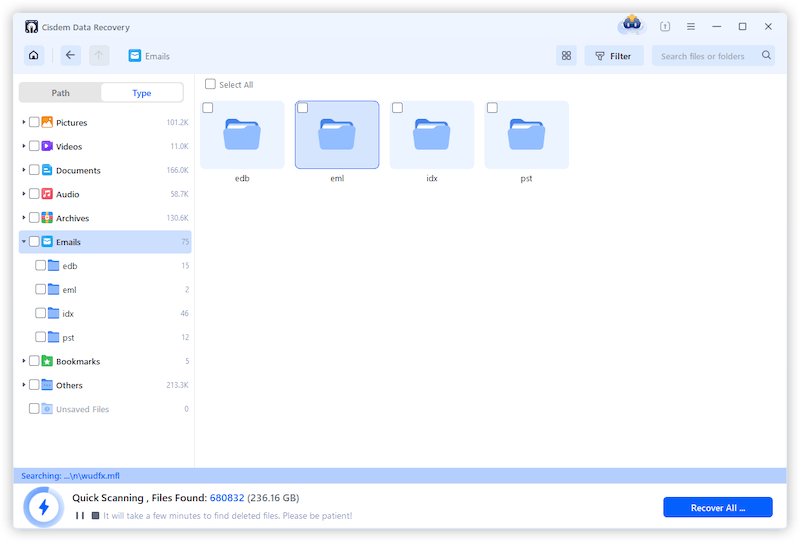
Free Download Windows 11/10/8/7 Free Download macOS 10.15 or later - Launch the software, select a drive or location where your email data might be stored. Continue with Search for Lost Data, the program will start fast scanning.
![how to recover old yahoo emais cisdem01]()
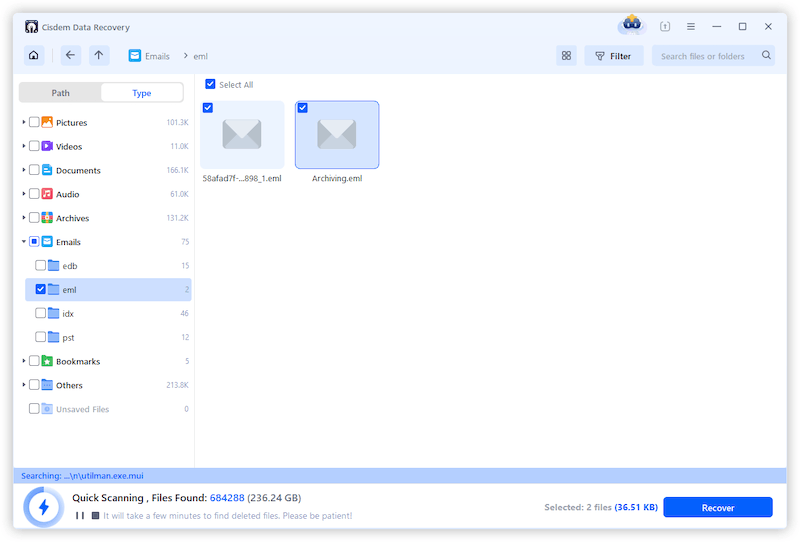
- Under the Type tab, choose Emails, all the recoverable EML, PST, MBOX and other emails will show up.
![how to recover old yahoo emais cisdem02]()
- Select the Yahoo email EML files you need, and click Recover button.
![recover yahoo emails cisdem 03]()
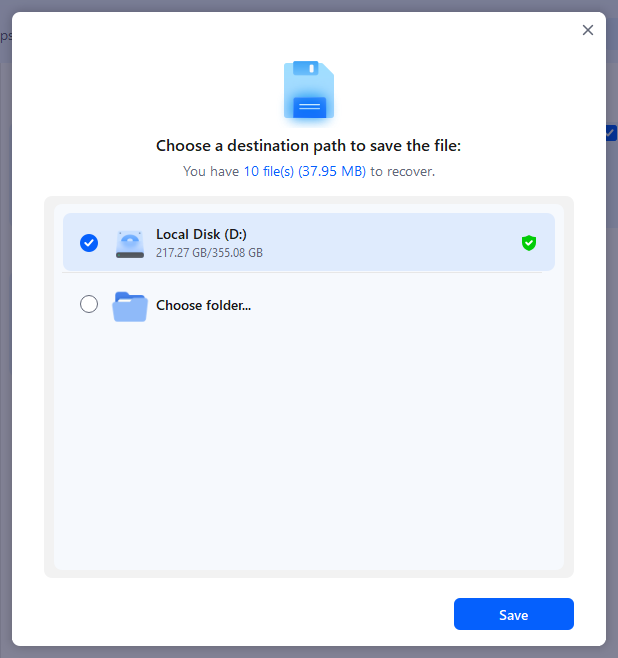
- Choose a destination path to save your restored email data. Then you can open them with your email client.
![how to recover old yahoo emails cisdem03]()
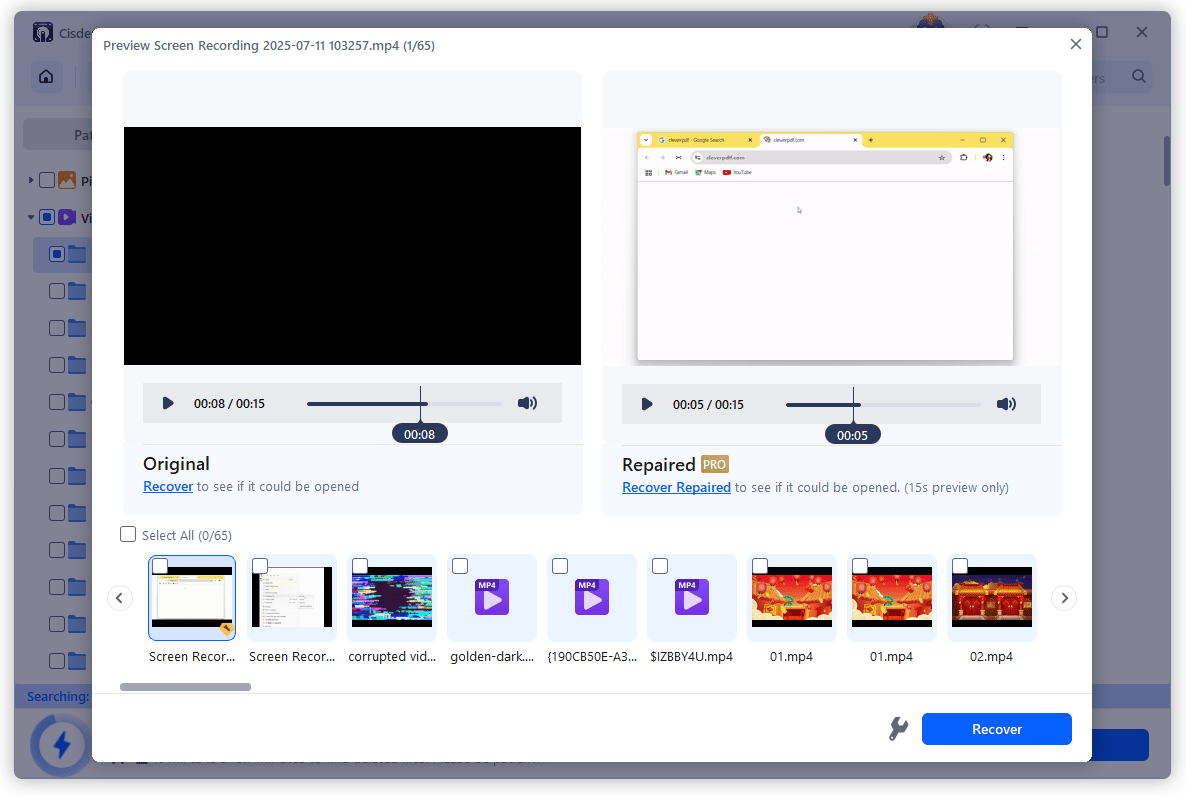
- (Optional) If the file in the email attachment is damaged, extract the file and save it to your device, then relaunch Cisdem, scan the drive and use the File Repair tool to fix the damaged files.
![repair yahoo emails]()
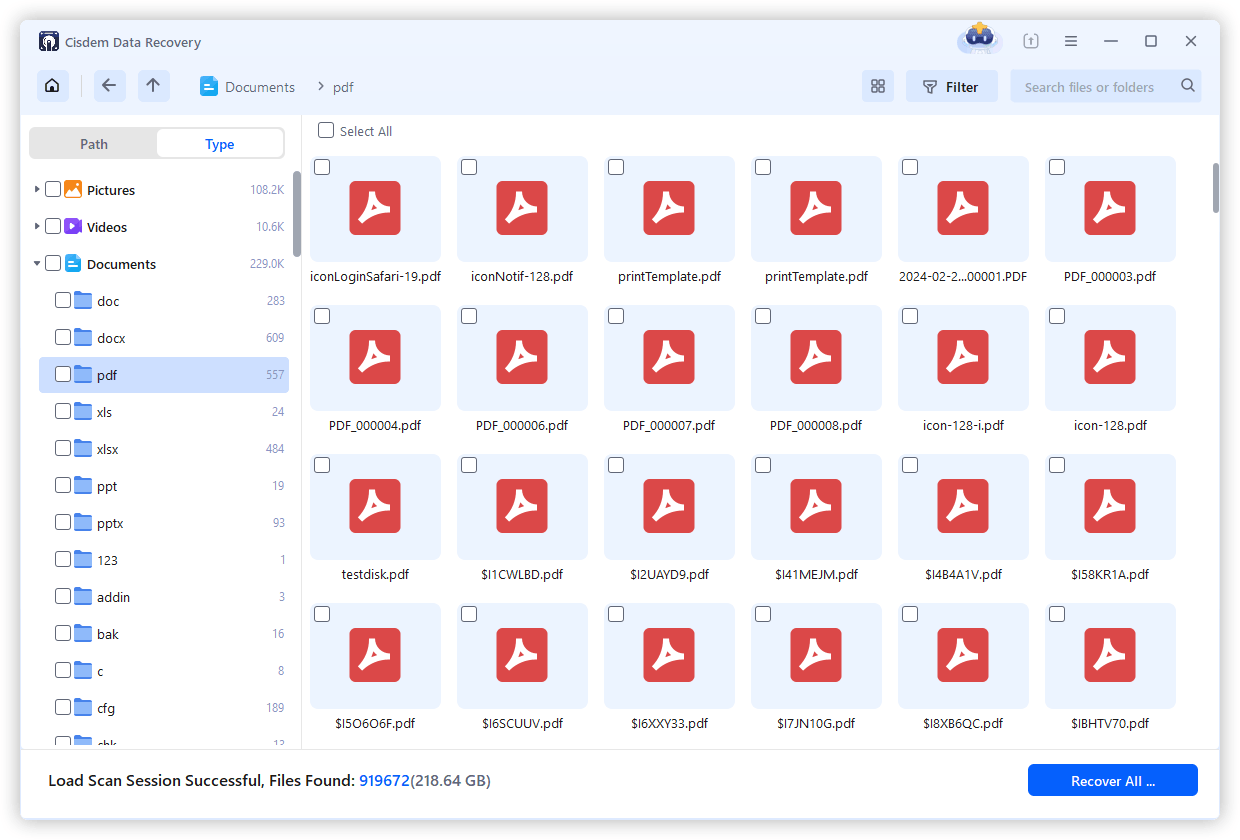
tips: Also, you can go to Documents > PDF to recover Yahoo emails, since Yahoo allows downloading emails as PDF format.
How to Recover Deleted Yahoo Emails within 7 Days?
Things get a lot easier if you want to retrieve Yahoo emails that have been deleted or gone missing in the last 7 days.
#1. Restore from Trash
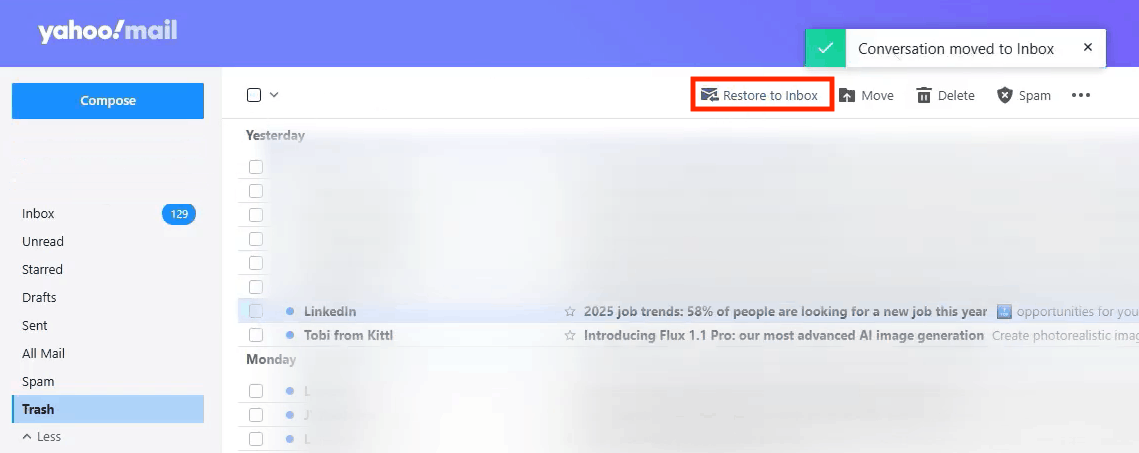
Yahoo email has a trash folder to hold the recently deleted emails in the last 7 days. If the deletion doesn’t exceed 7 days, then go checking the trash and restore.
- Log into your Yahoo email account.
- Go to Trash from the left panel.
- Select the deleted Yahoo email and click on Restore to Inbox.
![restore to inbox]()
- Then check the email in your box.
#2. Contact Yahoo Support for Help
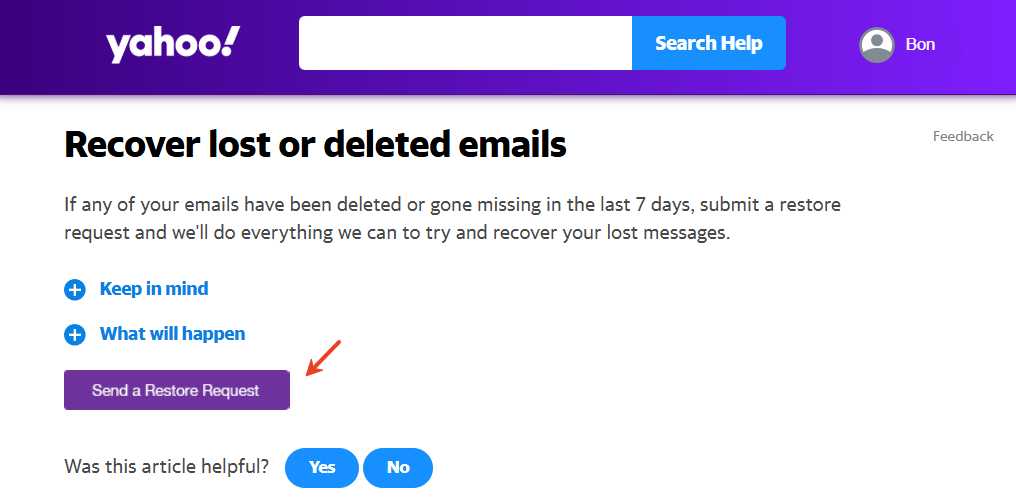
When a technical issue arises, product’s support service is always a solution, so is Yahoo Support. According to Yahoo official, they will try everything they can do to recover a deleted or missing Yahoo email in the last 7 days, by submitting a restore request.
- Log into your Yahoo account, visit this page https://help.yahoo.com/kb/recover-lost-deleted-emails-sln2552.html.
- Click on Send a Restore Request.
![how to recover old yahoo emails support03]()
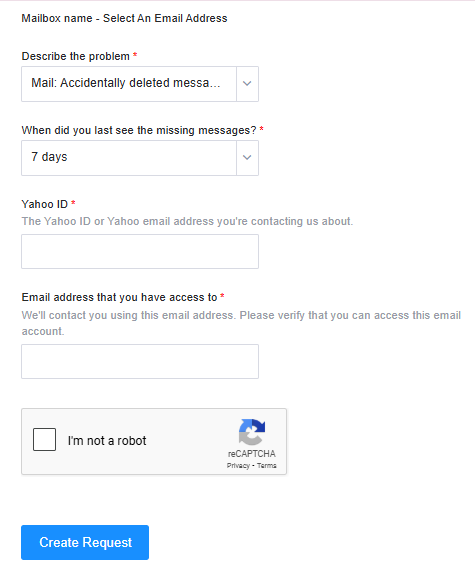
- Follow the instruction to provide details about your problem.
![how to recover old yahoo emails support04]()
- Submit your store request and wait for a response.
Note: If you are a premium user, you can contact a paid support agent on the Help Central page to get quicker reply.
#3. Check Other Folders in Your Yahoo Email
In most cases, we scroll through pages in Yahoo Inbox to find important emails. However, your emails may also be misjudged as spams, or moved to other folders. You should check every folder in your account to make sure they are not deleted at all.
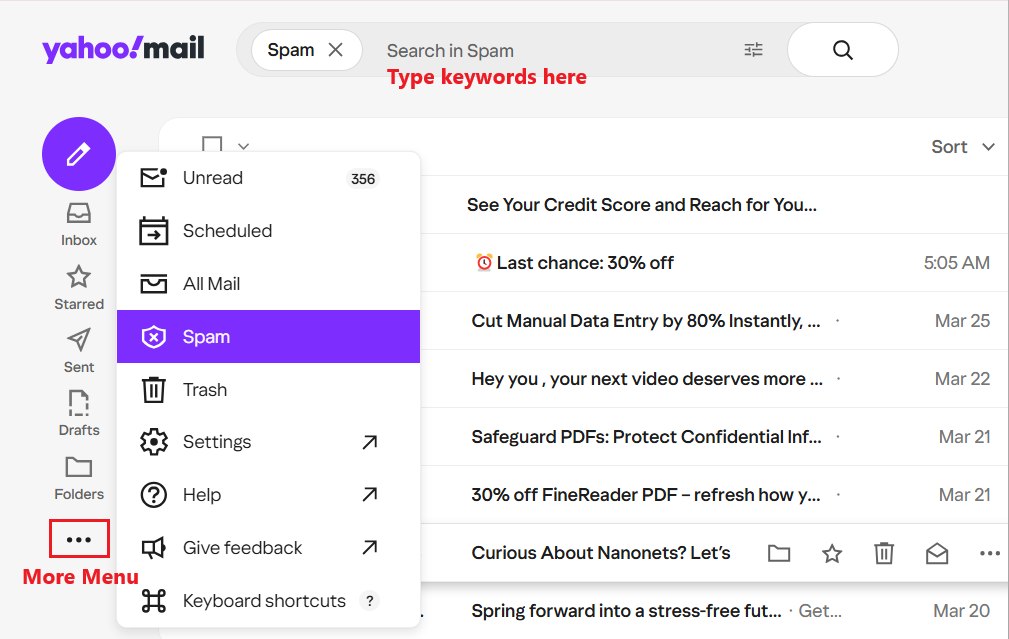
- Log in to your Yahoo Mail account on a browser.
- Expand More menu and choose Spam folder. (or any other folder)
![how to recover old yahoo emails search01]()
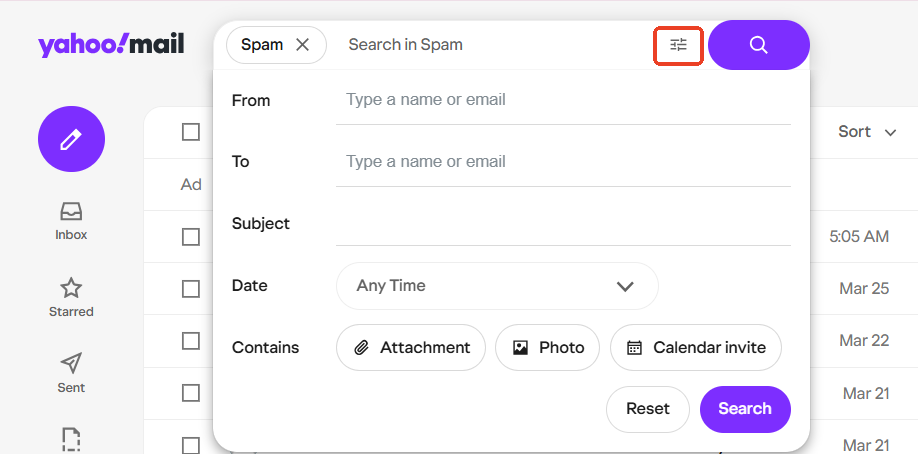
- Type keyword about your email in the Search box to locate it in the selected folder.
- Hit Advanced icon to make a more specific search.
![how to recover old yahoo emails search02]()
FAQs
1. Where are my old Yahoo emails?
As long as you did not delete them, they are still on the server in your Inbox or other folders.
Also, you can find a local copy on your device, if you’ve added the Yahoo account to a email client app.
2. Does Yahoo delete old emails?
Sometimes.
Yahoo can keep your emails forever, as long as you are an active user. But inactivity over 12 months will make Yahoo delete the old emails, even your account automatically.
Also, according to Yahoo, it will automatically empty emails in Trash after 7 days and Spam folder after 30 days.
3. How long does Yahoo keep emails?
Yahoo can keep emails forever, as long as the account is active. If you don't access your Yahoo email account for 12 months, Yahoo will consider it inactive and permanently delete all the emails.
If a Yahoo email is moved to Trash, it will be automatically deleted after 7 days. For spams, they will be deleted after 30 days.
4. How far back can Yahoo restore emails?
Regardless the email was received 10 years ago, two years ago or a few months ago, only deleted or lost emails within the past 7 days can be recovered by Yahoo. And the retrieval isn’t always successful.
5. Is there a way to recover an old Yahoo email?
It depends.
Once your old emails were cleared from Yahoo’s servers, Yahoo doesn’t support getting them back to Inbox. Yet, if there are any email backups or fragments on local storage, dedicated data recovery software like Cisdem can rescue your data and restore them in a safer location.
6. Why Yahoo deleted all my emails in the last 12 months?
According to Yahoo, it considers accounts that not using the mailbox for 12 months or more as inactive, and it will stop receiving emails, also delete all the emails since then.
If you are still an active user, but lost the emails, it may be caused by following factors:
- Sync glitch
- Inappropriate configuration in email client
- Hacked account
- Human errors to mistakenly delete or move
- Yahoo server issues
Summary
It is not easy to recover an old and deleted Yahoo email, but as long as you once backed up the files onto a storage device, it is possible to restore, using free tips or professional data recovery programs. Also, we should check Trash or other folders to see if the emails are moved to a wrong place. The most important, we should always back up important files on a regular basis.

Zoey shows a great interest in what she does. Although not long with Cisdem, she has possessed a professional understanding of data recovery.

JK Tam is the lead developer at Cisdem, bringing over two decades of hands-on experience in cross-platform software development to the editorial team. He is now the lead technical approver for all articles related to Data Recovery and DVD Burner.
Debra M. Crump
I thought my old Yahoo emails were definitely lost, it's been 13 years after all. This guide gave me hope and a few recovery methods I hadn't tried. Though i failed in my case, it is worth checking before giving up if you want to recover lost emails.