


How to Block Fortnite on Computer for Kids and Adults
 305
305
 0
0


Like many popular games, Fortnite is fun and addictive. If you are a parent with kids spending hours playing it every day, or if you find yourself addicted to the game, you might want to block it. In this article, I will discuss how to block Fortnite on Windows PC and Mac. Whether you or your child plays Fortnite through the app or via a web browser (using Amazon Luna, Xbox Cloud Gaming, or GeForce Now), you will find the article helpful.
 Cisdem AppCrypt
Easily Block Fortnite Access
- Block apps with a password, such as Fortnite
- Block websites on Chrome, Safari, and other browsers with a password
- Block specific sites or only pages, URLs with certain keywords, and categories (e.g. Game Sites, Social Sites)
- Provide a whitelist feature
- Allow you to block apps and websites 24/7 or at scheduled times
- Easy to use
- Hard to bypass
- Help you restrict Fortnite completely or set time limits for it
- Help with parental control, self-control, productivity, and more


How to block Fortnite on computers using a website and app blocker
Applies to: Windows, Mac
This method uses a website and app blocker called Cisdem AppCrypt. You can easily use it to control access to Fortnite for your children or yourself. The scheduling feature provides lots of flexibility. Password protection makes restrictions hard to bypass.
As you may know, users can play Fortnite through the desktop app or via a browser (using services like Xbox Cloud Gaming). Below are the instructions to block the game in both ways.
Steps to block the Fortnite app
(Since Mac users no longer play Fortnite app via the desktop app, the steps only cover Windows PC. But Mac users can follow the steps to block other games.)
1. Download and install Cisdem AppCrypt.
 Free Download Windows 10 or later
  Free Download macOS 10.15 or later
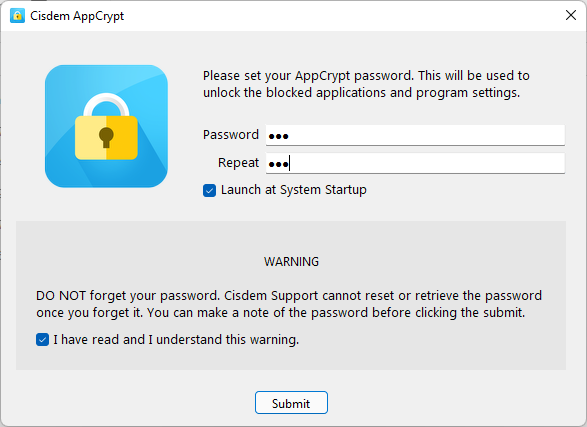
2. When you open this tool for the first time, set a password.
(If you want to prevent your own access to this game effectively, you can ask someone else to set the password for you.)
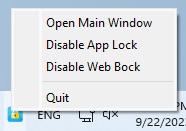
3. Click the Cisdem AppCrypt icon on the taskbar.
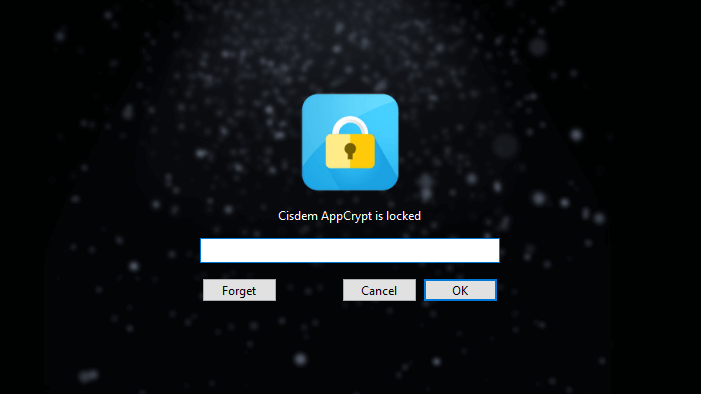
Enter the password to enter the tool's main window.
4. Now you are in the App Lock tab of the main window. Drag the desktop shortcut of Epic Games Launcher into the tab. If there isn't a shortcut, try finding Epic Games Launcher in C:\Program Files.
(Most players choose to download and play Fortnite on PC through the Epic Games Launcher. It is a digital distribution platform for video games. Without the Epic Games Launcher, players can't run and play Fortnite. To block access to Fortnite on Windows PC, all you need to do is block the launcher.)
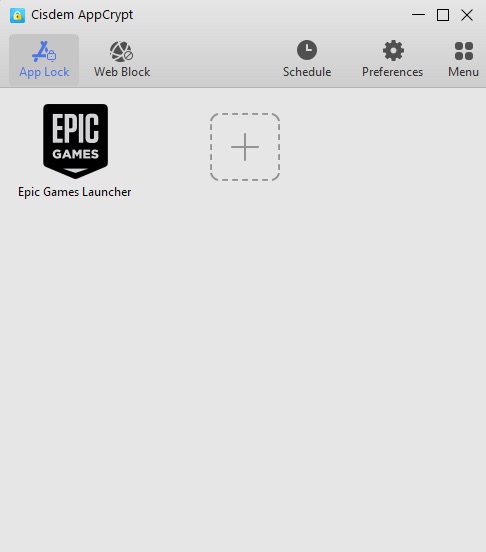
Now Fortnite is blocked. If someone tries to play Fortnite on this computer, it won’t open, and a window will pop up asking for the password.

If you or your child really wants to play the game and tries to bypass blocking, it won't work. Why? One can get around by quitting Cisdem AppCrypt, disabling its blocking feature, or removing the game launcher from the block list, but any of these actions will ask for the password.
Tip
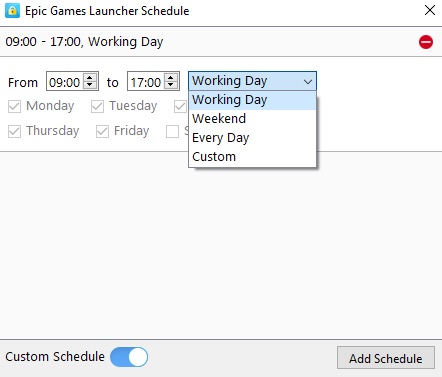
What if you want to set time limits for Fortnite instead of completely blocking it? This tip will help. Select Epic Games Launcher from the block list. Click the clock icon that appears. Enable Custom Schedule in the bottom left corner. Then click the Add Schedule button. Select the times of the day and days of the week when you want Fortnite to be restricted.
Steps to block the game in browsers
Mac users or Windows users with a limited hard drive space can play Fortnite via a browser using streaming services like Xbox Cloud Gaming. Here's how to block the game if it's played this way.
1. Enter the password to access Cisdem AppCrypt's main window.
2. Choose the Web Block tab. (If you are a Windows user, you need to install an extension on your browsers in order to implement blocking. Mac users don't need to do this.)
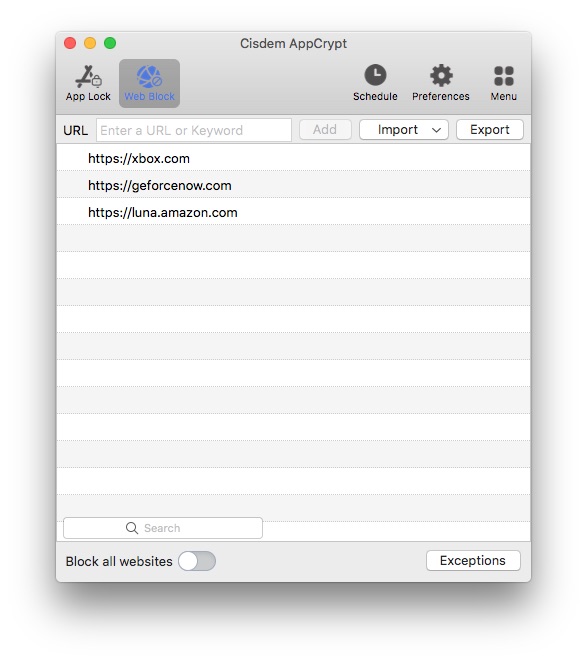
3. Enter xbox.com in the URL field and click Add. Add two other websites: geforcenow.com and luna.amazon.com.
Now you or your kid won’t be able to access Fortnite via the cloud gaming services.

How to block Fortnite using by editing the hosts file
Applies to: Windows, Mac
Your Windows or Mac computer actually provides a native solution to restrict Fortnite. That is to edit an operating system file called hosts. However, this method may not be your choice if you don't like the idea of modifying a system file, or if a VPN is used on the computer.
Steps on Windows
1. In the Start menu, search for Notepad and then run it as an administrator.
2. In Notepad, choose Files > Open to find and open the hosts file. It's located in C:\Windows\System32\drivers\etc.
(If you want, you can back up the original hosts file first.)
3. Now the hosts file is open and editable. At the bottom of the file, enter the following lines:
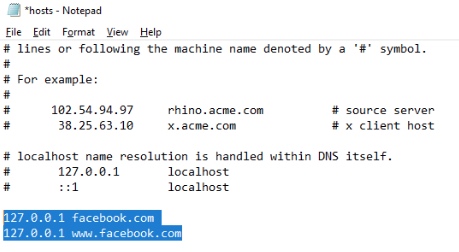
127.0.0.1 fortnite.com
127.0.0.1 epicgames.com
127.0.0.1 fns.api.epicgames.com
127.0.0.1 cdn1.epicgames.com
127.0.0.1 cdn2.epicgames.com
127.0.0.1 dl.epicgames.com
127.0.0.1 games.epicgames.com
127.0.0.1 mtlk1.epicgames.com
127.0.0.1 statproxy.ol.epicgames.com
127.0.0.1 xbox.com
127.0.0.1 geforcenow.com
127.0.0.1 luna.amazon.com
4. Save the edited hosts file.
Steps on Mac
1. Search for and open Terminal from Launchpad.
2. In Terminal, type sudo nano /etc/hosts and then press the Return/Enter key. Enter the administrator password when prompted.
3. Now the hosts file is open and editable.
4. Enter the new lines specified in Steps on Windows section above.
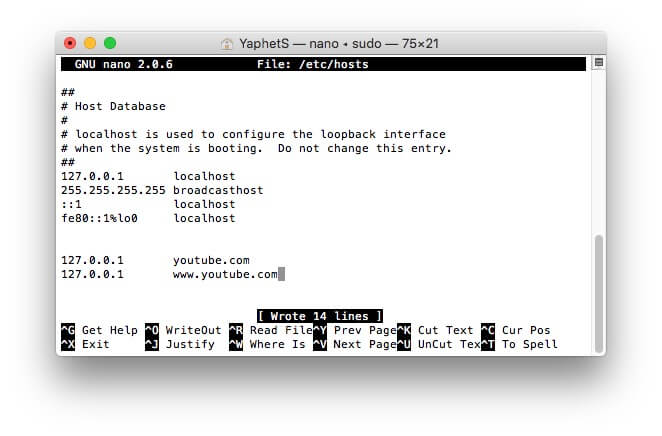
5. Press Control-O to save your editing and then Return-Enter.
6. Press Control-X to quit editing.
FAQs
What are the hidden dangers of Fortnite?
There are some hidden dangers of Fortnite that parents should be aware of.
Inappropriate content: There are some violent elements in this game. If allow children to play violent video games for too long, they may develop aggressive thoughts and behaviors. Additionally, this game allows players to communicate with each other via the in-game voice and text chat feature. Children may be exposed to bad content during this process.
Cyberbullying: Cyberbullying can happen to anyone, regardless of age. Especially when someone is not performing well in the game, other players may abuse him/her.
Overspending: Fortnite is free to play. However, players can pay for cosmetics like skins, back blings, and more for a better gaming experience. It's easy for kids to overspend in Fortnite.
Playing Fortnite with your kid is a good way to protect him from the dangers of this game. Alternatively, block Fortnite on computer directly using the methods I mentioned in this article.
Should you block Fortnite completely or set limits for it?
It depends on your situations and needs. If the game causes serious problems, such as inability to focus on your work or poor performance in school, you can consider blocking it. If you just want to reduce gaming time, setting time limits is enough.

Norah Hayes likes to share her tips on how to improve focus and stay motivated at work. She believes it is essential to eliminate all online distractions during work hours.

Ethan Long joined Cisdem in 2015 as a developer and now serves as the editorial advisor for Cisdem AppCrypt. He actively tests and uses Cisdem AppCrypt and other screen-time management tools to ensure AppCrypt meets its promises in real-world scenarios.