


(2026) How to Recover Deleted Pinterest Boards on Phone or Computer
 3.2K
3.2K
 1
1




Data Recovery
Recover Deleted Pinterest Boards and Pins


There may be different possible reasons for Pinterest boards and pins to be deleted or disappeared, such as accidental deletion, platform glitch, policy violation, hacked account, etc. Whatever the reason is, we’re here to help. This page delivers 6 simple and accessible solutions on how to recover deleted Pinterest boards. Let’s dive in.
Key Takeaways
- Pinterest has the Restore feature to let users recover recently deleted boards with ease, as long as the deletion happened in the past 7 days.
- Also, we can check archived boards, search a backup in mailbox, look for cached copy, recover with 3rd party data recovering tool, and contact Support to recover deleted Pinterest boards on Android, iPhone, PC, Mac.
Cisdem Data Recovery for Windows and Mac
Get Deleted Pinterest Boards and Pins back Easily
- Recover recently and permanently deleted Pinterest boards/pins within 3 steps
- Recover both photos and videos from a Pinterest post
- Repair damaged photos or videos from Pinterest boards
- Salvage data from Windows/Mac device, HDD, SSD, USB drive, Android SD card, NAS, Linux, etc.
- Support recovery of 1000+ file types: photo, video, audio, document, archive, email, etc.
- Restore unsaved files (Word, Excel, PowerPoint, bookmarks...)
- Also fix corrupted documents
- Preview recoverable items before retrieval
- Recover data from crashed or unbootable computer
- Save recovered data to local disk or cloud service
 Free Download Windows 11/10/8/7
 Free Download macOS 10.15 or later
1# Use Pinterest Restore Feature (Phone & Computer)
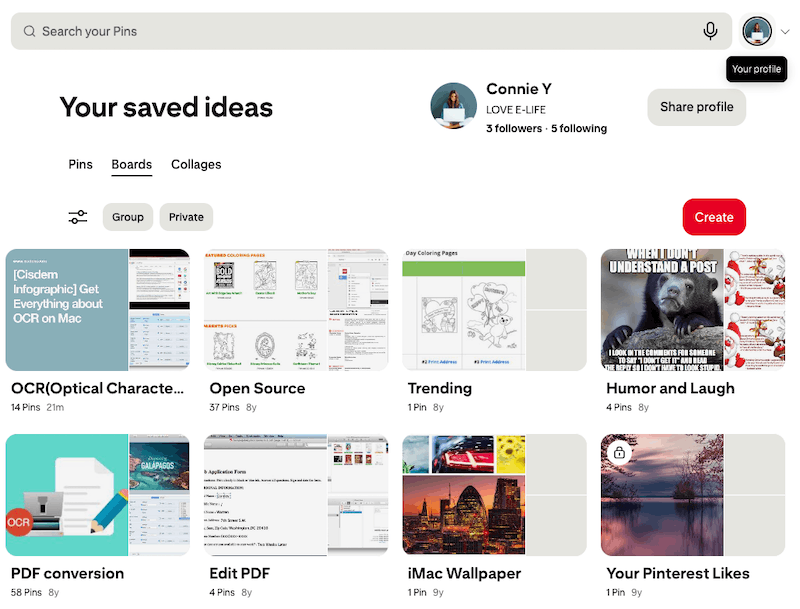
To begin with, the first place to look for your deleted board on Pinterest is the Recently deleted section, a built-in recovery feature to store a board for 7 days after its deletion. This method applies to recover deleted Pinterest board from iPhone and Android phone, also on desktop.
How to restore deleted Pinterest boards from recently deleted boards on phone or computer?
- Log into your account on Pinterest.
- Click your profile icon to navigate to a page displaying all your pins and boards.
![restore pinterests 01]()
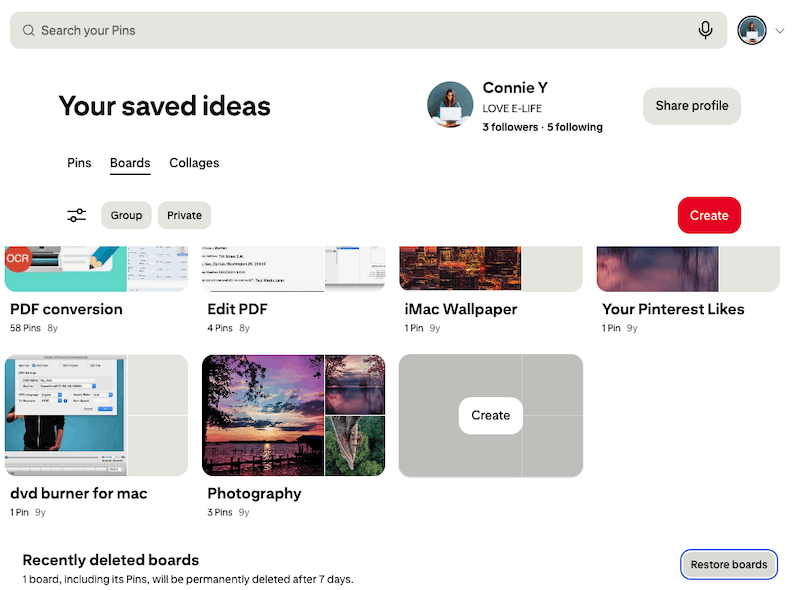
- Scroll down to Recently deleted boards, then click on Restore boards.
![restore pinterests 02]()
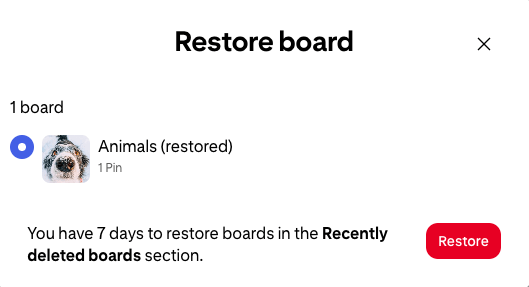
- Select the deleted board you want to recover, click Restore. The recovered board will go back to the profile page immediately.
![restore pinterests 03]()
The lost Pinterest board is not present in Recently deleted section? It might be hidden or misplaced somewhere else, or even permanently removed from Pinterest. Keep reading to get more useful methods for Pinterest board recovery.
2# Check for Archived Boards (Phone & Computer)
At times, Pinterests boards are missing just because it is archived and hide somewhere in your account. In this case, what we ought to do is check for archived boards, find the missing boards there and unarchive it for retrieval. This method also applies to mobile phone users and computer users.
How to recover a deleted board on Pinterest from archived boards?
- Go to pinterest.com and sign into your account.
- Click on the profile icon in the upper right side.
- In the profile page, go to Boards > Archived.
![unarchive pinterests01]()
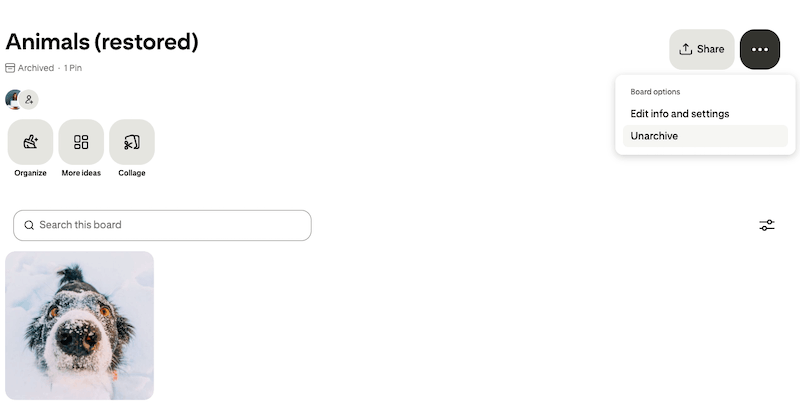
- Find the missing board, click on the 3-dots icon and choose Unarchive.
![unarchive pinterests02]()
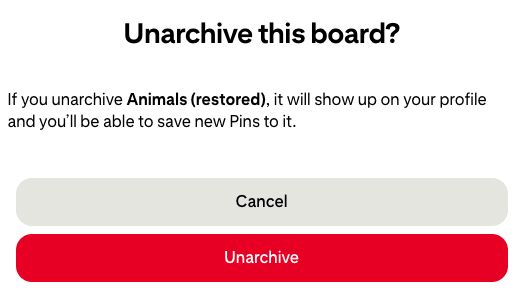
- In the pop-up window, continue to select Unarchive button to confirm. The unarchived board will reappear on your profile page.
![unarchive pinterest 03]()

3# Search via Shared Copies (Phone & Computer)
In the event that you have ever shared a board via link or social network, your email inbox might have a notification from Pinterest, or you can still find the boards from old posts in your social media account. Here is how.
Option 1. Retrieve deleted Pinterest board from mailbox
- Visit your email inbox on a computer or a mobile phone.
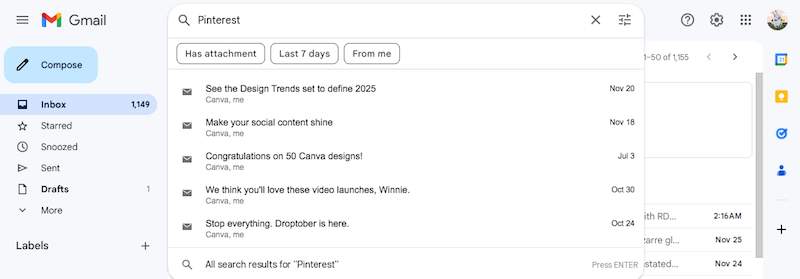
- Search for any emails from Pinterest. You can use keyword like “Pinterest”.
![recover from email backup 01]()
- Find the email containing the link of your deleted board.
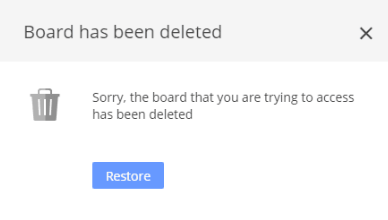
- Click on the link, you might get a notification like below, indicating the board has been deleted.
![recover from email backup 02]()
- Choose Restore button to revert the deleted board back to Pinterest.
Option 2. Search within Old Messages or Posts
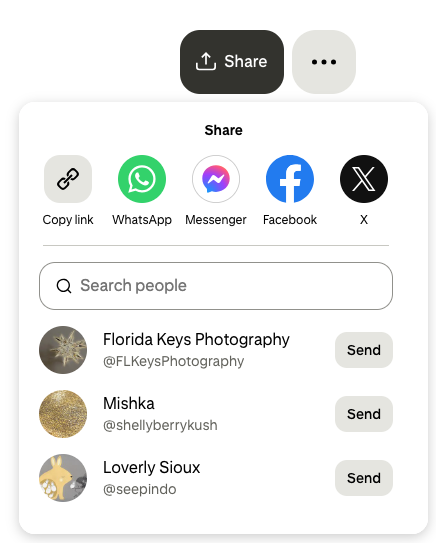
- Log into any app from the share list with your account.
![shared boards]()
- Search with keywords to find a post that contains the boards.
- Download the photo or video to your device, then submit to your Pinterest account again.
![shared boards 02]()
4# Check Recently Deleted on Phone
Many of Pinterest users prefer to use the app on their Android phone or iPhone. If you upload the pins and manage the boards on a mobile phone, when a Pinterest board is missing, you should check the photo gallery app on your phone to see if there is still a copy. If not, you can check the recently deleted album on iPhone or recycle bin on Android, the steps are shown as follows.
- Open Photos app on your iPhone, navigate to Recently Deleted folder. Or tap on photo gallery app on your Android phone, find the Recycle deleted folder.
![restore on android phone]()
- Select the deleted Pinterest photos or videos, and tap Restore.
- Upload the photos or videos to Pinterest again, create a board to restore.
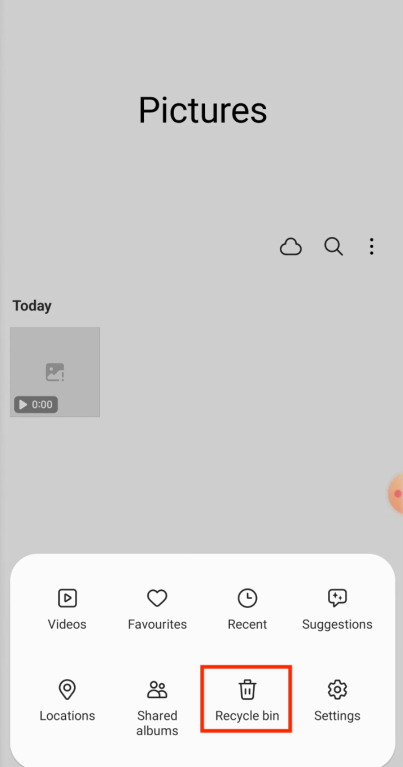
tips: If you cannot find the copies in recently deleted album or recycle bin on your phone, they might be permanently deleted from the trash, you need a 3rd party data recovery program to restore them. You can search in Google Play or App Store to download and install a high-ranking app to perform the file recovery on your phone.
5# Use Cisdem Data Recovery (Android Phone & Computer)
One more recommended option to restore Pinterest boards is making use of a dedicated data recovery tool, like Cisdem Data Recovery. You’re allowed to adopt this tool under specific scenarios, such as:
- Pinterest images and videos were downloaded and saved on your local hard disk.
- The source of Pinterest contents was saved in your local storage device.
- Temporary files of Pinterest boards and pins are generated due to Internet browsing.
Trusted by over 2 million users, Cisdem Data Recovery must be one of the best data recovery programs available in the current market. It designs professional and reliable solutions to recover deleted, lost, formatted, and even corrupted files from internal hard drive and external storage devices, both performing brilliantly. More notably, Cisdem stands out thanks to its high recovery rate (over 99.7%), easy-to-use UI, quick scan speed, advanced recovery algorithm and a wide range of extra features. All you need to do is give it a try and recover your deleted Pinterest board without hassles.
It supports recovering deleted Pinterest boards on PC, Mac, and Android phone.
How to recover deleted Pinterest board with Cisdem?
- Free download, install and run this software on your PC/Mac.
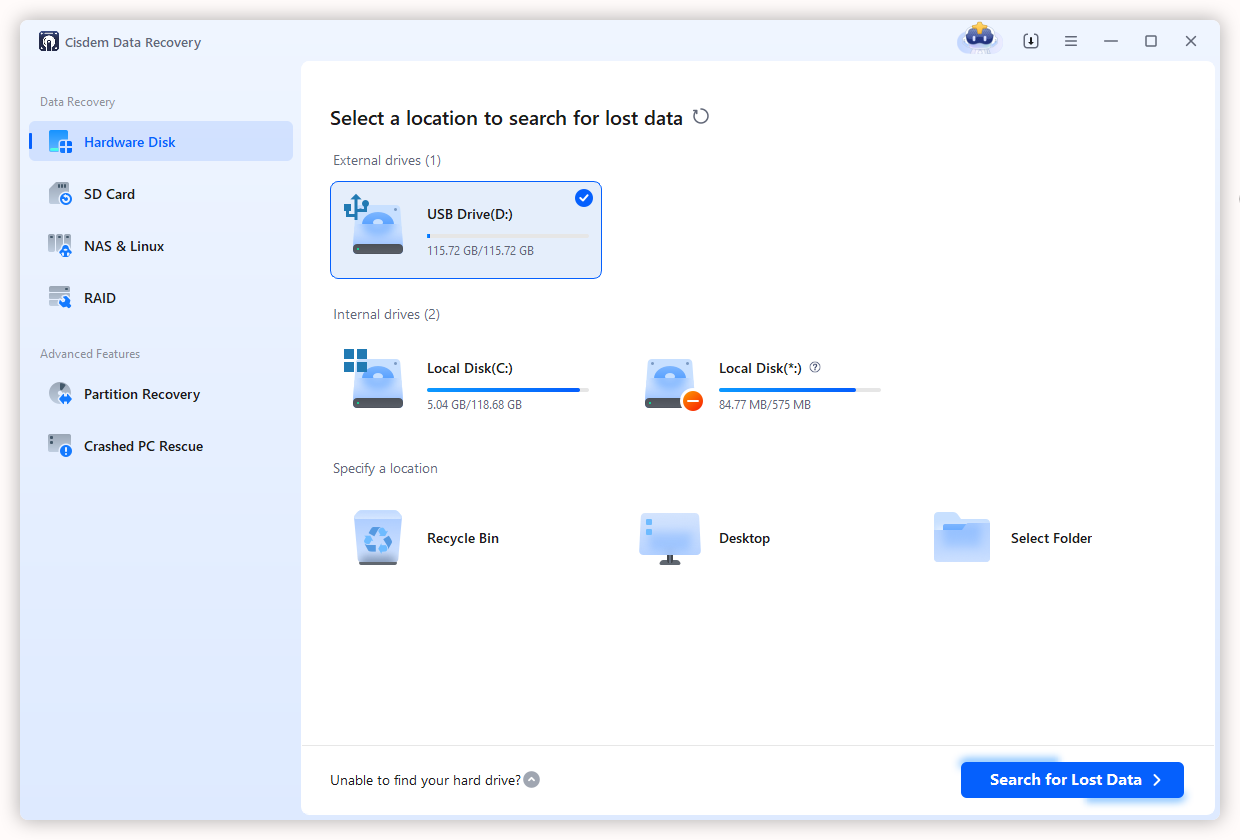
Free Download Windows 11/10/8/7 Free Download macOS 10.15 or later - Go to Hardware Disk, select the location where your Pinterest board got deleted or lost, and click on Search for Lost Data to start the scanning.
![recover Pinterest cisdem 01]()
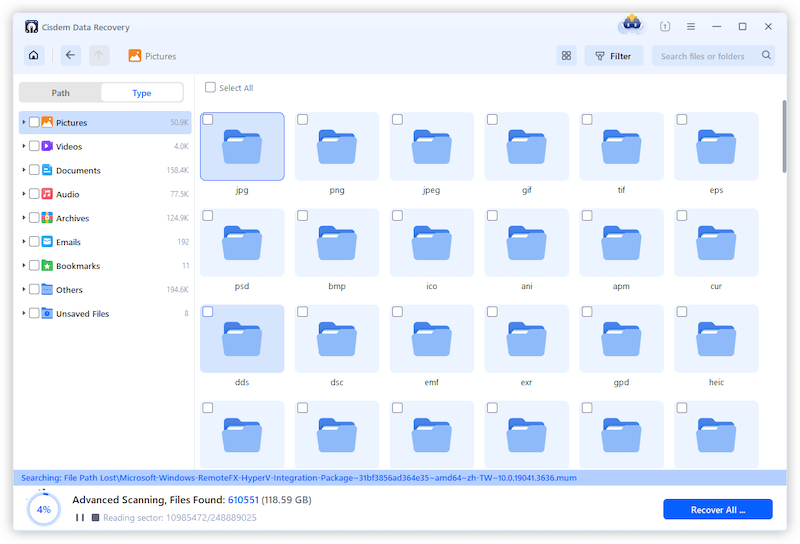
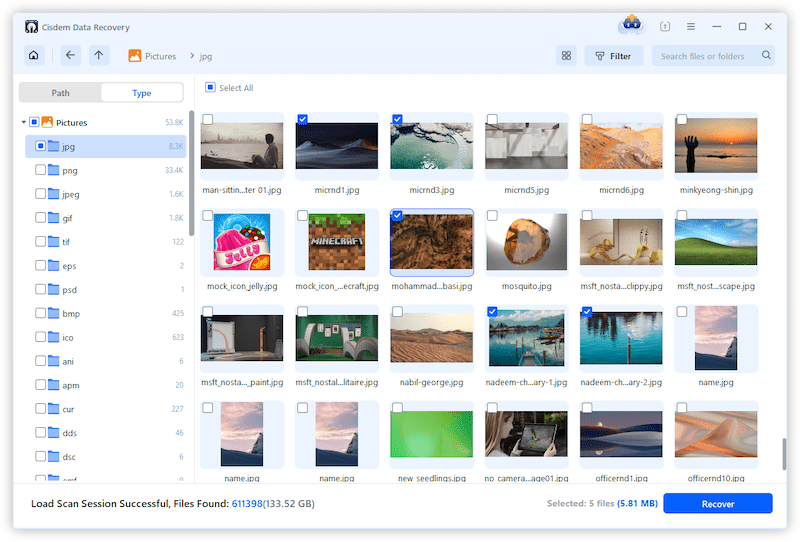
- Cisdem will carry out a thorough scanning to your selected location. After that, navigate to Path or Type, find any image or video files from your deleted board.
![recover pinterest board cisdem 02]()
- Select them and choose Recover button to restore your deleted Pinterest contents back.
![]()
6# Contact Pinterest Support
In case all the options mentioned above prove to be of no use, it’s time to seek help from Pinterest Support. The Support may find your deleted board back from Pinterest server or come up with other specialized workarounds for the board deletion.
How to restore deleted boards on Pinterest via Support?
- Head to Pinterest Help Center with your web browser.
- Scroll down to locate and select Contact us option.
![contact pinterest support 01]()
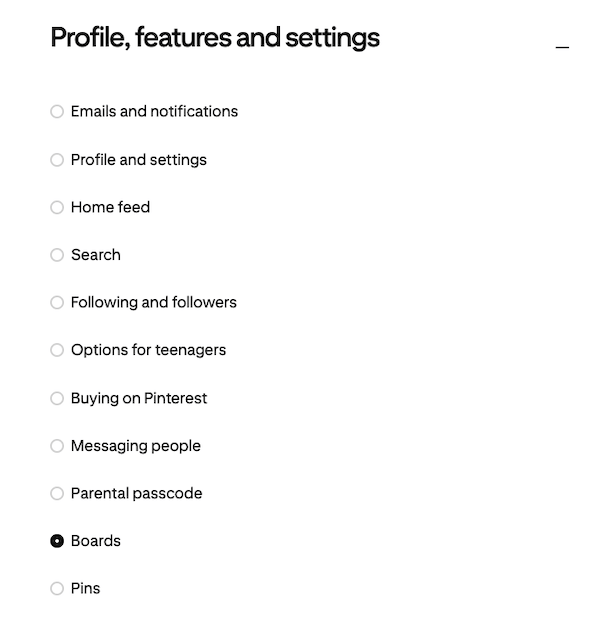
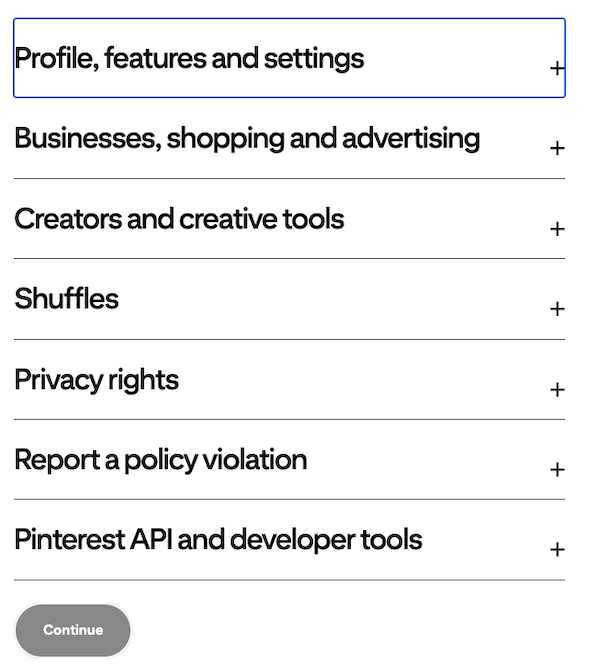
- Select Profile, features and settings > Boards.
![contact pinterest support 02]()
- Then click Continue.
![pinterest support 03]()
- Fill in your personal information.
- Choose Missing boards and click Continue.
![pinterest support 04]()
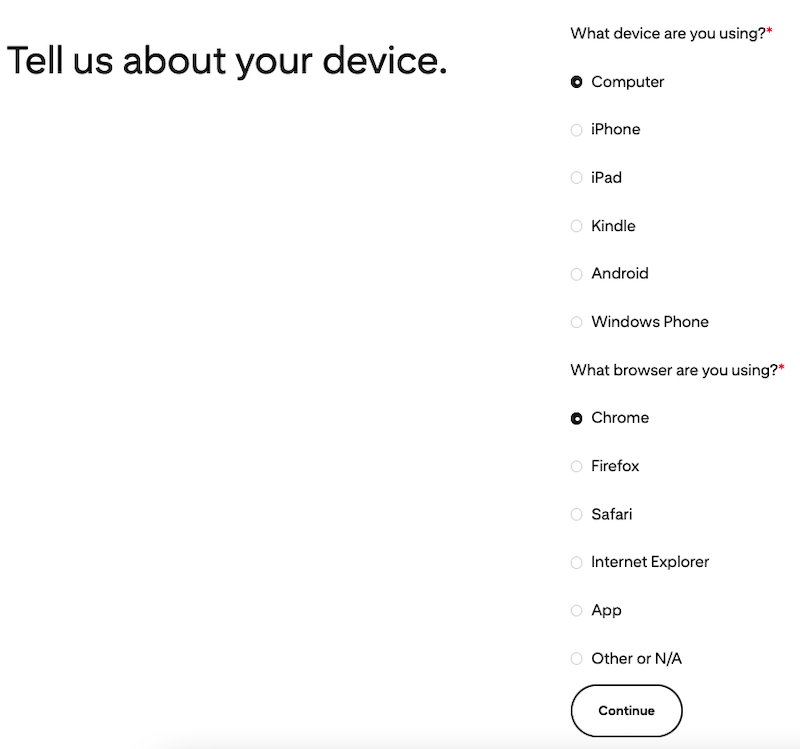
- Choose your device.
![pinterest support 06]()
- Answer the question "Did you get an error message" and click Continue.
- Then click the Submit button to submit your request and wait for the solution from Pinterest Support.


FAQs
1. Can you recover deleted Pinterest board?
Yes, we can.
We can recover deleted Pinterest board from recently deleted boards, as long as the deletion happens in the past 7 days. Also, we might once share or back up the photos/videos contained in the boards on our decive, like a mobile phone or computer. Therefore, we can find the copies, or use a 3rd-party program to recover the deleted boards.
2. Is there a recently deleted on Pinterest?
Yes, there is.
All the deleted Pinterest boards will be moved to the recently deleted boards on the profile page.
3. How to find recently deleted Pinterest boards?
Log into your account on Pinterest, click on the profile icon and navigate to the page showing all the pins and boards. Scroll down to the bottom of the page, Recently deleted boards will appear.
4. Why are my boards missing on Pinterest?
- The boards are private or archived: you may move the boards to a private group or archived group.
- The boards are accidentally deleted: they will go to recently deleted boards and seem to be missing.
- The boards are removed or restricted by Pinterest: boards that violate Pinterest's policies will be removed.
- Temporary app issue: a bug or a sync issue will cause missing boards as well.
- The boards are changed: if the board was created and managed by someone else, it might go missing when others changed the visibility.
Conclusion
Pinterest allows users to restore boards within 7 days, and the recently deleted boards is the first place where you should check to restore a deleted Pinterest boards. Also, there are additional 5 ways to recover the boards, according to where you've backed up or shared the boards. And still, Pinterest Support is worth a try by submitting a request, especially when the boards are missing and gone for unknown reasons.

Zoey shows a great interest in what she does. Although not long with Cisdem, she has possessed a professional understanding of data recovery.

JK Tam is the lead developer at Cisdem, bringing over two decades of hands-on experience in cross-platform software development to the editorial team. He is now the lead technical approver for all articles related to Data Recovery and DVD Burner.
Walter
I thought I had accidentally deleted one of my Pinterest boards, but I eventually found it in my archived boards and was able to restore it. I honestly didn’t know it could be brought back so easily.