


5 Best Contact Managers for Windows: Tested and Compared
 1.6K
1.6K
 0
0


Some users need a tool to manage contacts on Windows PC. To help you choose, I tested more than 10 contact management apps for various tasks (such as import, export, backup, tagging, and merging). This guide lists 5 best options, comparing their features, pros, and cons so you can find one that fits your needs.
 Cisdem ContactsMate
The Best Contact Management Software
- Support various contacts sources: Outlook, Google, and CSV files
- Export or convert contacts to 3 formats: vCard, Excel, and CSV (including Google CSV, Apple CSV, Shutterfly CSV, and more)
- Allow you to view, search, create, delete, edit, tag, call, and email contacts
- Detect and merge duplicate contacts with a single click (or you can edit them)
- Detect formatting issues, such as incomplete names, phone numbers or email addresses in wrong formats, etc.
- Easy to use and customize
 Free Download Windows 10 or later
Top 5 contact managers for Windows
#1 Cisdem ContactsMate
Compatibility: Windows 10 or later
Best for: Organizing contacts from multiple sources, finding duplicates, and exporting to different formats.
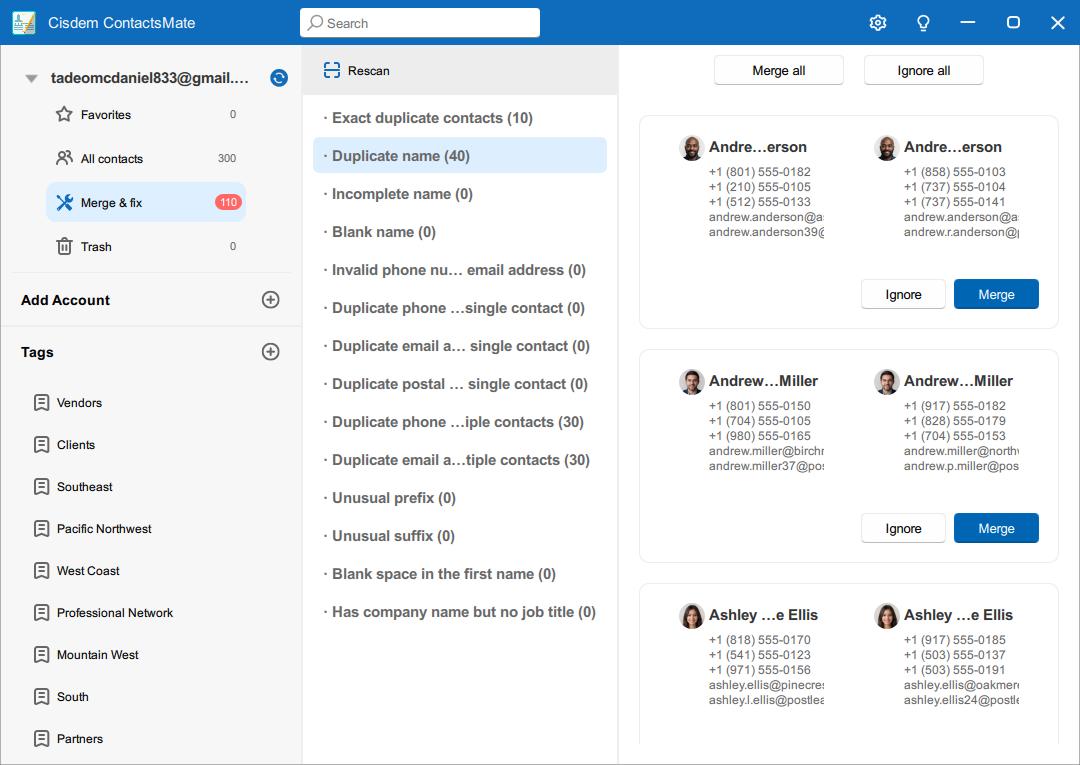
Cisdem ContactsMate provides a range of feature to help you keep your contacts list organized and ready to use. You can sync contacts from popular services, including Google and Outlook. It also supports importing contacts from CSV files. This way, you can manage your contacts from different sources in one place.
The simple interface makes contact management easy. You can easily view, search, add, edit, and email contacts. You can also transfer contacts between supported sources with a simple drag and drop. Changes you make in this contact manager will be automatically synced to your added sources, such as Google, and vice versa.
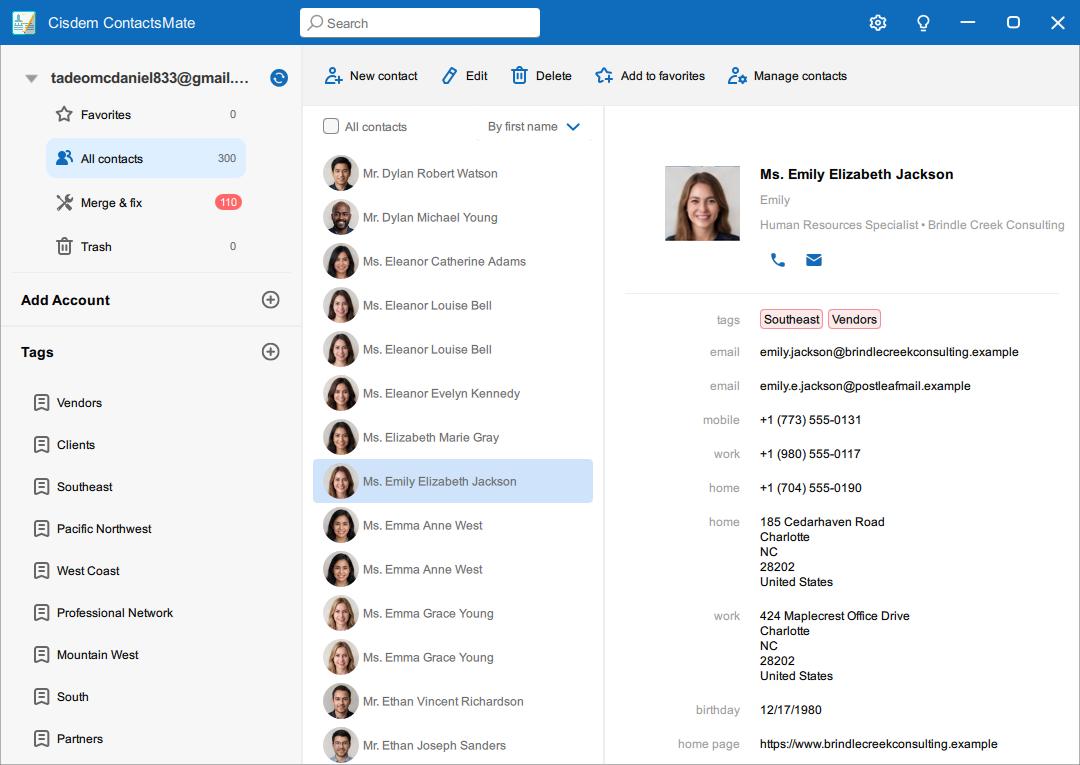
The export feature is what I find most useful. It lets you export selected contacts to CSV, vCard, or Excel (XLSX). For CSV, there are six options available, such as Google CSV and Shutterfly CSV. For example, if you aim to use the exported contacts in Shutterfly's address book, choose the Shutterfly CSV option, since it's design for this service.
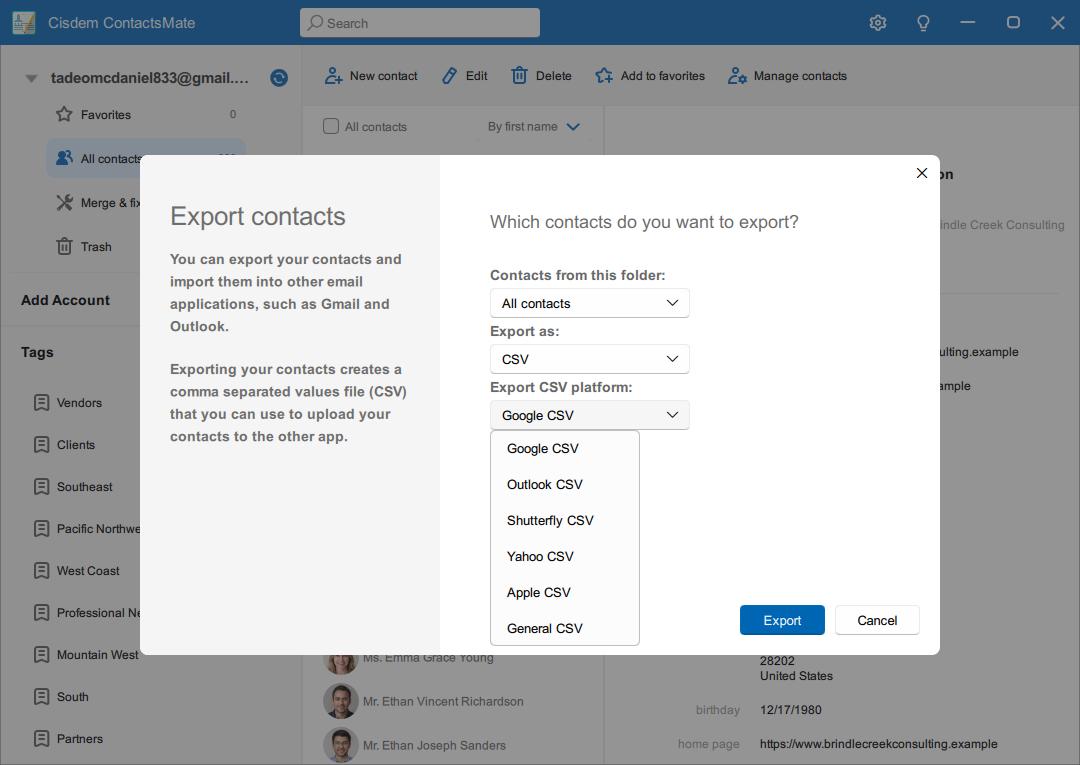
ContactsMate also automatically detects exact duplicate contacts, partial duplicates, as well as potentially incorrect contact information.
| Type | Examples | Fixes available |
|---|---|---|
| Exact duplicates | Multiple copies of the same contact with identical details |
Merge an individual duplicate group or use the option to merge all exact duplicates |
| Partial duplicates |
Contacts with the same name, phone number, or email addresses |
Review and edit the contact information manually |
| Potentially incorrect info |
Contacts with blank or incomplete names, invalid phone number format |
Review and edit the contact information as needed |
Pros:
- Manage contacts from from Google, Outlook, CSV files, etc. in one place.
- Let you view, add, edit, tag, group, delete, import, export, transfer and email contacts easily.
- You can add your frequently contacted contacts to the Favorites list.
- Display the contact details in the info panel clearly.
- Export selected contacts to CSV, vCard, or Excel, with service-specific CSV options.
- Let you transfer contacts between supported sources.
- Automatically find duplicate contacts for you to remove.
- Easy to use.
Cons:
- The Windows version does not support direct iCloud contact syncing.
- Not available for Android and iOS currently.
How to use this contact management software on Windows
Step 1. Download and install Cisdem ContactsMate on your Windows PC.
Step 2. Open it. Click the Add Account button.
Step 3. Enter your email address. Click Continue. Follow the prompts in your browser to allow it to connect your account.
Step 4. Return to ContactsMate. Now your contacts are synced with this contact manager. Repeat the process to add other accounts so you can manage all your contacts in this tool.
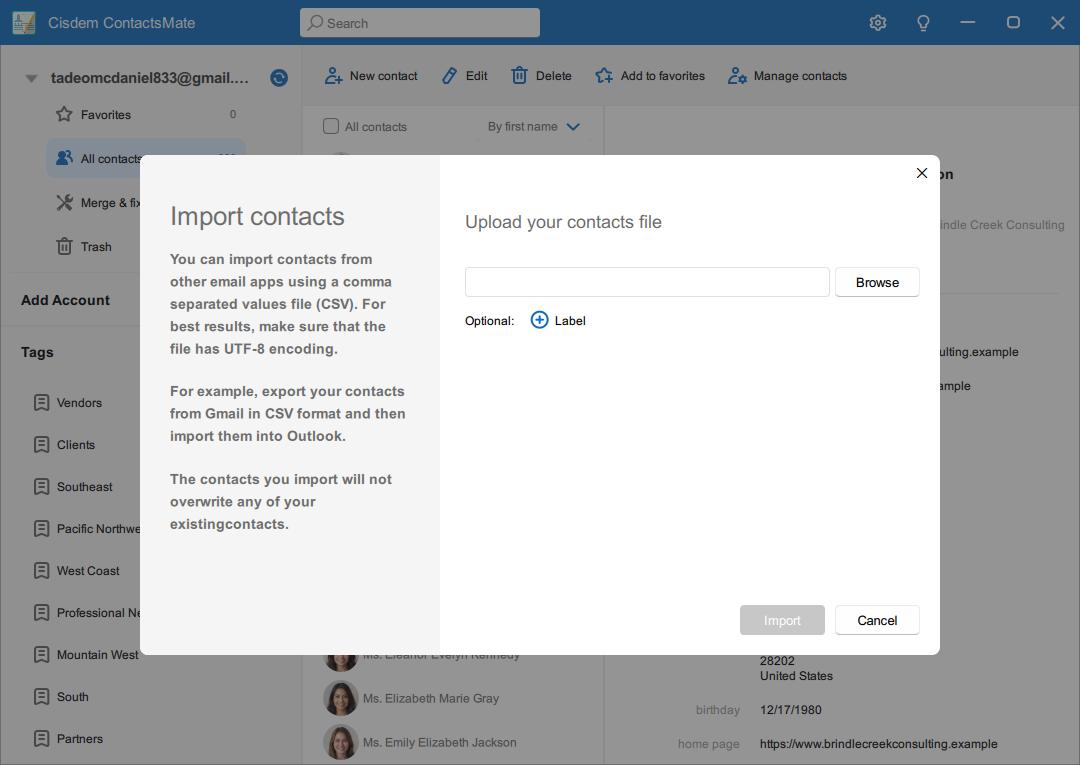
To import contacts from a CSV file, click Manage contacts > Import contacts > Browse. Select your contacts file. Click Open.
#2 Free Address Book
Compatibility: Windows XP or later
Best for: Users who want a free contact manager with custom fields and birthday reminders.
Free Address Book is a simple and easy-to-use contact manager for Windows. I think this tool is more suitable for personal users that don’t have large numbers of contacts to manage. Unlike ContactsMate, it doesn’t support syncing contacts directly from services like Outlook and Google, but it enables you to efficiently import contacts from CSV files. Also, you can manually add contact cards using the tool's user-friendly Contact editor feature. In addition to general fields (such as name, phone number, email, and city), you can add additional information by creating custom fields.
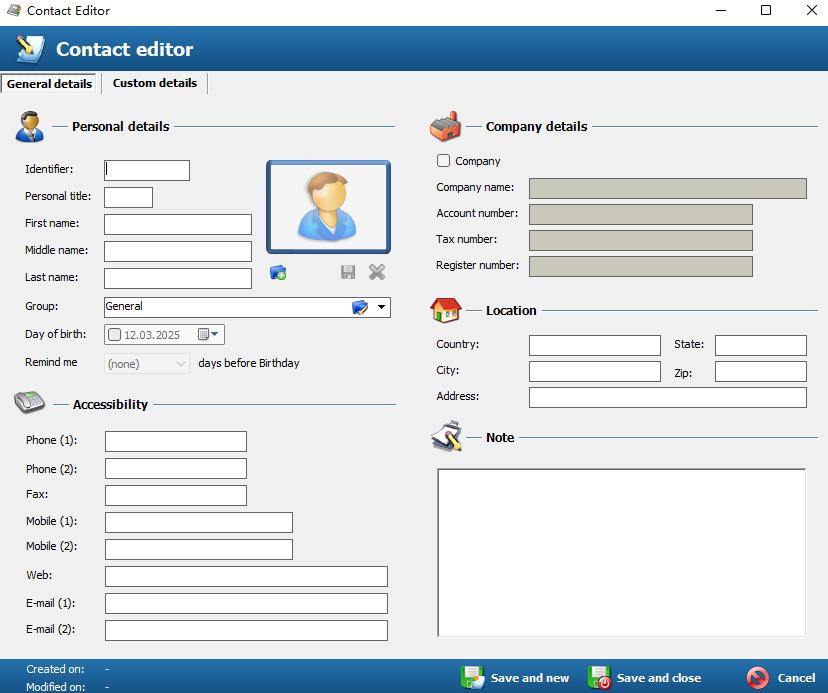
Its Contact editor also offers a minor feature that I like, which is a birthday reminder. When adding a birthday for a contact, you can set this feature to notify you one or several days in advance. This can also be used to remind you of other important dates, such as anniversaries.
This contact manager provides a search function. It supports searching contacts by different fields. For example, you can search for a contact's first name, last name, phone number, email, etc. When you only remember part of a contact's information, you can still quickly find it in a huge contact list.
Although this Windows contact manager is completely free, there are no pop-up ads during use, which gives me a good user experience. I found their official account on Facebook, but it seems that it has not been active for several years. The user support of this software may not be as good as ContactsMate.
Pros:
- It has a simple and clear interface.
- It supports adding custom fields.
- Let you import contacts from CSV file.
- Let you export your contacts to CSV.
- Provide a birthday reminder
- Free to use.
Cons:
- It only offers basic contact management features.
- The process of importing contacts from CSV is a bit cumbersome.
#3 C-Organizer
Compatibility: Windows Vista or later
Best for: Managing contacts, calendars, and tasks with password protection.
This Windows contact management software is much more feature-rich than the above two. It cost more but can meet the advanced needs of some users.
I found that it not only has a Contacts tab to manage large numbers of contacts, it also provides built-in Calendar and Tasks features. Through these features, you can directly associate meetings, to-do tasks, etc. with certain contacts. At the same time, it provides reminder feature, which is very helpful for users with a lot of working tasks every day.
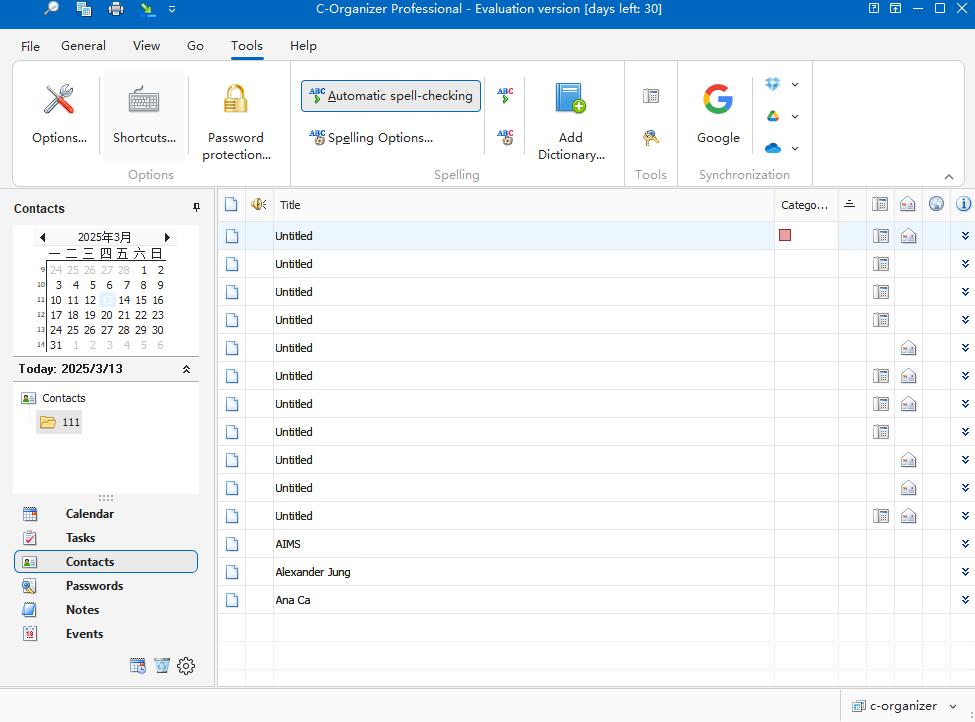
However, from the contact management function alone, I think it is not as good as ContactsMate and Free Address Book. For example, you need to double-click a contact name to view the details. And the info panel is not very intuitive. When importing contacts from a CSV file, it requires you to map the fields in the source fields list to fields in the destination fields list one by one. It cannot automatically complete this step, which is inconvenient.
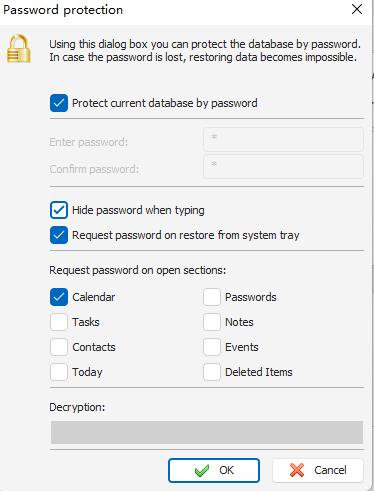
This tool does a great job in data security. It's password protection feature ensures your contact information cannot be accessed by unauthorized users. You can choose to lock an individual section of this contact manager or all sections.
Pros:
- It is very suitable for business users.
- It has 3 different interface styles.
- Feature-richer than other contact managers.
- Password protection feature can ensure users’ data security.
- Let you import contacts from CSV files.
- It offers backup and restore feature.
Cons:
- It is a bit expensive.
- The contacts importing feature is not convenient.
#4 My Personal Address Book
Compatibility: Windows 10 or later
Best for: Non tech-savvy users who want to organizing personal contacts and print address books.
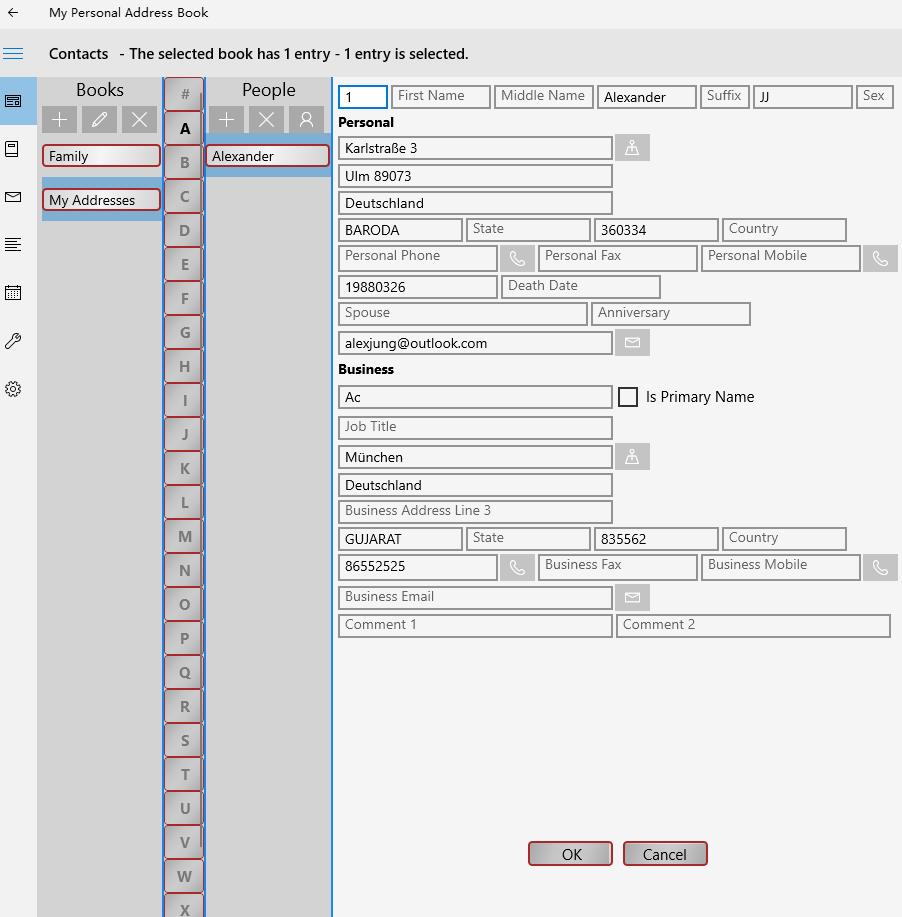
My Personal Address Book is a free contact management software for Windows. After using it, I think it is very suitable for senior users, or non tech savvy users. The font size of the app is larger than most other apps and its functions are relatively simple.
Based on personal needs, you can create different groups, such as “Client”, “Family”, and“Friends". Then add as many contact cards as you want into the groups. This makes it more efficient when you need to find a specific contact in your large contacts list.
It supports importing contacts from Microsoft Outlook or CSV files. It also let you export the entire contact list or a group of contacts to CSV or XML file.
This tool has a useful Print feature. You can print individual contacts, or batch print the entire contact list or a group of contacts. There are multiple print sizes for you to choose from, which is convenient for users who need a paper address book. It can also be used to backup contacts.
Pros:
- It has an intuitive and simple interface.
- Let you import and export contacts easily.
- Let you add reminders to Windows calendar.
- Help you print various size address books.
- Help you backup and restore contacts with ease.
Cons:
- Lacks some advanced contact management features.
- It doesn’t support adding custom fields.
#5 New Outlook for Windows
Compatibility: Windows 10 or later
Best for: Users who prefer Windows’ built-in option for basic contact management.
Yes, the People app is also a good contact management software for Windows.
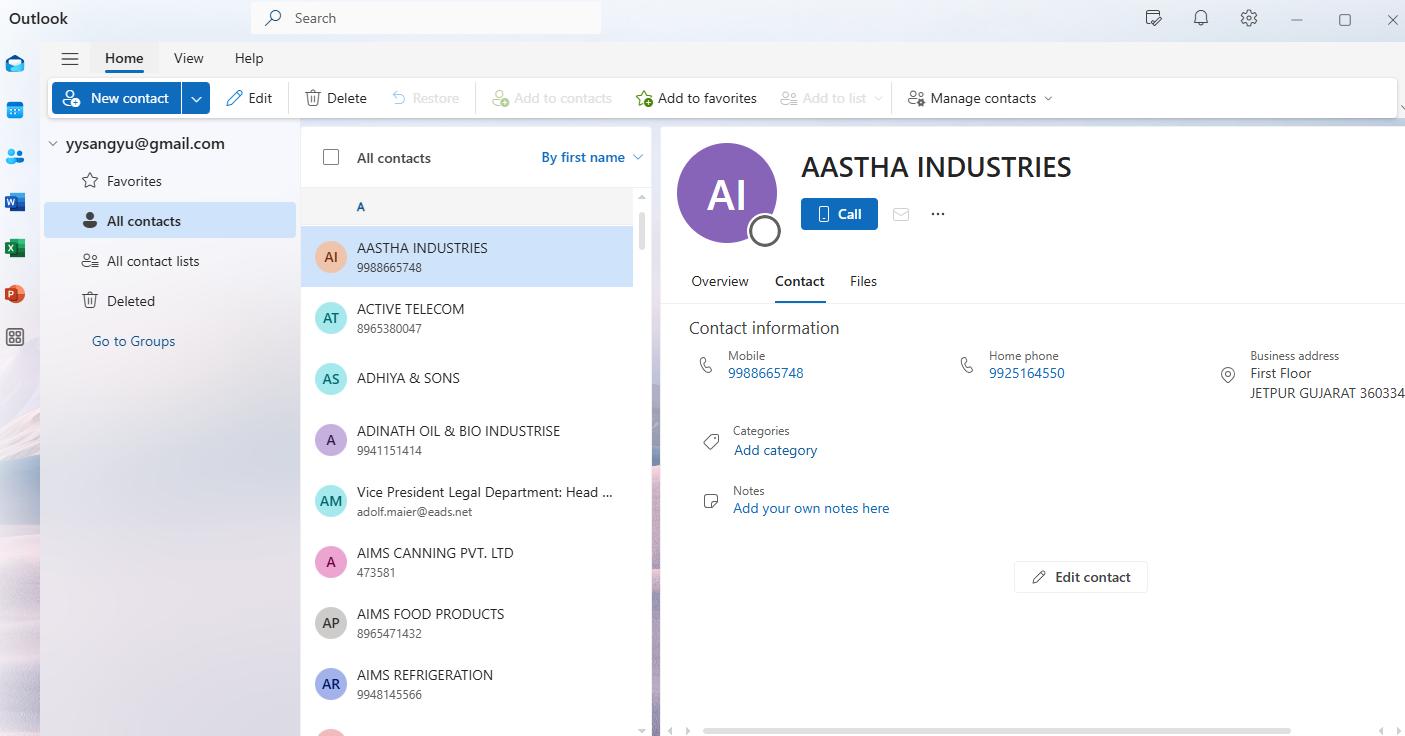
The People interface in the new Outlook for Windows can be a good contact management tool if you only need basic features. (If you are still using the old version, or you can't find such an app on your PC, you can get it from the Microsoft Store.)
This contacts manager for Windows can sync contacts from different sources, such as your Microsoft account, Exchange account, Google account, and more. You can view, add, and edit all the imported contacts directly in People and don't need to jump into other apps. New Outlook for Windows integrates with other apps of Microsoft, including Outlook Mail. When receiving an email, you are able to view the sender details from the email and save it as your contact.
This tool is built-in and user-friendly, but it's quite basic. In addition, some features are somewhat limited. For example, the Export Contacts feature supports exporting all contacts but not selected ones, and the Share as vCard feature works with individual contacts but not multiple or all contacts at once.
Pros:
- Built-in and free.
- Supports various services like Outlook and Google.
- User-friendly with a simple interface.
Cons:
- Very basic.
- Some features are limited.
Benefits of using a contact management software for Windows
Here are some benefits of using a professional contact manager on Windows:
View all contacts in one place. Through importing or syncing all your contacts from different sources, you can easily view and manage all of them in this software without having to log in to different platforms and find the contact card you need. Good contact manager software such as Cisdem ContactsMate supports importing contacts from all popular contacts systems with a few clicks, which can save you a lot of time.
Organize your messy contacts list. Contact management software usually offer different features to help you organize your messy contacts list more efficiency. Such as labels and groups, allowing you to divide your contacts into different categories. Some of them offer a duplicate contact cleaner. Thanks to this feature, you will never again encounter the mess of multiple duplicate contact cards appearing when searching for a contact in your contact list.
Contacts backup and restore. You can also use a contact manager to backup and restore your contact with ease. Export your contacts to CSV, vCard, or other common formats. Then store the contact file on your local device or cloud drive. By doing this, your contact list can be easily restored even if you change devices or encounter unexpected data loss event.
Improve work efficiency. For business users, a professional contact manager for Windows can help you clearly record customer data, and timely follow up with customers to maintain relationships. You can also use the tool to send emails to all customers in a certain group, which is effective.
FAQs
What’s the best free contact manager for Windows?
I think Free Address Book is the best free contact manager for Windows. Although it doesn’t offer many advanced contact management features, it covers all the basic needs and works well for most users.
What’s the best contact manager for users who manage large numbers of contacts but aren’t tech-savvy?
If you have a large contact list but aren’t tech-savvy, Cisdem ContactsMate is your best option, which let you manage all your contacts from different sources in one place, with an intuitive interface.
Conclusion
A professional contact management tool is essential. It greatly improves my work efficiency and keeps my contact list organized. This article introduces 5 best contact management software for Windows and their features, pros and cons. You can choose the most helpful one according to your needs.

With a passion for tech and writing, Sarah joined Cisdem, where she focuses on creating articles about using utility tools to enhance file management and simplify contact management.

Adrian Li is Cisdem’s Chief Engineer and serves as the editorial advisor for Duplicate Finder and ContactsMate. His work and insights have been featured in leading tech publications such as Fossbytes, TUAW, Redmond Pie, SafetyDetectives, and BestForAndroid.