


Cisdem AppCrypt for Windows Advanced Guide
 324
324
 0
0


01 Solutions for Cisdem AppCrypt is not Blocking Websites on Windows
Cisdem AppCrypt is designed to block distracting or inappropriate websites. However, some Windows users may find that even after adding websites to the block list, those sites are still accessible. This can be frustrating and in this guide, we will walk you through to find a solution to solve this problem.
1. Check if the extension Cisdem Web Blocker has been installed
Cisdem AppCrypt for Windows supports 5 browsers: Chrome, Edge, Firefox, Brave and Opera. Cisdem AppCrypt requires extension Cisdem Web Block to block websites, so please confirm it has been installed on your browsers.
You can go to the main window of Cisdem AppCrypt, click Menu> Check Browser Extensions to overview the status of all browser extensions.
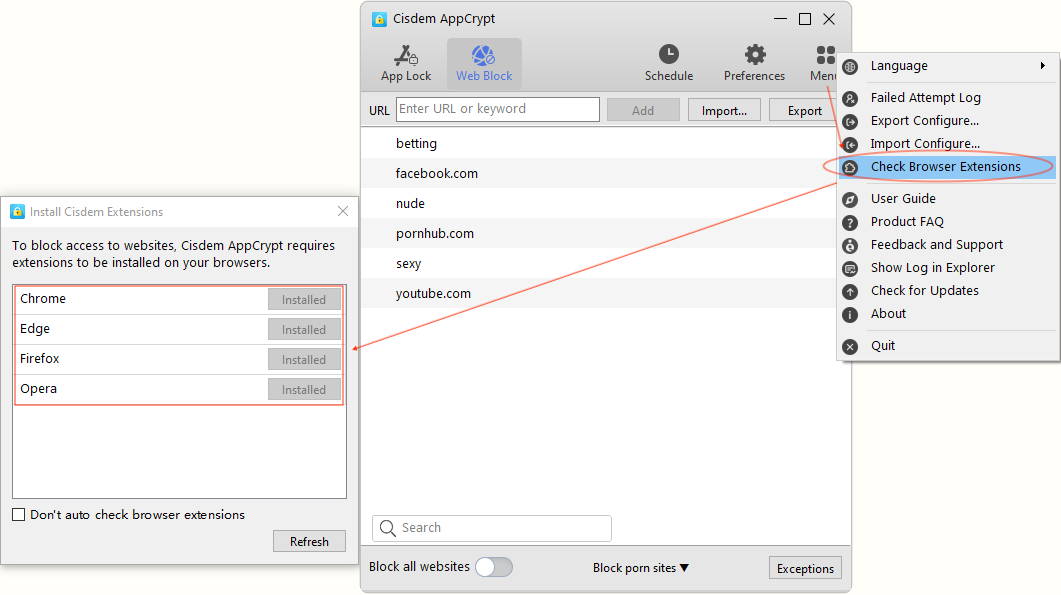
If you have any questions on downloading or installing extensions, reference Cisdem AppCrypt for Windows User Guide.
2. Check Schedule Settings
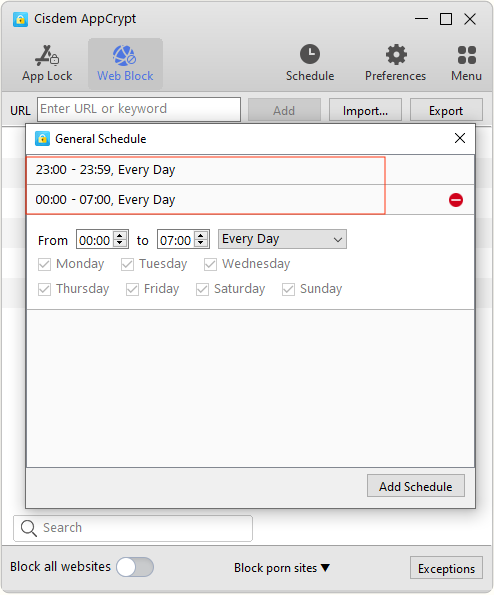
The schedule is used to set the dates and times for blocking websites and apps, so if it has not been setup correctly, websites will not be blocked either.
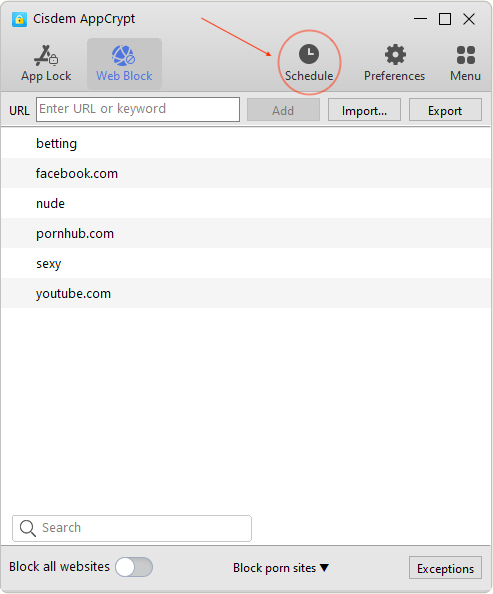
Tips: If you want to set a time period to block websites all night, you need to set up two schedules. For example, if you want to block websites from 23:00 to 7:00, you can set the schedules as the screenshot shown below.
3. Check if WebBlock is enabled
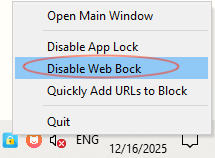
Cisdem AppCrypt provides a way for you to temporarily disable the WebBlock function, just click the padlock icon on the top menu bar and then you can choose to Disable Web Block. Please confirm that the WebBlock function is enabled.
02 What to do to protect Cisdem AppCrypt from being bypassed on Windows
Normally Cisdem AppCrypt helps you lock apps and block websites on your Windows PC. But if it’s not set up correctly, someone may still find a way around it. Here, we will show you how to set up it correctly to from being bypassed.
1. Set a secure password
When you first launch Cisdem AppCrypt, you will be prompted to set a password. This password is used to unlock secured apps, go to the main window of Cisdem AppCrypt to change settings or quit Cisdem AppCrypt. It’s crucial that you choose a secure password, as it plays a key role in protecting your privacy and settings.
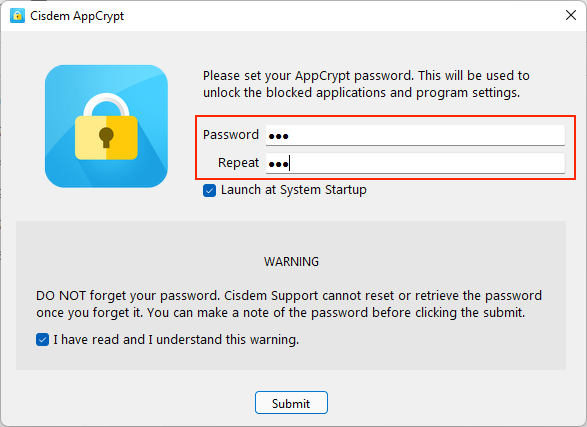
Password Tips:
a. If you forgot your password, send a request to our support team at support@cisdem.com using the email address you used to place the order, our support team will send you a one-time secret code. To reset your password, click “Forget” on the password prompt window, copy and paste the secret code into the box, you will be able to reset your password on the following window.
b. If you use Cisdem AppCrypt for self-control and you don’t want yourself to unlock it. We suggest you ask your friend to set a password or set a random password that you won’t know.
2. Auto launch Cisdem AppCrypt
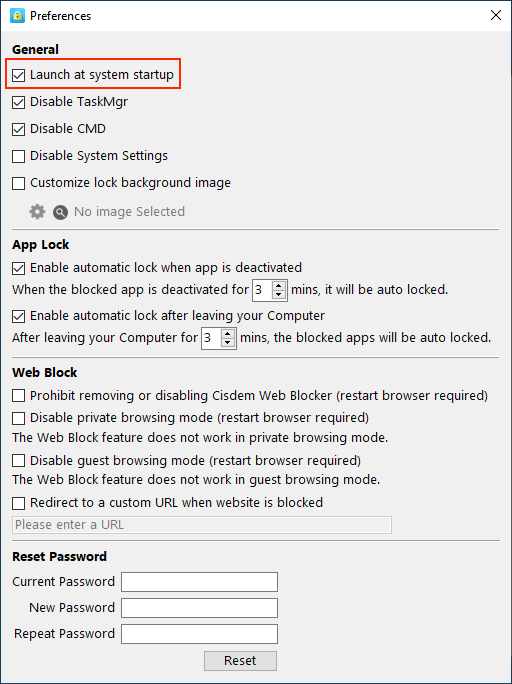
If you want continuous block from Cisdem AppCrypt, make sure Cisdem AppCrypt is running always even after restarting your computer. To enable the auto launch function, you can go to Preferneces of Cisdem AppCrypt, check on the option "Launch at systems startup"
3. Disable Task Manager, CMD and System Settings
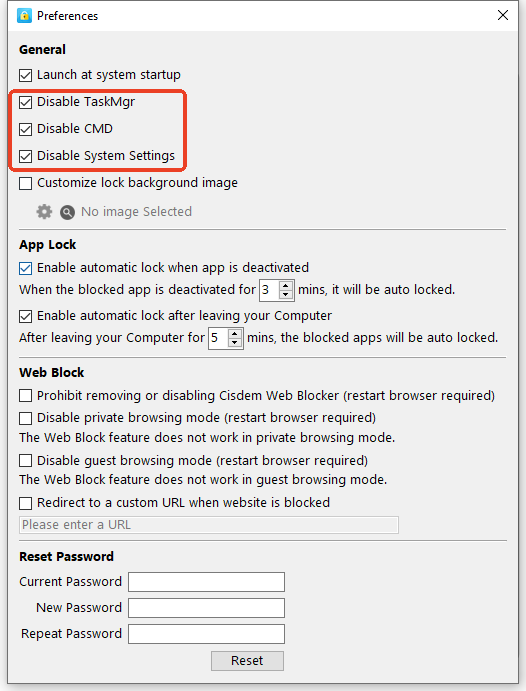
Technical guys can bypass Cisdem AppCrypt using Task Manager, CMD and System Settings. To enhance security, it is recommended to disable them. You can disable them in Preferences of Cisdem AppCrypt as the screenshot shown below
4. Protect extension from being removed
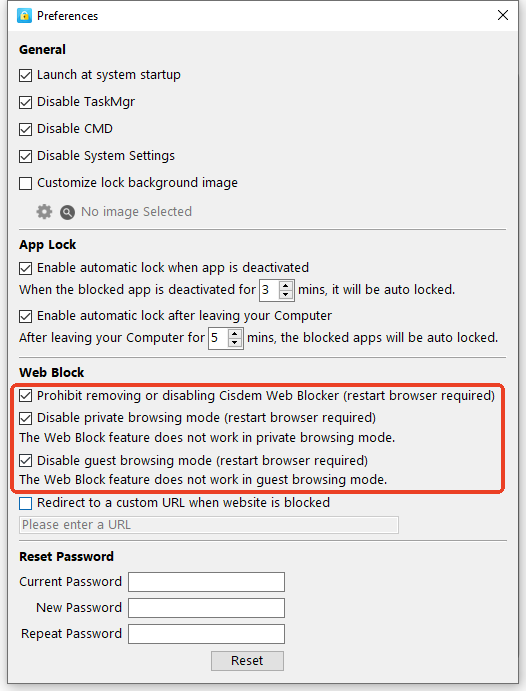
The extension Cisdem Web Block is required for Cisdem AppCrypt to block websites, protect it from being removed or disabled is necessary. You can go to Preferences of Cisdem AppCrypt check the option “Prohibit removing or disabling Cisdem Web Block”.
You are also recommended to check the other two options “Disable private browsing mode” and “Disable guest browsing mode” to make it more security.

Traci Gordon has worked as a tester in a software company for 8 years, she believes that the best software should be a tool that can help users accomplish what they need with the simplest steps.

Ethan Long joined Cisdem in 2015 as a developer and now serves as the editorial advisor for Cisdem AppCrypt. He actively tests and uses Cisdem AppCrypt and other screen-time management tools to ensure AppCrypt meets its promises in real-world scenarios.