


 macOS
macOS
Reviews
Both technical experts and everyday users appreciate Cisdem DVD Burner's streamlined workflow and practical menu design features. It enables users of all skill levels to create professional-grade DVDs.
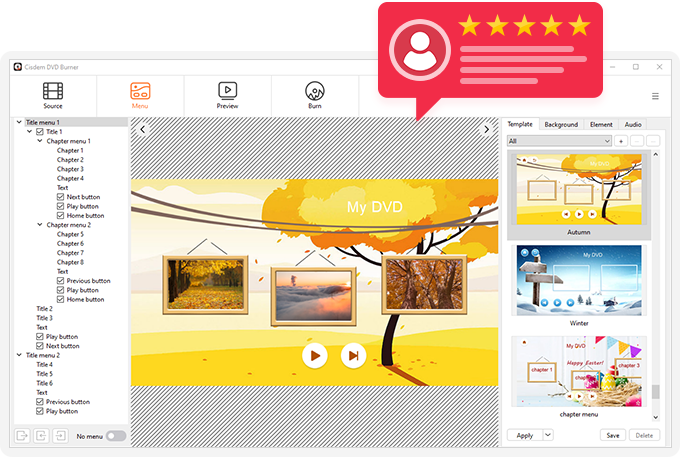
Tech Reviews of Cisdem DVD Burner for Mac

"Cisdem DVD Burner for Mac è un’applicazione che consente di creare DVD in modo molto semplice, ad esempio aggiungendo i menu che consentono di richiamare le clip da pulsanti personalizzabili in vari modi."

"Cisdem DVD Burner is the all in one dvd making software that offers an easy to use video editor that you can use to edit the videos you will burn to DVD. To open the video editing window, either double-click on one of the video thumbnails or choose that video you want to edit and click the Edit button on the lower left side of the main interface."

"Cisdem offers you the DVDBurner which burns your DVD on Mac with audios, Videos, Subtitles, & menu. With CISDEM, You can basically burn any DVD on your Mac. The major contrast between any other DVD burner and Cisdem DVD Burner for Mac is that it’s great with the number of functions it provide and quality."

"Cisdem Video/Audio DVD Burner is really a great tool and a perfect alternative for iDVD. The burning speed is good, the interface is very user friendly and the real time preview is just outstanding."

"Many DVD burners just make the aspect ratio of the video reduced, which gives you the low quality of picture. But, cisdem DVDBurner maintains the perfect balance of the disc volume and aspect ratio to give you the high quality DVD experience."

"All the test confirmed that no degradation in video and audio quality. While some DVD Burners irritatingly reduce the quality during the burning process, Cisdem DVD Burner for Mac stands out the crowd without any change in video and audio quality."

"Finally, an App that lets you burn DVDs on Mac Yosemite no matter what the source or format of the video is. All video files you put into Cisdem DVD Burner for Mac are re-encoded for standard movie discs and are playable on any DVD/BD player. There are no compatibility issues whatsoever."
User Reviews of Cisdem DVD Burner for Mac
Rated 4,8 out of 5 (107 Reviews)
Bewertung schreiben
Bewerten Sie dieses Produkt *
Name *
Kurze Zusammenfassung *
Schreiben Sie Ihre Bewertung *
Cisdem DVD Burner for Mac
Easily make professional and unique DVDs with the best DVD burning software.

I'm picky about how my projects look, so the editing features won me over. I could trim dead air, crop out black bars, rotate a clip that was shot sideways, and even embed permanent subtitles right in the app. Adding chapter markers made the final DVD easy to navigate. The side-by-side preview let me check changes before burning, which saved me from wasting a disc. Genuinely useful for a hobbyist.
October 21, 2026 | Mary Cruz
Speed and quality both exceeded my expectations. Burning a 2-hour 1080p video to a DVD-9 took far less time than I feared, and the picture looked clean on my TV. I also love that it can output an ISO file and a DVD folder, not just a physical disc, so I can archive a master copy before burning. The Fit to Disc option automatically balanced quality and size when my project was a bit too large. Very reliable.
October 07, 2026 | Brian Johnson
Toast20Proで何度やってもソフトのバグでチャプターのハイライトが表示されなかったので、こちらのソフトにしたら一発で上手く動きました!4日粘ってできなかったことがたった1時間で実現できた!完璧!ありがとう!!!
September 12, 2026 | Masaki Haraguchi
The menu designer is the feature I did not know I needed. There are 50-plus templates, but I liked that I could swap in my own background photo, change the text and buttons, and add my own music. Having options for a full menu with chapters, a menu-only version, or no menu at all covered every case I ran into. It made the DVDs I made for a family reunion feel personal rather than generic. Highly recommend for anyone shipping discs to relatives.
September 10, 2026 | Patricia Wright
One thing that keeps me coming back to Cisdem DVD Burner is the preview step. Before I waste a disc, I can watch the whole thing exactly as it would play on a DVD player, menus, titles, and chapters included, so I catch mistakes first. When a project turns out well I love that it burns several copies back to back without re-queuing, which saved me real time making gifts for relatives. And saving the project as a .cdbproject file lets me pick up where I left off later instead of starting over.
September 08, 2026 | Karen Harris
I was genuinely worried when I heard about newer macOS versions that a tool this good might eventually drop support for the latest Apple Silicon and leave my M4 Mac behind. So when Cisdem released the universal version, it was a huge relief. I installed it on my M4 and everything runs natively and fast, no Rosetta slowdown and no compatibility warnings. It is clear they are committed to keeping this app working on current hardware, which is exactly what I want from software I rely on for burning family DVDs. Happy customer.
August 27, 2026 | Andrew Thomas
I'd been carrying around about 15GB of GoPro footage from a trip to the Lake District for the better part of a year, never getting round to doing anything with it. My mother-in-law kept asking for copies and she's firmly in the DVD camp — no streaming, no USB sticks, just a DVD player hooked up to her telly. I'm not particularly technical but Cisdem made it straightforward enough. I trimmed the clips down within the app, added a basic menu with a photo background, and burned two copies in about an hour. The quality on her telly was spot on, no weird stretching or letterboxing issues. What I appreciated was that it just worked without me having to read a manual or watch tutorials. The built-in editor is basic but sufficient for trimming and cropping, and you can add background music to the menu which was a nice touch. Would happily recommend to anyone in a similar boat.
August 24, 2026 | Nigel
Works well and the output quality is solid. Encoding speed could be better though — a 90-minute video takes about 35 minutes on my Mac. Still, it's reliable and hasn't failed me yet.
July 27, 2026 | Mike
I love your product “DVD Burner for Mac”. It's the best one available on the market.
July 03, 2026 | Sara
Needed to burn a school play recording to DVD for the drama department. Dragged the file in, picked a template, hit burn. Done in 20 minutes and it played on every player we tested. No complaints.
June 25, 2026 | Ross
Mehr