


5 Pomodoro Timers for Computers and Phones-Choose the Right for You
 431
431
 0
0


The Pomodoro Technique is a simple time management method created by Francesco Cirillo in 1992. It breaks task into intervals, typically 25 minutes in length, followed by 5-minutes short break. Then repeat the process. You can take a longer break after repeating 4 Pomodoros. If you are familiar with this method, you can simply use the built-in clock app on your device to do this. However, it will waste your time at work, and requires setting the timer frequently. I tested several Pomodoro timers for different user needs, including Pomodoro apps, Pomodoro extensions and online tools. Which one is best for you? Read this article to view their pros, cons and features.
 Cisdem Focus
The Best Pomodoro Timer for Mac
- Let you easily practice the Pomodoro technical
- Let you to alter the length of your Pomodoro session
- Block distracting websites and apps to increase focus
- Enables you start a Pomodoro right away
- Enables you to set multiple different Pomodoro timers
- Offer the Hardcore mode and Password mode
- Track apps and websites you mostly use and visit at work
- Help you improve work efficiency and boost productivity
- Easy to use
- Compatible with macOS 10.12 or later
 Free Download
Why the Pomodoro technique boosts productivity?
The Pomodoro technical is a well-known time management framework. Why it good for productivity?
- The Pomodoro technique is a method based on time-limited work intervals, which create a sense of urgency at work, and make us stay motivated and concentrated at work.
- It simplifies complex tasks by breaking down all of your tasks into 25 minutes blocks of focus time. Motivate us to achieve goals step by step.
- Taking a break every 25 minutes let us find a work-rest balance and keep brain mentally sharp. This is important when you are faced with long-term tasks.
- We are able to monitor the task progress and make adjustment very 25 minutes, which greatly improve work efficiency, and increase enthusiasm toward the work.
5 best Pomodoro timers, which one may suit you?
Below are 5 best Pomodoro apps, extension and online tools. I will show you their main features and share my user experience.
#1 Cisdem Focus
Cisdem Focus is an easy to use yet powerful Pomodoro timer Mac app. It is especially suitable for users who lack self-control. It's not just a Pomodoro app, but also a website blocker/app locker tool.
Flexible Pomodoro timer for better productivity
For users convenience, the UI design of this Pomodoro app is simple and easy to understand. It allows you easily practice the Pomodoro technique for your tasks. The default Pomodoro session is 25 minutes, followed by a 5-minutes break. For every 4 Pomodoro take a longer break for 30 minutes. However, you are able to adjust the Pomodoro timer to fit your needs, including modifying the length of each Pomodoro, the break time and the number of Pomodoros before a long break. In addition, it enables you to create multiple Pomodoro plans for different tasks. You can quickly start a plan at any time.
In the Password mode, a password is needed to stop the timer or access the tool. If you think this is not enough, you can enable the Hardcore mode in the Preferences window. By doing this, you can’t make any changings during focus time.
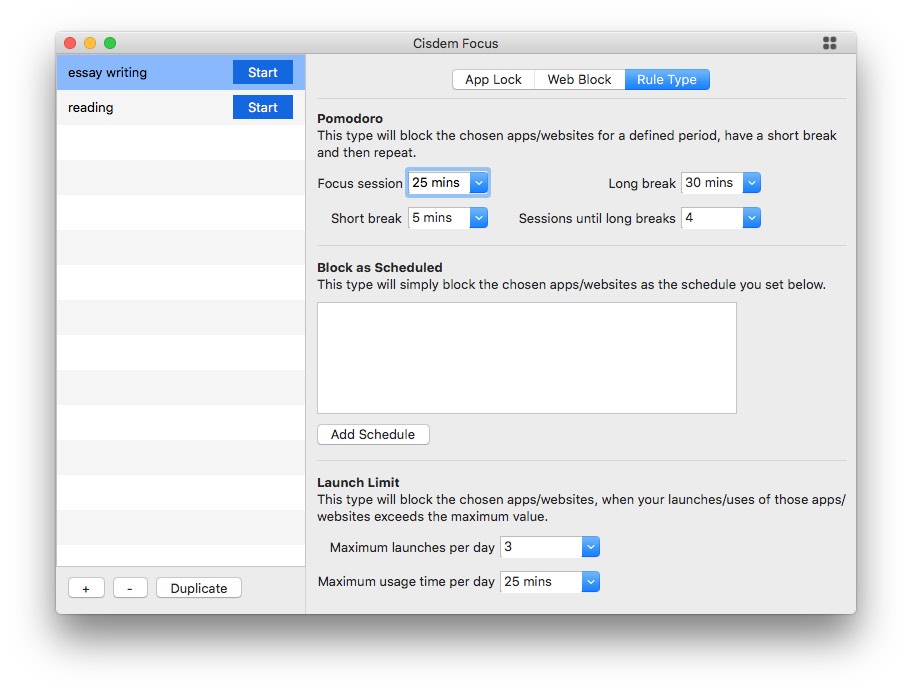
Block distracting applications, websites and pages
Blocking distractions during Pomodoro time can help you focus better. As a productivity tool, Cisdem Focus enables you to lock time-wasting apps on your Mac. Once you start the Pomodoro plan, the locker will take effect. It also supports blocking specific websites and webpages. Blocking categories of websites allows you to ban thousands of sites with one click.
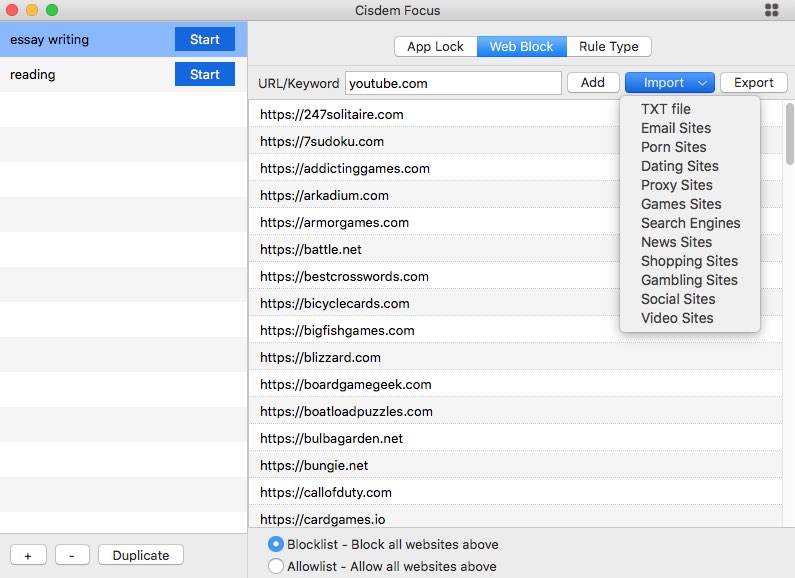
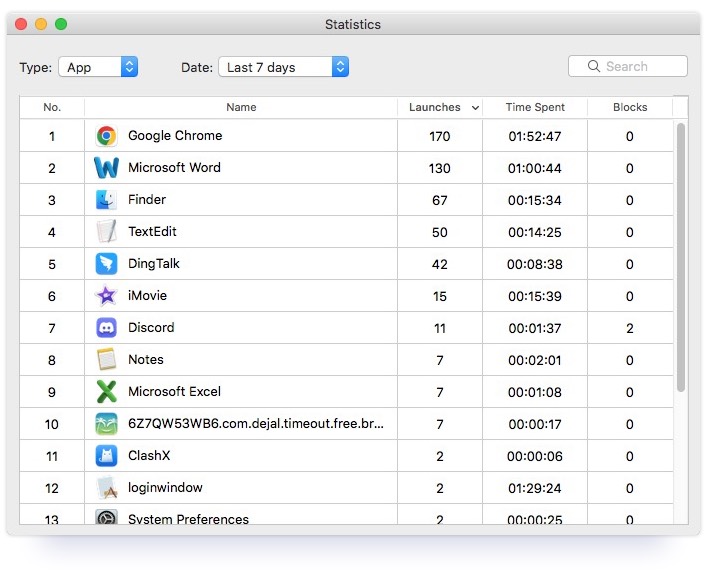
Report how your time spent
If you don’t know how much time you typically spend on a task, or aren't sure how to set up your block list, this Pomodoro app’s Statistics feature displays daily, weekly and monthly statistics on time you spent on apps and websites. This feature may guide you to adjust your Pomodoro timer for better productivity.
#2 Flow
In psychology, the term “flow state” describes a mental state in which a person is fully focus on a task or activity. Flow is just a simple but mighty Pomodoro app that helps users focus better at work.
Simple and clean interface
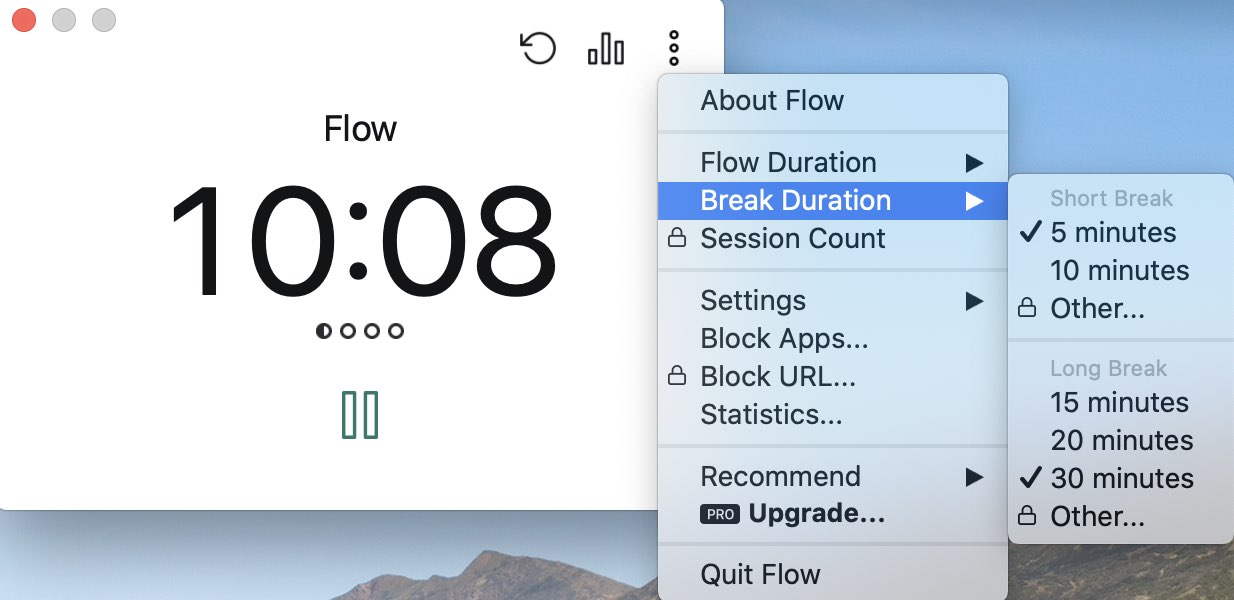
This Pomodoro timer for Mac and iOS is designed with a black and white UI, without any colorful elements. There is a big timer on the main interface. Clicking the Pause button below will start the timer. A running timer can be paused at any time. It also allows you to reset the timer by tapping on the refresh icon in the upper right corner.
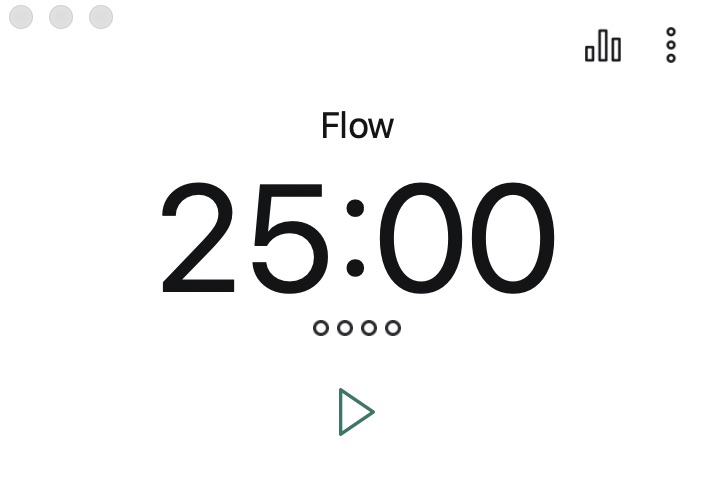
Custom flow duration and break duration
The Flow Duration and Break Duration is the length of your work sessions and breaks. You can customize them to fit your working style. The Session count is the amount of Flow session before a long break. This feature is available in the Flow Pro version. If you don’t need a long break, you can simply set the durations accordingly.
Ticking sound helps you get into flow state
You may not able to stay focused with just a simple timer. Listening to clock ticking sound is a great way to get into flow. As an ambient noise, it also helps improve memory. Flow app offers this feature in Pro version. In fact, its free version may already meet the basic needs of many users. If you have more advanced needs, such as URL blocking, commitment mode (you will not able to stop the timer in this mode) and calendar sync, you can upgrade to Flow Pro.
#3 PowerPom
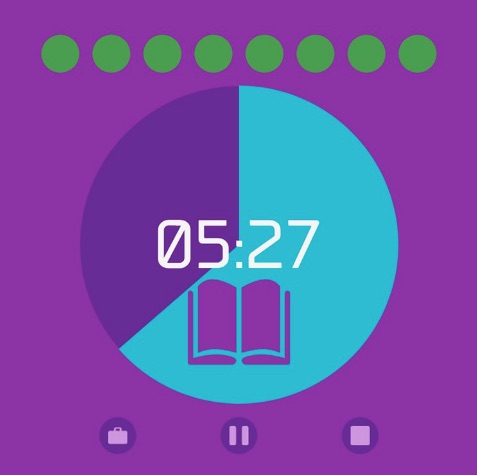
If you are Windows user, you can consider PowerPom-a simple-designed application that provides a basic Pomodoro. It has a cute user interface. The disadvantage is that it does not tell user how to use each button. It’s a bit time wasting to set the timer.
Set Pomodoro timer for each task
PowerPom enables you to easily set Pomodoro timer for any task. You can set different Pomodoros for each of your tasks. For example, if the task is difficult and takes a long time to complete, you can set the Pomodoro session longer. So you won't be interrupted by the Pomodoro notifications frequently. However, this tool does not provide the password lock function, you can stop or reset the timer at any time if you are interrupted by other things.
Record your progress every day
This Pomodoro timer Windows records the duration of you focus every day. After using the Pomodoro Technique for a period of time, you will make a great progress and be able to stay focused longer.

#4 Focus To-Do
Focus To-Do is a Pomodoro Chrome extension that helps you manage time, organize tasks and track working hours. You can also get its app in App Store or Microsoft Store. For me, its extension is more convenient.
Organize your time with daily, weekly plans
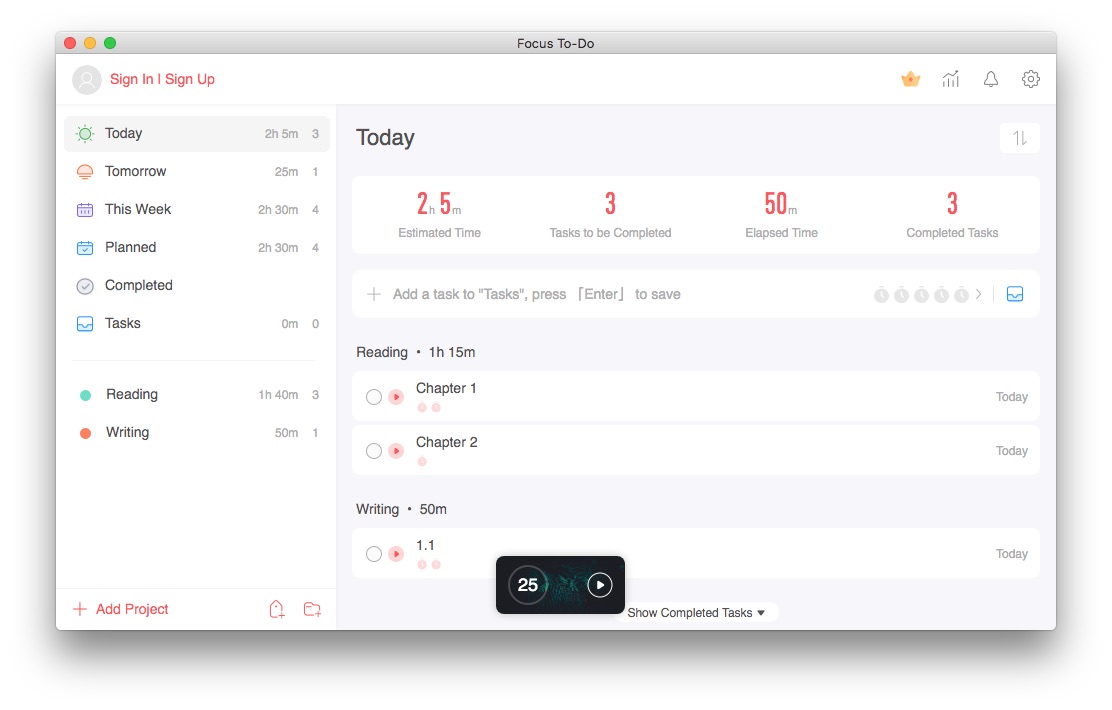
Focus To-Do combines Pomodoro timer with task management. It allows you to create daily and weekly plan. First click the plus icon on the bottom right to add project, such as reading, writing and more. Then add specific tasks for the project. Set how many Pomodoros intervals you need in a day to finish this task. You can also add a due date to specific task. This Pomodoro Chrome extension is a good choice for those who have long-term planning. However, its user interface is a bit complex, and not user friendly.
Track your daily, weekly and total Focus time
To motivate you stay focused and get tasks done, Focus To-Do gives you detailed reports on your Focus time today, this week, and your total Focus time. It also records how many tasks you completed. The statistics on time distribution of project can help you find what time of day you are most productive.
Sync the data with all your devices
Some people work on multiple devices. It’s troublesome to set up the same Pomodoros and plans on all devices. Fortunately, you can easily sync data across all your devices on its premium version. Some advanced features like unlimited quantity of projects and cloud backup are only available in Premium.
#5 TomatoTimer
As a free online Pomodoro timer, TomatoTimer has a clean and crisp interface, as well as basic but useful features. If you don’t want to install any Pomodoro applications or extensions to your computer, TomatoTimer may meet your needs.
Start a Pomodoro quickly with keyboard shortcuts
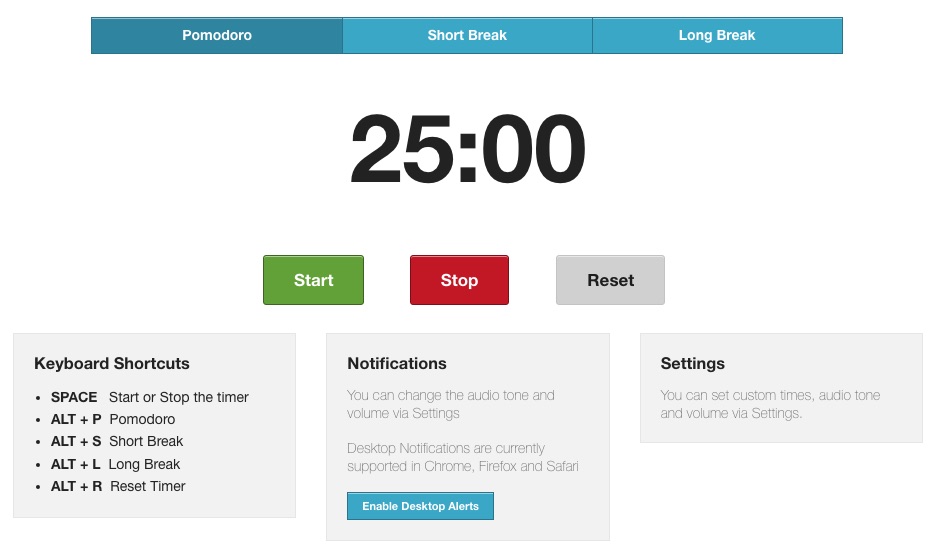
To save your time and improve work efficiency, TomatoTimer provides several shortcuts keys to quickly start, stop or reset the timer. After opening its site, you can directly use the Pomodoro technique with the keyboard, but only if you are familiar with those shortcuts.
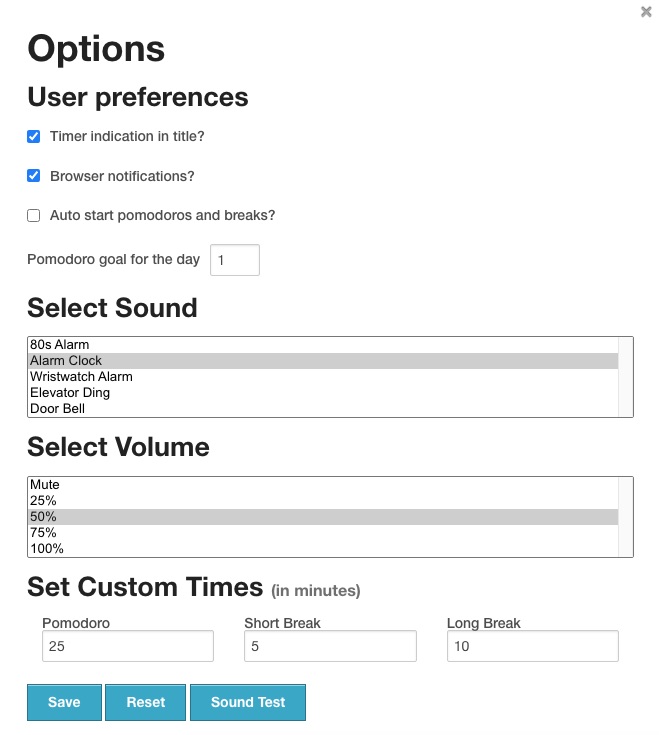
Custom notification sounds and volume
There are 5 different audio notifications at the end of a time period for you to choose. You can select one that will get your attention but not annoy you. The notification volume can also be adjusted. You can even mute it. What’s more, this online Pomodoro timer allows you to enable desktop alerts. This feature currently supported in Chrome, Firefox and Safari.
A comparison of these Pomodoro timers
| Cisdem Focus | Flow | PowerPom | Focus To-Do | TomatoTimer | |
|---|---|---|---|---|---|
| Supported OS | Mac | Mac, iOS | Windows | All devices | All devices |
| Custom durations | ✔ | ✔ | ✔ | ✔ | ✔ |
| Sites blocking | ✔ | ✔ | ✗ | ✗ | ✗ |
| App locking | ✔ | ✔ | ✗ | ✗ | ✗ |
| Time tracking | ✔ | ✔ | ✔ | ✔ | ✗ |
| Create plans | ✔ | ✗ | ✔ | ✔ | ✗ |
| Password protect mode | ✔ | ✗ | ✗ | ✗ | ✗ |
| Calendar sync | ✗ | ✔ | ✗ | ✗ | ✗ |
Is the Pomodoro timer suitable for everyone?
The Pomodoro Technique is a great time management method, but it may not be suitable for everyone. The most important reason is that you’ll be interrupted every time block. If you are doing work that requires long periods of concentration, or if you always take a long time to get back to work after being interrupted, this method won’t work for you, and may even slow down your productivity.
Conclusion
I introduced 5 Pomodoro timers for Mac, Windows and mobile phones in this article. If you cannot manage your time well, or you always distracted by other things while working, Pomodoro timer can be a good tool to help you improve efficiency and boost productivity. To choose a suitable Pomodoro, you need to consider these factors: what device do you work with? Do you have great self-control? How long can you focus on a task? Do you have the habit of making work plans? Hope you can choose the right Pomodoro timer based on my comparison of these tools in this article.

Norah Hayes likes to share her tips on how to improve focus and stay motivated at work. She believes it is essential to eliminate all online distractions during work hours.

Ethan Long joined Cisdem in 2015 as a developer and now serves as the editorial advisor for Cisdem AppCrypt. He actively tests and uses Cisdem AppCrypt and other screen-time management tools to ensure AppCrypt meets its promises in real-world scenarios.