


 Cisdem Data Recovery





 Data Recovery
Best App to Recover Data from SD Card


I was transferring photos from my camera to my Mac. I had two SD cards on my desk, one was for the new pictures, and the other one was an old backup that I didn’t need anymore. Somehow, I formatted the wrong one, all the newly shoot landscape photos for my 2025 project were gone. I reached out several professional data recovery service labs, but the cost and an additional card shipment to them talked me out of it. Therefore, I asked my colleague for advice, she recommended Cisdem Data Recovery, which actually helped me restore virtually all the photos from the formatted SD card. - Helen | Photographers
Helen, who works as a photographer for a magazine, shoots great landscape photos and relies on multiple SD cards to manage thousands of high-resolution photos.
Challenge of restoring photos from formatted SD card
An SD card may not be recognized due to various reasons, such as corrupted file system, physical damage, unstable connection and so on. If the card cannot mount properly on a Mac, the data on it won’t be accessible at all.
In addition, a scan will return thousands of, even more photos. It is not easy to make sure if they are the wanted photos without a Preview feature. And due to the large volume of photos, it is time consuming to manually manage the recovered photos, even their original names are kept. Helen believed the formatted photo recovery can be much easier than she thought, if she picked the right tool.
Solution: Using Cisdem Data Recovery
Knowing how bad a formatting can be to her photos, Helen's first instinct was to seek professional help. She contacted several data recovery service labs, but the high cost and delay of shipping made such an option impractical. She turned to a colleague, who highly recommended trying Cisdem Data Recovery on her Mac. It was a great solution indeed.
Helen had a great experience of formatted SD card recovery, it was much easier than she ever thought. She wants to share her experience, and alleviate the stress for others that in the same situation. These steps can help SD card users to restore photos after formatting.
Steps to Restore Photos from A Formatted SD Card on Mac
Step 1. Install the app
I downloaded Cisdem Data Recovery for Mac from Cisdem website. The installer was 77MB, so the download process was very quick. Then I double clicked on the dmg file, the installation started, and finished quickly.
Step 2. Select the SD card.
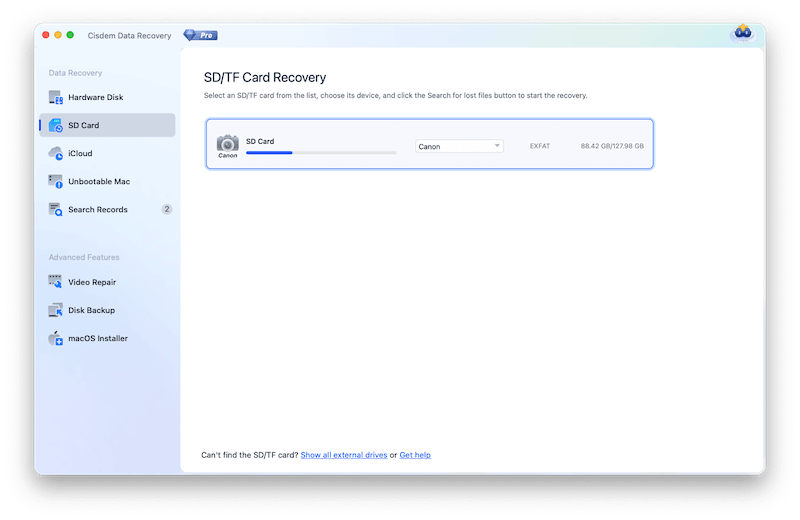
I connected the SD card to my Mac via a card reader. Then went to SD Card and selected the card that was mistakenly formatted.
Step 3. Scan the SD card.
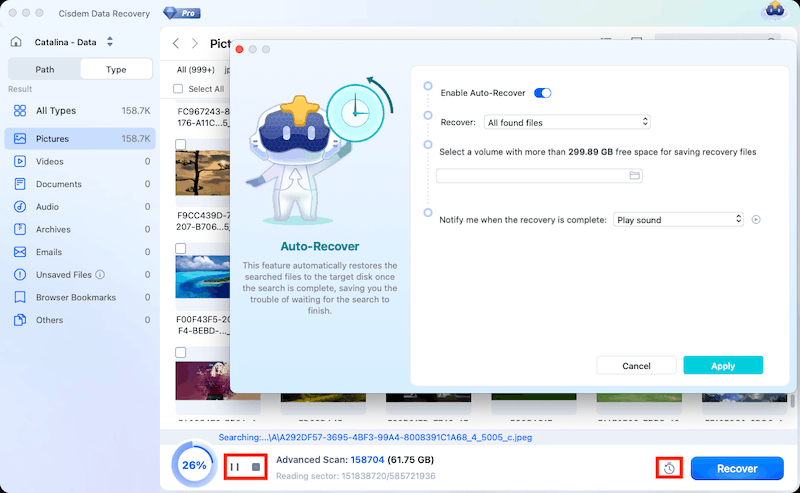
Then I clicked Search for lost data to start the scanning. I could pause or stop the scanning whenever I wanted, also I could click on the clock icon to enable Auto-Recover, which helps restore files automatically to target drive when the scanning is complete.
Step 4. Locate and preview the photos on the formatted SD card.
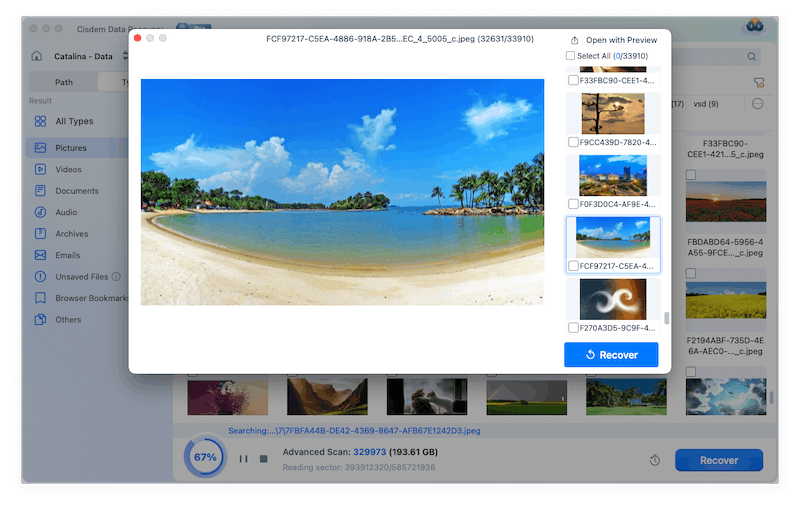
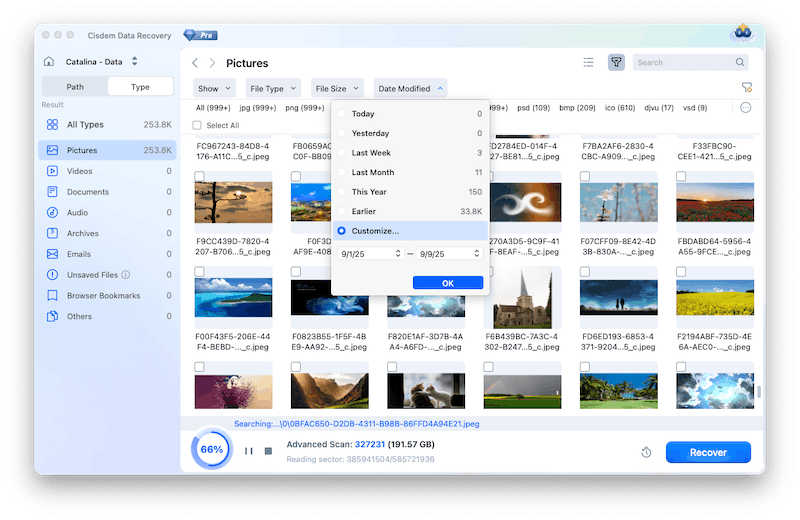
Once the scan was done, all the recoverable photos were listed according to image types. I could quickly locate photos via image type. I also tried the Filter tool to locate my photos according to file size or date modified. It was convenient to use.
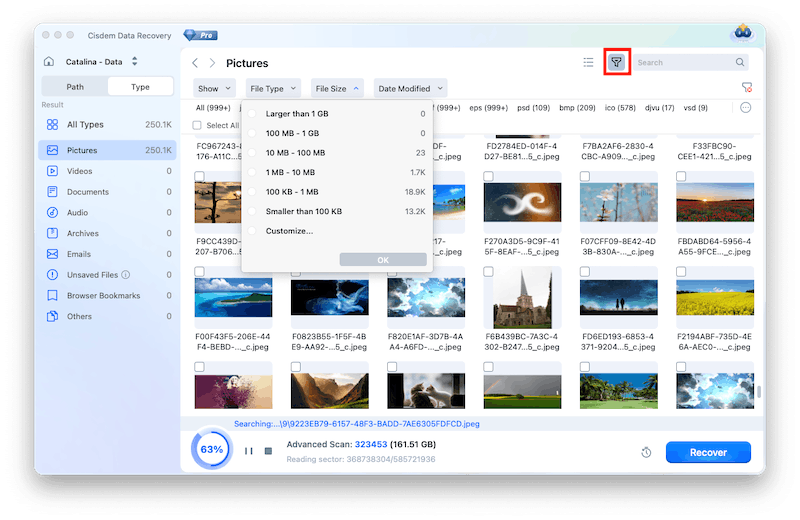
And I double clicked the thumbnail to preview my photos.
Tips from Cisdem
If you want to recover your photos and keep them organized, you are recommended to recover the photos by date modified, search and select all the photos taken in a specific time, and recover. In this way, you don’t need to manually organize the files and folders later.
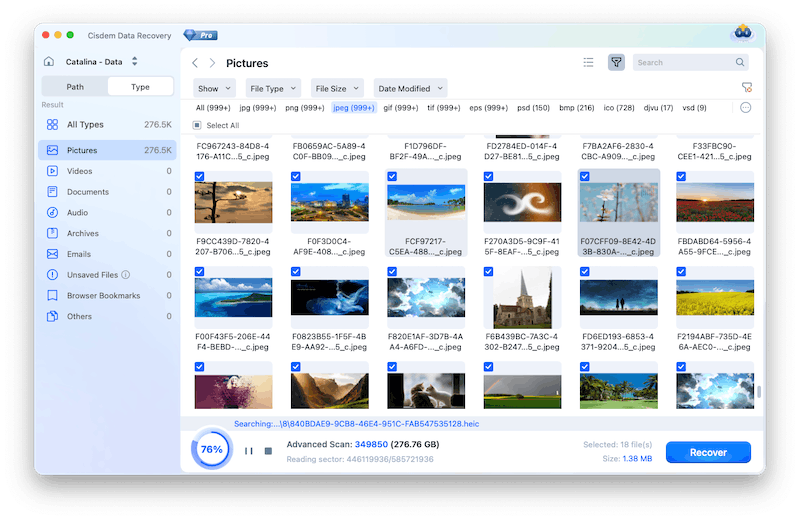
Step 5. Select photos to recover.
By checking the box before the photos, I was able to recover the photos, and I save them back to the formatted SD card again.
FAQ
Quick Format only deletes the file index. Your photos are still there and highly recoverable. Full Format overwrites the entire card, it is difficult to recover the data unless with a dedicated program.
It can be caused by various reasons: damaged card reader, loose connection, faulty port, unsupported file system, corrupted file system, hardware issues and so on. Cisdem Data Recovery supports virtually all brands and all file system format of SD card. If it is not detected in Cisdem, you can click “Get hep” or “Contact us” for assistance.
Sure. But it's highly recommended to copy your recovered photos to an additional safe location, in case of further data loss in the future.
Loved the article, share!

