


Cisdem VideoPaw for Mac Advanced Guide
 327
327
 0
0


01 How to Download Private Videos
Cisdem VideoPaw for Mac support downloading videos from a various of platforms, like YouTube, Facebook, Twitter, etc. However, you may encounter an issue while downloading private videos. In this guide, we will show you how to download private videos with Cisdem VideoPaw for Mac.
Step 1 Set Chrome as your default browser, log in your account of the video website and access the private video on Chrome.
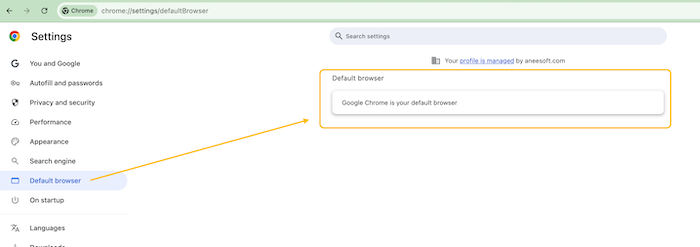
Tips: We need to obtain authorization from the video website, and only Chrome is available now.
Step 2 Run Cisdem VideoPaw, choose and click the Video Downloader option
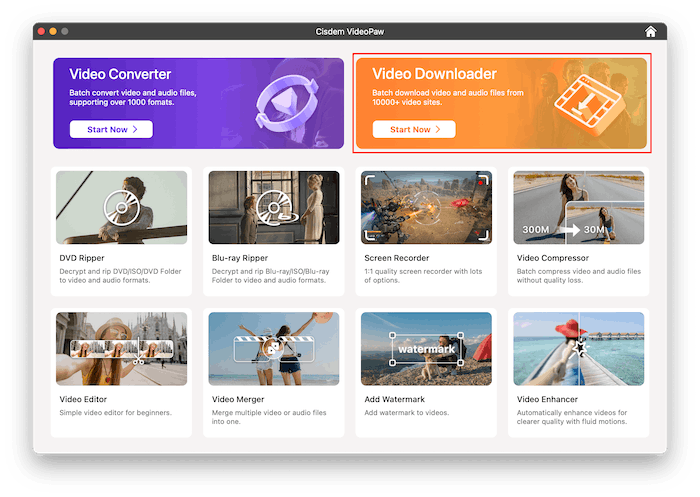
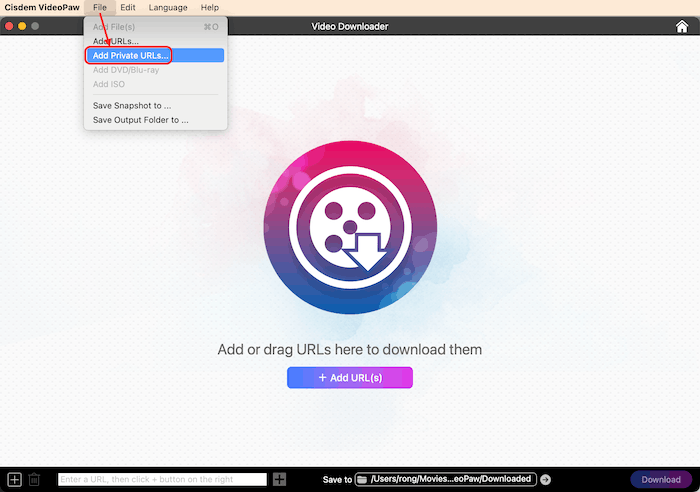
Step 3 Click File> Add Private URLs..., paste the URLs of the private videos into the address box, click OK to load the videos, and then click Start to start the conversion.
Conclusion
When you need to download videos from websites that needs login, you can try the method above and please note the following requirements:
1. This method is only available in the Chrome browser.
2. You have to set Chrome as the default browser.
3. You need to log into your account on the target video website using Chrome.
02 Things to Know about Adding DVDs/Blu-rays for Ripping
Cisdem VideoPaw supports ripping both Standard DVDs and Blu-ray DVDs. However, some users have faced some problems while adding DVDs/Blu-rays into the program. After going through this guide, you’ll know exactly how to solve these problems.
“I Have just bought this product to convert an.VOB file to mp4 from an old DVD.I drag and drop but it doesn't accept it.”
“I have tried about 5 different times ripping BluRay / Regular DVD and I could not successfully add them into the program.”
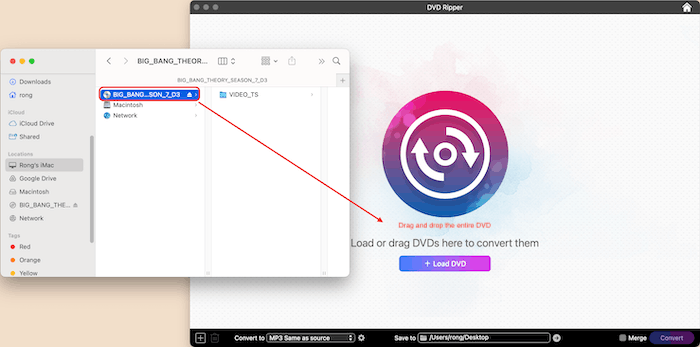
1. What you need to add into the program for ripping?
You need to add the entire DVD/Blu-ray into the program, see the screenshot below
2. Can you add .VOB files or .M2TS files into the program?
If you directly drag and drop the .VOB or .M2TS files from a DVD/Blu-ray, those files cannot be ripped by Cisdem VideoPaw. The .VOB and.M2TS files are only part of a Standard DVD or Blu-ray DVD, with those individual files, Cisdem VideoPaw cannot get the context: playlists, segment order, decryption keys, so the converter often fails or produces unusable videos. That is, you need to add the full DVD/blu-ray disc so Cisdem VideoPaw can rip the actual movie.
3. Can you add an ISO file?
Yes, you can directly drag and drop the ISO file into the program.
Conclusion
In summary, when using Cisdem VideoPaw to rip DVDs or Blu-rays, it’s essential to add the entire DVD/Blu-ray or ISO files rather than individual files like .VOB or .M2TS files. By following these simple guidelines, you can avoid common issues and successfully digitize your DVD or Blu-ray with Cisdem VideoPaw.

Traci Gordon has worked as a tester in a software company for 8 years, she believes that the best software should be a tool that can help users accomplish what they need with the simplest steps.

Ryan Li is a senior developer at Cisdem. Since joining the company in 2017, he has led the development of Cisdem VideoPaw and now serves as the editorial advisor for all articles related to Video Converter.